If SUBTOTAL(109, ...) and SUBTOTAL(9, ...) return the same number on a workbook that contains hidden rows, one of the two is wrong. It is one of the easiest traps to fall into when building a spreadsheet calculation engine, and HotXLS, the native Excel spreadsheet component for Delphi and C++Builder, avoids it by letting its calculation engine ask the worksheet whether a given row is hidden
The symptom rarely arrives as a question about formula codes. It arrives as a mismatch: a batch job on the server computes a total, a user opens the same file in Excel with a filter applied, and the two numbers differ by whatever the filtered-out rows happened to sum to. Nobody suspects the aggregation function, because the formula string in the cell is identical in both places. The difference is entirely in what the evaluator was allowed to see
Why would SUBTOTAL 109 include hidden rows?
Because in most engine designs the layer that evaluates a formula never learns about row visibility. The obvious design reaches cell values through a single value callback, like the TXLSGetValue callback in lxCalc.pas, which answers with a value for a (sheet, row, column) triple and nothing else. Visibility is a presentation attribute stored on the row record, and if nothing else travels down the call chain, the engine ends up with one aggregation path that both halves of the SUBTOTAL function-number table resolve to. That is not a rounding-error class of mistake: the hidden-row policy is the whole reason the second half of the table exists. ECMA-376 Part 1, published as ISO/IEC 29500-1, defines SUBTOTAL in its formula function definitions (§18.17.7) with a first argument that selects both the inner aggregation and the hidden-row policy. Codes 1 through 11 map to AVERAGE, COUNT, COUNTA, MAX, MIN, PRODUCT, STDEV, STDEVP, SUM, VAR, and VARP while including values on manually hidden rows. Codes 101 through 111 select the same eleven aggregations and exclude them. A user who types 109 instead of 9 is making a deliberate statement about hidden data, and an engine that collapses the distinction silently overrules that statement
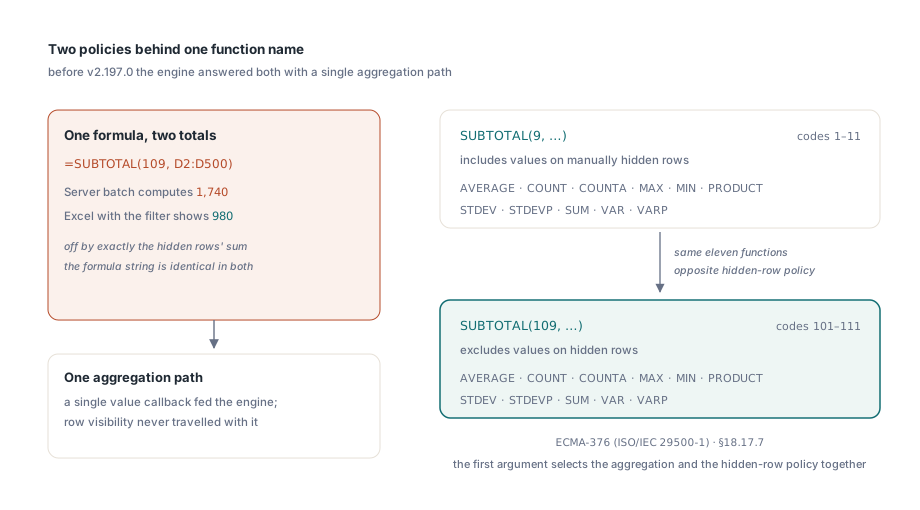
What the function numbers map to inside the engine
HotXLS resolves the SUBTOTAL first argument in CalcSubtotalFunc, which normalises codes 101 through 111 down onto the same inner function identifiers as codes 1 through 11 and then dispatches on the aggregation itself. Most of the family flows through the incremental ExcelSum accumulator, the one that handles SUM, COUNT, COUNTA, MIN, MAX, and AVERAGE. Five of them cannot: STDEV, VAR, STDEVP, VARP, and PRODUCT need a closed-form pass over the data, so CalcSubtotalFunc routes inner codes 12, 46, 193, 194, and 183 to a separate reducer, SubtotalReduceVariance. That split is the first thing worth mapping before touching anything, because two independent aggregation paths mean two independent cell-walk loops, and a hidden-row check added to only one of them produces the worst possible outcome: SUBTOTAL(109, ...) respects the filter while SUBTOTAL(107, ...) on the same range does not. HotXLS has six of them once AGGREGATE is included, spread across range evaluation, plain range collection, and three separate reducers
Why a scratch field instead of six new signatures?
Because threading a new parameter through six cell-walk functions, plus everything that calls them, is a wide change to a hot code path for the sake of one boolean. HotXLS has a precedent for the alternative: a transient field on the calculator, in the same spirit as the scratch field that GetRangeInfo uses to record when a 3D reference resolved into an external workbook. The hidden-row gate is a second one: a callback type, TXLSIsRowHidden, declared as a function of (SheetIndex, row) returning Boolean, stored in FIsRowHidden, plus a transient FIgnoreHiddenRows flag. The flag is armed at the entry of CalcSubtotalFunc when the function code falls in 101 through 111, and at the entry of CalcAggregateFunc for the AGGREGATE option codes that select hidden-row exclusion. Every cell-walk loop then inspects it and skips one row when it is set, at the cost of a single line each
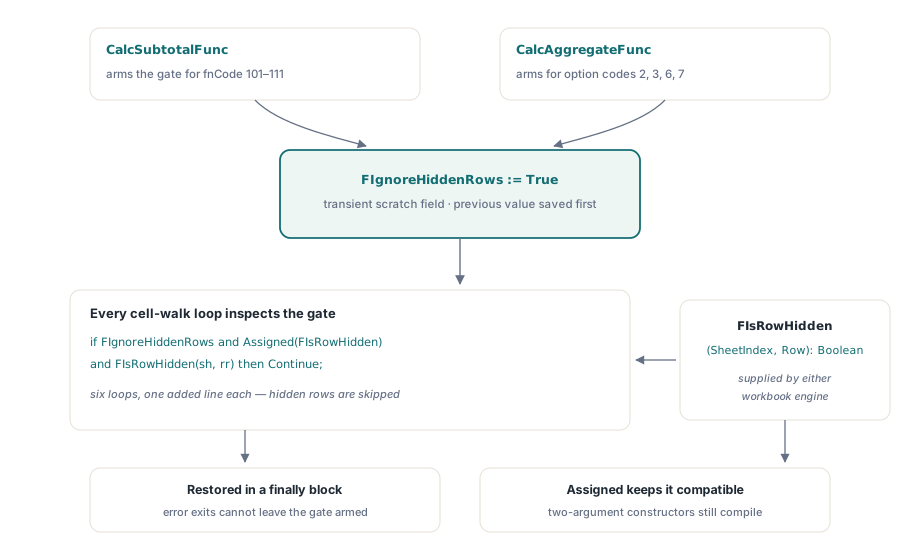
// The shape repeated in all six cell-walk loops
for sh := s1 to s2 do
  for rr := r1 to r2 do
  begin
    if FIgnoreHiddenRows and Assigned(FIsRowHidden) and FIsRowHidden(sh, rr) then
      Continue;
    for cc := c1 to c2 do
    begin
      // ... fold Cells[rr, cc] into the accumulator ...
    end;
  end;
Two details in the arming code carry the correctness of the whole scheme. The flag is saved and restored rather than simply set and cleared, because a SUBTOTAL argument can contain an expression that runs its own evaluation while the outer aggregation is still on the stack, and that nested work must not inherit or destroy the outer gate. And the restore lives in a finally block, because CalcSubtotalFunc has several early exits for error codes; a flag left armed after an error return would silently corrupt the next unrelated formula in the recalculation order
prevIgnoreHidden := FIgnoreHiddenRows;
if (fnCode >= 101) and (fnCode <= 111) and Assigned(FIsRowHidden) then
  FIgnoreHiddenRows := True;
try
  // aggregate over Item.Child[2] .. Item.Child[ChildCount]
  // every Exit path below is covered by the finally
finally
  FIgnoreHiddenRows := prevIgnoreHidden;
end;
The Assigned test is what keeps the calculator API compatible. The TXLSCalculator constructor takes a third parameter that defaults to nil, so code that builds a calculator with the two-argument call compiles unchanged and gets the include-hidden behaviour
Where does the hidden-row bit actually come from?
From the worksheet, through two different sources, because HotXLS carries two workbook engines. The legacy BIFF side answers from TXLSRowInfoList.GetHidden, reached through TXLSWorkbook.GetRowHidden. The OOXML side answers from TXLSXWorksheet.GetRowHidden, reached through TXLSXWorkbook.GetCalcRowHidden. Both are wired into the calculator at construction time, alongside the cell-value callback they mirror. The row conventions are where this kind of bridge normally goes wrong, so they are worth stating explicitly. The calculator hands the callback a 0-based row, matching the coordinates TXLSGetValue already uses. The XLSX worksheet keys its row-hidden map by 1-based row number, exactly as Excel numbers rows, which is also what the public RowHidden[ARow] property exposes. The XLSX bridge therefore adds one before the lookup, and the BIFF bridge does not, because TXLSRowInfoList is already 0-based. Both bridges treat a sheet index or row outside the valid range as visible, so an out-of-bounds query degrades into the include-hidden answer instead of dropping data
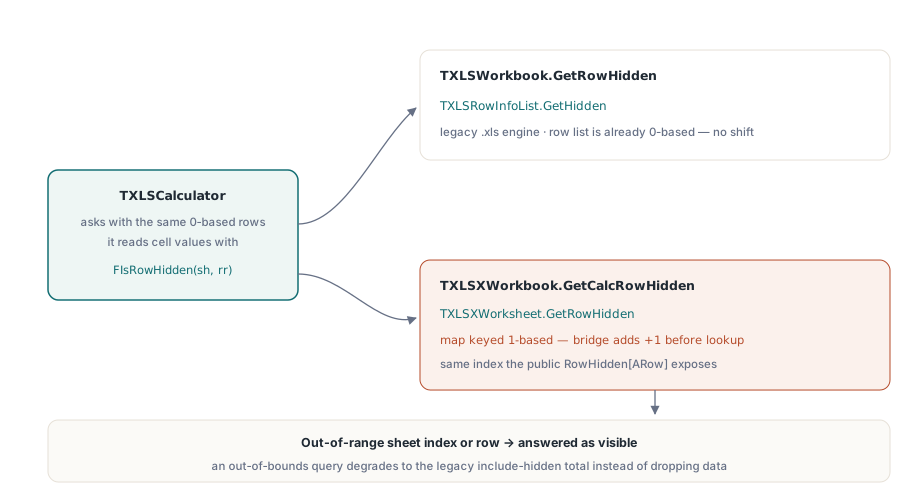
What changes for filtered workbooks
This is the case where the hidden-row policy matters most. Applying an AutoFilter in HotXLS through ApplyAutoFilter evaluates the column criteria and hides every data row that does not match, which is precisely what Excel does when a user clicks a filter dropdown. Those rows are invisible to the user, and because the calculation engine consults the same row state, a server-side SUBTOTAL(109, ...) reports the filtered total rather than the unfiltered one
var
  Book: TXLSXWorkbook;
  Sheet: TXLSXWorksheet;
  VisibleRows: Integer;
begin
  Book := TXLSXWorkbook.Create;
  try
    Book.Open('orders.xlsx');
    Sheet := Book.Sheets[0];

    Sheet.SetAutoFilter('A1:E500');
    Sheet.AddAutoFilterColumn(3, xlsxAfOpGreaterOrEqual, '1000');
    VisibleRows := Sheet.ApplyAutoFilter;   // hides the non-matching rows

    Sheet.Cells[501, 4].Formula := '=SUBTOTAL(109,D2:D500)';
    Book.Recalculate;
    // The cell value agrees with what Excel shows for the same filter,
    // and VisibleRows tells you how many rows fed into it

    Book.SaveAs('orders-filtered.xlsx');
  finally
    Book.Free;
  end;
end;
Manual hiding works the same way, since RowHidden[ARow] := True is the same state the filter writes. That equivalence is deliberate in Excel and holds in HotXLS as well. One consequence deserves a note in whatever documentation ships with your generated workbooks: a total computed with code 109 is a view-dependent number, so a recipient who clears the filter changes it. When a report must state a fixed figure regardless of what the reader does to the view, code 9 is the correct choice and always was. Filters, validation, and tables are covered together in the article on data validation, AutoFilter, and tables. Because hiding rows does not touch any formula, it also does not dirty the dependency graph on its own, which is worth knowing if you rely on incremental recalculation over the dirty subgraph to keep large workbooks responsive
AGGREGATE option codes
AGGREGATE is SUBTOTAL with a second policy argument, and HotXLS handles it in CalcAggregateFunc. The option argument encodes independent switches: whether nested SUBTOTAL and AGGREGATE calls inside the range are skipped, whether values on hidden rows are skipped, and whether error values are suppressed rather than propagated. HotXLS arms the shared hidden-row gate for option codes 2, 3, 6, and 7, and suppresses error values for option codes 4 through 7. The function-number argument then selects the aggregation exactly as SUBTOTAL does, including the routing of variance, standard deviation, and product through their own reducers. Real workbooks almost always place SUBTOTAL formulas outside the ranges other SUBTOTAL formulas aggregate over; if your generator builds overlapping aggregation ranges, keep the inner totals out of the outer range rather than relying on the option codes to deduplicate them
An arity guard in the same dispatcher
The same dispatcher carries an argument-count check, and the design reason is the same one behind the scratch field: put the check where it can be written once. With roughly 280 built-in function bodies, leaving each one to verify its own argument count against Item.ChildCount gives no consistent boundary for the case of too many arguments, and the trap is easy to miss: a call like =SIN(1,2) reaches a function body that examines its first argument, ignores the surplus, and returns a plausible number where Excel returns #VALUE!. HotXLS stores the declared arity of every built-in in its function registry, exposed as THashFunc.ArgsCnt with -1 marking a variadic function such as SUM, IF, or CONCAT, forwards it through the TXLSFormula.FuncArgsCntByPtg property, and checks it in one gate at the top of GetValueItemFunc, the main dispatcher
lDeclaredArgs := FFormula.FuncArgsCntByPtg[Item.IntValue];
if lDeclaredArgs >= 0 then
begin
  lProvidedArgs := Item.ChildCount - 1;   // Child[0] is the function node
  if lProvidedArgs > lDeclaredArgs then
  begin
    Result := lxErrorValue;               // =SIN(1,2) yields #VALUE!
    Exit;
  end;
end;
The guard rejects too many arguments and deliberately says nothing about too few. Omitting a trailing optional argument is legal in Excel for VLOOKUP, SUBSTITUTE, and a long list of others, so a symmetric check would break correct formulas to catch incorrect ones. Unknown identifiers report as variadic and skip the gate entirely, which is what keeps user-defined functions out of its way; if you register your own functions, the behaviour described in the guide to the formula engine and custom functions is unaffected. The too-few case stays with each function body, because each of those bodies has its own error code semantics
The calculation engine described here, both workbook facades, and the AutoFilter and row-visibility APIs that feed it are part of the HotXLS Delphi spreadsheet component, which ships with full source for Delphi and C++Builder and requires no Excel installation on the machine that runs it