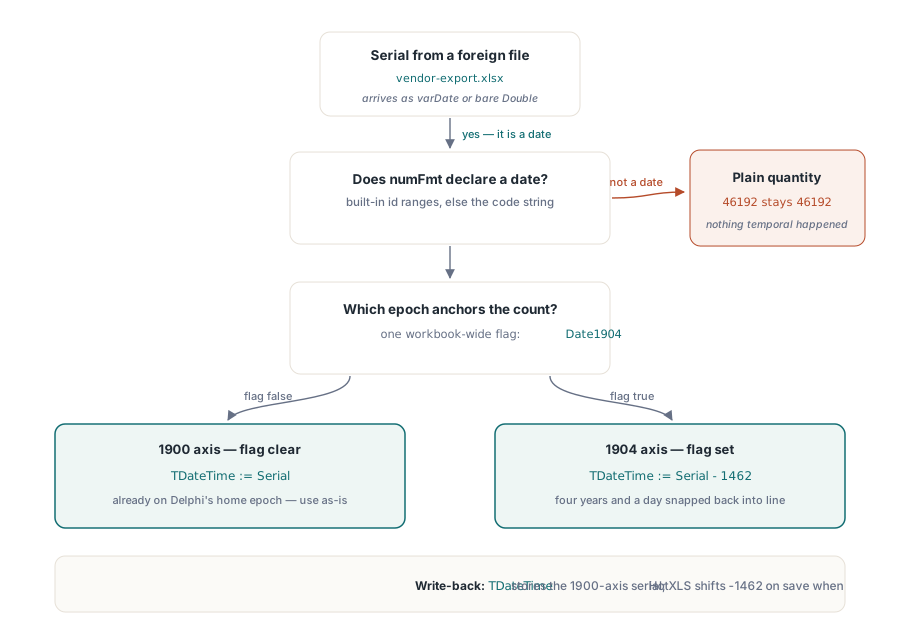
Open a spreadsheet, click a cell that shows 2026-06-19, and the formula bar still reads a date. Read the same cell from Delphi and you get the number 46192. Both views are correct, because Excel never stored a date in that cell. It stored a serial number, a count of days, and attached a number format that tells the screen to render the count as a calendar date. There is no date type in the cell value. There is a number and a display rule, and the display rule is the only thing that distinguishes a date from a plain quantity
That separation is the root of every date bug a spreadsheet library has to dodge. A serial alone does not say what day it is, because it does not say what day zero was. The same number means two dates four years apart depending on a single workbook flag. And a number that should read back as a date will read back as a bare quantity unless something inspects its format and recognises a date pattern. This is how the date model in HotXLS is built, and why it has to be
A date cell is a number plus a format
Excel stores a date as the number of days since an epoch, with the time of day in the fractional part. Midday on a serial carries .5. The integer part is the day count. Nothing in the stored value marks it as temporal. What marks it is the cell's number format: ECMA-376 calls this a numFmt, and a cell whose format code spells out a date or time pattern is shown as a date. Strip the format off and the same cell shows a number; the underlying value never changed
This is why reading a cell value gives you a Variant that may be a varDate or may be a plain Double, and why the number format on the same cell is the signal that decides which a third party meant. When HotXLS opens an XLSX file, a cell carries both its Value and its NumberFormatIndex into TXLSXCell, and the format index is what you consult to learn whether the number is a date
var
  Book: TXLSXWorkbook;
  Cell: TXLSXCell;
begin
  Book := TXLSXWorkbook.Create;
  try
    if Book.Open('timesheet.xlsx') <> 1 then
      raise Exception.Create('Cannot open workbook');

    Cell := Book.Sheets[0].Cells[1, 1];   // row 1, col 1 (1-based)
    // Value may arrive as varDate or as a plain numeric serial;
    // the format index is the signal that tells them apart.
    Writeln('raw value : ', VarToStr(Cell.Value));
    Writeln('numFmt idx: ', Cell.NumberFormatIndex);
    Writeln('format    : ', Cell.NumberFormat);
  finally
    Book.Free;
  end;
end;
Two epochs, 1462 days apart
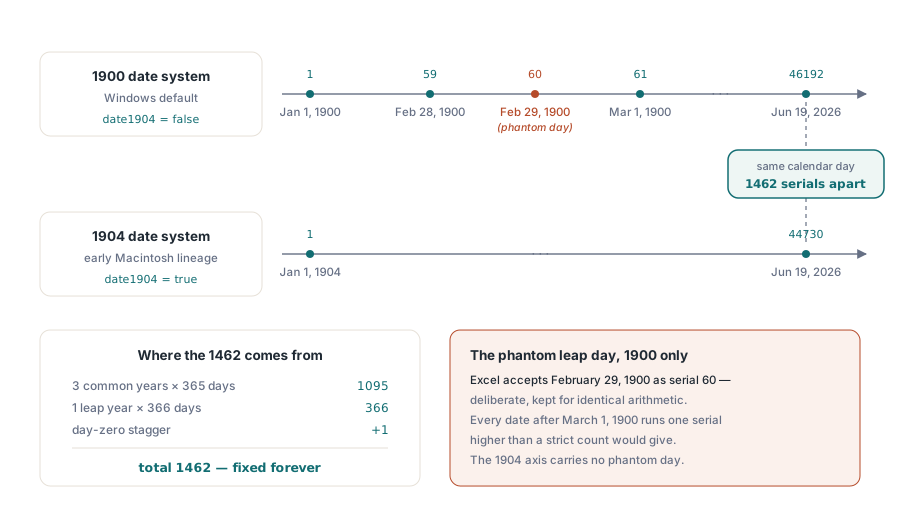
The default date system, the one every Windows workbook uses, counts from the very end of 1899, so that serial 1 falls on the first day of 1900. The other system traces to the early Macintosh and counts from the start of 1904, so its serial 1 is four years and a day later. A workbook records which system it uses in one flag. In an OOXML package that flag is date1904 on the workbook part; HotXLS surfaces it as the Date1904 property of the workbook
The gap between the two epochs is exactly 1462 days. That is four calendar years, three of 365 days and one of 366, totalling 1461, plus one more for the day-and-a-bit offset between the two day-zero conventions. The number is fixed and you can carry it in your head. Its importance is that it is not zero. A serial copied out of a 1904 workbook and interpreted under 1900 rules, or the reverse, lands every date 1462 days off, which presents as dates that are wrong by just over four years and is easy to mistake for corrupt data
Because Delphi's own TDateTime is anchored to the 1900 convention, a library that maps Excel serials to TDateTime has to offset by 1462 in both directions whenever the workbook is flagged 1904. Reading a 1904 serial, subtract 1462 before treating it as a TDateTime; writing a TDateTime into a 1904 workbook, subtract 1462 from the serial so Excel renders the day you meant. HotXLS applies this shift internally when it serializes date values for a workbook whose Date1904 is set, so the value you assign as a TDateTime round-trips to the same calendar day on the screen
The deliberate 1900 leap-year quirk
There is a famous wrinkle in the 1900 system. Excel treats 1900 as a leap year and accepts February 29, 1900 as a real date, serial 60. The year 1900 was not a leap year, because century years are leap years only when divisible by 400, and 1900 is not. The phantom day is a deliberate compatibility behaviour inherited from an early spreadsheet that shipped with the bug, kept ever since so that serial arithmetic stays identical across decades of files
The practical consequence is small but real: for any date on or after March 1, 1900, the serial is one higher than a strictly correct day count would give, because the non-existent February 29 consumed a number. A spreadsheet library reproduces the quirk rather than fixing it, because matching Excel's arithmetic exactly is the entire job. Correcting it would put every modern date one day off from what Excel shows, which is a worse outcome than carrying a forty-thousand-day-old off-by-one that no real date in business use ever touches. The 1904 system has no equivalent phantom day, which is one reason a few shops historically preferred it
Detecting a date from numFmt
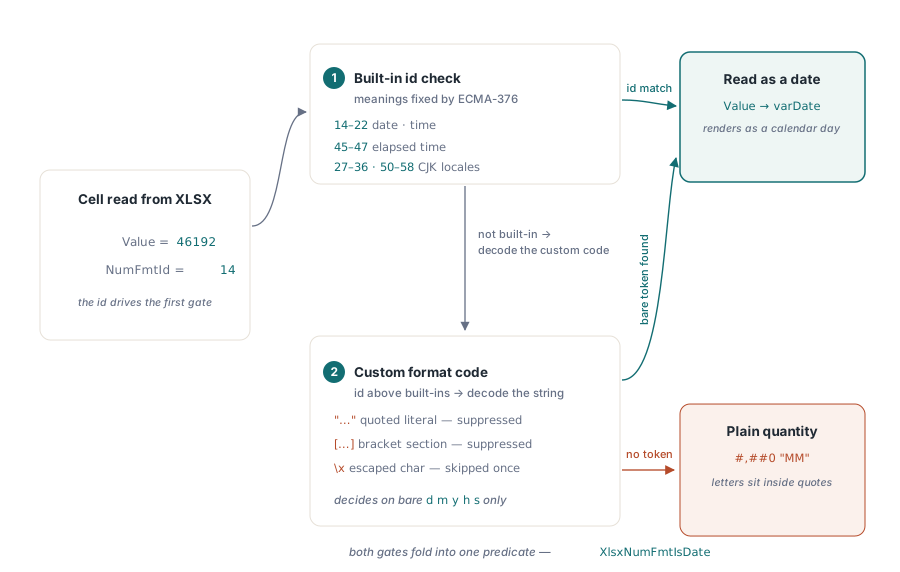
When a number arrives from a file someone else wrote, its format is the only evidence that it is a date. ECMA-376 assigns a block of built-in format ids whose meaning is fixed by the specification, and the date and time formats occupy known ranges. Ids 14 through 22 are the general-locale date and time formats, the familiar m/d/yyyy, h:mm, and their relatives. Ids 45 through 47 are the elapsed-time formats. Two further bands, 27 through 36 and 50 through 58, are the locale-specific date and time formats used for CJK calendars, defined in ECMA-376 18.8.30. A cell whose number format id falls in any of these ranges is a date or time cell
Built-in ids cover the common cases but not custom ones. When a workbook defines its own format code, say a non-standard ordering or a localized month name, the id is above the built-in range and points into the workbook's number-format table. For those, recognising a date means reading the format-code string and looking for date tokens. HotXLS folds both checks into one internal predicate, XlsxNumFmtIsDate, which returns true immediately for the built-in date ranges and otherwise parses the custom format code through XlsxFormatCodeIsDate. The public side of that is the cell's NumberFormat string and its NumberFormatIndex, which give you both the resolved format code and the id to test
Why the format parser cannot just scan for d and m
Parsing a format code for date tokens looks trivial until you remember what else lives in a number format. A naive search for the letters that spell dates, the d, m, y, h, and s of day, month, year, hour, and second, will misfire on two structures that are not date tokens at all
The first is the quoted string literal. A number format can embed literal text in double quotes, so a financial format like #,##0 "MM" appends the characters M and M to a number with no temporal meaning whatsoever. A scanner that counts the letters inside the quotes as month tokens would wrongly flag that currency format as a date. The second is the bracket section. Number formats carry directives in square brackets, colour names such as [Red], comparison conditions such as [>1000], locale tags, and the elapsed-time markers [h] and [mm]. Some bracket content holds date letters and some does not, and treating bracketed text the same as the body of the format leads to both false positives and missed cases
The correct parser walks the format code character by character, tracking whether it is inside a quoted literal and how deep it is inside bracket nesting, and it also honors the backslash escape that quotes a single following character. Only an unescaped date letter found outside any string literal and outside any bracket section counts as a real date token. That is exactly how XlsxFormatCodeIsDate scans: a quote flips an in-literal state that suppresses token detection until the closing quote, a backslash skips the next character, and a bracket-depth counter suppresses detection inside [...] runs. The payoff is that #,##0 "MM" is correctly read as a number format, while a terse custom code that contains nothing but a single m or d outside quotes is still correctly recognised as a date
Reading dates out of third-party files
Everything above converges on one workflow: turning a number that some other application wrote back into a date you can trust. The serial gives you the day count, the workbook's Date1904 flag tells you which epoch the count is measured from, and the cell's number format id or custom code is the single piece of evidence that the number was meant as a date in the first place. Drop any one of the three and you get a plausible wrong answer rather than a visible error
var
  Book: TXLSXWorkbook;
  Sheet: TXLSXWorksheet;
  Cell: TXLSXCell;
  r: Integer;
begin
  Book := TXLSXWorkbook.Create;
  try
    if Book.Open('vendor-export.xlsx') <> 1 then
      raise Exception.Create('Cannot open export');

    // The 1904 flag is workbook-wide: read it once, apply it to
    // every serial the workbook hands back.
    if Book.Date1904 then
      Writeln('workbook uses the 1904 date system')
    else
      Writeln('workbook uses the 1900 date system');

    Sheet := Book.Sheets[0];
    for r := 1 to 10 do
    begin
      Cell := Sheet.Cells[r, 1];
      // A date is only a date when its format says so; the same numeric
      // value with a plain format is just a quantity.
      Writeln(Format('row %d  value=%s  numFmt=%d  code="%s"',
        [r, VarToStr(Cell.Value), Cell.NumberFormatIndex, Cell.NumberFormat]));
    end;
  finally
    Book.Free;
  end;
end;
The legacy BIFF side has one extra trap worth naming. In an older .xls stream, a run of adjacent numeric cells can be packed into a single multi-cell record, the MULRK, that stores several values with their format references in one structure. Date cells stored that way are no less dates for being packed, so the same format-id test has to reach inside the multi-cell record and apply per cell, and the 1904 offset still governs every serial it yields. A reader that only inspects standalone number records, and skips the packed ones, will silently turn a column of dates into a column of integers
Mapping serials to TDateTime in practice
Once the format check confirms a date and the Date1904 flag is known, the conversion is mechanical. A value that HotXLS already hands back as a varDate is a TDateTime you can use directly. A value that arrives as a bare Double, which happens when the source wrote a serial without a recognised date format, is converted by reading it as a day count on the 1900 axis and, for a 1904 workbook, subtracting the 1462-day offset first so the epochs line up. Going the other way, assigning a TDateTime to a cell stores the 1900-based serial, and HotXLS applies the same 1462-day shift on save when the workbook is flagged 1904, so the saved file shows the date you intended rather than one four years adrift
Set the flag deliberately when you generate a workbook. The default leaves Date1904 false, which matches Excel for Windows and is almost always what you want; set it true only when you are reproducing a Mac-origin workbook or a downstream system specifically expects the 1904 axis. The one rule that prevents the whole class of four-year errors is consistency: pick the epoch once per workbook, write every date under it, and read every serial back under the flag the file actually carries
Dates are one column in a wider story about what a cell really holds. The neighboring metadata layer, the title and author and timestamps that ride alongside the grid, is covered in our article on workbook metadata and document properties, where the same Created and Modified values are stored as TDateTime with the same unset-equals-zero convention. When a date is the result of a calculation rather than a stored value, the evaluation rules in our article on the formula engine and custom functions determine the serial that the format then renders. Both work over the same date model that ships in the HotXLS Delphi Component for Delphi and C++Builder, which reads and writes XLS and XLSX dates without Excel automation