A range check written as =0<B2<100 returns FALSE in Excel on every row, including the row where B2 holds 50. Excel evaluates 0<B2 first, gets TRUE, and then asks whether TRUE is less than 100; a logical value ranks above every number, so the answer is FALSE whatever B2 contains. Blank cells and SUMIF have surprises of the same kind: an empty cell equals 0, "" and FALSE at the same time, and =SUMIF(A1:A10,">5",B1) adds up ten cells of column B
A calculation engine that recalculates such a workbook outside Excel has to reproduce those answers, even when they are obviously not what the author meant. The cached result stored in the file is what a viewer, a mail preview or a downstream import sees before anyone presses F9. If the server writes TRUE for the range check and Excel later shows FALSE, the same report contains two different numbers depending on where it was opened, and nobody can tell which one to trust. Fixing the author's formula is the author's job
Why does =1<2<3 return FALSE in Excel?
Excel returns FALSE for =1<2<3 because all six comparison operators share one precedence level and associate left to right, so the formula means (1<2)<3, and the inner TRUE then loses a type-ranking contest against the number 3. HotXLS Delphi Component parses comparison chains the same way in both of its workbook engines, the classic TXLSWorkbook and the XLSX-native TXLSXWorkbook. The parser reads one operand, and while the next token is =, <>, <, >, <= or >=, it builds a comparison node with everything parsed so far as its left child and the next operand as its right child, then carries that node into the next round. That is the same loop shape it uses for +, - and &
The trap sits in the textbook grammar. Written as expr = operand op expr, a recursive-descent parser recurses into itself for the right-hand side and quietly makes the operator right-associative. Under that reading =1<2<3 becomes 1<(2<3), which is 1<TRUE, which is TRUE. The error runs in both directions: =3>2>1 is TRUE in Excel and FALSE under right associativity, and =1=1=TRUE flips the same way. Parenthesised forms come out right either way, so the mistake slips past any test that only checks (a<b)<c
The Calculate method evaluates a formula string without putting it in a cell, which makes it a quick way to check a whole list of chains against both engines. The method is covered in more depth in the HotXLS formula engine overview
uses
  SysUtils, Variants, lxCalc, lxHandle, lxHandleX;   // lxOk is declared in lxCalc

const
  Formulas: array [0..6] of string = ('=1<2<3', '=3>2>1', '=(1<2)<3',
    '=1<(2<3)', '=1=1=TRUE', '=3>2>1=TRUE', '=1<2<3=FALSE');
  // Excel's answers:  FALSE, TRUE, FALSE, TRUE, TRUE, TRUE, TRUE
var
  Classic: IXLSWorkbook;
  Xlsx: TXLSXWorkbook;
  i: Integer;
begin
  Classic := TXLSWorkbook.Create;   // reference-counted through the interface
  Xlsx := TXLSXWorkbook.Create;
  try
    // TXLSXWorkbook.Calculate evaluates against the active sheet and
    // returns Null when the workbook has no sheet yet
    Xlsx.Sheets.Add('Data');
    for i := 0 to High(Formulas) do
      Writeln(Formulas[i], '  classic=', VarToStr(Classic.Calculate(Formulas[i])),
        '  xlsx=', VarToStr(Xlsx.Calculate(Formulas[i])));
  finally
    Xlsx.Free;
  end;
end;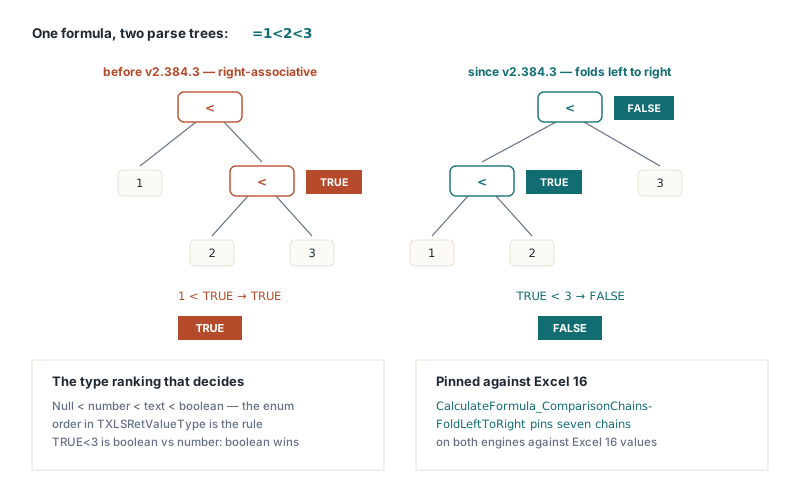
Numbers, text and booleans: the cross-type ranking
When the two sides of a comparison have different types, Excel does not convert one into the other. It ranks the types instead: every number is less than every text value, and every text value is less than every boolean. HotXLS classifies both operands as number, text or boolean and, when the classes differ, compares the classes alone. So =TRUE>99999 is TRUE, ="1">2 is TRUE, and =FALSE>"zzz" is TRUE as well. This is the piece that makes chained comparisons feel arbitrary. TRUE<3 is not TRUE coerced to 1 and compared with 3; it is a boolean compared with a number, and the boolean wins
Inside one class the comparison is the natural one, with a twist for text: string comparison ignores case, so ="abc"="ABC" returns TRUE in Excel and in HotXLS. Dates are serial numbers to the engine, which means a date always ranks below any text, including a text cell that merely looks like a date. A column of imported dates where half the cells arrived as strings will sort and compare in two separate bands, and =A2>DATE(2026,1,1) returns TRUE for every one of the string cells
What does a blank cell equal in a comparison?
A blank cell used as a comparison operand takes the type of the other side: it equals 0 against a number, "" against text and FALSE against a logical value. With A1 empty, =A1=0, =A1="" and =A1=FALSE are all TRUE in Excel. HotXLS makes the same substitution before ranking the two operands, for all six comparison operators and in both engines. When both operands are blank no substitution happens, and they compare equal
var
  Wb: IXLSWorkbook;
  Sh: TXLSWorksheet;
begin
  Wb := TXLSWorkbook.Create;
  Sh := Wb.Sheets.Add;                  // the first sheet becomes the active one
  Sh.Range['B1', 'B1'].Value := 5;      // A1 is left blank on purpose

  Writeln(VarToStr(Wb.Calculate('=A1=0')));      // True
  Writeln(VarToStr(Wb.Calculate('=A1=""')));     // True
  Writeln(VarToStr(Wb.Calculate('=A1=FALSE')));  // True
  Writeln(VarToStr(Wb.Calculate('=A1<B1')));     // True: the blank compares as 0
  Writeln(VarToStr(Wb.Calculate('=A1<0')));      // False: 0 is not below 0
end;
The last line is the one that bites in practice. Arithmetic already treats a blank as 0, so =A1+1 gives 1 in any engine. Comparison is where a shortcut goes wrong. An engine that keeps "blank" as its own lowest rank, below every number, answers TRUE for =A1<0, and then =IF(A1<0,"overdrawn","ok") labels every empty balance cell as overdrawn. Substituting only 0 or the empty string is not enough either: against a boolean the blank would become 0, which ranks below both TRUE and FALSE, and =A1=FALSE would come out FALSE on an empty cell
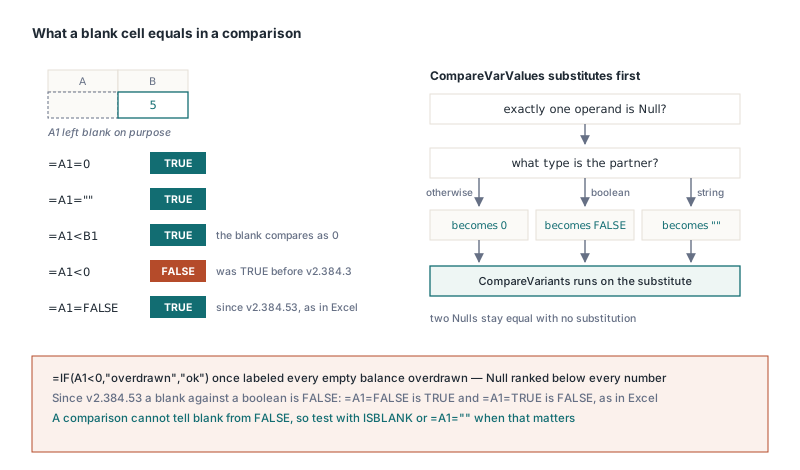
There is a consequence worth planning for. Because a blank compares as FALSE against a logical value, =A1=FALSE cannot tell an empty cell from a cell holding FALSE, in Excel or in HotXLS, and =A1=0 cannot tell empty from zero. Templates that need to know whether someone actually entered a value should test with ISBLANK(A1). The =A1="" form is weaker, since it is also TRUE for a formula that returns an empty string
Why does SUMIF with a single-cell sum range cover the whole column?
Excel keeps the shape of the criteria range and uses the sum range only for its top-left cell, so =SUMIF(A1:A10,">5",B1) means B1:B10. Plenty of hand-built templates rely on that shorthand without their authors knowing it. The obvious implementation, clamping the walk to the smaller of the two ranges, reduces the example to a single test of A1 against B1 and returns 0. HotXLS walks the criteria range and reads each value at the same row and column offset from the sum range's top-left corner. AVERAGEIF goes through the same walk and gets the same resize, and a sum range larger than the criteria range is trimmed to the criteria shape
var
  Book: TXLSXWorkbook;
  Sheet: TXLSXWorksheet;
  Row: Integer;
begin
  Book := TXLSXWorkbook.Create;
  try
    Sheet := Book.Sheets.Add('Sales');
    for Row := 1 to 10 do
    begin
      Sheet.Cells[Row, 1].Value := Row;          // criteria column: 1..10
      Sheet.Cells[Row, 2].Value := Row * 100;    // amounts: 100..1000
    end;
    Sheet.Cells[1, 4].Formula := '=SUMIF(A1:A10,">5",B1)';      // one-cell sum range
    Sheet.Cells[2, 4].Formula := '=SUMIF(A1:A10,">5",B1:B10)';  // explicit sum range
    Sheet.Cells[3, 4].Formula := '=AVERAGEIF(A1:A10,">5",B1)';  // same resize
    if Book.Recalculate = lxOk then
      // D1 and D2: 4000 (600+700+800+900+1000); D3: 800
      Writeln(VarToStr(Sheet.Cells[1, 4].Value), ' ',
        VarToStr(Sheet.Cells[2, 4].Value), ' ', VarToStr(Sheet.Cells[3, 4].Value));
  finally
    Book.Free;
  end;
end;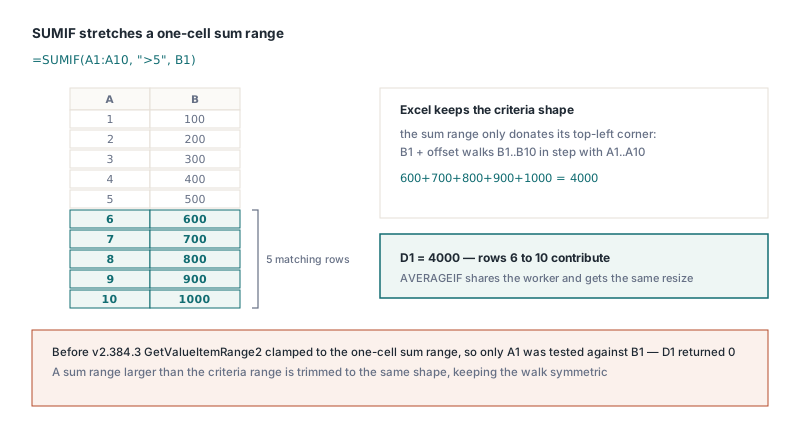
For templates you write yourself, spell out the full sum range. The engine honours the shorthand because existing files depend on it, but B1 in a formula reads like a single cell to the next person who maintains the sheet, and that person will reasonably assume only one amount is being added. The criteria in the middle is evaluated as a single value while the two outer arguments are references; that split between argument classes is explained in the article on implicit intersection and argument classes. Conditional totals that must also skip filtered or hidden rows follow different rules again, covered in the SUBTOTAL and AGGREGATE hidden-row article
INDIRECT reference styles and YEARFRAC basis 0
Two smaller functions carry the same kind of trap. INDIRECT takes an optional second argument, a1, and when it is FALSE the text is an R1C1 reference: =INDIRECT("R2C3",FALSE) reads C2. A parser that ignores the flag reads "R2" as column R, row 2, which is a real cell, so the formula returns a plausible value from the wrong place. HotXLS reads the flag as a boolean, a number (zero means FALSE) or the text "FALSE", and converts R1C1 text before resolving it, with bracketed offsets such as R[1]C[1] measured from the cell that holds the formula. Text with anything left over after a valid reference, such as "B2 junk", returns #REF! instead of silently using B2
YEARFRAC with basis 0 uses the US (NASD) 30/360 day count, including the last-of-February rules that DAYS360 applies: when both dates are the last day of February, the end day becomes 30, and then a start on the last day of February becomes 30. From 2024-02-29 to 2025-02-28 that gives 360 days and a fraction of exactly 1. A plain 30/360 count that skips those rules gives 359 days and 0.99722, and the difference turns up in interest accruals that span the end of February
var
  Wb: IXLSWorkbook;
  Sh: TXLSWorksheet;
begin
  Wb := TXLSWorkbook.Create;
  Sh := Wb.Sheets.Add;
  Sh.Range['C2', 'C2'].Value := 'row 2, column 3';

  Writeln(VarToStr(Wb.Calculate('=INDIRECT("R2C3",FALSE)')));   // row 2, column 3
  Writeln(VarToStr(Wb.Calculate('=ISERROR(INDIRECT("B2 junk"))')));  // True: #REF!
  Writeln(VarToStr(Wb.Calculate(
    '=YEARFRAC(DATE(2024,2,29),DATE(2025,2,28),0)')));           // 1
end;
When you document or test behaviour like this, take the expected values from Excel itself and not from what the formula seems to say. "1 is less than 2 is less than 3" suggests that =1<2<3 is TRUE, which is precisely the answer a right-associative parser gives and the opposite of what Excel returns. A short table of formulas with the values Excel shows next to them catches all four cases in this article: chains, blanks, the SUMIF resize and the February day count
HotXLS reads, recalculates and writes XLS, XLSX, ODS and CSV from Delphi and C++Builder without Excel on the machine, and the comparison, blank-cell and conditional-aggregate rules above belong to the calculation engine that both workbook classes share. The supported function list, editions and licensing are on the HotXLS Delphi spreadsheet component page