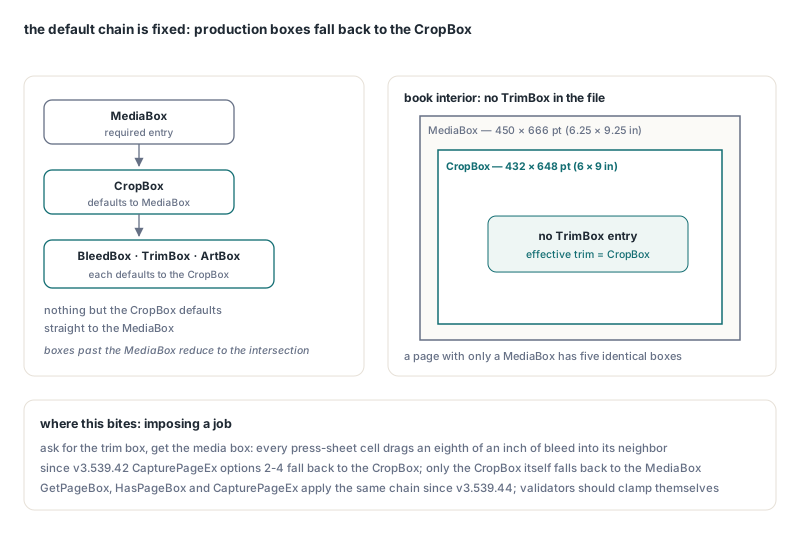
When a PDF page has no TrimBox, its effective TrimBox is the page's CropBox, and when the CropBox is missing too, it is the MediaBox. BleedBox and ArtBox follow the same rule. PDFlibPas, the PDF Library for Delphi, applies this default chain consistently in GetPageBox, HasPageBox and CapturePageEx since v3.539.44, and it ignores production boxes placed on a /Pages node, because ISO 32000-1 does not let them inherit
That reads like a footnote until you impose a job. Picture a book interior with a 6.25 × 9.25 in MediaBox, a CropBox set to the 6 × 9 in trim, and no TrimBox, because whoever exported it never thought to write one. Ask for the trim box, get the media box instead, and every cell on your press sheet drags an eighth of an inch of bleed and slug into its neighbour. PDFlibPas had defects in exactly this area, fixed in v3.539.42 and v3.539.44, and the way they were fixed says something about how page-box semantics should be implemented in any PDF library
Which box applies when a page has no TrimBox?
The answer is a fixed default chain from ISO 32000-1 §14.11.2: the CropBox defaults to the MediaBox, and the BleedBox, TrimBox and ArtBox each default to the CropBox. Nothing except the CropBox defaults straight to the MediaBox. A page that defines only a MediaBox therefore has five identical boxes, and a page that defines a MediaBox plus a CropBox has four boxes equal to the CropBox
| Box | PDFlibPas BoxType | Default when absent | Inheritable from /Pages |
|---|---|---|---|
| MediaBox | 1 | None, the entry is required | Yes |
| CropBox | 2 | MediaBox | Yes |
| BleedBox | 3 | CropBox | No |
| TrimBox | 4 | CropBox | No |
| ArtBox | 5 | CropBox | No |
The two-step chain matters because the CropBox may itself be inherited. The effective TrimBox of a page with neither a TrimBox nor a CropBox of its own is the CropBox of the nearest ancestor that has one, and failing that, the inherited MediaBox. The spec adds one more rule that is easy to forget: the crop, bleed, trim and art boxes should not extend past the media box, and if they do, they are effectively reduced to their intersection with it. PDFlibPas reports each box as stored in the file, so a validator that handles untrusted input should clamp against the MediaBox itself
Which page attributes can a /Pages node pass down?
Exactly four: Resources, MediaBox, CropBox and Rotate. ISO 32000-1 §7.7.3.4 defines attribute inheritance, and Table 30 marks only those four page-object entries as inheritable. BleedBox, TrimBox and ArtBox belong to the leaf page. A TrimBox written into a /Pages node is not an inherited value; it is a non-standard key that a conforming reader ignores
Non-standard files like that exist, typically with a single TrimBox on the root page tree node as shorthand for "every page has this trim". The shorthand looks right in any tool that walks /Parent for every key, and that is the problem: the file now means two things depending on who reads it. A reader that follows the spec sees no TrimBox and uses the CropBox, while a reader that inherits everything sees the parent value. In a prepress pipeline that ambiguity ends up on the press sheet
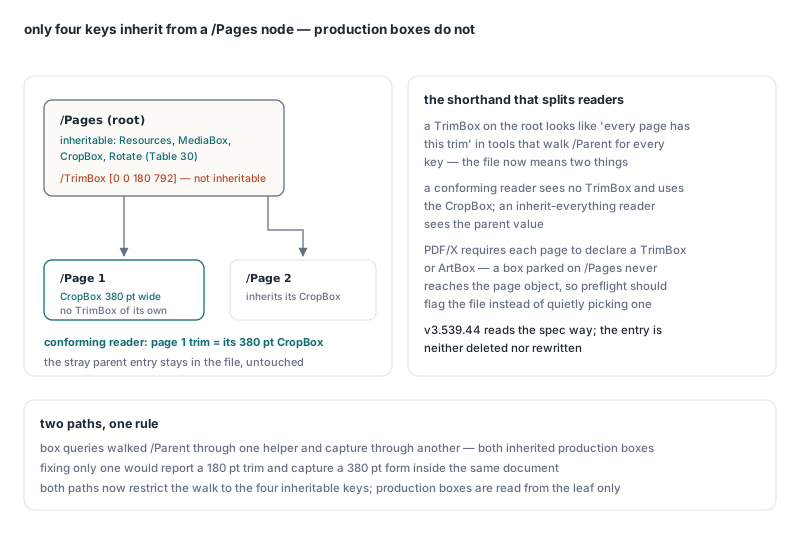
PDF/X (ISO 15930) workflows depend on the TrimBox for finished size, and the PDF/X profiles require each page to declare a TrimBox or an ArtBox. A box parked on a /Pages node does not meet that requirement, because the key never reaches the page object. Preflight should flag such files rather than quietly read them one way or the other
What did PDFlibPas get wrong before v3.539.44?
PDFlibPas had three separate defects, all in the gap between what the spec says and what two independent code paths did. The first was fixed in v3.539.42, the other two in v3.539.44
Production boxes defaulted to the MediaBox during capture
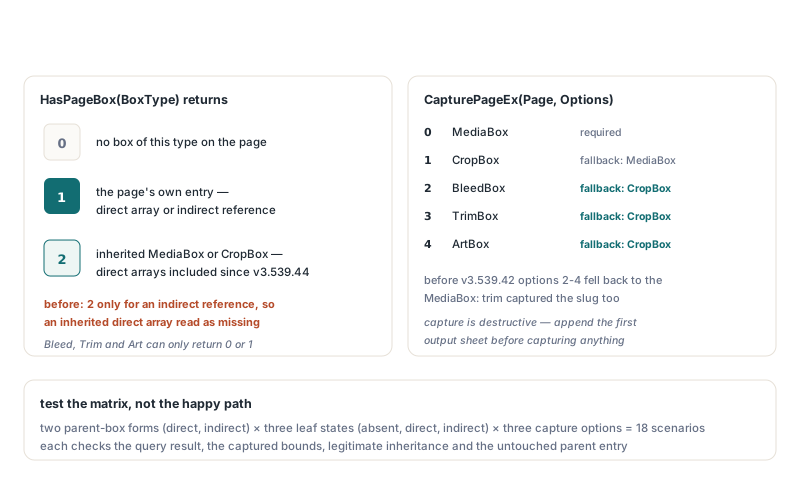
Before v3.539.42, the internal routine that prepares a page for capture (it copies inherited entries onto the page and fills in missing boxes) gave the BleedBox, TrimBox and ArtBox the MediaBox values when they were absent. CapturePageEx with options 2 to 4 reads its bounding rectangle from exactly those filled-in entries, so on a page that defines only a CropBox, asking for the trim box captured the whole media box. GetPageBox already applied the CropBox default, and the CapturePageEx reference had always said the crop box is used when the requested box is missing; the capture code disagreed with both. Since v3.539.42 the three production boxes default to the page's CropBox, which by that point is already on the page (its own, copied from an ancestor, or filled in from the MediaBox), and only the CropBox itself falls back to the MediaBox
Two inheritance paths, one semantic rule
The second defect was the non-standard inheritance itself, and the subtle part was that PDFlibPas resolved boxes along two independent paths. Box queries (GetPageBox and HasPageBox) walked the /Parent chain through one helper, and capture walked it through a separate local helper. Both inherited every key, production boxes included. Fixing only one of them would have produced a contradiction inside a single document: with a 180-point-wide TrimBox on the /Pages node and a 380-point-wide CropBox on the page, GetPageBox would still report a trim width of 180 while CapturePageEx built a 380-wide form. In v3.539.44 both paths restrict the /Parent walk to the four inheritable keys, production boxes are read from the leaf only, and the stray parent entry stays in the file untouched, neither deleted nor rewritten
HasPageBox missed direct parent arrays
HasPageBox returns 0 when the page has no box of the requested type, 1 when the page has its own box (stored directly or through an indirect reference), and 2 when a MediaBox or CropBox is inherited from an ancestor. The old code returned 2 only when the inherited value was an indirect reference, so an inherited direct array returned 0. The fix separates dereferencing from the array test, and both representations now return 2. Since v3.539.44, HasPageBox for a BleedBox, TrimBox or ArtBox can only return 0 or 1
The lesson generalises well beyond page boxes. When one piece of spec semantics has two implementation entry points in a library, fix them together and test them as a matrix rather than with one happy-path file. The PDFlibPas regression set crosses two parent-box representations (direct and indirect array) with three leaf states (absent, direct array, indirect array) and three capture options (bleed, trim, art), giving 18 scenarios, and each one checks the query result, the captured bounds, legitimate MediaBox and CropBox inheritance, and the untouched parent entry
How do I read the effective TrimBox in Delphi?
Call GetPageBox(4, Dimension) on the selected page. PDFlibPas applies the default chain for you, so the result is the effective TrimBox whether or not the page has one. Pair it with HasPageBox when you need to know where the value came from, which a preflight report usually does
uses
  System.SysUtils, PDFlibrary;

const
  BOX_CROP   = 2;
  BOX_TRIM   = 4;
  DIM_LEFT   = 0;
  DIM_WIDTH  = 2;
  DIM_HEIGHT = 3;
  DIM_BOTTOM = 5;

function DescribeTrim(Lib: TPDFlib; Page: Integer): string;
var
  Source: string;
begin
  Lib.SelectPage(Page);
  if Lib.HasPageBox(BOX_TRIM) = 1 then
    Source := 'own TrimBox'
  else if Lib.HasPageBox(BOX_CROP) <> 0 then   // 1 = own, 2 = inherited
    Source := 'defaulted to the CropBox'
  else
    Source := 'defaulted to the MediaBox';
  Result := Format('page %d: trim %.2f x %.2f pt at (%.2f, %.2f), %s',
    [Page,
     Lib.GetPageBox(BOX_TRIM, DIM_WIDTH),
     Lib.GetPageBox(BOX_TRIM, DIM_HEIGHT),
     Lib.GetPageBox(BOX_TRIM, DIM_LEFT),
     Lib.GetPageBox(BOX_TRIM, DIM_BOTTOM),
     Source]);
end;

var
  Lib: TPDFlib;
  Page: Integer;
begin
  Lib := TPDFlib.Create;
  try
    if Lib.LoadFromFile('interior.pdf', '') = 1 then
      for Page := 1 to Lib.PageCount do
        Writeln(DescribeTrim(Lib, Page));
  finally
    Lib.Free;
  end;
end.
Both GetPageBox and SetPageBox work in the document's current coordinate settings. The examples here run with the defaults: origin 0 (bottom left, matching PDF user space) and points as the measurement unit, so the Top dimension is the upper edge measured up from the bottom of the page. After SetOrigin(1) the Top and Bottom dimensions are measured down from the top of the page instead, and after SetMeasurementUnits(1) every value comes back in millimetres. Width and height do not depend on the origin
Finding production boxes stranded on /Pages nodes
Since v3.539.44 the box API no longer sees a TrimBox on a /Pages node, which is correct, but a preflight tool usually wants to report such a file rather than silently read it the spec way. Page tree nodes are ordinary objects, so the low-level object API can find them: walk object numbers up to GetMaxObjectNumber, read each with GetObjectToString, and look for a /Pages dictionary that carries a production box key. The second half of the check is the per-page test PDF/X cares about, and HasPageBox now answers it the way a PDF/X validator would, because a parent TrimBox no longer counts
procedure PreflightTrim(Lib: TPDFlib; Log: TStrings);
const
  ProductionKeys: array[0..2] of string = ('/BleedBox', '/TrimBox', '/ArtBox');
var
  ObjNum, K, Page, Missing: Integer;
  Src: string;
begin
  // 1. Production boxes on page tree nodes: non-standard and ignored
  for ObjNum := 1 to Lib.GetMaxObjectNumber do
  begin
    Src := '';                                // free numbers return no text
    Src := string(Lib.GetObjectToString(ObjNum));
    if Pos('/Type /Pages', Src) = 0 then
      Continue;
    for K := Low(ProductionKeys) to High(ProductionKeys) do
      if Pos(ProductionKeys[K] + ' ', Src) > 0 then
        Log.Add(Format('object %d: %s on a /Pages node is not inheritable',
          [ObjNum, ProductionKeys[K]]));
  end;

  // 2. PDF/X: every page needs its own TrimBox or ArtBox
  Missing := 0;
  for Page := 1 to Lib.PageCount do
  begin
    Lib.SelectPage(Page);
    if (Lib.HasPageBox(4) = 0) and (Lib.HasPageBox(5) = 0) then
    begin
      Inc(Missing);
      Log.Add(Format('page %d: no TrimBox or ArtBox', [Page]));
    end;
  end;

  // 3. Optional repair: a 6 x 9 in trim inside a 6.25 x 9.25 in media box
  //    (points, bottom-left origin: Left, Top, Width, Height)
  if Missing > 0 then
    Log.Add(Format('TrimBox written on %d pages',
      [Lib.SetPageBoxRange('', 4, 9, 657, 432, 648)]));
end;
The text match is a pragmatic check, not a parser. It relies on PDFlibPas serialising each dictionary entry as a key, one space and a value, which holds for objects read back through GetObjectToString. The repair step deserves a decision rather than a reflex: the stray parent value may well be what the author intended, but confirm it against the job ticket before you make it official. SetPageBoxRange with an empty range applies the box to every page and returns the number of pages updated. When a page's existing box is an indirect array, which another page or a /Pages node may share, SetPageBox gives that page a new direct array instead of rewriting the shared object. Setting a BleedBox, TrimBox or ArtBox also raises an unlocked document to PDF 1.3, the version that introduced those entries
Imposing pages on the TrimBox with CapturePageEx
CapturePageEx(Page, 3) turns a page into a Form XObject whose bounding box is the page's effective TrimBox, and DrawCapturedPage places that form on another page at any size. Since v3.539.42, option 3 on a page without a TrimBox gives you the CropBox, as the reference describes, instead of the MediaBox with all its slug
Two properties of capture shape the code. Capture is destructive: the captured page is removed from the document, and the document can never drop to zero pages, so append the first output sheet before capturing anything. Capture also works within one document only, so pull every input into a single document first; the techniques for collating and interleaving PDF sources in one pass apply directly
procedure ImposeTwoUp(const InFile, OutFile: string);
var
  Lib: TPDFlib;
  Captures: array of Integer;
  SourceCount, I: Integer;
  TrimW, TrimH: Double;
begin
  Lib := TPDFlib.Create;
  try
    if Lib.LoadFromFile(InFile, '') <> 1 then
      raise Exception.Create('Cannot open ' + InFile);
    SourceCount := Lib.PageCount;

    // Effective trim size of page 1 (this layout assumes a uniform trim)
    Lib.SelectPage(1);
    TrimW := Lib.GetPageBox(4, 2);
    TrimH := Lib.GetPageBox(4, 3);

    // Append and size the first sheet; NewPage selects the new page
    Lib.NewPage;
    Lib.SetPageDimensions(2 * TrimW, TrimH);

    // Each capture removes page 1, so the next source page moves up
    SetLength(Captures, SourceCount);
    for I := 0 to SourceCount - 1 do
    begin
      Captures[I] := Lib.CapturePageEx(1, 3);   // 3 = TrimBox
      if Captures[I] = 0 then
        raise Exception.CreateFmt('Capture of source page %d failed', [I + 1]);
    end;

    // Only the sheet is left: two trimmed pages per sheet, side by side
    Lib.SelectPage(1);
    for I := 0 to SourceCount - 1 do
    begin
      if (I > 0) and (I mod 2 = 0) then
        Lib.NewPage;                            // same size as the current sheet
      // Default origin: Top is the upper edge, measured from the bottom
      Lib.DrawCapturedPage(Captures[I], (I mod 2) * TrimW, TrimH, TrimW, TrimH);
    end;
    Lib.SaveToFile(OutFile);
  finally
    Lib.Free;
  end;
end;
A trim-based capture clips everything outside the TrimBox, which is what you want for a digital proof or a cut-and-stack layout. For a press sheet that is trimmed after printing, capture with option 2 so the bleed survives, and space the cells by the bleed width. Because capture removes the source pages, bookmarks and links that pointed at them lose their targets, so impose into a separate output file rather than editing a document whose navigation you still need; replacing pages without breaking bookmarks covers that side of page surgery
When the source has to stay intact, ImportPageAsFormXObject(SourceDocumentID, SourcePage, Options) takes the same 0 to 4 option values (pass Lib.SelectedDocument for the current document), leaves the source page tree unchanged, normalises inherited page rotation into the form matrix, and returns a handle that DrawCapturedPage accepts. CapturePageEx does not undo /Rotate, so rotated input needs that step first, and flattening page rotation without breaking page boxes shows what happens to each box when you do. One caution for inputs that may carry production boxes on /Pages nodes: the import path resolves its box through its own ancestor lookup, separate from the two paths aligned in v3.539.44, so check HasPageBox(4) on the source page first and pass option 1 (CropBox) when it returns 0. That keeps the result tied to the spec rather than to how the file happened to be written
Page box quick reference
- Effective CropBox: the page's own CropBox, else the nearest inherited CropBox, else the effective MediaBox (ISO 32000-1 §14.11.2)
- Effective BleedBox, TrimBox and ArtBox: the leaf page's own entry, else the effective CropBox
- Only
Resources,MediaBox,CropBoxandRotateinherit from/Pagesnodes (§7.7.3.4, Table 30); production boxes on/Pagesnodes are ignored GetPageBox(BoxType, Dimension): BoxType 1 MediaBox, 2 CropBox, 3 BleedBox, 4 TrimBox, 5 ArtBox; Dimension 0 Left, 1 Top, 2 Width, 3 Height, 4 Right, 5 BottomHasPageBox(BoxType): 0 no box, 1 the page's own box (direct or indirect), 2 an inherited MediaBox or CropBox (direct or indirect)CapturePageEx(Page, Options): 0 MediaBox, 1 CropBox with MediaBox fallback, 2 to 4 BleedBox, TrimBox or ArtBox with CropBox fallback- Upgrade to v3.539.44 or later for consistent defaults and inheritance across box queries and capture
Page boxes are where PDF's quiet defaults meet prepress tolerances measured in fractions of a millimetre, and a library either applies those defaults the same way everywhere or hands you two answers to one question. The full box, capture and Form XObject API is documented on the PDFlibPas PDF Library for Delphi product page