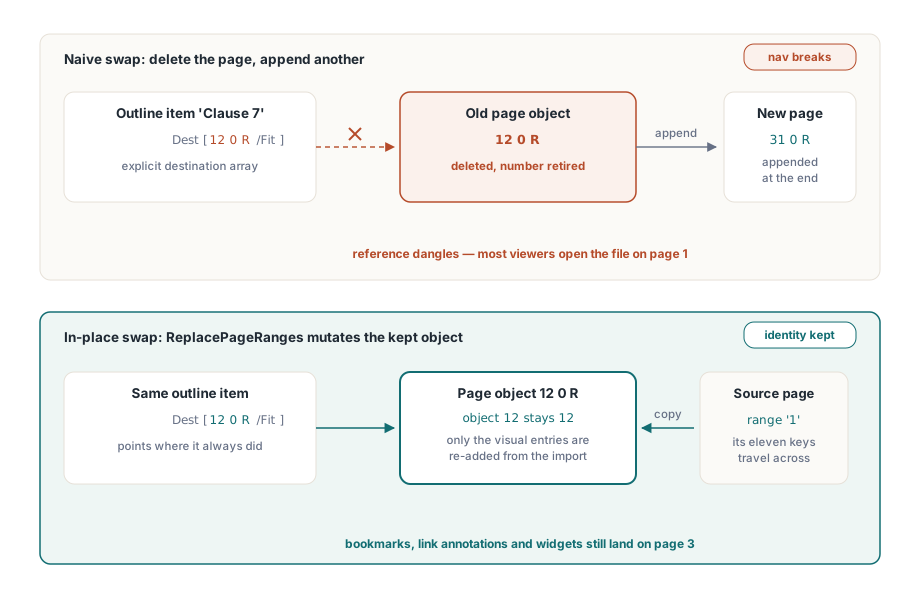
Replacing page 3 of an agreed contract should not shift its table of contents. Delete the old page and insert a new one, however, and every bookmark that pointed there will land elsewhere. The PDF Library for Delphi Delphi PDF library prevents that by retaining the target page object and transferring only the entries that supply its visual content
Why do bookmarks break after replacing a PDF page?
Bookmarks break because a PDF destination names a page by indirect object reference, not by page number. ISO 32000-1 §12.3.2.2 defines an explicit destination as an array whose first element is an indirect reference to the page object. Delete that object and append a replacement, and the reference is dangling: most viewers respond by dropping the reader on page 1, which is exactly the symptom people report after a delete-then-insert replacement. The page tree looks perfect, the page count is right, the rendering is right, and the whole navigation layer is quietly wrong
Named destinations do not rescue you either. §12.3.2.3 routes a name through the /Dests name tree in the document catalogue, but the leaf that name resolves to is still an explicit destination array holding the same page reference. Naming adds a layer of indirection above the page reference, not around it. The same reasoning covers the rest of the interactive layer described in §12.5: a link annotation carries a /Dest or a /A GoTo action whose /D is that array, every annotation may carry a /P entry that is an indirect reference to its page, and a form field widget is an annotation on exactly the same footing. One naive page swap detaches four subsystems at once, and if you want to see them enumerated on a real file, the same object graph is what outline and annotation introspection walks
Which page entries carry identity and which carry appearance
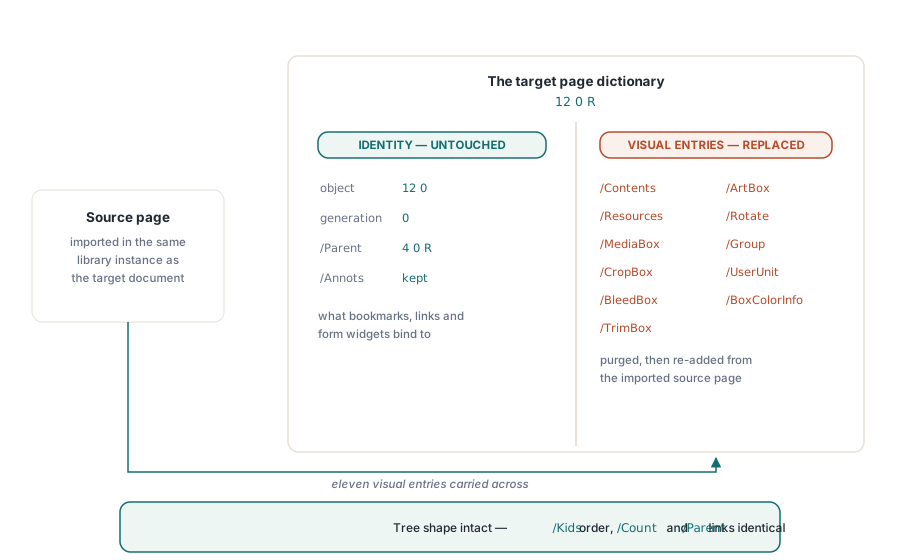
A page dictionary mixes two kinds of entries, and an in-place replacement succeeds precisely when you separate them. The appearance side is finite and enumerable: /Contents, /Resources, the five page boxes /MediaBox, /CropBox, /BleedBox, /TrimBox and /ArtBox, plus /Rotate, /Group, /UserUnit and /BoxColorInfo. Those eleven entries decide everything a rasteriser produces for the page, and nothing else in the file points at them by name
The identity side is what the rest of the document has bound itself to: the page object number and generation, the /Parent back-link into the page tree, and /Annots. PDF Library for Delphi keeps every one of those untouched. ReplacePageRanges purges the eleven visual entries from the target page dictionary and re-adds them from the imported source page, so the target page object is mutated in place rather than replaced. The page tree structure required by §7.7.3 also stays byte-identical in shape: /Kids order, /Count, and each surviving /Parent are the same before and after, because no node was ever unlinked
How does PDF Library for Delphi replace a page without renumbering objects?
The call takes a source document, a 1-based target start page, a source range expression, and an options flag. Both documents must be open in the same instance, and the target document is the selected one. Because the target page count never changes, the range you request has to fit inside the document starting at TargetStartPage, and that is checked before anything is created
var
  Lib: TPDFlib;
  TargetDoc, SourceDoc: Integer;
begin
  Lib := TPDFlib.Create;
  try
    // The document whose bookmarks and links must survive
    if Lib.LoadFromFile('contract-final.pdf', '') <> 1 then
      Exit;
    TargetDoc := Lib.SelectedDocument;

    // The revised clause page, rendered by whatever produced it
    if Lib.LoadFromFile('clause-7-revised.pdf', '') <> 1 then
      Exit;
    SourceDoc := Lib.SelectedDocument;

    Lib.SelectDocument(TargetDoc);
    // Source page 1 overwrites the visuals of target page 3.
    // Page count, page 3 object number, bookmarks and annotations are kept.
    if Lib.ReplacePageRanges(SourceDoc, 3, '1', 0) = 1 then
      Lib.SaveToFile('contract-final.pdf');
  finally
    Lib.Free;
  end;
end;
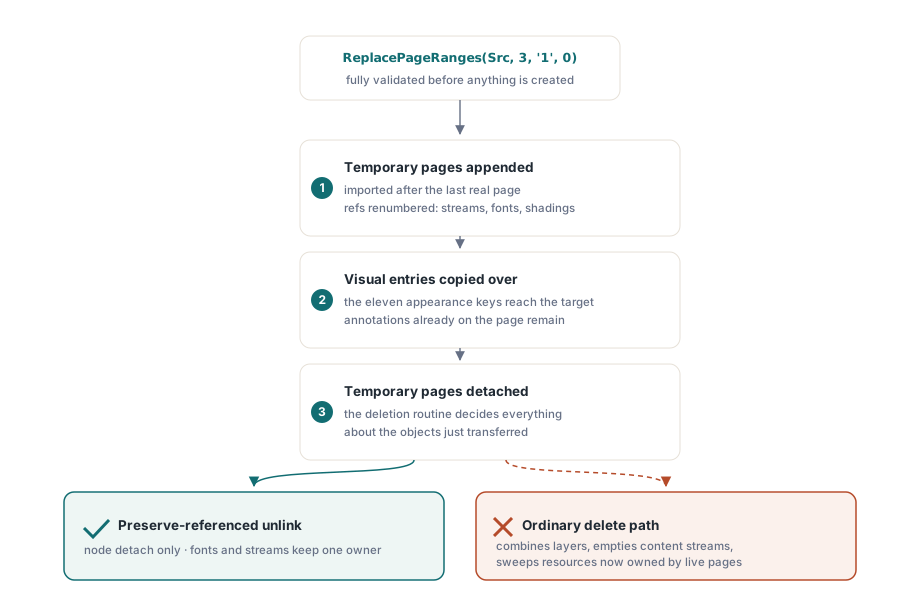
Internally the source pages cannot simply be read across document boundaries, because every indirect reference inside them belongs to the source object numbering. So the source range is first imported the ordinary way, as temporary pages appended after the last real page, which runs the full object-graph remapping: content streams, fonts, XObjects, shadings and colour spaces are all renumbered into the target document. Only then are the eleven visual entries copied from each temporary page onto its target page, and only then are the temporary pages unlinked from the page tree. The remapping work happens where it is cheap and safe, and the destructive edit is reduced to a dictionary-level swap on pages that already exist
The delete path that would destroy what you just transferred
Removing those temporary pages is the step that looks trivial and is not. The ordinary page-deletion path in the library does more than unlink a node: it combines the layers of each page being deleted, empties the first content stream, and reclaims resources that no other page shares. That is correct behaviour for a real deletion, and catastrophic here, because by the time the temporary pages are removed the target pages already reference exactly those content streams and resource objects. Emptying them would blank the page you just replaced, and the resource sweep would collect fonts and images that now have a live owner
The fix is a preserve-referenced-objects mode on the internal delete path. When it is set, the deletion skips both the unshared-resource sweep and the content-stream clearing, and does nothing except detach the pages from the page tree and fix up the tree bookkeeping. The transferred objects survive with a new owner, and object ownership after the operation is what you would draw on a whiteboard: one content stream, one owning page, one object number that never moved. The related lifecycle rules for creating, deleting and reordering pages are covered separately in the notes on document and page lifecycle operations
Ordering, duplicates, and all-or-nothing failure
The options flag selects how the source range is interpreted. 0 sorts the parsed page numbers and removes duplicates, which is the sane default when the caller passes something like '4-6,2' and simply means those four pages. 1 preserves the order you wrote and permits a page to repeat, so '2,1,2' genuinely means three replacements taken from two source pages. Validation runs first and runs completely: the range syntax, every page number against the source page count, the option value itself, and the target capacity are all checked before a single object is created. A rejected call sets LastErrorCode to 412, restores the previously selected page, and leaves the document exactly as it was
var
  Replaced: Integer;
begin
  Lib.SelectDocument(TargetDoc);
  // Options = 1: source order is preserved and repeats are allowed, so
  // target pages 5, 6 and 7 receive source pages 2, 1 and 2 respectively
  Replaced := Lib.ReplacePageRanges(SourceDoc, 5, '2,1,2', 1);
  if Replaced = 0 then
    raise Exception.CreateFmt('Replacement rejected, LastErrorCode = %d',
      [Lib.LastErrorCode]);
  // On success the selection is the first replaced page
  Assert(Lib.SelectedPage = 5);
end;
Atomicity extends past validation into the transfer itself. Before the first source page is imported, the eleven visual entries of every target page in range are snapshotted as encoded values. If the import fails, or the imported page count does not match what was requested, the snapshots are decoded back onto the target pages and the temporary pages are removed, so a mid-flight failure still leaves the original visuals in place on their original objects. That matters more than it sounds: a half-replaced page range in a contract is worse than a failed call, because nothing in the file marks it as half-done
// Post-conditions worth asserting in a regression test
Lib.SelectPage(3);
// Geometry now comes from the source page
WriteLn(Format('%.2f x %.2f', [Lib.PageWidth, Lib.PageHeight]));
// Annotations that were already on target page 3 are still attached
WriteLn(Lib.AnnotationCount);
// The bookmark created before the replacement still resolves to page 3
WriteLn(Lib.GetOutlinePage(OutlineID));
// And the document is still the same length
WriteLn(Lib.PageCount);
What does in-place replacement still not do for you?
Source annotations, source form fields and source outlines are deliberately not imported. Bringing a widget across without its /AcroForm field entry, or a marked-content-bearing annotation without its structure tree ownership, produces a half-imported interactive object that no viewer can reason about, so the operation transfers appearance only. The practical consequence is that if the replacement page is supposed to carry new form fields or new links, you add them to the target page afterwards, against the target page object that is still sitting there waiting for them
Two more boundaries are worth checking on your own files. First, /Annots is preserved but page geometry is not, so replacing a 220 mm page with a 320 mm page keeps annotation rectangles at their old coordinates inside a differently sized /MediaBox; if geometry changes, reposition the annotations you kept. Second, entries outside the eleven visual keys stay with the target page by design, which is right for /Trans or /AA and stale for /Thumb, so regenerate thumbnails after a replacement. Tagged documents need one extra thought: the structure elements still point at the correct page object through /Pg, but their marked-content identifiers describe content that is no longer there, so a page swap inside a PDF/UA workflow is a structure-tree edit as well as a content edit. If your job is really compositing rather than swapping, layering artwork onto pages you keep, the page stitching and template approach is the cheaper tool
Everything described here, including the range expression syntax, the option values and the surrounding page manipulation API, ships in the standard PDF Library for Delphi Delphi PDF Library for Delphi and C++Builder, whose reference documentation carries the full entry for the page replacement call and its error codes