A page number drawn at x = 560, y = 30 in PDF user space (origin at the bottom left) belongs in the bottom-right corner of a Letter page. On a scanned landscape page stored as portrait media, with /MediaBox [0 0 612 792] and /Rotate 90, the same drawing call puts the number 30 points from the left edge and 52 points above the bottom of what the reader sees, with the digits running straight down the margin. The stamping code did exactly what it was told. It wrote into a coordinate system that every viewer turns a quarter clockwise before anyone looks at it
Scanners and phone capture apps produce pages like this all the time, because setting a rotation flag is far cheaper than re-encoding a JPEG. Viewers honour /Rotate, so the file looks fine right up until something works in raw user space: a stamping routine, an imposition step that sizes its slots from /MediaBox alone, a print RIP with its own idea of orientation. The durable fix is to flatten the rotation, moving the turn into the content stream and setting /Rotate to 0 so the stored geometry and the displayed geometry finally agree. That sounds like one matrix. In practice it reaches five page boxes, three kinds of annotation geometry, every link that targets the page and the structure tree, and ISO 32000-1 has a separate rule for each of them
Which way does /Rotate turn a PDF page?
/Rotate turns the page clockwise for display and printing, in multiples of 90 degrees (ISO 32000-1 §7.7.3.3, Table 30). At 90 degrees the left edge of the media becomes the top and the top edge becomes the right-hand side, so in a y-down device space the mapping is X = (y - Bottom) * Scale and Y = (x - Left) * Scale. At 270 degrees the right edge becomes the top instead. The key is also inheritable: together with /Resources, /MediaBox and /CropBox it is one of the four page attributes a /Pages ancestor can supply (§7.7.3.4), so a page dictionary with no /Rotate of its own can still be turned. THotPDF.GetLoadedPageRotation walks the /Parent chain, takes the first /Rotate it meets and normalises it into 0–359, so a stored -90 comes back as 270
Direction is the part that goes wrong without anyone noticing. A page-to-device matrix with the y components swapped for 90 and 270 degrees does not rotate the page at all — it mirrors it across the diagonal, and the determinant changes sign. Both angles still look turned. The bitmap has the swapped width and height, and mapping a point into the view and back returns where you started, so dimension checks and round-trip tests pass without complaint. What catches the mistake is a page with an asymmetric marker in one corner, rendered and compared pixel by pixel against an independent renderer; checking a geometry implementation only against itself proves very little here. In HotPDF, FlattenLoadedPageRotation and RenderLoadedPageToBitmap share one clockwise convention, so a corner the renderer draws at the top left of a rotated page is still at the top left after flattening
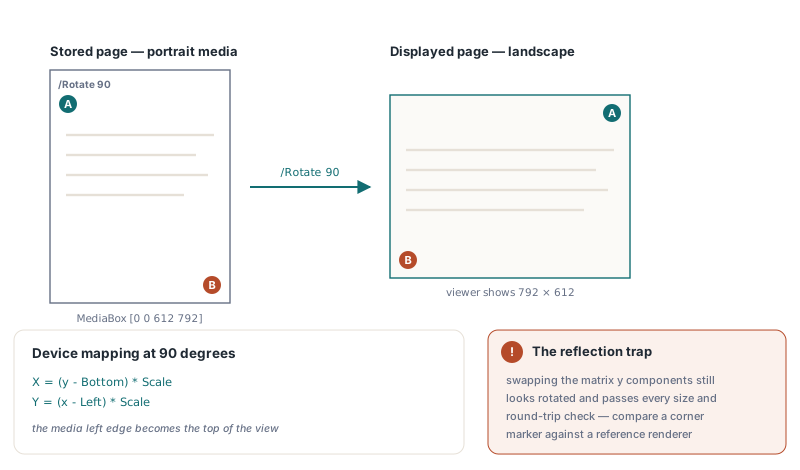
Flattening a page range with FlattenLoadedPageRotation
THotPDF.FlattenLoadedPageRotation(PageRange, Info) processes every page in PageRange whose effective rotation is 90, 180 or 270 and returns the number of pages it flattened. An empty PageRange means the whole document; otherwise the string uses the one-based '1-3,7' syntax, and a page number past the end raises an exception instead of quietly dropping out of the range. The original content streams are left byte for byte as they were. The method puts a new stream at the front of /Contents holding q and a cm turn, puts a stream holding Q at the back, and then writes /Rotate 0 into the page dictionary itself
| Effective /Rotate | Prefix stream | New MediaBox |
|---|---|---|
| 90 | q 0 -1 1 0 -Bottom Width+Left cm | [0 0 Height Width] |
| 180 | q -1 0 0 -1 Width+Left Height+Bottom cm | [0 0 Width Height] |
| 270 | q 0 1 -1 0 Height+Bottom -Left cm | [0 0 Height Width] |
The explicit zero matters more than it looks. Deleting the /Rotate key would seem tidier, and it breaks every page whose 90 came from a /Pages node: the page inherits the turn again and the viewer rotates content that is already upright. A /Rotate 0 on the page dictionary blocks that inheritance, which makes it the only safe value to write
var
  Pdf: THotPDF;
  Info: THPDFRotationFlattenInfo;
  Flattened: Integer;
begin
  Pdf := THotPDF.Create(nil);
  try
    if Pdf.LoadFromFile('scanned-batch.pdf') > 0 then
    begin
      // '' = every page; pages already at 0 degrees are counted but untouched
      Flattened := Pdf.FlattenLoadedPageRotation('', Info);
      Writeln(Format('Scanned %d, flattened %d pages',
        [Info.ScannedPageCount, Info.FlattenedPageCount]));
      Writeln(Format('Turned %d annotations, %d destinations, %d tagged geometry entries',
        [Info.TransformedAnnotationCount, Info.TransformedDestinationCount,
         Info.TransformedStructureGeometryCount]));
      if Flattened > 0 then
        Pdf.SaveLoadedDocument('scanned-batch-upright.pdf');
    end;
  finally
    Pdf.Free;
  end;
end;
Log the THPDFRotationFlattenInfo record instead of discarding it. ScannedPageCount is the number of pages in the range, FlattenedPageCount matches the return value, and the three Transformed... counters show whether links, bookmarks or tagged geometry pointed at the turned pages. Zero destinations across a scanner batch is normal, since scanners rarely write links at all. A tagged PDF/UA file that reports zero structure geometry while you know it carries figure bounding boxes is the one to open by hand
Read every page box before writing any
Flattening rewrites only the boxes the page already has, and it reads all of them before writing the first. The order matters because of the default chain in §14.11.2: GetLoadedPageBox(PageIndex, pbCropBox, ...) returns the MediaBox when the page has no /CropBox, and /BleedBox, /TrimBox and /ArtBox fall back to the CropBox. A loop that reads, turns and writes one box at a time walks straight into that chain. It turns the MediaBox and stores it, reads the "CropBox", gets the freshly turned MediaBox back, turns it a second time and writes a CropBox the page never had. On a Letter page that second turn yields [0 -180 612 612], and clipped to the new MediaBox the visible page shrinks to a 612 × 612 square
Inheritance splits the five boxes into two groups. MediaBox and CropBox are looked up along the /Parent chain, while BleedBox, TrimBox and ArtBox count only when they sit on the page dictionary itself. FlattenLoadedPageRotation follows the same split when it decides which boxes exist: an inherited CropBox is turned and written onto the page, and a stray /TrimBox on a /Pages node is treated as absent and never copied down
procedure DumpPageGeometry(Pdf: THotPDF; PageIndex: Integer);
var
  L, B, R, T: Single;
begin
  Writeln('Effective /Rotate: ', Pdf.GetLoadedPageRotation(PageIndex));
  if Pdf.GetLoadedPageBox(PageIndex, pbMediaBox, L, B, R, T) then
    Writeln(Format('MediaBox [%g %g %g %g]', [L, B, R, T]));
  // True even without a /TrimBox key: the value falls back to CropBox, then MediaBox
  if Pdf.GetLoadedPageBox(PageIndex, pbTrimBox, L, B, R, T) then
    Writeln(Format('TrimBox  [%g %g %g %g]', [L, B, R, T]));
  // Preset Letter; GetLoadedPageVisibleBox leaves the outputs untouched on failure
  L := 0; B := 0; R := 612; T := 792;
  Pdf.GetLoadedPageVisibleBox(PageIndex, L, B, R, T);
  Writeln(Format('Visible  [%g %g %g %g]', [L, B, R, T]));
end;
Run that helper before and after flattening. For a 90-degree page with MediaBox [0 0 612 792], the flattened MediaBox reads [0 0 792 612]. Every rewritten box goes through the same clockwise turn relative to the original MediaBox origin, so the new MediaBox always starts at 0,0, and a TrimBox of [18 18 594 774] becomes [18 18 774 594] — still 18 points in from every edge of the landscape page
GetLoadedPageVisibleBox returns the region a viewer displays and a printer prints: the CropBox clipped to the MediaBox, normalised so Left is less than Right and Bottom less than Top. The page renderer and the SVG export size their output from that same box. Code that wants the size a person actually sees should call GetLoadedPageVisibleBox, because reading /MediaBox for that purpose gives the wrong answer on any page with a CropBox
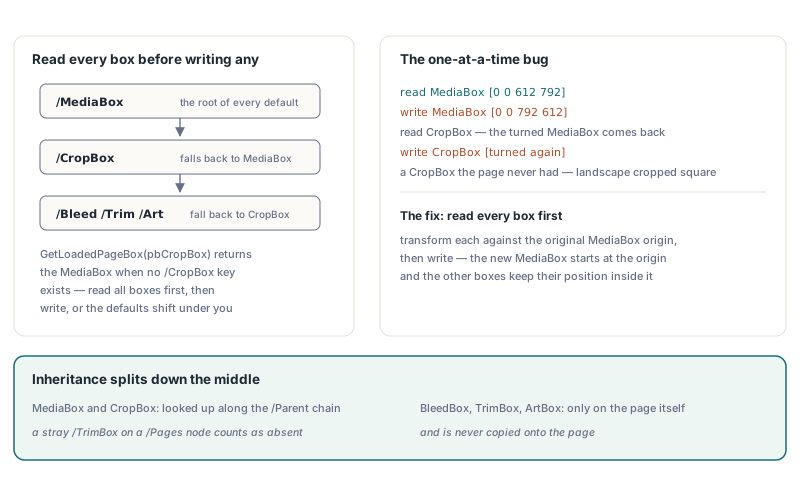
Why do annotations break when you only rotate /Rect?
Annotations break because an appearance stream is never drawn straight into /Rect. Under §12.5.5 the viewer first transforms the form's /BBox by its /Matrix, then scales and translates the bounding box of the result into /Rect. Turn only /Rect and a 200 × 40 stamp gets squeezed into a 40 × 200 slot, where nobody can read it. FlattenLoadedPageRotation therefore right-multiplies the page's clockwise turn onto each appearance /Matrix ([0 -1 1 0 0 0] at 90 degrees, in the row-vector convention) across the /N, /R and /D appearances and every state inside them. One appearance stream can serve several annotations or states, so each stream is turned exactly once per call; a stream shared by pages with different rotations takes the turn of the first page that reaches it
Two smaller rules keep form fields and sticky notes where they belong. A widget's /MK /R entry (§12.5.6.19) is an anticlockwise angle, so the page's clockwise angle is subtracted from it, modulo 360. Leave it alone and the next appearance regeneration draws the field text in the wrong direction. Annotations with the NoRotate flag (bit position 5, value 16, §12.5.3) stay upright on a rotated page and pivot around the upper-left corner of their /Rect; for those the method keeps the width, the height and the upright appearance, and only moves that corner to where the turn puts it
Past the annotation dictionaries, the same call turns /QuadPoints, /Vertices, /L and /InkList. It rewrites explicit destinations that name the page: /XYZ points and /FitR rectangles are mapped through the turn, and at 90 or 270 degrees /FitH and /FitBH become /FitV and /FitBV, and the other way round (§12.3.2.2). It also transforms tagged geometry such as attribute /BBox entries on structure elements whose /Pg is the page
The structure tree is where a straightforward walk goes wrong in an unpleasant way. A structure element's /Pg points back at the page object, so a scanner that carries "this belongs to the page" down every key follows /Pg into the page, then into /Annots — turning annotation rectangles a second time — and into Form XObjects whose /BBox lives in form space and is already covered by the outer cm. Following /P climbs to the tree root and pulls in elements from other pages. Whether any of this fires depends on the order objects happen to be visited; when /Pages precedes /StructTreeRoot in the catalog, the page tends to be reached first and the damage stays hidden, so ordinary test files can pass. FlattenLoadedPageRotation carries page context only through /K (children) and /A (attributes), and a child with its own /Pg on another page is left for that page
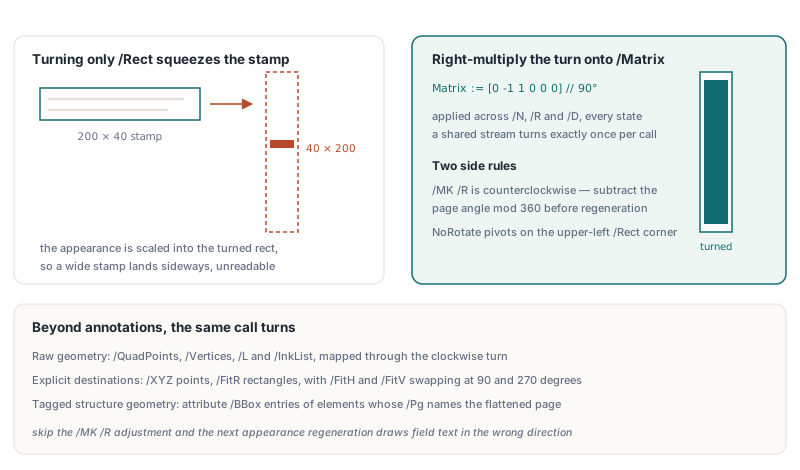
Checking the result before you ship the batch
A flattened page should look identical in a viewer, and the useful checks are the ones that would notice if it did not. A few behaviours shape how you verify it
- Pages whose effective rotation is already 0, or whose MediaBox is missing or has zero width or height, are skipped without an exception, so compare the return value with the count you expected to change
- Form XObjects referenced from the page resources keep their own
/BBoxand/Matrix, because the outercmalready turns everything they draw - Destinations are found by walking every indirect object once per flattened page; on a large file with hundreds of rotated pages, budget for that walk on each one
RenderLoadedPageToBitmapdraws the page content streams and leaves annotations out, so a visual check of turned stamps needsFlattenLoadedAnnotationsfirst, on a scratch copy of the document
The test page that pays for itself has something asymmetric in one corner, such as a filled square at the top left of the displayed page. Render it before flattening and after, then compare the pixels around that marker. Width and height alone agree just as happily on a mirrored page
// Scratch copy only: FlattenLoadedAnnotations bakes the annotations
// into the page content and removes them from the page
Pdf.FlattenLoadedAnnotations('1');              // one-based page range
Before := Pdf.RenderLoadedPageToBitmap(0, 96);  // zero-based page index
if Before = nil then
  raise Exception.Create('Page 1 did not render');
try
  Pdf.FlattenLoadedPageRotation('1', Info);
  After := Pdf.RenderLoadedPageToBitmap(0, 96);
  if After = nil then
    raise Exception.Create('Flattened page 1 did not render');
  try
    // Your own checks, not library calls: the sizes must match...
    Assert((Before.Width = After.Width) and (Before.Height = After.Height));
    // ...and so must the marker pixels in the top-left corner
    Assert(Before.Canvas.Pixels[8, 8] = After.Canvas.Pixels[8, 8]);
  finally
    After.Free;
  end;
finally
  Before.Free;
end;
If the stamps on your rotated pages have no appearance streams yet, synthesizing annotation appearances before flattening them covers that step. The renderer behind the corner comparison is described in rendering a loaded PDF page to a bitmap, and redaction and N-up stitching on loaded PDFs relies on the same idea of adding streams to /Contents without re-encoding the original ones. FlattenLoadedPageRotation, GetLoadedPageBox and GetLoadedPageVisibleBox ship with HotPDF for Delphi and C++Builder — the HotPDF Delphi PDF component page has the details