HotPDF v2.743.0 flattens PDF annotations that carry no /AP appearance stream instead of silently skipping them. FlattenLoadedAnnotations now routes an appearance-less widget through EnsureLoadedFieldAppearanceStream and builds a Form XObject for appearance-less markup out of the annotation's own properties, so the values typed into a /NeedAppearances form survive into the page content instead of vanishing at flatten time. The failure that forced this change looks like a no-op. A customer sends a filled application form, printed to PDF from a browser. You load it in HotPDF, call FlattenLoadedAnnotations, get back 0, save, and ship a document with empty boxes where the applicant typed a name and an amount. Nothing raised, nothing logged. The values were in the file the whole time, sitting in each field's /V entry, and the flatten pass walked straight past them because none of those widgets carried an appearance stream to bake
Why does flattening a browser-printed form lose the typed values?
Because a /NeedAppearances form stores the value without storing a picture of the value. ISO 32000-1 12.7.2 lets an interactive form set /NeedAppearances true in the AcroForm dictionary, which tells the viewer to construct each field's visual surface at open time from /V, /DA and /Q. Producers that generate forms cheaply — browser print paths, server-side fillers, some scanning front ends — take that offer and write no /AP at all. Flattening, as defined by the appearance algorithm in ISO 32000-1 12.5.5, is a transcription job: take the annotation's normal appearance stream, map its /BBox onto its /Rect, invoke it from the page content stream with a Do operator, then delete the annotation. With no source stream there is nothing to transcribe. The original HotPDF implementation, from v2.386.0, treated that as "skip", which is defensible in isolation and disastrous in aggregate: the documents most likely to need flattening are the ones least likely to carry appearances. The same hole swallowed markup — a Highlight from a review tool, a Square from a redline pass, an Ink signature — whenever the producer relied on the viewer to draw it
Where HotPDF hooks the synthesis into FlattenLoadedAnnotations
The hook point is deliberately late: after the appearance lookup fails, not before it. FlattenLoadedAnnotations still asks GetLoadedAnnotationAppearanceStream for the normal appearance first, and an annotation that already has one is baked exactly as it was in v2.386.0. Only a nil result, on an annotation with a non-degenerate /Rect and no hidden flag, enters the synthesis path. That ordering matters: a document author who took the trouble to write an /AP gets their own bytes back, not a HotPDF reconstruction of them
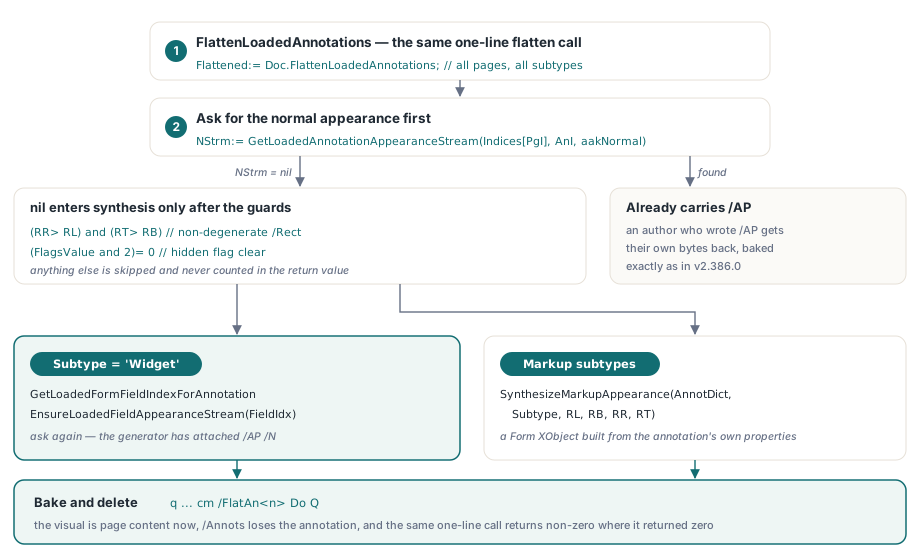
NStrm:= GetLoadedAnnotationAppearanceStream(Indices[PgI], AnI, aakNormal);
if (NStrm= nil) and (RR> RL) and (RT> RB) and ((FlagsValue and 2)= 0) then
begin
  if Subtype= 'Widget' then
  begin
    FieldIdx:= GetLoadedFormFieldIndexForAnnotation(Indices[PgI], AnI, WidgetIdx);
    if FieldIdx>= 0 then
      EnsureLoadedFieldAppearanceStream(FieldIdx);
    // ask again: the generator has attached /AP /N to the widget
    NStrm:= GetLoadedAnnotationAppearanceStream(Indices[PgI], AnI, aakNormal);
  end
  else
    NStrm:= SynthesizeMarkupAppearance(AnnotDict, Subtype, RL, RB, RR, RT);
end;
From there the two annotation families split. A widget is resolved back to its owning field through GetLoadedFormFieldIndexForAnnotation and handed to EnsureLoadedFieldAppearanceStream, the field appearance generator that has been in this Delphi PDF library since v2.328.0. Reusing it rather than writing a second field renderer is the whole point — it already covers Type0 fonts, line wrapping, quadding, checkbox and radio /AS states and /MK rotation, the same machinery behind adding AcroForm fields to an already-loaded PDF. Everything else goes to the markup synthesiser. For the caller nothing changes: the same one-line flatten call now returns a non-zero count on documents that used to return zero
Doc:= THotPDF.Create(nil);
try
  Doc.LoadFromFile('needappearances-form.pdf');
  // v2.743.0: AP-less widgets and markup are synthesised, then baked
  Flattened:= Doc.FlattenLoadedAnnotations;          // all pages, all subtypes
  // Flattened:= Doc.FlattenLoadedAnnotations('1-3', 'Highlight');
  if Flattened= 0 then
    raise Exception.Create('nothing was flattened');
  Doc.SaveLoadedDocument('flattened.pdf');
finally
  Doc.Free;
end;
Why do QuadPoints and InkList land in the wrong place?
Because those coordinates are in page user space while the synthesised appearance stream draws in its own /BBox space, and the two origins are not the same point. ISO 32000-1 Table 176 defines /QuadPoints for text markup annotations in default user space, and Table 174 does the same for the line annotation's /L endpoints; /InkList follows the same convention. HotPDF gives the synthesised form a /BBox of [0 0 W H] whose origin sits at the lower-left corner of /Rect. So every point pulled out of /QuadPoints, /L or /InkList has to be translated by the negated /Rect lower-left before it is written into the content stream. Get this wrong and a highlight on a line 700 points up the page draws 700 points above its own box, which in practice means it draws nowhere. The correction is one subtraction per coordinate, and it composes with the cm the bake emits afterward — that matrix maps the /BBox back onto /Rect, so the two steps cancel to correct absolute geometry
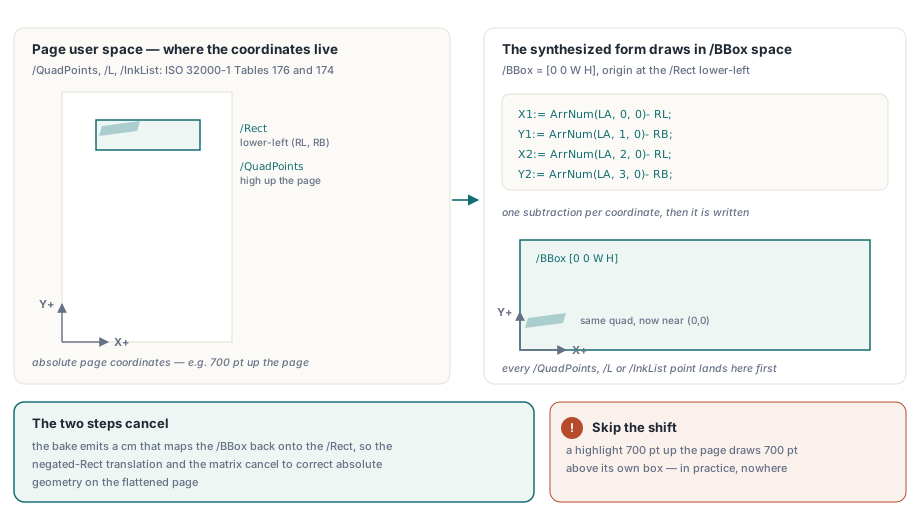
// The /L endpoints use page user space (ISO 32000-1 Table 174); the form
// BBox origin sits at the /Rect lower-left, so shift by -(RL, RB)
X1:= ArrNum(LA, 0, 0)- RL;
Y1:= ArrNum(LA, 1, 0)- RB;
X2:= ArrNum(LA, 2, 0)- RL;
Y2:= ArrNum(LA, 3, 0)- RB;
StrokeOp:= ColorOp(DArr('C'), true);
if StrokeOp= '' then
  StrokeOp:= '0 G';
Result:= _FloatToStrR(BW)+ ' w '#10+ StrokeOp+ #10+
  _FloatToStrR(X1)+ ' '+ _FloatToStrR(Y1)+ ' m '+
  _FloatToStrR(X2)+ ' '+ _FloatToStrR(Y2)+ ' l S'#10;
What the synthesised markup appearance actually draws
The markup synthesiser reads the annotation dictionary and nothing else, which keeps the output predictable and keeps it honest about what it cannot know. FreeText and Stamp draw /Contents using the font and colour parsed out of /DA, aligned by /Q, with 2 pt padding. Square and Circle draw a re or a four-arc Bezier outline stroked in /C, filled with /IC when present, at the width from /BS /W. Line and Ink stroke their vertices. Highlight fills each quad, while Underline, StrikeOut and Squiggly stroke a rule at the quad bottom, at the quad midpoint, or as a one-point zigzag. A /CA below 1 becomes an ExtGState with a ca entry, referenced as /GSA gs at the head of the stream
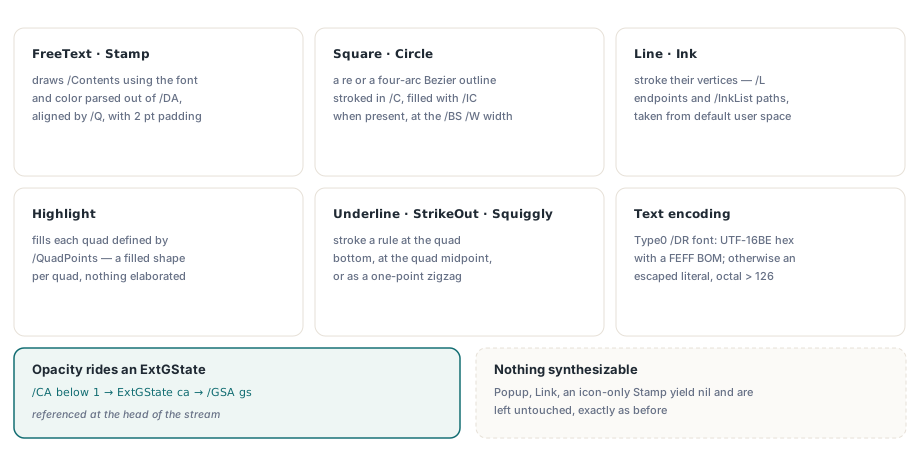
Text encoding is decided from the AcroForm /DR /Font entry named by /DA. If that font's /Subtype is Type0, HotPDF writes the string as a UTF-16BE hex literal with the FEFF byte order mark; otherwise it writes an escaped literal string, with parentheses and backslashes escaped and bytes above 126 written in octal. The Tf operator from /DA is emitted before BT, which is legal because text state persists across the text object boundary, and it saves taking the /DA string apart. Two limits deserve to be stated plainly. Line width for wrapping and quadding is estimated with a half-em / full-em heuristic rather than real font metrics, so alignment on a proportional font is close but not exact. And a subtype with nothing synthesizable — Popup, Link, a Stamp whose only content is an icon name — yields nil and is left untouched, exactly as before
The temporary /Annots swap that punishes a helpful cleanup
FlattenOneWidget, the per-widget path used by FlattenLoadedFormFields, is an aliasing trap that any change inside the shared flatten loop has to respect. It temporarily replaces the page's /Annots value with a one-element array so the generic flatten pass operates on a single widget, then restores the original PHPDFDictionaryItem pointer in a finally block. The restore writes back into a dictionary slot it captured before the call
DictItem:= PHPDFDictionaryItem(PageObj.Items.Items[AnnotsIndex]);
Item:= DictItem^.Value;
TemporaryAnnots:= THPDFArrayObject.Create(nil);
TemporaryAnnots.AddObject(Target);
DictItem^.Value:= TemporaryAnnots;
try
  Result:= FlattenLoadedAnnotations(IntToStr(PageIndex+ 1), 'Widget')= 1;
finally
  DictItem^.Value:= Item;   // dangling if the inner loop freed this item
  TemporaryAnnots.Free;
end;
Add a reasonable-looking tidy-up inside the shared inner loop — a DeleteValue('Annots') once the array empties, so the saved page carries no vestigial empty array — and that call frees the very dictionary item DictItem points at. The finally then writes through a dangling pointer and the process dies with "Invalid pointer operation". Two existing tests caught it immediately, which is the only reason this is a footnote and not a support ticket. The rule generalises: before adding cleanup to a shared loop, check the callers for alias or swap contracts. A leftover empty /Annots array is a cosmetic wart, and not worth trading a pointer lifetime guarantee for
What stays unbaked, and what flattening costs
Hidden annotations are excluded on purpose. An annotation whose /F integer has bit position 2 set is hidden per ISO 32000-1 12.5.3, and when it also has no /AP there is a real temptation to synthesise one and bake it like the rest. That would be a bug with security consequences: baking an invisible note into the page content makes it visible to everyone who opens the file. HotPDF leaves those annotations exactly where they are and does not count them in the return value. Be equally clear with your users about the price of the ones that do get baked. Flattening is irreversible — the annotation is deleted from the page's /Annots array and its visual is now page content, so there is no more editing the field value, no comment thread, no /AS state toggling, and no way to recover the structured data short of the original file. Flatten a copy, keep the original, and reach for it only where the document stops being a form and becomes a record. If your problem is XFA-backed rather than appearance-less, the separate XFA to AcroForm flattening path in HotPDF is the one to start with, and if you are still building the form, the notes on wiring AcroForm field actions and validation cover the write side
One verification caveat, because it will otherwise cost you an afternoon. ExtractLoadedPageGlyphs does not descend into Form XObjects, and a baked appearance lives inside one — the page content stream holds only a q ... cm /FlatAn<n> Do Q sequence. Glyph extraction on a flattened page therefore reports nothing, and that is correct behaviour rather than a lost bake. Verify either at the byte level, checking for the /FlatAn resource name, the Do invocation and /Subtype /Form, or through the rendering pipeline, which does expand XObjects
Annotation flattening looks like three lines of transcription right up until you meet the documents people actually generate. If you work with filled forms, review markup or archival output in Delphi or C++Builder, it is worth reading how the HotPDF Delphi PDF component handles the loaded-document side of AcroForms and annotations before you build an appearance generator of your own on top of it