CollateDocumentsEx in the PDF Library for Delphi Delphi PDF library combines several open documents into one interleaved document. On each pass it appends GroupSize pages from every source, accepts a page-range list for each source, and reads a descending range such as 3-1 in reverse. A single call can therefore put a stack of fronts and a reversed stack of backs into reading order
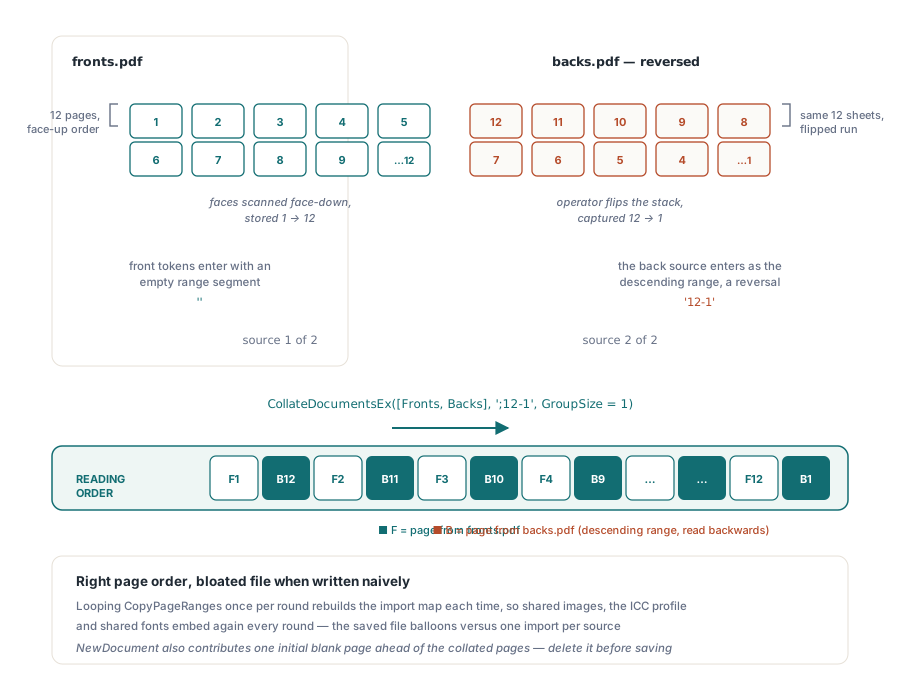
The situation behind that API is ordinary and very common. A sheet-fed scanner with a single-sided feed scans the whole stack face down; the operator then turns the stack over and scans it again. The result is two PDFs: fronts in order and backs in reverse. What the user needs is one file containing page 1 front, page 1 back, page 2 front, and so forth. This article covers the ordering problem and the resource-duplication trap beneath it. If raw concatenation speed is your concern, see fast PDF merge by byte-level ref shifting; if the inputs are too large to keep in memory, see merging and splitting gigabyte PDFs with direct access
The scanner produces two stacks, one in reverse
Collation is not the same as merging. A merge concatenates page ranges; a collation interleaves them, and the pattern depends on the physical device that produced the input. Get that pattern wrong and the file is not merely imperfect but unreadable: every other page belongs to another sheet. Nearly every practical case comes down to three variables: the number of sources in rotation, the pages taken from each source per pass, and whether a source is read in reverse. CollateDocuments handles the first two through a straightforward array of document handles and a GroupSize integer. CollateDocumentsEx adds the third with a semicolon-separated page-range list, one segment per source; an empty segment means all pages from that source, while a descending range reverses it. Both functions append to the currently selected document and return 1 when successful or 0 when an argument is rejected
Why can a naive collation multiply the file size?
The import map from source object numbers to target object numbers is rebuilt for every copy call, so anything reachable from more than one chunk is imported once per chunk. Within PDF Library for Delphi, TPDFDocument.CopyPagesFromDoc resets its NewIndObjList at the start of each invocation. That list is the copier's only record of what it has already brought across. Call it once for a ten-page range and a font shared by all ten pages is embedded once. Call it ten times for one page at a time and the same font is embedded ten times. This matters much more for scans than text documents, because a scanned page is one large image XObject and the shared objects carry the real weight: an embedded ICC profile, a shared /DecodeParms chain, a stamp or watermark form XObject applied to every sheet, and the OCR text-layer font. The obvious round-robin implementation loops over passes, and that is precisely the pathological case
// Do not do this. Each CopyPageRanges call rebuilds the import map,
// so anything the two sources share internally is imported once per
// round instead of once per source.
var
  RoundIndex: Integer;
begin
  for RoundIndex := 1 to 12 do
  begin
    PDF.CopyPageRanges(Fronts, IntToStr(RoundIndex));
    PDF.CopyPageRanges(Backs, IntToStr(13 - RoundIndex));
  end;
end;
Twelve passes, two sources, twenty-four import maps. There is no warning. The page order is right, every page renders, and the only symptom is a file several times larger than the combined inputs. In a 300-page batch job, that multiplier is not a rounding error; it is the difference between an archive that fits the retention allowance and one that does not
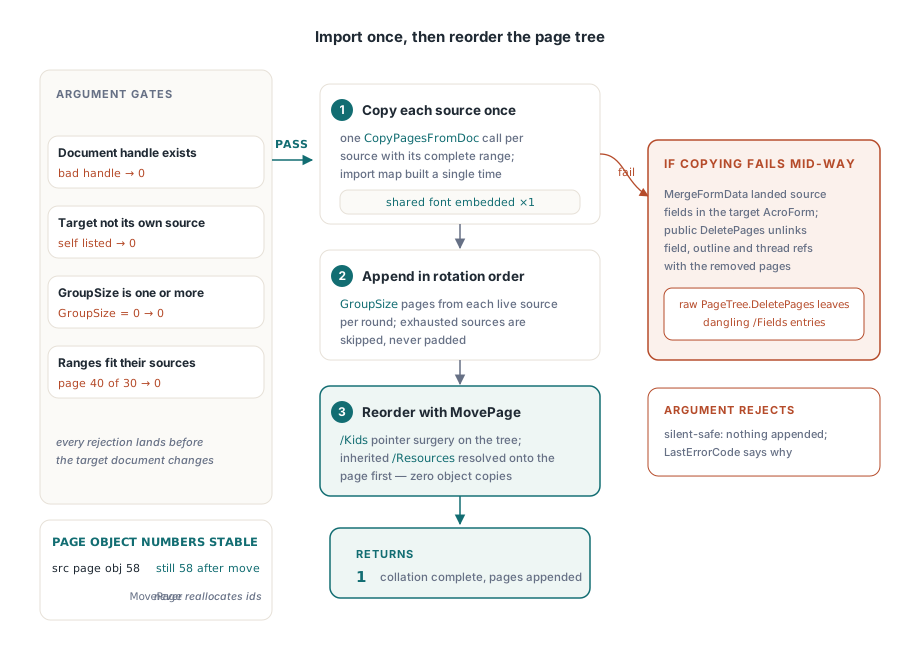
Import once, then reorder the page tree
The remedy is to separate the two concerns that the naive loop combines. Copying determines which objects exist in the target; ordering determines where pages sit in its page tree. CollateDocumentsEx copies each source once only, using one CopyPagesFromDoc call for that source's complete range. Each source therefore has one import map and shared resources are written once. Interleaving starts only after every source has been imported, entirely through TPDFPageTree.MovePage
Page moves are free in the way that matters here. ISO 32000-1 §7.7.3 defines the page tree as a balanced arrangement of node dictionaries whose /Kids arrays hold indirect references, while /Count carries each node's leaf total. Moving a page removes one indirect reference from a /Kids array, inserts it into another, adjusts both /Count values, and repoints the page /Parent. It touches no content stream, duplicates no resource and creates no object. The page object retains its object number, which is why object numbers remain stable as they do in page replacement that preserves object numbers. There is one further detail a simple page move misses but MovePage handles. ISO 32000-1 §7.7.3.4 permits /Resources, /MediaBox, /CropBox and /Rotate to be inherited from an ancestor rather than stated on the page. A page that takes its resources from node A and is moved under node B could silently inherit different values, or none at all. MovePage resolves each inherited value and writes it to the page dictionary before relocation, so the page takes its own attributes with it
What does the reordering pass actually do?
It performs a selection sort with insert-at semantics. First it calculates the desired order within the appended block: cycle through the sources, take up to GroupSize indices from each, omit a source once it is exhausted, and repeat until every page is placed. That yields a permutation over the block. Applying it is the awkward part because MovePage inserts rather than swaps, so each move shifts every page between the old and new positions by one
The implementation maintains a Current array representing the present location of every appended page. It searches forward from position K for the page that belongs there, performs the move, then slides the array entries to reflect the change in the tree. That is O(n squared) in array operations and zero in object copies, the right trade for this workload: a 500-page collation involves a quarter of a million integer shuffles but no duplicated image bytes. Descending ranges and repeated pages need no special treatment because PLParsePageRangeList is called with sorting disabled and duplicates allowed, preserving the requested order intact
Reversed ranges and a one-call duplex merge
Once reversal is expressed as a range, the flatbed double-pass case reduces to one call. The fronts use their natural order, the backs use 12-1, and the empty first segment before the semicolon says that the first source contributes all its pages
var
  PDF: TPDFlib;
  Target, Fronts, Backs: Integer;
begin
  PDF := TPDFlib.Create;
  try
    Target := PDF.NewDocument;
    if PDF.LoadFromFile('fronts.pdf', '') <> 1 then
      Exit;
    Fronts := PDF.SelectedDocument;
    if PDF.LoadFromFile('backs.pdf', '') <> 1 then
      Exit;
    Backs := PDF.SelectedDocument;
    PDF.SelectDocument(Target);
    // fronts 1..12 in order, backs scanned in reverse: F1 B12 F2 B11 ...
    if PDF.CollateDocumentsEx([Fronts, Backs], ';12-1', 1) = 1 then
      PDF.SaveToFile('duplex.pdf');
  finally
    PDF.Free;
  end;
end;
Two behaviours in that example are worth making explicit. Collated pages are appended to the selected document, so a document created by NewDocument places its initial blank page before them; delete it if it is not required. Sources may also be uneven: with GroupSize 2 for a three-page and a five-page source, the passes produce A1 A2 B1 B2, then A3 B3 B4 as A runs out, then B5 alone, because an exhausted source is skipped rather than padded
Rollback, form fields, and what is not brought across
Every argument is validated before the target is changed. A missing document handle, a selected document listed as its own source, a GroupSize below one, a segment count unlike the source count, or a range that names a missing page all return 0 and leave the target untouched. Copy-time failure is more difficult and is dealt with through public DeletePages, not raw PageTree.DeletePages. The distinction matters: copying runs with MergeFormData enabled, so the source form fields will already have been added to the target /AcroForm /Fields array when a later source fails. Deleting pages only at page-tree level would remove the widget pages and leave dangling field references; the public path unlinks field, outline and article-thread references along with the pages
if PDF.CollateDocumentsEx([Fronts, Backs], ';12-1', 1) = 0 then
  // Nothing was appended and the target is byte-identical to before.
  // 412 is the copy failure; 0 means the arguments were rejected
  // during validation, before any page was touched.
  Log(Format('collate rejected, LastErrorCode=%d', [PDF.LastErrorCode]));
Be clear with users about the boundaries. Collation carries pages, their annotations and their form fields, and merges the AcroForm field list, calculation-order array and default-resources dictionary. It does not bring source bookmarks across: a scanned front stack nearly always has an empty outline tree, so nothing is lost in the duplex case, but when two authored documents are collated their outlines remain behind and the navigation must be rebuilt. Named destinations that existed solely in the source catalogue are in the same position. Account for that before promising a customer lossless collation
PDF Library for Delphi supplies its collation functions alongside the rest of its page-assembly features, so the scanner workflow, range-based extraction and large-file paths are all available through one component in Delphi and C++Builder. The full API reference and a trial build are on the losLab Delphi PDF library product page