The nightly job that assembled mortgage closing packets ran fine for two years, then started dying the week a scanning vendor moved to 600 DPI. Individual archive files crossed 1.8 GB, and the assembly step — which loaded each document fully before touching a single page — began exhausting the worker's address space just to count pages. The requirement had not changed: open, count, pick ranges, concatenate. What changed is that full-tree loading stops being a reasonable default somewhere around the gigabyte mark. PDF Library for Delphi, losLab's PDF library for Delphi and C++Builder, addresses exactly this with its Direct Access layer: a family of DA-prefixed functions backed by a streaming reader that walks the cross-reference table in place instead of materializing the document
Where the memory goes in a full load
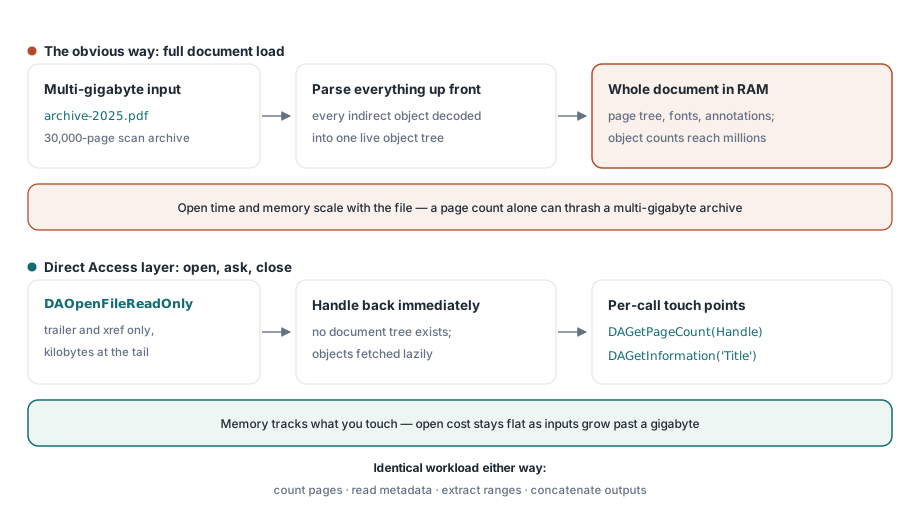
Loading a PDF 'normally' means parsing the xref, resolving every indirect object into an in-memory tree, decoding object streams, and wiring up the page tree, fonts, and annotations into objects you can manipulate. For editing workflows that is the right trade. For merge, split, and inspection workloads it is mostly waste: a 30,000-page scan archive might contain millions of indirect objects, of which a split job needs to read a few hundred — the page nodes in the requested range and whatever they reference
The Direct Access layer inverts the model. DAOpenFile and DAOpenFileReadOnly parse the trailer and xref — a few kilobytes at the end of the file — and return a file handle. Objects are fetched lazily when a call needs them. The practical consequence is that opening a multi-gigabyte file takes about as long as opening a small one, and memory tracks what you touch instead of what the file contains
Probing a huge file without loading it
The pattern below comes from the library's own large-file benchmark: open read-only, ask questions, close. No document tree ever exists
var
  Lib: TPDFlib;
  Handle, Pages: Integer;
begin
  Lib := TPDFlib.Create;
  try
    Handle := Lib.DAOpenFileReadOnly('archive-2025.pdf', '');
    if Handle = 0 then
      raise Exception.Create('Direct access open failed');
    Pages := Lib.DAGetPageCount(Handle);
    Writeln('pages : ', Pages);
    Writeln('title : ', Lib.DAGetInformation(Handle, 'Title'));
    Lib.DACloseFile(Handle);
  finally
    Lib.Free;
  end;
end;
Read-only mode is worth preferring whenever you can: it lets the intake stage run whilst other processes hold the file, and it documents intent — a probe stage that accidentally calls a mutating function will fail fast instead of corrupting the archive
PageRef is an object handle, not a page number
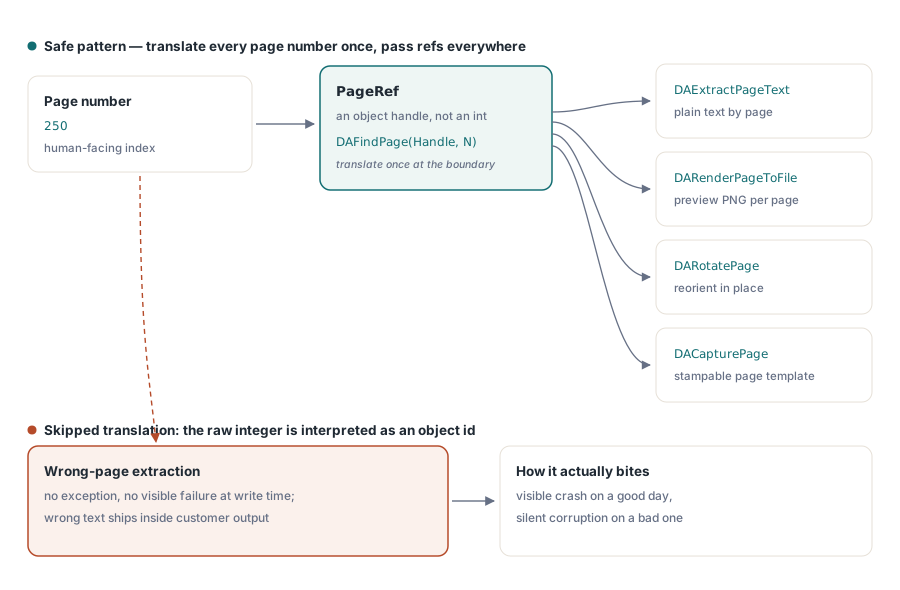
The single most common mistake with the DA API is passing a page number where a function expects a PageRef. Almost every per-page DA call — DAExtractPageText, DARenderPageToFile, DARotatePage, DACapturePage — takes a reference handle to the page object, obtained by translating the human-facing number through DAFindPage:
PageRef := Lib.DAFindPage(Handle, 250);          // page number -> object handle
if PageRef <> 0 then
begin
  Text := Lib.DAExtractPageText(Handle, PageRef, 0);
  Lib.DARenderPageToFile(Handle, PageRef, 5, 150, 'page250.png');
end;
Passing the raw number 250 instead does not raise an error — it addresses whatever object happens to sit behind that handle value, which on a lucky day fails visibly and on an unlucky day extracts text from the wrong page into a customer-facing document. If you wrap the DA layer in your own service code, make the translation impossible to skip: accept page numbers at the boundary, call DAFindPage immediately, and pass only refs internally
Merging hundreds of files with a named list
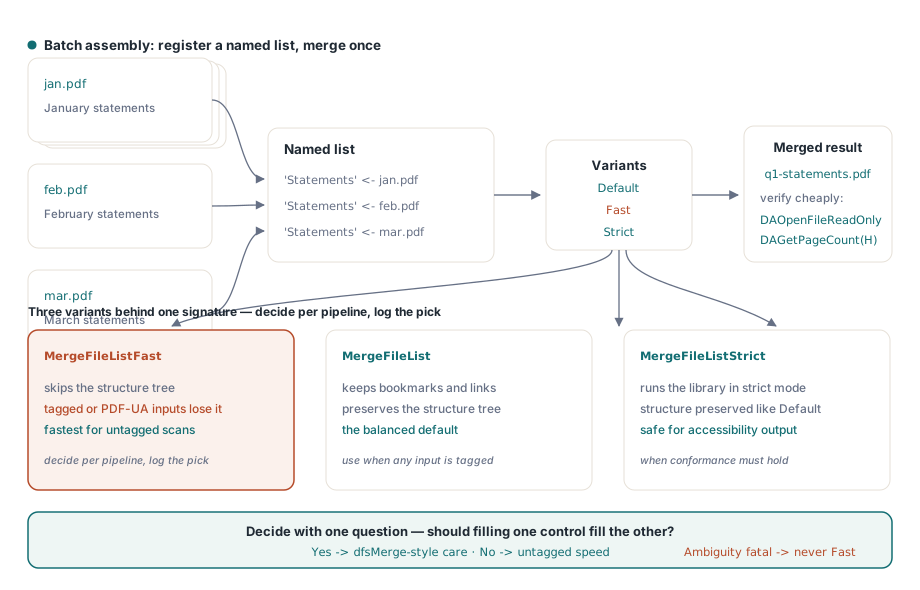
For two files, MergeFiles(First, Second, Output) is enough. Batch assembly scales better through file lists: register inputs under a list name, then merge the list in one pass
Lib.AddToFileList('Statements', 'jan.pdf');
Lib.AddToFileList('Statements', 'feb.pdf');
Lib.AddToFileList('Statements', 'mar.pdf');
Lib.MergeFileList('Statements', 'q1-statements.pdf');

// Verify the result the cheap way: direct access again
Handle := Lib.DAOpenFileReadOnly('q1-statements.pdf', '');
Writeln('merged pages: ', Lib.DAGetPageCount(Handle));
Lib.DACloseFile(Handle);
The merge family has three variants, and the difference is not speed alone. MergeFileListFast skips preservation of the structure tree; MergeFileListStrict enforces strict mode; the unsuffixed version is the balanced default. The operational rule that falls out: if any input is a Tagged PDF whose accessibility structure must survive — anything produced for PDF/UA, for instance — use the default or Strict variant, because Fast will silently drop the structure tree. For plain scan archives with no tagging, Fast is free performance. Decide per pipeline, not per developer mood, and record the variant used in the job log
Splitting without loading: range extraction
Splitting follows the same no-load philosophy. ExtractFilePages(InputFileName, Password, OutputFileName, RangeList) pulls a page range straight from file to file — '1-500', '501-1000', or comma-separated selections — without the source ever becoming a document tree. When a document is already loaded for other reasons, ExtractPageRanges produces a new in-memory document from the current one, and CopyPageRanges pulls ranges across from another loaded document by ID. For per-statement splitting of consolidated print streams, the file-to-file form is the one that keeps a 4 GB input from ever inflating into RAM
Files that lie about their geometry
Large-file pipelines meet damaged files at a rate small-file pipelines never see, simply because the inputs pass through more systems. Two failure shapes deserve explicit handling
Firstly, shifted headers. Mail gateways and print spoolers sometimes prepend bytes to a PDF, so the %PDF marker no longer sits at offset 0 and every xref offset in the file is wrong by the same amount. The streaming reader detects this and exposes it — DAShiftedHeader at the flat level, ShiftedHeader on TSmartPDFReader — and compensates during reads. Home-grown offset arithmetic typically does not, which explains why 'works on every file we generate, fails on files from customer X' is the classic symptom
Secondly, broken cross-reference tables. DACopyFile(InputFileName, OutputFileName, PageCount) streams the entire file to a new copy whilst rebuilding the xref, returning the page count as a by-product. Running it as a normalisation stage in front of a picky downstream consumer converts a class of intermittent parse failures into one predictable repair step. And when your own edits need saving, DAAppendFile writes them as an incremental update — appending a new revision instead of rewriting gigabytes, which keeps the save cost proportional to the change, not to the file
Delivery details: linearization and composition
Two adjacent capabilities round out a large-file pipeline. When the assembled output is served over HTTP for in-browser viewing, LinearizeFile reorganizes it for byte-range streaming so the first page displays before the remainder of a 500 MB packet has downloaded — worth doing as the final stage, after all merging, because any later modification de-linearizes the file. And when packets need composition instead of plain concatenation — a coversheet stamped behind every statement, two source pages imposed onto one output sheet — DACapturePage turns any page into a reusable template that DADrawCapturedPage places onto a destination page at an arbitrary rectangle, still without a full document load on the multi-gigabyte source
Limits and what stays read-only
The PDF format runs out of headroom long before Direct Access does. Offsets are Int64 the whole way through the DA layer, so the ceilings that actually bite are the free space on the volume and the 10-digit xref offset field used by classic (non-stream) cross-reference tables. Multi-gigabyte scan archives are unremarkable in day-to-day use, and memory stays bounded whatever the file size, because an object is only fetched when a call asks for it
Two questions come up often enough to answer here. Merging down the default path carries document structure across, so bookmarks and links survive; it is the Fast variant that swaps the structure tree for speed, which is precisely why it belongs to untagged inputs only. The safe habit is to open the merged output, walk its outline and spot-check a handful of internal links before it ships. On editing, there is a useful middle ground between read-only probing and a full load: page-level operations run straight off the handle — DARotatePage, DAMovePage and DAHidePage among them — alongside form-field reads, whilst DAAppendFile persists those edits as an incremental revision. Content-level editing, meaning anything that rewrites the marking operators inside a page, remains the job of the full document layer
Related articles
If your merged output must remain accessible, the structure-tree background is covered by the Tagged PDF accessibility article — it explains what the Fast merge variant would discard. For pulling content out of the ranges you split, see the text, image, and font extraction guide
The full Direct Access function list ships with the library; editions and trial downloads are on the PDF Library for Delphi product page