Suppose a two-column chapter puts a footnote reference on the penultimate line of the left column. A one-line note needs roughly 14 points at the foot of that column, and only 9 are left. Both obvious outcomes are wrong: draw the note anyway and it prints over the body text, or push only the note onwards and it ends up under the right column, next to text it has nothing to do with. A browser never has to make that call, because a web page has no bottom edge. Flexbox and CSS Grid were designed on the same assumption, so once report HTML has to land on fixed-size pages, each of them needs a rule for what happens when the box runs out of height
A flex dashboard row in a fixed-width box
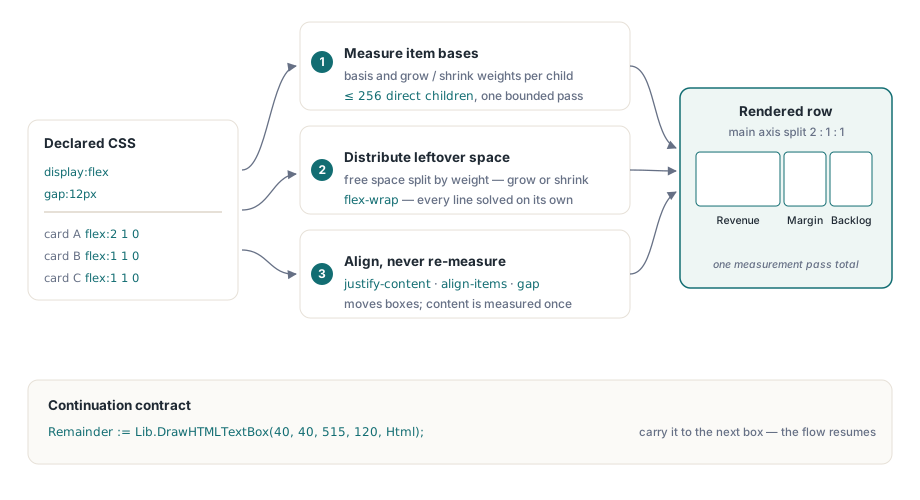
PDF Library for Delphi treats any element styled display: flex or display: inline-flex as a genuine flex container, so a row of cards stays a row rather than collapsing into stacked blocks. You draw it with DrawHTMLTextBox(Left, Top, Width, Height, HTMLText), which returns a WideString: empty when everything fitted, otherwise the part that still has to be drawn somewhere else
In the row direction each item gets a basis, the basis values and the gaps between items are summed, and whatever is left over on the line is handed out. Positive space goes by flex-grow. Negative space is taken back by flex-shrink multiplied by the item's basis, which is the CSS rule and has a pleasant side effect that we will see in a moment. With flex-wrap set, items move to a new line once the next basis no longer fits, and each line distributes its own free space. justify-content, align-items, align-content, gap and the -reverse directions then only move boxes that have already been measured
uses
  SysUtils, PDFlibrary;

var
  Lib: TPDFlib;
  Html, Remainder: WideString;
begin
  Lib := TPDFlib.Create;
  try
    Lib.SetOrigin(1);          // top-left origin: Top grows down the page
    Lib.SetPageSize('A4');

    // Percentage bases keep the 2:1:1 ratio exact, gap included
    Html :=
      '<div style="display:flex; gap:12px;">' +
      '<div style="flex:0 1 50%; background:#f4f6f8; padding:8px;">' +
        '<b>Revenue</b><br/>EUR 4,182,300</div>' +
      '<div style="flex:0 1 25%; background:#f4f6f8; padding:8px;">' +
        '<b>Margin</b><br/>18.4%</div>' +
      '<div style="flex:0 1 25%; background:#f4f6f8; padding:8px;">' +
        '<b>Backlog</b><br/>92 days</div>' +
      '</div>';

    Remainder := Lib.DrawHTMLTextBox(40, 40, 515, 120, Html);
    if Remainder <> '' then
      raise Exception.Create('Dashboard row needs more than 120 pt');

    Lib.SaveToFile('dashboard.pdf');
  finally
    Lib.Free;
  end;
end;
Do the sums for the 515-point box. The gap of 12px converts to 9 points, so two gaps cost 18. The bases add up to the full 515, which overshoots by exactly those 18 points. Shrink is weighted by basis, so the 50% card gives back 9 points and each 25% card gives back 4.5, leaving 248.5, 124.25 and 124.25. The ratio is still exactly 2:1:1, and the code never had to subtract the gaps by hand
Why do equal flex: 1 items come out unequal?
Because their basis is the width of their content. The renderer takes a basis from flex-basis, from a length inside the flex shorthand (a value with pt, px, em or %), or from width. When none of those yields a positive length, the item's measured content width becomes its basis. A bare flex: 1 and the browser idiom flex: 1 1 0 both end up there, since a unitless 0 is not read as a length. Equal grow factors then add equal amounts of free space on top of unequal starting widths
Write the same dashboard with flex: 1 on every card and the Revenue card, whose seven-digit figure makes its content the widest of the three, starts wider than the Margin card and stays wider by exactly that amount after growth, because each card receives the same third of whatever free space remains. For toolbars, tag lists and button rows that is often the look you want anyway. Not for a dashboard. Anything that has to line up with a table above or below it deserves explicit percentage or point bases with grow set to 0, which is our recommendation and exactly what the example does: the three cards then land at 248.5, 124.25 and 124.25 points on every page, whatever the figures inside them say
The column direction follows the same logic on the vertical axis. The basis comes from flex-basis or height, failing that from the measured content height, and free space exists only when the container declares a height. Without one, the container is exactly as tall as its items and justify-content has nothing to distribute
Grid tracks, placement and spans
For display: grid, PDF Library for Delphi reads grid-template-columns and grid-template-rows as fixed lengths, percentages, fr units, repeat(n, track) and minmax(a, b). Fixed tracks and gaps are subtracted from the available width, and the remainder is split by fr weight. A minmax() track is sized by its second argument, so minmax(120px, 1fr) behaves like 1fr, and auto, min-content and max-content tracks each take one share of the free space
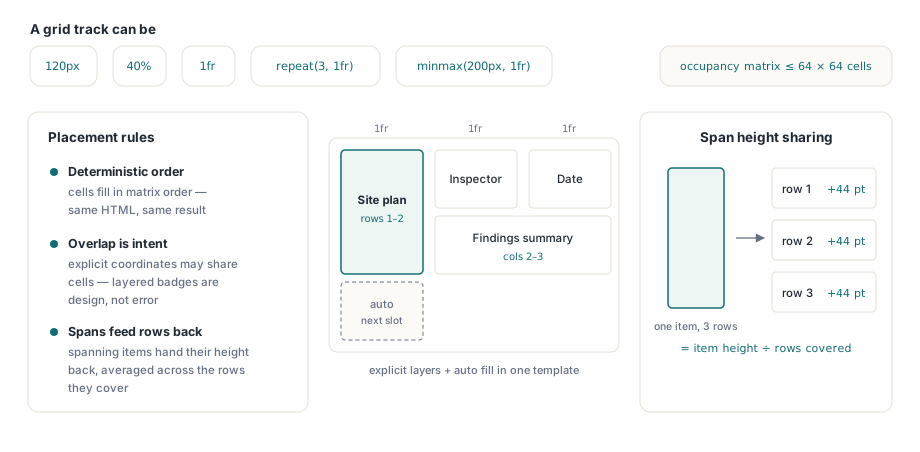
Placement is deterministic. Auto-placed items walk the grid row by row (or column by column with grid-auto-flow: column) and skip cells that are already taken. An item given only a row searches that row for a free column; an item given only a column searches down that column. Items with both coordinates go exactly where they say, even on top of another item, which is how a badge gets layered over a card
Spans call for one habit. The renderer reads a span from the part after the slash, as in grid-row: 1 / span 2, or from grid-row-end: span 2 and grid-column-end: span 2. The bare grid-row: span 2 that browsers accept as the whole value is not one of those spellings, so keep the start line and the slash
// Inspection sheet: fixed label column, two flexible columns
Html :=
  '<div style="display:grid; ' +
  'grid-template-columns:120pt repeat(2, 1fr); gap:6pt;">' +
  '<div style="grid-row:1 / span 2; background:#eef2ff;">' +
    'Site plan</div>' +
  '<div>Inspector</div>' +
  '<div>Date</div>' +
  '<div style="grid-column:2 / span 2;">Findings summary</div>' +
  '</div>';

Remainder := Lib.DrawHTMLTextBox(40, 180, 515, 260, Html);
In that 515-point box the label column is 120 points, the two gaps take 12, and each 1fr column gets 191.5. The Site plan cell has a row but no column, so it lands in column 1 and covers rows 1 and 2. Inspector and Date fill the rest of row 1. The summary has a column but no row, so placement searches down column 2, finds row 1 taken, and settles in row 2 across both flexible columns
Row heights come from content. Because a spanning item divides its measured height evenly across the rows it covers, and each row then takes the largest share any of its items asks for, the extra height of a tall cell is spread over every row it touches rather than dumped on the first one. A tall Site plan cell therefore raises both rows a little instead of stretching only the first and leaving Findings summary floating in a gap
Containers move between boxes in one piece
A flex or grid container is never split across two boxes. Ever. When the whole container does not fit in the remaining space, the container and everything after it go into the returned remainder, and since that remainder is exactly what you pass to the next box or the next page, the card row simply opens the following frame with its measured geometry intact. Half a KPI tile at the bottom of page 3 and the other half on page 4 is worse than a gap, and that is the trade-off this rule makes. A container taller than an entire empty box is the exception: it is drawn at the top of that box regardless and runs past its bottom edge, because no later box would be any bigger
The practical upshot is that you should know a container's height before you commit it to a page. GetHTMLTextHeight(Width, HTMLText) measures without drawing, flex and grid included
// GridHtml, Y and PageBottom belong to your report code
Needed := Lib.GetHTMLTextHeight(515, GridHtml);
if Y + Needed > PageBottom then
begin
  Lib.NewPage;
  Lib.SetPageSize('A4');
  Y := 40;
end;
Lib.DrawHTMLTextBox(40, Y, 515, Needed, GridHtml);
Y := Y + Needed + 12;
Measurement is bounded on purpose, which matters when customers edit templates. A flex or grid container takes its first 256 direct children, grid placement works within 64 rows, and a track list holds at most 64 tracks, with repeat() counts capped to match. A flex container with hundreds of children is almost always a data table in disguise, and the table path, with its own column measurement and rowspan support, lays it out better in any case
How are footnotes kept with their reference?
PDF Library for Delphi measures each note the moment it meets the reference and subtracts that height from the body budget of the current box. A note is written as <aside style="float:footnote">, <aside role="doc-footnote"> or a <footnote> element. The reference becomes a superscript number at two-thirds of the surrounding font size, and the note text is set at 8 points on 10-point leading, prefixed with the same number
If the body so far plus the new note no longer fits, the marker and everything after it move into the remainder together. Note and reference travel as a pair. That answers the opening scenario: the reference line and its note open the next column, and neither the overprint nor the orphaned note can occur. In a bounded box the note area is pinned to the bottom beneath a thin grey rule a quarter of the box width long. In unbounded measurement, such as GetHTMLTextHeight, there is no bottom to pin to, so the notes follow the body directly
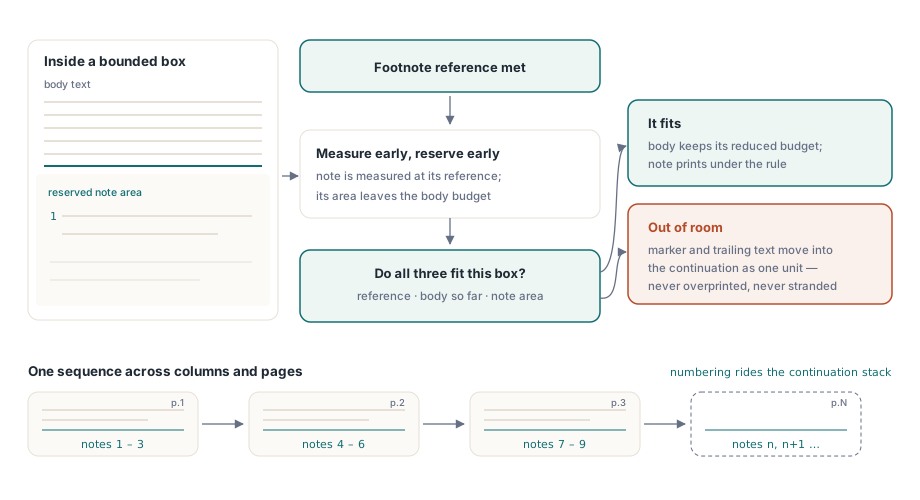
Numbering starts at 1 for every fresh HTML string. The next number is stored inside the remainder string itself, so DrawHTMLTextBox chains and DrawHTMLStory keep one running sequence across columns and pages, provided the remainder is passed back exactly as it was returned. Rebuilding the continuation from your own source text starts the count again
Chapter :=
'<p>The bearing stayed within tolerance for the full six hours' +
'<aside style="float:footnote">Ambient temperature held at ' +
'21 °C throughout the run.</aside> of the load test.</p>' +
MoreChapterHtml; // the rest of your chapter
// 2 columns, 16 pt gutter, at most 20 pages; the story adds pages itself
Rest := Lib.DrawHTMLStory(40, 40, 515, 760, 2, 16, 20, Chapter);
Err := Lib.LastErrorCode; // read once: reading resets it
if Err = PDFLIB_ERROR_HTML_STORY_INVALID then
// bad geometry: Columns 1..64, MaxPages 1..10000, gutters narrower than Width
else if Err = PDFLIB_ERROR_HTML_STORY then
// two frames in a row made no progress
else if Rest <> '' then
// 20 pages used and text remains: continue later with Rest
;DrawHTMLStory(Left, Top, Width, Height, Columns, Gutter, MaxPages, HTMLText) starts on the current page, fills the columns from left to right, and adds pages with the same dimensions until the text runs out or MaxPages is reached. Telling those three outcomes apart is the reason to read LastErrorCode before testing the returned string. Invalid arguments return the input unchanged, which otherwise looks exactly like a story that ran out of pages
Feeding the layout from real content
For multi-column body text, the column and hyphenation behaviour described in hyphenation and balanced text columns governs how the flow looks inside each column. Where the markup comes from data rather than hand-written templates, the dataset report engine is the route that generates it before flex and grid arrange it on the page. Content that later has to leave the PDF again goes through exporting PDF to Markdown and DOCX
HTML layout with flex, grid and footnotes, report generation and semantic export ship in a single library for Delphi, C++Builder and Free Pascal. The PDF Library for Delphi product page covers the rest of the HTML renderer and the drawing API