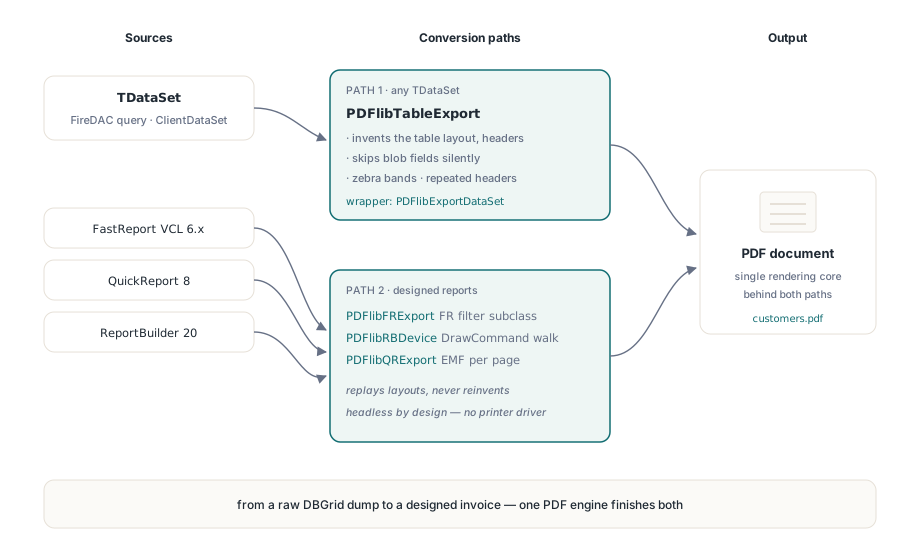
To export a TDataSet or a report to PDF in Delphi, losLab PDF Library offers two paths. PDFlibTableExport adapts any TDataSet — a FireDAC query, a ClientDataSet, an in-memory table — into a paginated PDF table, and three bridges under Addons hand a prepared FastReport, QuickReport, or ReportBuilder report to the same PDF writer. Both produce a real PDF with no printer driver and no visible window
The two problems look similar and are not. A DBGrid or a raw query result has no layout of its own, so exporting it means inventing one: columns, headers, page breaks. A FastReport or ReportBuilder document already carries a designed layout, so exporting it means faithfully replaying someone else's drawing commands into PDF space. losLab PDF Library keeps these concerns in separate units precisely because the failure modes differ, and the rest of this article walks each one and where it stops being reliable
How do you export a TDataSet to PDF in Delphi?
PDFlibTableExport turns a dataset into a table in one call. The exporter walks the field list once, skips binary blob fields automatically — ftBlob, ftGraphic, ftBytes and their kin have no useful cell text — right-aligns numeric columns, and paints an optional zebra stripe over a styled header band. Under the hood it builds the grid with CreateTable, fills cells with SetTableCellContent, and renders with DrawTableRows, the same public Table API you would drive by hand. The convenience wrapper PDFlibExportDataSet configures millimetres and a top-left origin for you, so the caller only supplies a page
uses
  Data.DB, FireDAC.Comp.Client, FireDAC.Stan.StorageBin,
  PDFlibrary, PDFlibTableExport;

var
  MemTable: TFDMemTable;
  PDF: TPDFlib;
  Options: TPDFlibTableExportOptions;
begin
  MemTable := TFDMemTable.Create(nil);
  PDF := TPDFlib.Create;
  try
    MemTable.LoadFromFile('customer.FDS');   // any TDataSet works here

    PDF.SetOrigin(1);
    PDF.SetMeasurementUnits(1);              // millimetres
    PDF.SetPageSize('A4');
    PDF.AddStandardFont(4);

    Options := DefaultTableExportOptions;
    Options.Title := 'Customers';
    Options.ColumnWidth := 32;               // 11 fields fit on A4 at 32 mm
    Options.RepeatHeader := True;            // redraw the header on each page

    PDFlibExportDataSet(PDF, MemTable, 'customers.pdf', Options);
  finally
    PDF.Free;
    MemTable.Free;
  end;
end;
The automatic blob skip is a default, not a straitjacket. When you need per-field control — a custom column label, a narrower width, or dropping an internal key column that is not a blob — construct a TPDFlibTableExporter directly and hook its OnFieldFilter event, which fires once per field and hands you a mutable spec. Set Include to False to drop the field, or set ColumnWidth and DisplayLabel to override the defaults. That hook is also where you exclude a wide memo column you do not want ballooning the page
Pagination: passing the draw state between pages
DrawTableRows carries the pagination state, and understanding its contract is the whole game. You call it with a first row and a last row; passing a last row below 1 means draw to the end of the table, bounded by the height you gave. The function returns the height it actually drew, and GetTableLastDrawnRow reports the last row that fit. That pair is the state you hand from one page to the next: when the last drawn row is short of the total, you open a new page and resume from the row after it. Nothing is re-measured — the continuation picks up exactly where the previous call left off
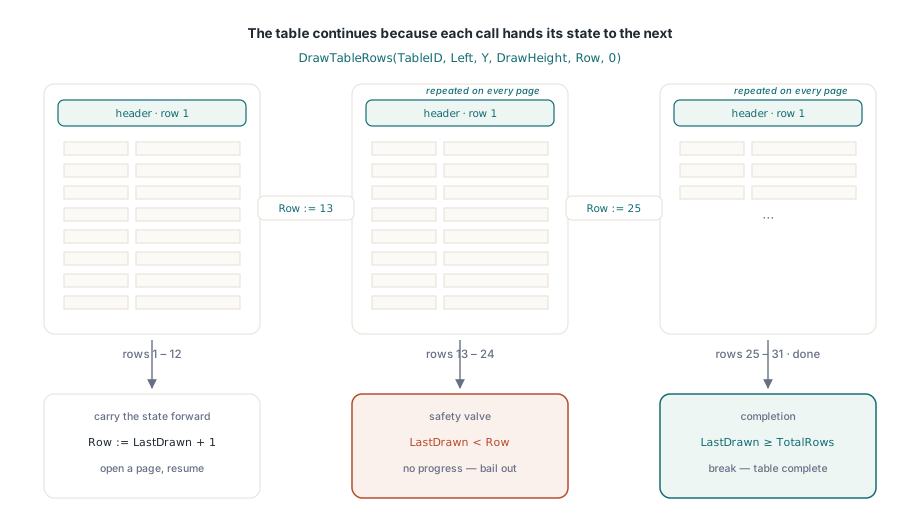
// How the exporter continues a long table across pages
PageHeight := PDF.PageHeight;
Y := PageHeight - Options.Top;
Row := 1;
while Row <= TotalRows do
begin
  DrawHeight := Y - Options.BottomMargin;
  // Last row = 0 means "draw to the end", bounded by DrawHeight
  PDF.DrawTableRows(TableID, Options.Left, Y, DrawHeight, Row, 0);
  LastDrawn := PDF.GetTableLastDrawnRow(TableID);
  if LastDrawn >= TotalRows then
    Break;                       // the whole table fit on this page
  if LastDrawn < Row then
    Break;                       // safety: no forward progress, bail out
  PDF.NewPage;
  Row := LastDrawn + 1;          // continue from the first undrawn row
  Y := PageHeight - Options.Top;
end;
The loop is also where the repeating header lives. On each continuation page the exporter optionally draws row 1 again — the header — before the data rows, and it uses the height returned by that first DrawTableRows call to offset the body below it. This is why DrawTableRows returns a height rather than a next-row coordinate: the return value is what lets you stack a re-drawn header and the continuing body without hard-coding either one's size
How do you export a FastReport or ReportBuilder report to PDF?
The report bridges take the opposite approach: they never invent a layout, they replay one. Each bridge attaches to its engine at the engine's native export seam. PDFlibFRExport subclasses TfrxCustomExportFilter and receives FastReport's memo, picture, shape, and line objects, translating each into a PDF Library for Delphi primitive. PDFlibRBDevice subclasses TppFileDevice and walks ReportBuilder's DrawCommand list. PDFlibQRExport takes a third route entirely, which the next section covers. All three run headless, which is the whole reason to reach for them on a server
Headless is not free, and FastReport is the cautionary tale. TfrxReport.Export routes through the preview pages, which consult the filter's ShowDialog property, and that property inherits a default of True. On a machine with no interactive desktop the modal dialog returns a cancelled result and the export quietly fails. Set ShowDialog to False before you call Export and the report renders silently. ReportBuilder has the parallel switches — AllowPrintToFile and ShowPrintDialog — and QuickReport, which drives everything through Prepare, needs no dialog suppression at all
var
  Exporter: TPDFlibFRExport;
begin
  Report.PrepareReport;                  // build the pages first
  Exporter := TPDFlibFRExport.Create(nil);
  try
    Exporter.FileName := 'invoice.pdf';
    Exporter.ShowDialog := False;        // headless: skip the modal, no cancel
    Report.Export(Exporter);
  finally
    Exporter.Free;
  end;
end;
Three engines, three coordinate systems
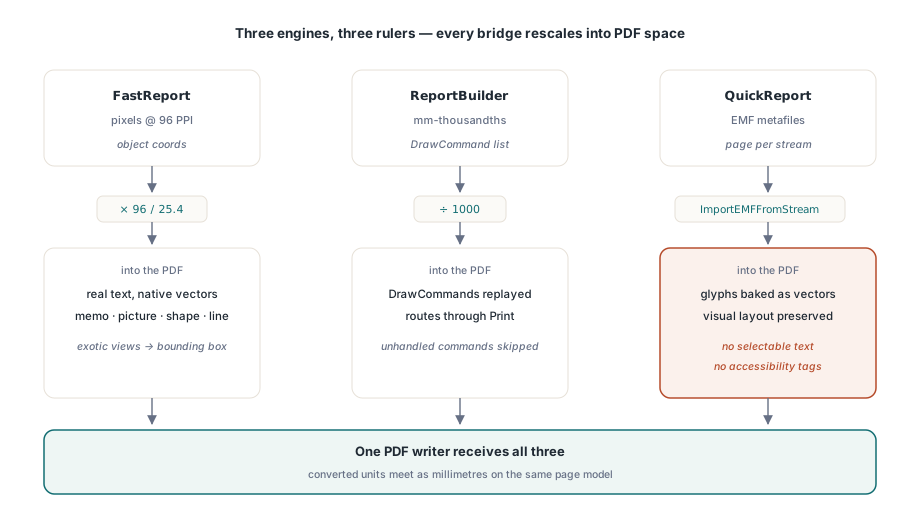
Each bridge does its own coordinate arithmetic, because each engine measures the world differently. PDFlibFRExport treats FastReport object positions as pixels at 96 PPI and scales by 96/25.4 to reach millimetres. PDFlibRBDevice reads ReportBuilder's draw commands in mm-thousandths and divides by 1000, and it registers itself through ppRegisterDevice, so setting ppReport.DeviceType to 'PDF Library for Delphi' and calling Print is enough to route output through it. PDFlibQRExport does no coordinate math at all: a prepared QuickReport page is already an EMF metafile, so the bridge saves each page to a stream and feeds it to ImportEMFFromStream, letting the library's device-context and metafile rendering path place every glyph and rule. The FastReport and ReportBuilder bridges, by contrast, emit native vector drawing primitives and native text
var
  PDF: TPDFlib;
begin
  PDF := TPDFlib.Create;
  try
    PDF.SetOrigin(1);
    // Prepares the report and appends every page in one call; the bridge
    // turns each page's EMF into PDF through ImportEMFFromStream.
    PDFlibQRExportReport(PDF, QuickRep1, 'ledger.pdf');
  finally
    PDF.Free;
  end;
end;
Where the fidelity ends
Know the boundaries before you commit a workflow to these bridges. The dataset exporter drops binary columns silently, so a report that must show an embedded image needs a different approach than a straight table. The QuickReport path, because it goes through EMF, bakes text into vector glyphs — the page looks right but carries no selectable or searchable text and no tagged PDF structure for accessibility. FastReport and ReportBuilder keep real text, but the typed handlers cover the common views — memo, picture, shape, line — and fall back to a bounding box or skip the exotic ones, so a report leaning on rich text, barcodes, or gradient fills will lose detail. None of this is a defect; it is the honest edge of a translation layer
One operational caveat outranks the rest. None of the three engines ship inside losLab PDF Library, and the bridges are deliberately excluded from the main build — they compile only from a project that already has FastReport VCL 6.x, QuickReport 8, or ReportBuilder 20 on its search path. The metafile and DrawCommand surfaces they target have stayed stable across several major engine versions, but you own the version match. Get that right and the two paths cover the whole spread, from an ad-hoc DBGrid dump to a designed invoice. The table exporter and the report bridges both ship with losLab PDF Library for Delphi and C++Builder