Half a point decides it. In a report with 10-point body text, a section title set in 11-point bold converts to Markdown as an ordinary paragraph, while a 12-point caption on the cover, in a regular weight, comes back as ### Quarterly figures. That looks backwards until you remember what a PDF page actually stores: glyphs at coordinates, a font name and a size. Nothing on the page says 'heading'. Every heading a converter emits is a guess built from those three facts, and the guess has thresholds
Why a PDF page has no paragraphs to export
A PDF page contains text-showing operators, not paragraphs. Each operator places a run of glyphs at a position, in whatever order the producing application happened to emit them, and ISO 32000-1 places no obligation on the producer to say that two runs belong to the same sentence, let alone the same list item or table cell. The format describes a printed page exactly, and it gets there by throwing away the structure that produced the page
So every converter rebuilds what the generator discarded. Lines come from shared baselines and vertical spacing. Paragraph breaks come from changes in spacing and indentation. A list is a run of blocks that start with a bullet character or a number pattern. A table is a grid of text blocks whose edges line up across rows and columns. On documents that follow ordinary typographic habits this works well; on a brochure laid out for visual effect it has very little to hold on to
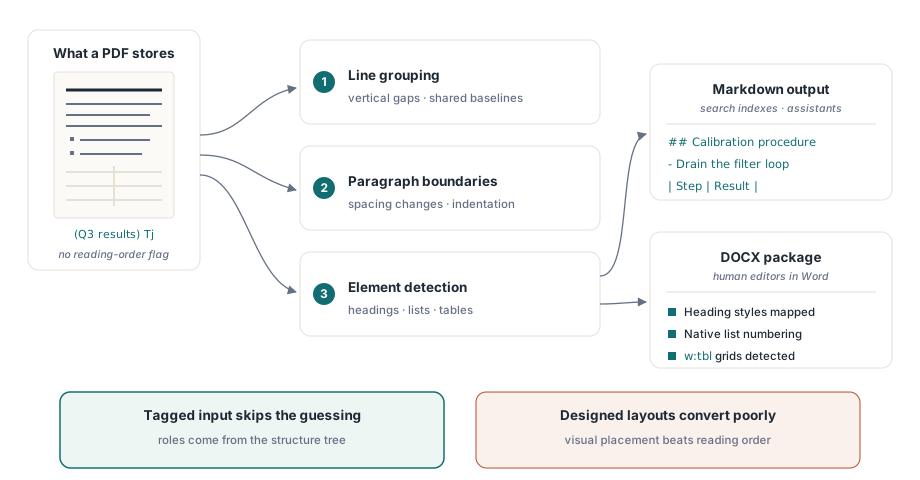
Tagged PDFs are the big exception. When a document carries a structure tree, the paragraph, heading, list and table roles are recorded by the producer instead of guessed afterwards, which is why the work described in tagged PDF accessibility structure also pays off in conversion quality. If you control the producer, tagging the output is the cheapest thing you can do for whoever converts it later
Where the heading levels come from
PDF Library for Delphi decides heading levels in two ways, depending on the input. On a tagged page, a block whose structure role is H1 through H6 keeps that level, and H or Title becomes level 1. On an untagged page the export falls back to font size relative to the page's body text, and it only considers single-line paragraphs of 200 characters or fewer
The size rule needs both a ratio and an absolute gap, measured against the dominant body size:
| Markdown output | Largest text on the line | With a 10 pt body |
|---|---|---|
# | at least 1.6 times the body size and at least 4 pt larger | 16 pt and up |
## | at least 1.35 times and at least 2.5 pt larger | 13.5 pt and up |
### | at least 1.15 times and at least 1.25 pt larger | 11.5 pt and up |
That explains the opening example. An 11-point bold title over 10-point text misses the third tier by half a point, and weight plays no part in the level. The cover caption at 12 points clears it. The absolute gap exists for small body sizes: on 6-point footnote-sized text a ratio alone would promote a 7-point line to a heading, and the extra 1.25 pt requirement stops that
We think this is the right trade. Bold is far too common inside body text (lead-in phrases, defined terms, totals in a summary line) to be a reliable heading signal on its own, and a converter that promotes every bold line produces Markdown with dozens of spurious sections. Missing a few bold-only headings costs less. If your documents rely on bold-at-body-size titles, the reliable fix is upstream: tag them, or bump the title size by a point and a half
Bold and italic in the output are read from the font name. A run whose font name contains Bold, Black or Demi becomes **bold**; Italic or Oblique becomes *italic*. Producers that subset fonts under opaque names such as F3, or that fake bold by stroking regular glyphs, give the export nothing to read, and that text arrives unstyled
Markdown export for retrieval pipelines
The Markdown path is the one to reach for when the destination is a text pipeline: a documentation site, a search index, a chunked corpus for an assistant. ExportPageMarkdown returns one page as a WideString, ExportDocumentMarkdown returns a page range, and SaveMarkdownToFile and SaveMarkdownToStream write the same text as UTF-8 without a byte-order mark. The missing BOM is deliberate; a number of static site generators and diff tools treat it as content
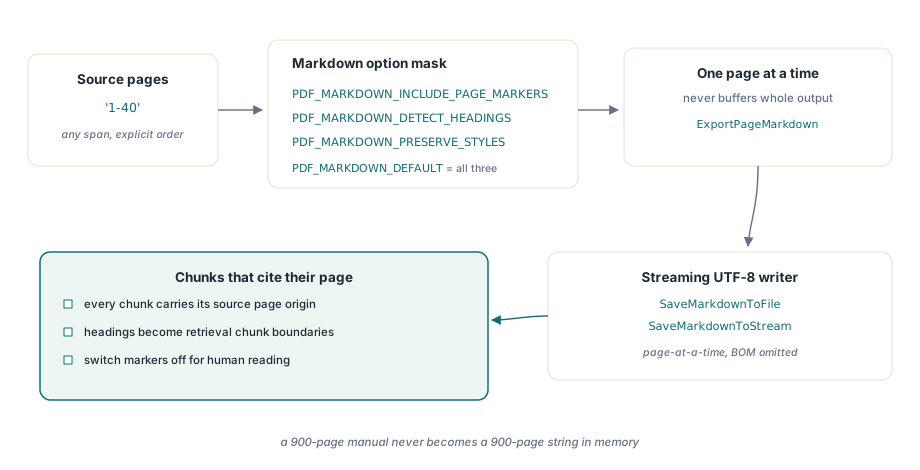
Options are a bit mask: PDF_MARKDOWN_INCLUDE_PAGE_MARKERS (1), PDF_MARKDOWN_DETECT_HEADINGS (2) and PDF_MARKDOWN_PRESERVE_STYLES (4), with PDF_MARKDOWN_DEFAULT combining all three. A second, document-wide setting controls the analysis itself: SetStructuredTextOptions takes the PDF_STRUCTURED_* flags, and its default detects columns, detects running headers and footers, and joins tables that continue across a page break
uses
  SysUtils, PDFlibrary;

var
  Pdf: TPDFlib;
  Exported: Integer;
begin
  Pdf := TPDFlib.Create;
  try
    if Pdf.LoadFromFile('handbook.pdf', '') = 0 then
      raise Exception.Create('Cannot open handbook.pdf');

    // Detection of running headers and footers is on by default;
    // adding EXCLUDE_FURNITURE also drops them from the output
    Pdf.SetStructuredTextOptions(PDF_STRUCTURED_ADVANCED_DEFAULT or
      PDF_STRUCTURED_EXCLUDE_FURNITURE);

    // Page markers and headings, but no ** and * emphasis
    Exported := Pdf.SaveMarkdownToFile('1-40',
      PDF_MARKDOWN_INCLUDE_PAGE_MARKERS or PDF_MARKDOWN_DETECT_HEADINGS,
      'handbook.md');
    if Exported = 0 then
      raise Exception.CreateFmt('Markdown export failed, error %d',
        [Pdf.LastErrorCode]);

    // JSON with one entry per page: readingSource is tagged, mixed,
    // geometric or geometric-columns
    Writeln(Pdf.GetLastStructuredTextDiagnostics);
  finally
    Pdf.Free;
  end;
end;
For a retrieval corpus we drop PDF_MARKDOWN_PRESERVE_STYLES. Emphasis is applied run by run, so a bold phrase set in several runs comes out as **Net** **revenue**, which reads fine on screen and adds noise to every embedding. Page markers are the opposite case: keep them. Each marker is an HTML comment, <!-- page: 12 -->, invisible when the Markdown is rendered and trivial to parse when you split chunks, so a retrieved passage can cite the page it came from. When a table runs on from the previous page, the marker for the new page is left out so the pipe table stays in one piece
Two behaviours catch people who export page by page in a loop. First, running headers are recognised by repetition: a paragraph in the top or bottom 12 percent of the page counts as furniture when matching text sits in the same band on another page of the same export, with digits normalised so 'Page 3 of 40' matches 'Page 4 of 40'. A single-page call has no other page to compare against, so an untagged running header stays in the text. Second, images in Markdown are embedded inline as data: URIs, which keeps the file self-contained and means a page with a large photograph can add hundreds of kilobytes of base64 to the file. If your chunker has a size limit, strip lines starting with 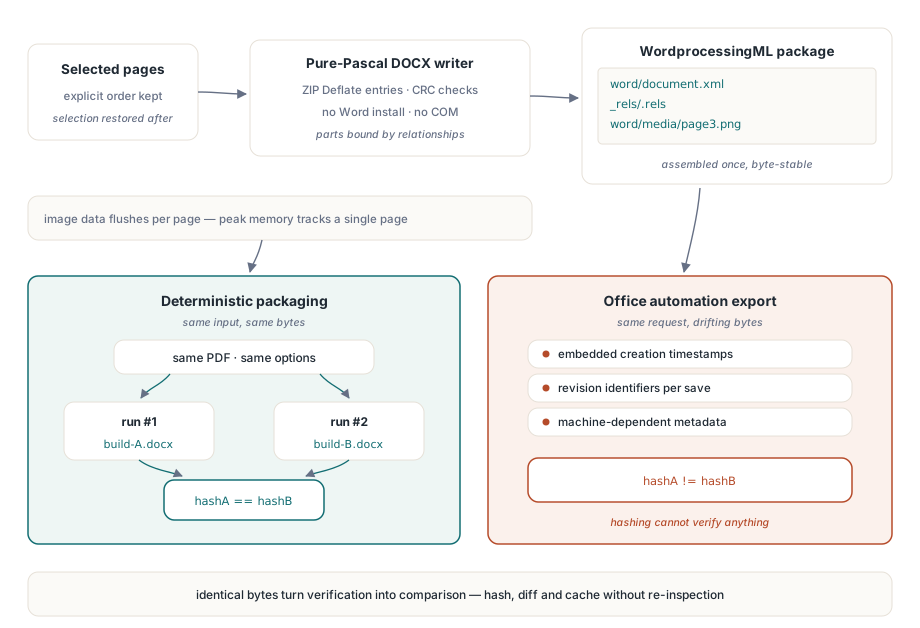
Two choices make that hold. Every ZIP entry carries the same fixed DOS date, 1 January 1980, instead of the time of the run, and the core properties part has no created or modified dates. Each entry is compressed with raw Deflate only when that actually makes it smaller, so PNG media, which is already compressed, is stored as-is. You can confirm the first point with unzip -v handbook.docx: every row shows the same date
Office automation cannot give you that. Saving through Word stamps the current time into the package metadata and the ZIP headers, so the same document converted twice differs in ways that defeat a hash. The same reasoning is behind the stable file identifiers in deterministic PDF IDs for reproducible builds: once output is reproducible, verification becomes a comparison
Which inputs convert well, and which never will
Conversion quality varies more with the input than with the converter, and it is worth telling your users so up front. Tagged PDFs and cleanly generated business documents (invoices, reports, contracts) convert well: headings land as headings, tables survive, lists renumber in Word. Two-column academic layouts come through in the right reading order when the column geometry is regular, and the diagnostics will report geometric-columns for those pages. Tables that break across pages are rejoined by inference, so spot-check them. Heavily designed marketing material, where text is placed for effect rather than in reading order, gives any converter little to recover; expect to touch up the result by hand
Scanned documents are a separate case. A page that is one large image contains no text objects, so there is nothing to export until a text layer exists, and running OCR is a prerequisite for both formats. Before committing to a large batch, sample a dozen representative files and enumerate what their pages contain, as described in text search and page element enumeration; a page with images and no text runs will tell you more in a second than reading the converted output will
Pick the format by what happens next. Markdown suits machines and pipelines: headings become chunk boundaries, tables stay readable as pipe tables, and page markers give every chunk a citation. DOCX suits people who need to change the document, because what they want back is an editable file in Word, with real lists and real tables, and the text alone does not give them that
PDF Library for Delphi ships for Delphi, C++Builder and Lazarus, with DLL and ActiveX editions that expose the same Markdown and DOCX export calls to C#, C++ and scripting hosts. The reference for every option flag and a trial download are on the PDF Library for Delphi product page