Pour a German product sheet into three 148-point columns and two things go wrong at once. The line in front of a word like Rechnungsprüfungsausschuss can end up a third empty, because the space before that 26-letter compound was the only place to break. And on the last page the leftover text fills one column, part of a second, and leaves the third blank. A line breaker that only knows about spaces, and never counts what remains, produces exactly that page
The fix comes in two halves: break inside words using rules for the text's language, and size the final columns from the number of lines still to be placed. Both halves only work if the line count behind the decision comes from the same breaks that get drawn, hyphens included, at a column width of 148 points rather than the 480-point region
A hyphenated three-column flow in PDF Library for Delphi
PDF Library for Delphi keeps a passage as a text flow: NewTextFlow returns a handle, SetTextFlowLanguage and SetTextFlowHyphenation control where words may break, and DrawTextFlowColumns pours as much of the remaining text as will fit into one to 64 equal-width columns and advances the flow. The column width is the region width minus the gutters, divided by the column count, so a 480-point region with three columns and 18-point gutters gives (480 − 2 × 18) / 3 = 148 points per column
The call returns the total number of lines it drew. Zero means nothing fitted, and in that case the flow stays where it was, so no text is lost; the trap is a page loop that keeps calling NewPage whilst the call keeps returning zero. That happens when the region is shorter than one line, or when a minimum-lines setting cannot be satisfied in the space on offer. The loop below treats zero as an error rather than spinning
var
  Lib: TPDFlib;
  FontID, Flow, Drawn: Integer;
begin
  Lib := TPDFlib.Create;
  try
    Lib.SetDocumentLanguage('de-DE');      // before NewTextFlow, see below
    FontID := Lib.AddTrueTypeFont('Georgia', 1);
    Lib.SetTextSize(10.5);

    Flow := Lib.NewTextFlow(ArticleBody);
    try
      Lib.SetTextFlowHyphenation(Flow, 1, 3, 3);
      Lib.SetTextFlowMinLines(Flow, 2);   // no single line stranded at a column foot

      repeat
        // Left 66, Top 72, 480 x 620 pt region, 3 columns, 18 pt gutters, balanced
        Drawn := Lib.DrawTextFlowColumns(Flow, 66, 72, 480, 620, 3, 18, 1);
        if Lib.TextFlowFinished(Flow) = 1 then
          Break;
        if Drawn = 0 then
          raise Exception.Create('Column region cannot take the next lines');
        Lib.NewPage;
        Lib.SelectFont(FontID);
        Lib.SetTextSize(10.5);            // NewPage brings the font back at 12 pt
      until False;
    finally
      Lib.ReleaseTextFlow(Flow);
    end;

    Lib.SaveToFile('newsletter.pdf');
  finally
    Lib.Free;
  end;
end;
The coordinates are measured from the top-left corner of the page whatever origin you have set, because the column call lays its lines out downwards from Top. With the default left alignment, every line starts at its column's left edge, so slack from a bad break shows up as a ragged right edge; in justified type the same slack turns into rivers
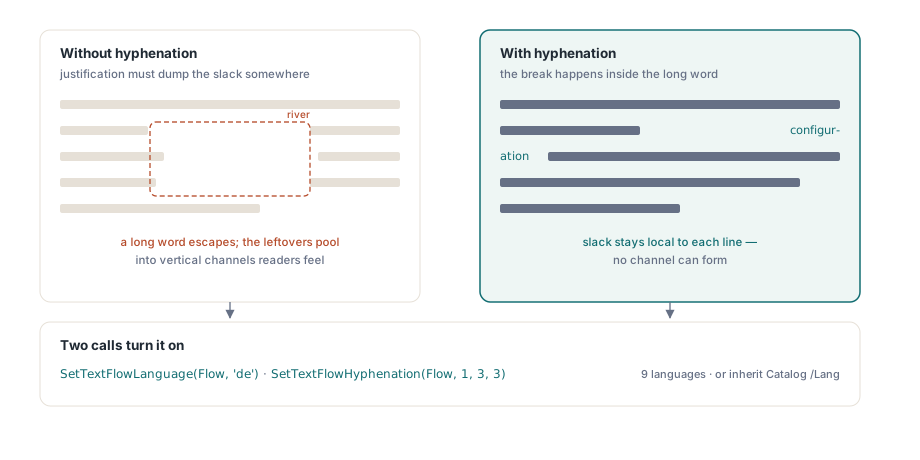
Where does the hyphenation language come from?
A new flow takes its language from the document Catalog /Lang entry at the moment NewTextFlow runs. That is the same value screen readers and search indexers read, so a document that already declares its language, as tagged output from automatic tagging for accessible PDFs does, gets hyphenation for free. The timing matters, though. Call SetDocumentLanguage after the flow exists and that flow never sees it; the first example sets the language first for precisely that reason
When the tag names a supported language, automatic hyphenation switches itself on. The rules cover English, German, Dutch, French, Spanish, Italian, Portuguese, Russian, Turkish, Danish, Swedish, Finnish, Polish, Czech and Hungarian. Region subtags are dropped before the lookup, so de-CH, de-AT and de all hyphenate as German. A tag the rules do not cover, such as ja, is accepted, and automatic breaking simply switches off for that flow
Three return values tell you what happened, and they are worth checking in code that takes the language from user data:
SetTextFlowLanguagereturns 0 only for a malformed tag; a well-formed tag for a language that is not covered returns 1 and leaves automatic hyphenation offSetTextFlowHyphenationwithEnable = 1returns 0 when the flow's language has no rules, so a breaker cannot make up break points with no language behind themGetTextFlowHyphenationreports whether automatic breaking is on at this moment, which is the value to log when a layout looks wrong
Order matters here as well. SetTextFlowLanguage recomputes the on/off state from the new language, so calling it after SetTextFlowHyphenation(Flow, 0, …) switches hyphenation back on for a supported language. Set the language first, then the hyphenation options
MinPrefix and MinSuffix are a house-style setting
The two integers following the enable flag are the minimum number of letters that must stay on the line before a break and move to the next line after it. Both accept 1 to 16. When hyphenation switches on because of the language alone, both are 2, and a word is only considered for breaking when it has at least MinPrefix + MinSuffix + 1 letters
Two and two is the setting we would change in almost every document. It produces more break opportunities, but a two-letter fragment at the end of a line reads like a typo, and in German or Dutch it splits off things such as a two-letter prefix that the reader then has to stitch back on. Three and three costs a few more ragged lines and looks like proper typesetting. Raise the minimums further for large type, where every fragment stands out; drop to two only for a genuinely narrow column where you have decided that a tight measure beats a clean one
Which words can break, and what happens to a URL
Lines break at spaces and tabs, and a line feed forces a new line. Inside a word, automatic hyphenation looks only at words made up entirely of letters (Latin, including the accented Latin Extended ranges, and Cyrillic), with any leading or trailing punctuation set aside. The rules are conservative combinations of vowels, legal consonant clusters and common affixes, so they place fewer break points than a dictionary hyphenator would. Words with digits or internal punctuation, such as ISO-32000 or v2Beta, and words longer than 128 letters get no automatic points
Soft hyphens (U+00AD) are the override. If a word contains any, those positions become its only break points: the automatic rules are skipped for that word, and the soft hyphens work even when automatic hyphenation is off or the language has no rules. Use them for brand names, product codes and terms the rules split badly; in the next example, Rechnungs and prüfungs are the only two places where the compound can break
var
  Flow: Integer;
  Body, Rest: WideString;
begin
  // U+00AD marks the only places this compound may break
  Body := 'Die Pr' + #$00FC + 'fung erfolgt durch den Rechnungs' + #$00AD +
    'pr' + #$00FC + 'fungs' + #$00AD + 'ausschuss der Gesellschaft';
  Flow := Lib.NewTextFlow(Body);
  try
    if Lib.SetTextFlowLanguage(Flow, CustomerLanguageTag) = 0 then
      raise Exception.Create('Malformed language tag: ' + CustomerLanguageTag);
    if Lib.SetTextFlowHyphenation(Flow, 1, 3, 3) = 0 then
      LogWarning('No hyphenation rules; only soft hyphens will break words');
      // LogWarning is your own logging routine

    Lib.DrawTextFlow(Flow, 72, 72, 148, 240);

    // Whatever did not fit comes back exactly as passed in,
    // soft hyphens included
    Rest := Lib.GetTextFlowRemaining(Flow);
  finally
    Lib.ReleaseTextFlow(Flow);
  end;
end;
A hyphen-minus is drawn only at the break that is actually chosen. Unchosen soft hyphens are invisible in both measurement and drawing, and the break is recorded against the original text, which is why GetTextFlowRemaining hands back the soft hyphens untouched. The naive design gets this wrong in a recognisable way: it writes the hyphen into the string whilst trying a candidate, the break later moves, and a stray hyphen ends up in the middle of a line
A token that fits on no line at all, be it a long URL or an accession number with no legal break, is cut at the longest prefix that fits, with no hyphen added. The cut never lands between the two halves of a surrogate pair or in front of a combining mark, so an emoji or an accented letter is never split across lines
What Balance=1 changes on the last page
The Balance argument only matters when everything that remains fits inside the region. In that case DrawTextFlowColumns divides the remaining line count by the column count, rounds up, and uses the result as every column's height. Twenty-two remaining lines in three columns come out as 8, 8 and 6. When the remainder does not fit, every column keeps its full height so that the page carries as much as it can and the rest continues on the next page
A minimum-lines setting can raise the balanced height. With SetTextFlowMinLines(Flow, 3) and four lines left, the balanced height of two is below the minimum, so the columns fill in order: three lines in the first column, one in the second, the third empty. A short tail at the very end of the passage is always placed, since there is nowhere else for it to go. To keep at least two lines together at the top of the next column as well, SetTextFlowPaginationLines takes orphan and widow minimums in a single call
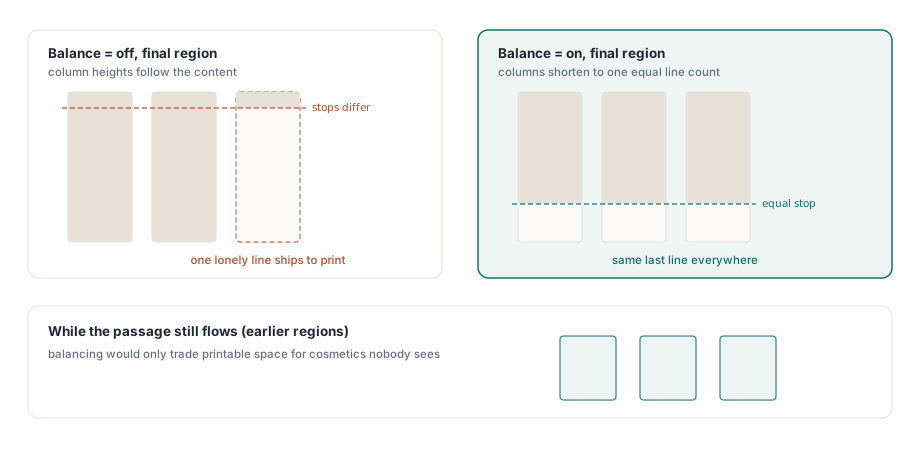
For continuous articles, simply pass 1 every time. Mid-passage it changes nothing. The columns are full anyway. We would only pass 0 when the column region is a fixed box in a form-like layout, where a 52-line remainder in 43-line columns should land as 43, 9 and 0 rather than 18, 18 and 16
When the layout itself depends on how long the passage is, measure before drawing. MeasureTextFlow returns how many lines the rest of the flow needs at a given width, using the same breaking, hyphenation included, without advancing the flow
var
  Flow, Needed, LinesPerColumn: Integer;
  LinePitch: Double;
begin
  Flow := Lib.NewTextFlow(ArticleBody);
  try
    Lib.SetTextFlowLanguage(Flow, 'fr');
    Lib.SetTextFlowHyphenation(Flow, 1, 3, 3);

    Lib.SelectFont(FontID);
    Lib.SetTextSize(10.5);
    // Line pitch the column call uses: 1.2 x the selected text height
    LinePitch := Lib.GetTextHeight * 1.2;
    LinesPerColumn := Trunc(620 / LinePitch);

    Needed := Lib.MeasureTextFlow(Flow, (480 - 2 * 18) / 3);
    if Needed > 3 * LinesPerColumn then
      UseTwoPageSpread      // your own layout choice
    else
      UseSinglePage;        // Balance=1 will even out the columns

    Lib.DrawTextFlowColumns(Flow, 66, 72, 480, 620, 3, 18, 1);
    if Lib.TextFlowFinished(Flow) <> 1 then
      CarryOver(Lib.GetTextFlowRemaining(Flow));   // also your own
  finally
    Lib.ReleaseTextFlow(Flow);
  end;
end;
Keep the font and size identical from box to box
DrawTextFlow, DrawTextFlowColumns and MeasureTextFlow all break lines with the font and size selected at the moment they are called. Change either of them between two boxes of the same flow and the second box breaks differently from what the first measured. The line pitch moves with it, since it is 1.2 times the selected text height. Suppose GetTextHeight reports 12 points for your face: the pitch is 14.4 points and a 620-point column holds 43 lines
The easiest way to trip over this is a new page. NewPage reselects the current font, but at 12 points, and SelectFont does the same. A flow set at 10.5 points on page one therefore runs at 12 points from page two onwards unless the loop calls SetTextSize again: wider words, a taller pitch, fewer lines per column, and a MeasureTextFlow result from page one that no longer matches. The symptom looks intermittent because page one is always right. Reselect the font and then the size after every NewPage, in that order, as the first example does
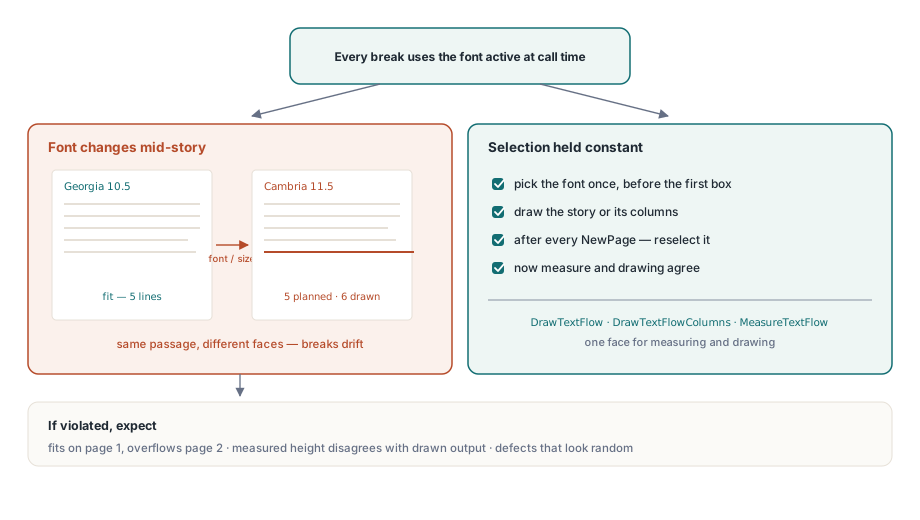
Passages that mix scripts go through the same selected-font path in measurement and drawing, so the substitute faces chosen by automatic font fallback for CJK and emoji text do not open up a gap between the two. In report layouts where the flow shares the page with headers, footers and data-driven blocks, the order from the dataset report engine carries over: measure first, place the fixed elements, then hand the flow whatever region is left
The text flow calls covered here, from creation and measurement to rewind and release, are part of PDF Library for Delphi for Delphi, C++Builder and Lazarus. The function reference and download are available on the PDF Library for Delphi product page