An invoice template set in Arial prints "Invoice for" and then nothing. The text call returned 1, the file validated, and text extraction came back ten characters short: every Han character in 北京示例科技有限公司 had gone, because Arial has none of them. Automatic font fallback in PDF Library for Delphi is on by default and pulls such characters from installed faces, AddFontFallback sets your own search order, and a missing-glyph policy with a JSON report deals with whatever no face can draw
The silent part is what makes this costly. A PDF with a blank where a party name should be passes every structural check, opens in every viewer, and usually gets spotted by the customer rather than by your test suite
Why does unsupported text vanish instead of raising an error?
PDF has no notion of a font refusing a character, so a missing glyph is not an error at file level. A simple font maps one-byte codes to glyph names through an encoding; a composite font maps codes through a CMap to CIDs and then to glyph indices. Ask a face for something it does not contain and you end up on glyph index zero, .notdef, which ISO 32000-1 §9.7.6.3 treats as the standard outcome for undefined characters. Most faces draw .notdef as nothing at all. Some draw an empty box
Either way the content stream is well formed and the page renders. Nothing in the specification asks a producer to check coverage before writing a text operator, so a generator that skips the check turns out a conforming file that has quietly lost content. That is why fallback and reporting belong together. Resolving what can be resolved is half the job; telling you about the rest is the other half, and in our view the more important one for anything with a name or an amount on it
Turning on the fallback chain in PDF Library for Delphi
Fallback only kicks in when the selected font genuinely lacks a character in the string, so Latin-only text keeps its normal path and costs nothing extra. A new TPDFlib instance already has automatic fallback switched on, so the drawing code needs no extra call whatsoever:
var
  Lib: TPDFlib;
begin
  Lib := TPDFlib.Create;
  try
    // Automatic fallback is on by default: emoji, kana, Hangul,
    // Han and symbols are looked up in a built-in candidate table
    Lib.SetMissingGlyphPolicy(PDF_MISSING_GLYPH_REPORT);

    Lib.AddTrueTypeFont('Arial', 2);   // 2 = embed as a subset
    Lib.SetTextSize(11);
    Lib.DrawText(72, 720, 'Invoice for 北京示例科技有限公司');
    Lib.DrawText(72, 700, 'Delivery status: on time ✅');

    Lib.SaveToFile('invoice.pdf');
  finally
    Lib.Free;
  end;
end;
With automatic fallback on, the library picks candidates by the script of each unresolved character. The table is fixed and Windows-oriented: emoji and pictographs try Segoe UI Emoji, then Segoe UI Symbol, then Arial Unicode MS; kana tries Yu Gothic first; Hangul tries Malgun Gothic first; the unified Han block tries Microsoft YaHei, then Microsoft JhengHei, Yu Gothic, Malgun Gothic and SimSun; maths and technical symbols go to Segoe UI Symbol and Cambria Math. Everything else drops through to a broad list that starts with Nirmala UI and Segoe UI
Faces you register with AddFontFallback are tried before that built-in table, in the order you added them. SetAutomaticFontFallback(0) switches off only the built-in table: the explicit chain stays active, which is the setting to choose when you want the output to use your approved faces and nothing else. AddFontFallback ignores a name that is already in the list and returns its 1-based position, and ClearFontFallbacks, RemoveFontFallback and GetFontFallbackCount let you rebuild the chain between documents
The Han unification trap: who wins the shared characters?
Chinese, Japanese and Korean share most of the Han ideographs in Unicode, yet each locale expects different letterforms for many of them. The code point for 直 or 骨 is the same in a Tokyo address and a Beijing one; the shape a native reader expects is not. A fallback chain only answers "which installed face has a glyph for this code point", and every CJK face has one, so whichever face comes first wins every shared character
The automatic table puts Microsoft YaHei first for Han. That is fine for simplified Chinese and wrong for Japanese. A Japanese address on that invoice comes out with kana drawn by Yu Gothic (kana sends the lookup to the Japanese face first) and kanji drawn by YaHei with Chinese shapes, all on one line. Nothing is missing, the report stays empty, and a Japanese reader can tell at a glance that something is off
Our recommendation is to stop relying on the automatic order for Han and build the explicit chain from the document's locale. You normally know it already, from the customer record or the template language:
procedure ConfigureFallback(Lib: TPDFlib; const Locale: string);
begin
  Lib.ClearFontFallbacks;
  if Locale = 'ja' then
  begin
    Lib.AddFontFallback('Yu Gothic');
    Lib.AddFontFallback('Meiryo');
  end
  else if (Locale = 'zh-TW') or (Locale = 'zh-HK') then
    Lib.AddFontFallback('Microsoft JhengHei')
  else if Locale = 'ko' then
    Lib.AddFontFallback('Malgun Gothic')
  else
    Lib.AddFontFallback('Microsoft YaHei');
  // Emoji, symbols and any script not covered above still go
  // through the built-in candidates; pass 0 here to forbid that
  Lib.SetAutomaticFontFallback(1);
end;
Call it once per document, before the first DrawText. Order inside the explicit list matters in the same way: the first face that covers a character wins, so a pan-Unicode face such as Arial Unicode MS belongs at the end, if anywhere. Put it first and it will draw almost everything, and the script-specific faces you chose so carefully will never be consulted
Fallback works on whole clusters
PDF Library for Delphi decides fallback per grapheme cluster, so a cluster is always drawn by a single face. A Devanagari syllable, an emoji with a skin-tone modifier, a base letter with combining accents: each of these is one unit on screen, and the shaping decisions inside it come from tables in one particular font. Half a cluster from Arial and half from a fallback face would put a glyph on the page that is technically present and visibly broken, which is arguably worse than a blank
The selected font shapes the string first. Only clusters that came back as glyph zero go looking for another face, and neighbouring clusters that resolve to the same face are drawn together as one run, so a ten-character Chinese name becomes a single YaHei run rather than ten separate font switches. Right-to-left order is preserved too: a fallback run inside Arabic or Hebrew text sits where the bidirectional algorithm put it. The same shaping machinery drives vertical writing for Japanese and Chinese
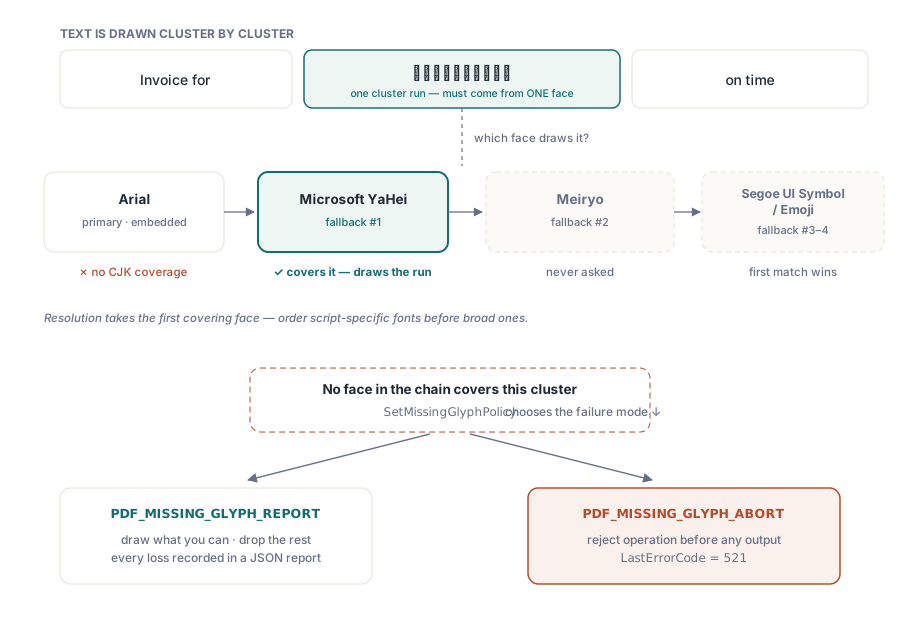
Should a missing glyph stop the document?
That depends on what the document is for, and PDF Library for Delphi lets you choose with SetMissingGlyphPolicy. PDF_MISSING_GLYPH_REPORT is the default: the text operation goes ahead, characters no face can draw are dropped from the output, and each one is recorded. PDF_MISSING_GLYPH_ABORT rejects the whole text operation before anything is written to the page, DrawText returns 0, and the error code is 521 (PDFLIB_ERROR_MISSING_GLYPH)
For internal batch reports, go with the report policy and log the gaps; a slightly incomplete report today beats no report at all. For contracts, invoices, certificates and anything else that carries a person's or company's name, go with abort. A dropped character in a party name is a defect you want to catch in your own pipeline, and because the abort happens before writing, no half-drawn line is left on the page
var
  Lib: TPDFlib;
  Err: Integer;
  Report: WideString;
begin
  Lib := TPDFlib.Create;
  try
    Lib.SetMissingGlyphPolicy(PDF_MISSING_GLYPH_ABORT);
    Lib.AddTrueTypeFont('Arial', 2);
    Lib.SetTextSize(11);

    if Lib.DrawText(72, 660, CustomerName) <> 1 then
    begin
      Err := Lib.LastErrorCode;   // reading it also resets it to 0
      if Err = PDFLIB_ERROR_MISSING_GLYPH then
      begin
        Report := Lib.GetMissingGlyphReportJSON;
        // {"valid":false,"policy":1,"eventCount":1,"events":[
        //   {"sequence":1,"documentIndex":0,"page":1,"utf16Index":3,
        //    "codePoint":983041,"unicode":"U+F0001",
        //    "fontName":...,"fontType":...,"operation":"DrawText"}]}
        EscalateToOperator(Report);
      end;
    end;
  finally
    Lib.Free;
  end;
end;
Note the local variable. LastErrorCode clears itself when read, so code that checks Lib.LastErrorCode = 0 in one place and then logs Lib.LastErrorCode in another will log 0. Read it once and keep the value
Each report event carries the page, the UTF-16 index inside the string, the code point in decimal and in U+XXXX form, the font that was selected, its type and the API call that ran into the problem. With that, a support ticket names the exact character rather than describing a symptom. The valid flag is true only when no events were recorded, which makes it a cheap gate in a batch job
The library keeps the 256 most recent events and drops older ones, so a document full of unrenderable text cannot turn diagnostics into a memory issue. Events accumulate across documents on the same TPDFlib instance; call ClearMissingGlyphReport before each document if you want one report per file, or use the documentIndex field to tell them apart
Aborting on letters, tolerating decoration
A single policy for the whole document is sometimes too blunt an instrument. A shipping label might carry a decorative emoji next to the recipient's name, and you would rather lose the emoji than reject the label. The OnMissingGlyph event fires for every character that no face in the chain could draw, receives the policy as its default action, and can override it per code point:
type
  TGlyphGate = class
    procedure MissingGlyph(Sender: TObject; CodePoint: Cardinal;
      UTF16Index, Page: Integer; const FontName, Operation: WideString;
      var Action: Integer);
  end;

procedure TGlyphGate.MissingGlyph(Sender: TObject; CodePoint: Cardinal;
  UTF16Index, Page: Integer; const FontName, Operation: WideString;
  var Action: Integer);
begin
  // Pictographs and dingbats are decoration: drop and record them
  if ((CodePoint >= $1F000) and (CodePoint <= $1FAFF)) or
     ((CodePoint >= $2600) and (CodePoint <= $27BF)) then
    Action := PDF_MISSING_GLYPH_REPORT
  else
    Action := PDF_MISSING_GLYPH_ABORT;   // letters and digits must not vanish
end;

// Wiring it up
Gate := TGlyphGate.Create;
Lib.OnMissingGlyph := Gate.MissingGlyph;
The event runs after fallback has had its go, so it only sees characters that are truly unresolvable on this machine. Every one of them still lands in the JSON report, whichever action the handler chooses
Measuring, embedding and deploying
GetTextWidth goes through the same cluster-by-cluster fallback decisions as DrawText. That sounds obvious, yet it is exactly where home-grown fallback layers tend to go wrong: they patch the drawing call, leave measurement on the primary font, and every right-aligned total and table column is then worked out from widths that do not match what ends up on the page. Here a string measured before drawing occupies the width it was measured at, fallback runs included, which is what makes it reasonable to leave fallback on everywhere rather than only in the templates you audited by hand
One consequence under the abort policy: when measurement hits an unresolvable character, GetTextWidth returns 0 and sets error 521. Layout code that divides by a width or uses it to size a cell should check for that before trusting the number
Fallback faces are embedded only when they draw something. A face in the chain that never resolved a cluster adds nothing to the file, and a face that did is embedded as a subset of the glyphs it drew. A document with one Chinese character among 5,000 Latin ones carries one Han glyph, not a CJK font weighing several megabytes; file size optimisation and font subsetting covers how that subset is built. This is why a long chain covering every locale you serve is cheap to configure, and each PDF pays only for what it used. Files produced elsewhere that reference fonts they never embedded need a different repair, described in embedding missing fonts into an existing PDF
The deployment caveat is easy to overlook. Fallback resolves against the fonts installed on the machine that runs your code, and a development workstation with a full Office install has far more of them than a stripped-down server image or container. If Yu Gothic or Microsoft YaHei is not there, the chain has nothing to fall back on. Run one document with a Han name, a Hangul name and an emoji on the target server and read the JSON report: an empty events array there tells you more than any test on your own desktop. Ship the fonts you depend on, and check that their licences allow embedding
The same fallback chain, missing-glyph policy and report are exposed through the DLL and ActiveX editions, so C#, C++ or scripting callers set them up with the same calls. Reference documentation and downloads are on the PDF Library for Delphi product page