Wenn die einzige Aufgabe eines Servers darin besteht, Excel-Dateien auszugeben, hat er nichts damit zu tun, Excel auszuführen. Office auf einem Build-Agenten oder einem Berichtsdienst zu installieren, um es über COM-Automatisierung zu steuern, ist das falsche Design, und es ist das falsche Design, seit es diese Praxis gibt. Microsoft sagt das selbst, in einer Leitlinie, die sich in zwanzig Jahren nicht aufgeweicht hat: Office ist weder dafür gebaut noch dafür lizenziert, aus einem unbeaufsichtigten, serverseitigen Prozess automatisiert zu werden. Die richtige Antwort ist, die BIFF- und OOXML-Bytes direkt zu schreiben, ganz ohne Excel im Bild. Das ist die gesamte Prämisse von HotXLS, einer nativen Object-Pascal-Bibliothek, die die Tabellenformate selbst liest und schreibt, sodass es keine Desktop-Anwendung gibt, die hängen bleiben, lecken oder pro Arbeitsplatz bezahlt werden könnte
Warum das Steuern von EXCEL.EXE aus einem Dienst scheitert
COM-Automatisierung fernsteuert ein Desktop-Programm, und ein Desktop-Programm setzt stillschweigend drei Dinge voraus, die ein Windows-Dienst ihm nicht geben kann: ein geladenes Benutzerprofil, eine interaktive Fensterstation und einen Menschen, der auf den Bildschirm schaut. Nimmt man diese weg, kommen die Fehler in einer Form, die keine Entwicklermaschine je reproduziert. Eine Dateiwiederherstellungs-Abfrage, ein Add-in-Fehler oder ein Lizenzaktivierungsdialog öffnet sich auf einem Desktop, den niemand sehen kann, und der Automatisierungsaufruf, der ihn ausgelöst hat, kehrt nie zurück. Der Aufrufer läuft irgendwann in einen Timeout und stirbt; die Excel-Instanz tut das häufig nicht und überlebt als Waise, die Dateisperren hält und den nächsten Lauf vergiftet. Wer je zugesehen hat, wie sich elf verirrte EXCEL.EXE-Prozesse unter einem Dienstkonto auftürmen, kennt den Rest der Geschichte
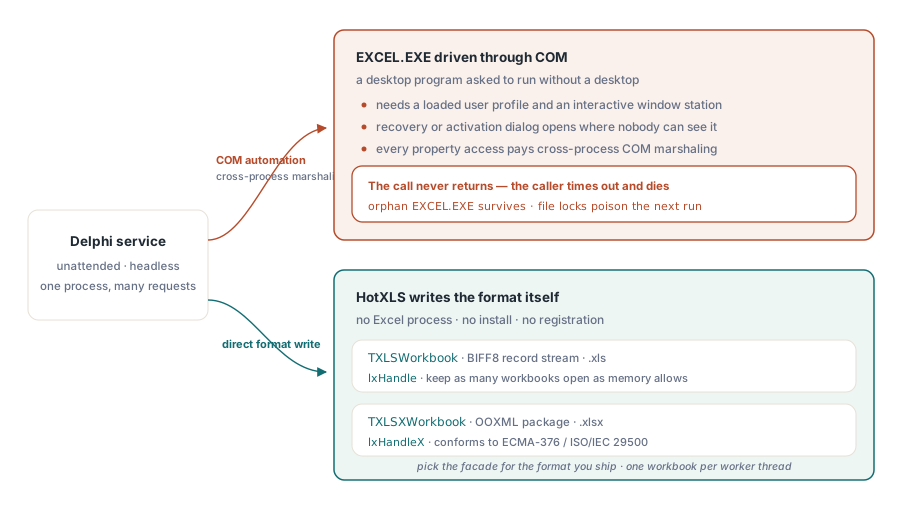
Die Skalierungsgeschichte ist nicht besser, selbst wenn nichts abstürzt. Eine Excel-Instanz ist eine Pipeline für eine einzige Arbeitsmappe, jeder Eigenschaftszugriff zahlt den Preis des prozessübergreifenden COM-Marshalings, und die Maschine, auf der der Code läuft, trägt eine Office-Lizenz, deren Bedingungen genau diese Nutzung ausschließen. Die meisten Teams stoßen auf diese Grenzen einen Ausfall nach dem anderen, was ungefähr die Art ist, wie „die COM-Schicht ablösen" auf einer Roadmap landet
Bevor diese Neuentwicklung beginnt, sollte eine Frage zum Umfang geklärt werden, denn sie entscheidet, wie viel der Arbeit real ist. COM-Code setzt fast nie nur Zellwerte. Er ruft Workbook.SaveAs mit Formatkonstanten auf, erzwingt Neuberechnung, schiebt Druckeinstellungen, greift manchmal zur Zwischenablage. Man geht den alten Code durch und notiert, welche dieser Verhaltensweisen tatsächlich in der Ausgabe landen, denn jede landet in einer anderen Ecke einer nativen Bibliothek, und ein paar davon (Zwischenablage-Interop ist das offensichtliche Beispiel) haben serverseitig keine Bedeutung und sollten gestrichen statt portiert werden
Zwei native Engines, zwei Besitzmodelle
HotXLS ersetzt den Excel-Prozess durch zwei direkte Formatimplementierungen. Eine BIFF8-Record-Stream-Engine (TXLSWorkbook, Unit lxHandle) übernimmt .xls. Ein OOXML-Paket-Writer (TXLSXWorkbook, Unit lxHandleX) erzeugt .xlsx, das ECMA-376 / ISO/IEC 29500 entspricht. Es gibt nichts zu registrieren und nichts auf dem Server zu installieren, und Sie können so viele Arbeitsmappen gleichzeitig geöffnet halten, wie der Speicher erlaubt
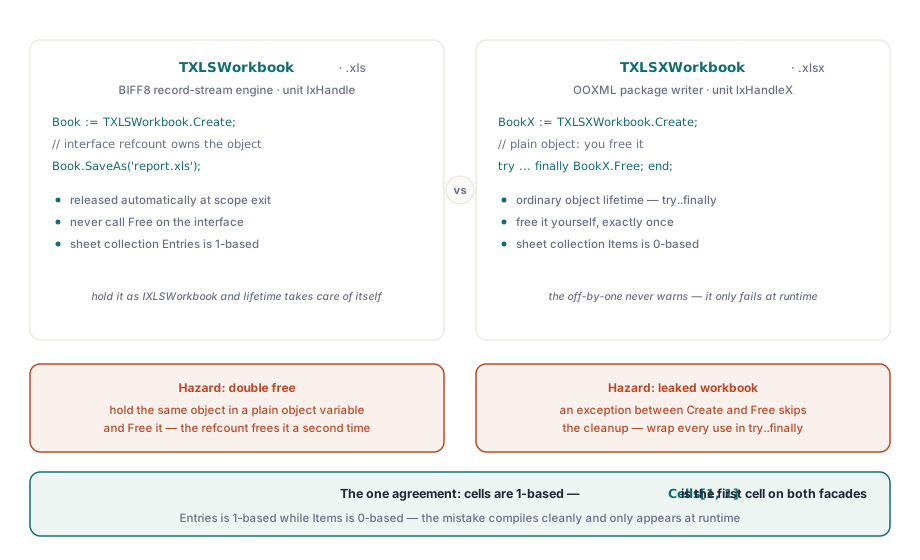
Was Leute früh stolpern lässt, ist, dass die beiden Fassaden ihren Speicher unterschiedlich besitzen, und der Unterschied ist still, bis er abstürzt:
var
  Book: IXLSWorkbook;          // Schnittstellenreferenz: wird automatisch freigegeben
  Sheet: IXLSWorksheet;
  BookX: TXLSXWorkbook;        // gewöhnliches Objekt: Sie geben es frei
  SheetX: TXLSXWorksheet;
begin
  // BIFF8-.xls-Ausgabe - kein Free; der Schnittstellen-Refcount besitzt es
  Book := TXLSWorkbook.Create;
  Sheet := Book.Sheets.Add;
  Sheet.Name := 'Report';
  Sheet.Cells.Item[1, 1].Value := 'Generated without Excel';
  Book.SaveAs('report.xls');

  // OOXML-.xlsx-Ausgabe - explizite Lebensdauer
  BookX := TXLSXWorkbook.Create;
  try
    SheetX := BookX.Sheets.Add('Report');
    SheetX.Cells[1, 1].Value := 'Generated without Excel';
    BookX.SaveAs('report.xlsx');
  finally
    BookX.Free;
  end;
end;
Die XLS-Fassade wird über die Schnittstelle IXLSWorkbook referenzgezählt. Man deklariert die Variable als Schnittstellentyp und ruft niemals Free darauf auf; hält man dasselbe Objekt in einer gewöhnlichen Objektvariablen und gibt es selbst frei, gibt der Refcount es ein zweites Mal frei. Die XLSX-Fassade ist ein gewöhnliches Objekt, das ein gewöhnliches try..finally will. Die Zelladressierung ist auf beiden Seiten 1-basiert, was die eine Stelle ist, an der die beiden übereinstimmen. Die Blattsammlungen tun es nicht: Entries auf der XLS-Seite ist 1-basiert, der XLSX-Indexer Items ist 0-basiert, und dieser Um-eins-Fehler kompiliert sauber, egal wie man ihn falsch macht, und zeigt sich erst zur Laufzeit
Eine Arbeitsmappe direkt in eine HTTP-Antwort schreiben
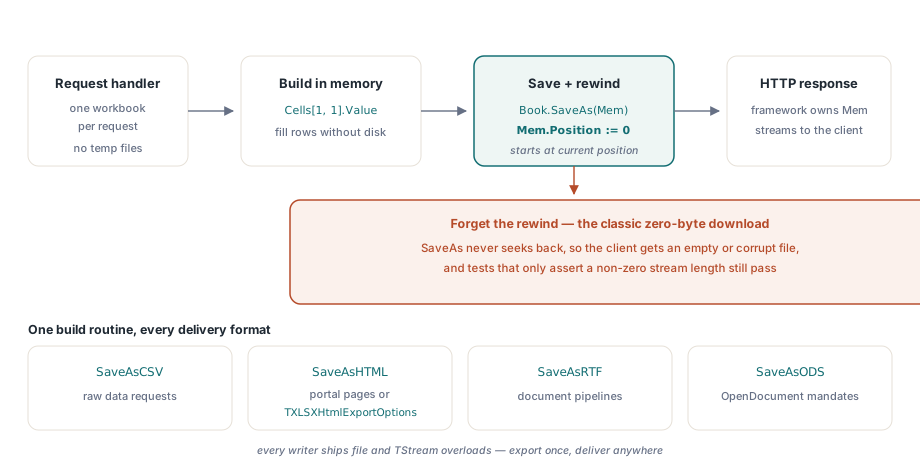
Ein serverseitiger Export hat meist keinen Grund, die Festplatte zu berühren. Temporäre Dateien verlangen eine Aufräumrichtlinie, kollidieren bei gleichzeitigen Anfragen und lassen Kundendaten auf Datenträgern liegen, die niemand zu prüfen gedachte. Beide Fassaden nehmen über ihre SaveAs-Überladungen einen TStream entgegen, sodass die Arbeitsmappe direkt in die Antwort gehen kann:
Mem := TMemoryStream.Create;
Book := TXLSXWorkbook.Create;
try
  Sheet := Book.Sheets.Add('Data');
  Sheet.Cells[1, 1].Value := 'Generated ' + DateTimeToStr(Now);
  Book.SaveAs(Mem);          // schreibt ab der AKTUELLEN Stream-Position
  Mem.Position := 0;         // vor der Übergabe des Streams zurückspulen
  Response.ContentType :=
    'application/vnd.openxmlformats-officedocument.spreadsheetml.sheet';
  Response.ContentStream := Mem;   // das Framework besitzt Mem jetzt
finally
  Book.Free;
end;
Das Zurückspulen ist die Zeile, die ihren Kommentar verdient. SaveAs(Stream) schreibt ab der aktuellen Position des Streams und springt danach nie auf null zurück. Vergisst man Mem.Position := 0, erhält der Client einen Download mit null Bytes, oder Excel erklärt die Datei für beschädigt. Das ist der häufigste Fehler in webseitigem Arbeitsmappen-Code, und der grausamste, weil er an jedem Unit-Test vorbeisegelt, der nur prüft, dass der Stream eine Länge ungleich null hat
Eine einzige Routine zum Aufbau der Arbeitsmappe erreicht jedes andere Lieferformat ohne Umstrukturierung. SaveAsCSV beantwortet die Bitte „gib mir einfach die Rohdaten", SaveAsHTML erledigt „leg es in eine Portalseite", SaveAsRTF speist Dokumentpipelines, und SaveAsODS deckt eine OpenDocument-Vorgabe ab, alle mit Datei- und Stream-Überladungen. Eine einzelne Exportroutine plus ein Formatparameter ersetzt, was früher meist vier separate COM-Makros waren. Die TXLSXHtmlExportOptions des HTML-Exporters tragen Titel, CSS-Klasse und einen Schalter für Fragment oder vollständiges Dokument, was den Portalfall davon fernhält, exportiertes Markup per Regex nachzubearbeiten
Formelwerte ohne Excel-Prozess, der sie berechnet
Unter COM-Automatisierung berechnete Excel alles umsonst neu, und der Verzicht auf COM entzieht das stillschweigend. SaveAs speichert Formeln als Text, ohne sie auszuwerten; die Zahlen erscheinen erst, wenn Excel die Datei öffnet und neu berechnet, ein Verhalten, das die XLS-Fassade über RecalcOnSave und CalculationMode einstellen lässt. Für eine Datei, die an eine Person geht, ist das genau richtig. Es ist falsch für einen Dienst, der eine Summe bestätigen muss, bevor er sie ausliefert, und falsch für den CSV-Export, der den Formeltext statt seines Ergebnisses schreibt. In beiden Fällen muss auf dem Server mit der eingebauten Engine ausgewertet werden:
SheetX.Cells[1, 1].Value := 1200;
SheetX.Cells[2, 1].Value := 950;
SheetX.Cells[3, 1].Formula := 'SUM(A1:A2)';   // XLSX-Fassade: kein '='-Präfix
Total := BookX.Calculate('SUM(A1:A2)');       // jetzt auf dem Server auswerten
if Total <> 2150 then
  raise Exception.Create('reconciliation failed before delivery');
Die Fassadenkonvention beißt hier erneut. Die XLSX-Seite weist Ausdrücke über Cell.Formula ohne Gleichheitszeichen zu; die XLS-Seite schreibt sie über Cell.Value mit führendem '='. Trägt man Code unverändert von einer zur anderen, speichert die falsche Konvention einen Textstring, der einer Formel nur ähnelt, ohne Fehler, der ihn markiert. Wenn die Formeln einer Arbeitsmappe in die eigene Geschäftslogik hineinreichen müssen, lässt der Callback OnUserFunction die Engine unbekannte Funktionsnamen zur Auswertungszeit an Delphi-Code übergeben. Das ist der native Ersatz für die UDF-Add-ins, die sich gern in genau den Tabellen verstecken, um die herum ein COM-Automatisierungssystem gewachsen ist
Bereitstellungskanten, die erst auf dem Server auftauchen
Ein paar Details entscheiden, ob der Rollout sauber oder rätselhaft wird, und das erste ist der Unit-Graph. Der Drag-and-Drop-Dataset-Exporter TDataToXLS zieht die VCL-Units Forms, Controls und Dialogs herein. Harmlos in einem Desktop-Werkzeug; in einem Konsolendienst schleppt er die gesamte VCL hinter sich her. Die Kern-Units lxHandle und lxHandleX greifen nur auf Windows, Classes, SysUtils und Variants zu, sodass ein reiner Dienst besser seine eigene Dataset-Schleife gegen die Kern-API schreibt, statt die Komponente der Bequemlichkeit halber zu importieren
Dann ist da das Threading. Workbook-Instanzen sind nicht threadsicher, aber sie teilen auch keinen globalen Zustand, sodass das skalierende Muster das einfachste ist: ein Workbook-Objekt je Job oder je Worker-Thread. Das bringt parallele Berichtserzeugung, was eine einzelne geteilte Excel-Instanz nie leisten kann. Ein Request-Handler, der seine eigene Arbeitsmappe erzeugt, füllt, speichert und freigibt, braucht überhaupt keine Locks, und der Wirkungsradius eines Fehlers schrumpft von „die geteilte Excel-Instanz hängt für alle" auf „diese eine Anfrage hat eine Exception ausgelöst", womit Ihre vorhandene Fehlerbehandlung bereits umzugehen weiß
Die Formatwahl ist das letzte davon. TXLSWorkbook.SaveAs schreibt standardmäßig BIFF (xlExcel97), und XLS-Inhalt nach .xlsx zu drücken läuft über die Brücke SaveXLSWorkbookAsXLSX mit reduzierter Wiedergabetreue. Man wählt die Fassade zur Entwurfszeit nach dem Format, das man ausliefern will, statt in einem zu bauen und am Ende der Pipeline zu konvertieren
Für die Datenlade-Hälfte eines typischen Ablöseprojekts behandeln die Muster für den Export von der Datenbank in die Arbeitsmappe sowohl die Komponente als auch die handgeschriebene Schleife, und sobald die Zeilenzahlen sechsstellig werden, machen die Leistungstechniken für große Arbeitsmappen den Unterschied zwischen Minuten und Sekunden aus. Berichte, die aus designergepflegten Layouts gebaut werden, behandelt die Anleitung zur vorlagenbasierten Berichtserzeugung
HotXLS wird als Object-Pascal-Quellcode für Delphi und C++Builder ausgeliefert; Editionen, Lizenzierung und die vollständige API-Referenz finden sich auf der Produktseite der HotXLS Delphi Component