Wenn ein Export mit 300.000 Zeilen sein Speicherbudget sprengt, bekommt meist die Zeilenzahl die Schuld. Die Zeilenzahl ist meist unschuldig. Die teuren Teile einer großen Arbeitsmappe sind die, die als Nebeneffekt entstehen: ein Stil-Pool, der um einen Eintrag je Zelle wächst, weil die Formatierung in der Schleife hinzugefügt wurde, Arbeitsblatt-XML, das beim Speichern als ein einziger riesiger String zusammengesetzt wird, eine Million identischer Formelkörper, die einzeln gespeichert werden. HotXLS, die native Delphi-Bibliothek von losLab für XLS- und XLSX-Dateien, gibt Ihnen für jeden dieser Kostenpunkte einen eigenen Hebel. Keiner davon ist standardmäßig aktiv, weil jeder einen Kompromiss verändert, sodass das Wissen, welcher Hebel zu welchem Symptom passt, die eigentliche Leistungskompetenz ist
Wo eine große Arbeitsmappe Speicher verbraucht
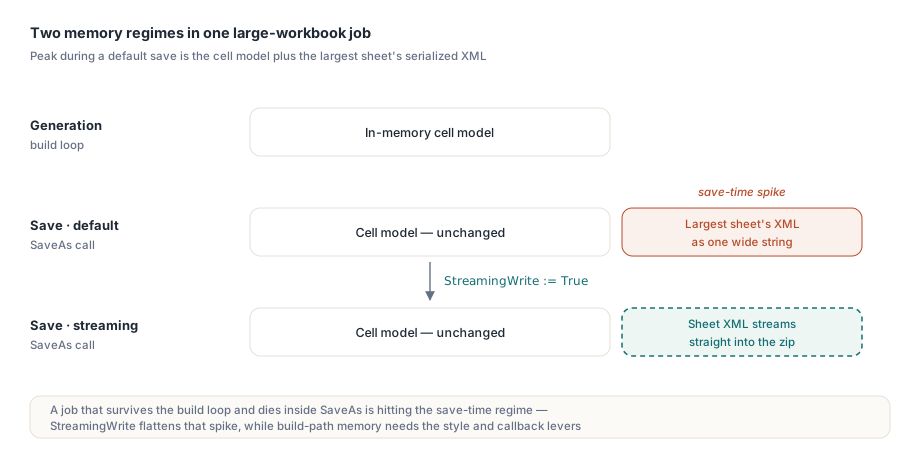
Es gibt zwei verschiedene Speicherregime, über die man nachdenken muss. Während der Erzeugung wächst das Zellmodell im Speicher mit jeder Zelle, die Sie anfassen: Werte, Formate und Formeln werden alle zu Objekten oder Pool-Einträgen. Während des Speicherns rendert der Standard-XLSX-Pfad zusätzlich das XML jedes Arbeitsblatts in einen breiten String, bevor er es in den Zip-Container komprimiert, sodass die Spitzenauslastung das Modell plus die serialisierte Form des größten Blatts ist. Ein Job, der die Aufbauschleife übersteht und dann in SaveAs stirbt, trifft das zweite Regime, nicht das erste, und die Lösung für das eine bewirkt beim anderen nichts
Die Dateigröße folgt einer verwandten Regel: Zellen sind nur ein Beitrag neben Stilen, gemeinsam genutzten Strings, Formeln, Bildern und Kommentaren. Ein Audit-Durchlauf mit ForEachCell und den Sammlungszählern je Blatt sagt Ihnen, welche Ressource eine Problemdatei tatsächlich dominiert, bevor Sie die falsche optimieren. Eine Feinheit beim Messen: Sheet.Cells.Count auf der XLSX-Seite meldet die Anzahl der instanziierten Zellen im dünn besetzten Speicher, nicht die Fläche des benutzten Bereichs. Ein Blatt, dessen Daten ein Rechteck von 1000 mal 50 belegen, bei dem die Hälfte der Zellen leer ist, zählt ungefähr 25.000, nicht 50.000. Diese Unterscheidung ist wichtig, wenn Sie die „riesige" Datei eines Kunden mit Ihren Fixtures vergleichen, denn Fläche des benutzten Bereichs und tatsächliche Zellbelegung können sich in dünn besetzten Finanzlayouts um eine Größenordnung unterscheiden
StreamingWrite behebt den Speicherpfad, nicht den Aufbaupfad
Das Setzen von TXLSXWorkbook.StreamingWrite := True schaltet SaveAs auf einen Streaming-Serialisierer um, der Arbeitsblatt-XML direkt in den Zip-Stream schreibt und das String-Zwischenprodukt je Blatt beseitigt. Der Standard ist aus Gründen der Verhaltenskompatibilität False, und das Einschalten ist eine Einzeiler-Änderung:
Book := TXLSXWorkbook.Create;
try
  Sheet := Book.Sheets.Add('Bulk');
  for R := 1 to 100000 do
  begin
    Sheet.Cells[R, 1].Value := R;
    Sheet.Cells[R, 2].Value := 'Row ' + IntToStr(R);
    Sheet.Cells[R, 3].Value := R * 1.5;
  end;
  Book.StreamingWrite := True;   // Blatt-XML wird in den Zip-Container gestreamt
  Book.SaveAs('bulk.xlsx');
finally
  Book.Free;
end;
Man sollte genau benennen, was das bringt: Das von der Schleife aufgebaute Zellmodell belegt exakt so viel Speicher wie zuvor. StreamingWrite glättet die Spitze beim Speichern, was den Unterschied zwischen einem Batchjob ausmacht, der durchläuft, und einem, der bei der 95-%-Marke scheitert. Erschöpft die Aufbauschleife selbst den Speicher, sind die beiden nächsten Hebel die, die Sie brauchen
Stil-Pools: einmal hinzufügen, den Index wiederverwenden
Die XLSX-Formatierung in HotXLS ist poolbasiert: Book.Fonts.Add(...), Fills.AddSolid(...) und Borders.Add(...) geben einen 0-basierten Pool-Index zurück, den Zellen referenzieren. Ein Aufruf von Fonts.Add mit identischen Parametern innerhalb einer Schleife wird dedupliziert, verschwendet also Zeit statt Platz. Alignments.Add verhält sich anders: Es gibt bei jedem Aufruf ein neues Objekt zurück, sodass die Erzeugung von Ausrichtungen je Zelle den Pool linear mit der Zeilenzahl wachsen lässt. Eine Gewohnheit deckt beide Fälle ab: Jeden Pool-Index einmal außerhalb der Schleife auflösen und innerhalb Indizes zuweisen
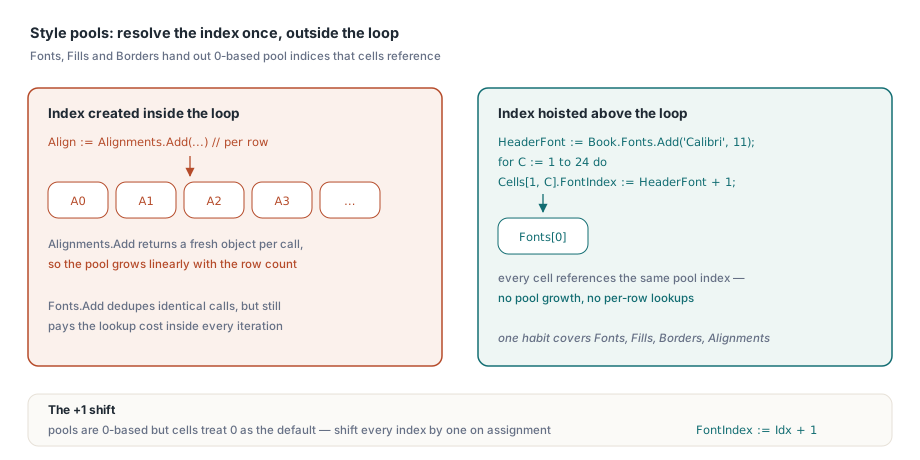
// Pool-Nachschlagen aus der heißen Schleife herausziehen
HeaderFont := Book.Fonts.Add('Calibri', 11, True, False);   // 0-basierter Pool-Index
for C := 1 to 24 do
  Sheet.Cells[1, C].FontIndex := HeaderFont + 1;            // Zellen speichern 1-basiert; 0 = Standard
Das + 1 ist kein Tippfehler, und es zu vergessen ist hier der klassische symptomerzeugende Fehler: Die Pools vergeben 0-basierte Indizes, während die zellseitigen Eigenschaften 0 als „Standard" behandeln, sodass jeder Pool-Index bei der Zuweisung um eins verschoben werden muss. Lässt man es weg, werden die Kopfzeilen stillschweigend in der Standardschrift der Arbeitsmappe gerendert, ein Defekt, den niemand bis zur Markenprüfung bemerkt
Variant-Verkehr je Zelle durch Zeilen-Callbacks ersetzen
Jedes Sheet.Cells[R, C].Value := X beinhaltet ein Nachschlagen oder Anlegen der Zelle plus eine Variant-Zuweisung. Bei einigen Hunderttausend Zellen wird dieser Overhead je Zugriff in Profilen messbar. HotXLS bietet auf beiden Fassaden Massen-Callback-APIs (ForEachCell und ForEachRow zum Lesen, WriteCells und WriteRows zum Schreiben), die die Iteration in die Engine verlagern und Ihrem Code jeweils ganze Zeilen übergeben:
procedure TLedgerExport.FillRow(Sender: TObject;
  SheetIndex, Row, FirstCol, LastCol: Integer;
  var Values: Variant; var Skip: Boolean; var Cancel: Boolean);
begin
  if Row > FCount then
  begin
    Cancel := True;     // den gesamten Schreibvorgang anhalten
    Exit;
  end;
  Values := VarArrayOf([FRows[Row - 1].Account,
                        FRows[Row - 1].PostedOn,
                        FRows[Row - 1].Amount]);
end;

// ein Engine-Aufruf statt Hunderttausender Eigenschaftszugriffe
Sheet.WriteRows(1, 1, FCount, 3, FillRow);
Das Skip-Flag des Callbacks lässt eine Zeile unberührt, ohne abzubrechen, und Cancel beendet die Operation vorzeitig, was nützlich ist, wenn die Quelle ein Reader ist, dessen Länge man erst unterwegs erfährt. Kombiniert man WriteRows für den Aufbau mit StreamingWrite für das Speichern, hat der Erzeugungspfad keinen verbleibenden Hotspot je Zelle mehr
Leseseitige Hebel auf der XLS-Fassade
Große alte .xls-Dateien haben ihren eigenen Werkzeugkasten. _DisableGraphics := True vor Open überspringt das Parsen der Zeichnungsebene vollständig, was das Laden von Arbeitsmappen beschleunigt, die jahrelang angesammelte Formen und eingebettete Bilder tragen. Die Einschränkung ist hart: Die Zeichnungsebene fehlt dann im Modell, sodass das Speichern einer solchen Arbeitsmappe eine Datei ohne ihre Zeichnungen schreibt. Dieses Flag sollte reinen Analysejobs vorbehalten bleiben. SetTempDir leitet die temporären Dateien des BIFF-Writers um, was auf Servern zählt, auf denen der Standard-Temp-Ort ein Kontingent hat oder auf langsamem Speicher liegt. UseSharedFormulas gruppiert wiederholte Formelkörper in Shared-Formula-Records und verkleinert Dateien, in denen sich eine Formelspalte über sechzigtausend Zeilen wiederholt
Leseschleifen über XLS-Daten haben eine Indizierungsfalle, die erwähnt werden sollte, weil sie bei defensiver Behandlung die Arbeit verdoppelt und bei Übersehen die Ergebnisse verfälscht: UsedRange meldet seine Grenzen FirstRow, LastRow, FirstCol und LastCol 0-basiert, während Cells.Item[Row, Col] 1-basiert ist. Ein Scan, der den benutzten Bereich durchläuft, muss beim Zellzugriff zu jeder Koordinate eins addieren, wie in Cells.Item[Row + 1, Col + 1], sonst liest er ein diagonal um eine Zelle verschobenes Raster, lässt stillschweigend die letzte Zeile und Spalte weg und nimmt eine Phantom-erste hinzu. Der ForEachCell-Callback umgeht die Diskrepanz vollständig, was ein weiterer Grund ist, ihn für Scans ganzer Blätter zu bevorzugen
Dateien vor dem Laden sondieren
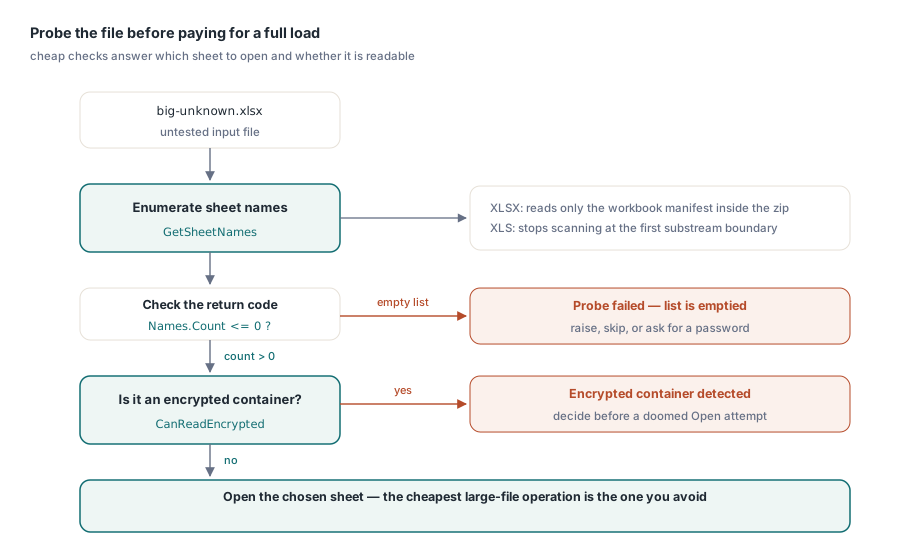
Die günstigste Operation auf einer großen Arbeitsmappe ist die, die man vermeidet. GetSheetNames auf beiden Fassaden listet die Arbeitsblätter einer Datei, ohne Zelldaten zu laden. Die XLSX-Implementierung liest nur das Workbook-Manifest im Zip und lässt die Workbook-Instanz ausdrücklich unbefüllt, und die XLS-Fassade hört an der ersten Substream-Grenze auf zu scannen. Das macht es zur richtigen Vorabprüfung für „welches Blatt soll dieser Importjob anzielen", und CanReadEncrypted beantwortet „ist das ein verschlüsselter Container", bevor ein zum Scheitern verurteilter Open-Versuch startet
Names := TStringList.Create;
Book := TXLSXWorkbook.Create;
try
  if Book.GetSheetNames('big-unknown.xlsx', Names) <= 0 then
    raise Exception.Create('cannot enumerate sheets');   // ein Fehler leert die Liste
  // das Zielblatt wählen, dann entscheiden, ob sich ein vollständiges Open lohnt
finally
  Book.Free;
  Names.Free;
end;
Man beachte die Rückgabecode-Konvention: Diese Sondierungsfunktionen signalisieren einen Fehler mit Werten kleiner oder gleich null und leeren die Ausgabeliste, daher sollte auf <= 0 geprüft werden, statt mit einem bestimmten Erfolgswert zu vergleichen
Den Ansatz auf den Job zuschneiden
Für unbeaufsichtigte Pipelines, die viele große Dateien nacheinander erzeugen, runden zwei weitere Gewohnheiten das Bild ab. Workbook-Objekte sind für gemeinsame Nutzung nicht threadsicher, aber nichts spricht gegen eine unabhängige Arbeitsmappe je Worker-Thread, was die Batch-Konvertierung sauber parallelisiert. Und wenn die Ausgabe an HTTP statt auf die Festplatte geht, kombinieren sich die TStream-Speicherüberladungen mit StreamingWrite, sodass eine große Antwort nie als temporäre Datei materialisiert. Eine betriebliche Fußnote gilt: Das Stream-Speichern schreibt ab der aktuellen Position ohne Zurückspulen, daher sollte Position := 0 gesetzt werden, bevor der Stream an das Antwort-Framework übergeben wird. Der Artikel zu Streaming-Schreiben und Batchjobs entwickelt dieses serverseitige Muster weiter, und der Artikel zum Datenbankexport zeigt, wo diese Hebel in einen datasetgetriebenen Bericht passen
Schließlich sollte man je Berichtsfamilie ein Worst-Case-Fixture vorhalten und es in der CI messen. Leistungsregressionen in der Dokumenterzeugung kündigen sich selten an. Ein in einer Schleife hinzugefügter Stil oder eine durch ein vollständiges Open ersetzte Sondierung ändert funktional nichts, und der nächtliche Batch dauert einfach vierzig Minuten länger. Ein zeitgemessener Test auf einem repräsentativen Fixture mit einer halben Million Zellen verwandelt diese Drift in einen roten Build statt in einen Betriebsvorfall
Evaluierungs-Builds, Demoprojekte mit einem Beispiel zur Massenerzeugung und die vollständige API-Referenz sind auf der Seite der HotXLS Delphi Component verfügbar