Angenommen, ein nächtlicher Delphi-Dienst erzeugt je Kunde eine XLSX-Datei, einige hundert Dateien, manche davon 400.000 Zeilen breit. Profilieren Sie ihn, und die Überraschung ist selten die Schleife, die Zellen füllt. Es ist der Aufruf von SaveAs. Mit dem Standard-Writer wird jedes Arbeitsblatt in einen einzigen XML-String im Speicher serialisiert, bevor dieser String in das OOXML-Zip komprimiert wird, und bei einem breiten Blatt kann der flüchtige String das Zellmodell, aus dem er gebaut wurde, weit übertreffen. So schießt ein Job, der seine Daten bequem aufbaut und bei 800 MB liegt, während des Speicherns über ein Containerlimit von 2 GB hinaus, und der OOM-Killer reicht den Fehlerbericht um 03:00 Uhr ein, wenn niemand hinsieht. HotXLS, die native Tabellenkalkulationsbibliothek von losLab für Delphi und C++Builder, hat eine Eigenschaft, die genau auf diese Spitze zielt: StreamingWrite. Daneben stehen zwei weitere Hebel, die darüber entscheiden, ob ein Batch-Worker innerhalb seines Speicher- und Zeitbudgets bleibt, nämlich zeilenweise Write-Callbacks und das Verhalten des Stilpools in einer engen Schleife
Was der Standard-Speicherpfad puffert und was StreamingWrite ändert
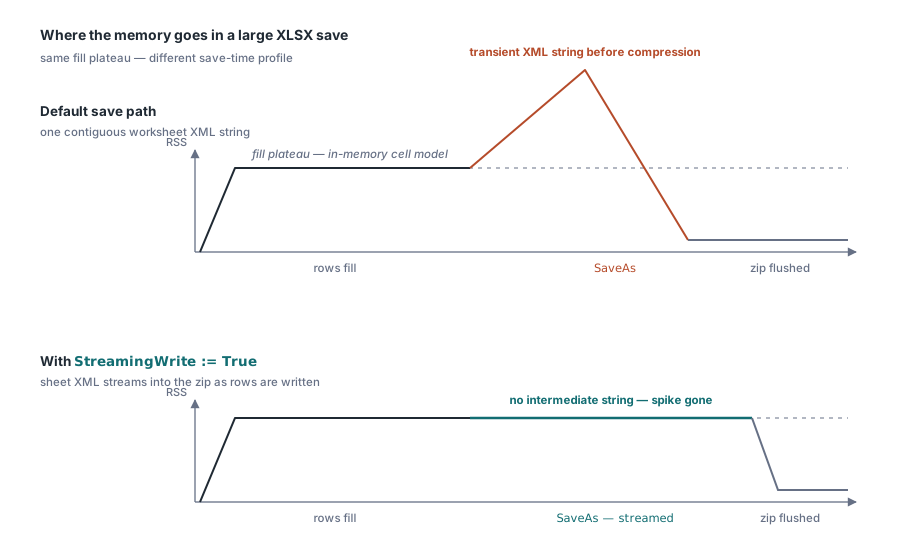
Der Standard-XLSX-Writer bevorzugt Einfachheit. Er rendert das Arbeitsblatt-XML vollständig und übergibt dann den fertigen String dem Zip-Kompressor. Für die überwältigende Mehrheit der Arbeitsmappen ist das der richtige Kompromiss, denn dort passt das XML des gesamten Blatts in wenige Megabyte. Richtig ist es nicht mehr, wenn die serialisierte Form eines einzigen Blatts hunderte Megabyte umfasst. Tabellenkalkulations-XML ist geschwätzig: Jede numerische Zelle kostet dutzende Zeichen Markup, und der String, der alles davon hält, muss zusammenhängend sein. Auf einem Speicherdiagramm ist die Signatur kaum zu übersehen. Ein langes flaches Plateau, während die Zeilen sich füllen, dann eine scharfe dreieckige Spitze während SaveAs, dann der Einbruch, sobald das Zip geschrieben ist
Book.StreamingWrite := True zu setzen schaltet SaveAs auf einen Arbeitsblatt-Writer um, der das Blatt-XML direkt in den Zip-Stream ausgibt, während es erzeugt wird. Der Zwischenstring wird nie angelegt, und die dreieckige Spitze flacht bis ins Rauschen ab
Seien Sie genau darin, was Ihnen das tatsächlich einbringt, denn Übertreibung führt zu falschen Kapazitätsplänen. Das Flag ändert allein den Speicherpfad. Der Aufbau der Arbeitsmappe belegt weiterhin das vollständige Zellmodell im Speicher, sodass das Plateau während der Füllphase exakt so hoch ist wie zuvor. Was verschwindet, ist die Serialisierungsspitze, die sich beim Speichern früher auf dieses Plateau türmte, und für einen Job, der 400.000 Zeilen füllt, ist genau diese Spitze regelmäßig der ganze Unterschied zwischen Einhalten und Sprengen eines Speicherbudgets. Die Eigenschaft ist auf False voreingestellt, um das historische Verhalten zu bewahren, sodass das Einschalten eine ausdrückliche Zeile ist, die Sie bewusst schreiben
Ein Massenexport mit eingeschaltetem Flag
Book := TXLSXWorkbook.Create;
try
  BoldIdx := Book.Fonts.Add('Calibri', 11, True, False); // Pool-Index, 0-basiert
  Sheet := Book.Sheets.Add('Bulk');
  for R := 1 to 100000 do
  begin
    Sheet.Cells[R, 1].Value := R;
    Sheet.Cells[R, 2].Value := 'Row ' + IntToStr(R);
    Sheet.Cells[R, 3].Value := R * 1.5;
    if (R mod 1000) = 0 then
      Sheet.Cells[R, 2].FontIndex := BoldIdx + 1;        // an der Zelle 1-basiert
  end;
  Book.StreamingWrite := True;   // Blatt-XML direkt in das Zip streamen
  Book.SaveAs('bulk.xlsx');
finally
  Book.Free;
end;
Cells[R, C] erzeugt Zellen bei Bedarf, was den Schleifenrumpf sauber hält. Zwei Rastergrenzen sollten Sie sich merken: 1.048.576 Zeilen und 16.384 Spalten, verfügbar als XlsxMaxRow und XlsxMaxCol. Ein Datenzulauf, der die Zeilengrenze überschreitet, muss in Ihrem eigenen Code auf mehrere Blätter verteilt werden. Nichts weiter unten in der Kette bemerkt die Überschreitung oder behebt sie für Sie, und die Datei endet schlicht an der Grenze abgeschnitten
Zeilen füllen ohne Variant-Aufwand je Zelle
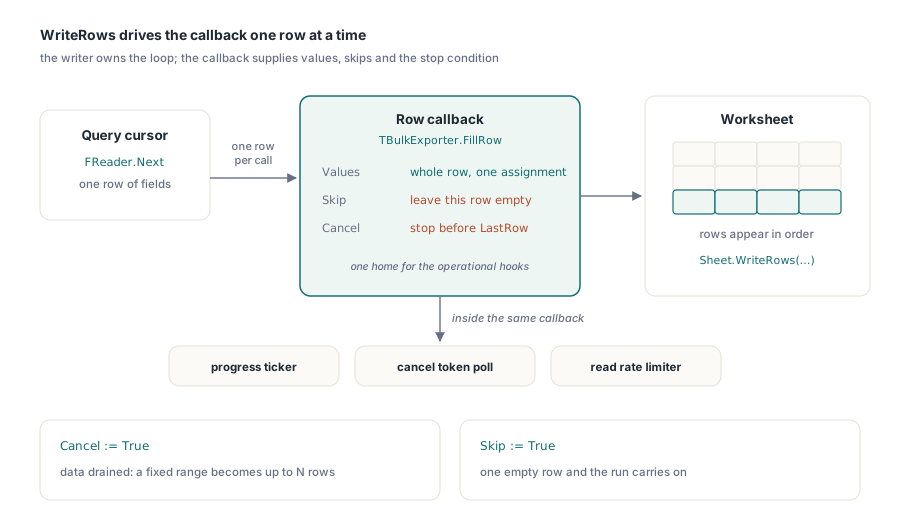
Jede Zuweisung an Cells[R, C].Value bezahlt eine Zellensuche und eine Variant-Umwandlung. Bei zehntausend Zeilen fällt das niemandem auf. Bei einer Million Zeilen mit je zwanzig Spalten wird dieser Aufwand je Aufruf zum dominierenden Kostenfaktor der Füllphase, und der Profiler zeigt direkt darauf. Die Batch-Schnittstellen erlauben es Ihnen stattdessen, dem Writer jeweils eine ganze Zeile zu übergeben. WriteRows steuert einen Callback, der je Aufruf eine Zeile liefert:
procedure TBulkExporter.FillRow(Sender: TObject; SheetIndex, Row, FirstCol,
  LastCol: Integer; var Values: Variant; var Skip: Boolean;
  var Cancel: Boolean);
begin
  if not FReader.Next then
  begin
    Cancel := True;              // Datenquelle erschöpft: sauber anhalten
    Exit;
  end;
  Values := VarArrayCreate([FirstCol, LastCol], varVariant);
  Values[FirstCol]     := FReader.RecordId;
  Values[FirstCol + 1] := FReader.CustomerName;
  Values[FirstCol + 2] := FReader.Amount;
end;

// Zeilen 2..100001, Spalten A..C aus dem Reader füllen
Sheet.WriteRows(2, 1, 100001, 3, FillRow);
Das Cancel-Flag verwandelt einen festen Zeilenbereich in „bis zu N Zeilen“, was die natürliche Form ist, wenn die Zeilenzahl aus einer Abfrage stammt, die Sie noch nicht zu Ende ausgeführt haben. Skip ist der sanftere Griff: Es lässt eine einzelne Zeile leer, ohne den Lauf anzuhalten. Über das Füllen von Zellen hinaus erweist sich der Callback als guter Ort für die betrieblichen Belange, die sonst auf umständliche Weise an eine Füllschleife angeflanscht werden. Ein Fortschrittszähler, der alle tausend Zeilen tickt, ein Abbruchtoken, das vom Job-Scheduler abgefragt wird, eine Ratenbegrenzung für Lesezugriffe auf die Quelldatenbank: All das liegt an einer Stelle, statt durch den zellenschreibenden Code gefädelt zu werden. Auf der Leseseite spiegeln ForEachRow und ForEachCell dasselbe Muster, was zählt, wenn ein Batchjob große Dateien sowohl verbraucht als auch erzeugt
Stilpools belohnen das Herausziehen aus der Schleife
Das XLSX-Stilmodell ist eine Menge gemeinsam genutzter Pools. Fonts.Add, Fills.AddSolid und Borders.Add geben alle einen 0-basierten Pool-Index zurück, und eine Zelle verweist auf eine Schrift, indem sie diesen Index plus eins in FontIndex speichert, wobei die Null für die Voreinstellung der Arbeitsmappe reserviert ist. Das +1 steht genau so im Massenbeispiel weiter oben. Vergessen Sie es, nimmt die Zelle stillschweigend den falschen Stil an, denn ein Off-by-One in einem Stilpool-Index ist immer noch ein gültiger Index, und nichts löst eine Exception aus
Die daraus folgende Disziplin lautet: Erzeugen Sie jedes Stilobjekt vor der Zeilenschleife und verweisen Sie innerhalb der Schleife auf seinen Index. Fonts.Add entfernt Duplikate identischer Definitionen, ein Aufruf je Zeile verschwendet also nur CPU. Alignments.Add ist die Falle, denn es liefert bei jedem Aufruf einen frischen Eintrag. Innerhalb einer Schleife über 100.000 Zeilen begräbt das die styles.xml unter hunderttausend doppelten Ausrichtungsdatensätzen, was die Datei auf der Platte aufbläht und jedes spätere Öffnen in Excel verlangsamt, weil die Duplikate erneut geparst werden. Bauen Sie jeden Stil einmal außerhalb der Schleife und verweisen Sie dann so oft auf seinen Index, wie Sie möchten
Streams, Temp-Verzeichnisse und die Batch-Schleife um das Ganze
Nichts davon setzt ein Dateisystem voraus. Beide Fassaden tragen quer über ihre IO-Oberfläche TStream-Überladungen, darunter Open und SaveAs und SaveAsCSV und SaveAsHTML und SaveAsODS, sodass ein Batch-Worker direkt in einen TMemoryStream für Blob-Speicher oder eine HTTP-Antwort rendern kann, ohne je die Platte zu berühren. Eine scharfe Kante ist zu beachten. SaveAs(Stream) schreibt ab der aktuellen Position des Streams und spult danach nicht zurück, setzen Sie also selbst Position := 0, bevor Sie den Stream an das Ausliefernde weitergeben, sonst liest der Konsument null Bytes. Die XLS-Fassade fügt zwei eigene Stellschrauben hinzu. SetTempDir richtet die temporären Dateien des BIFF-Writers auf einen Datenträger, der den Platz und die IO-Reserve hat, sie aufzunehmen, was auf Servern zählt, wo der voreingestellte Temp-Pfad auf einer beengten Systemplatte liegt. UseSharedFormulas faltet wiederholte Formelrümpfe zu gemeinsamen Gruppen zusammen, eine echte Größenreduktion für die klassische Berichtsform, bei der eine Formel eine ganze Spalte hinunter kopiert wird
Die Batch-Schleife selbst bleibt absichtlich langweilig:
for FileName in SourceFiles do
begin
  Book := TXLSXWorkbook.Create;        // frische Instanz: kein Zustand sickert durch
  try
    Book.StreamingWrite := True;
    if Book.Open(FileName) <> 1 then
      Continue;                        // eine schlechte Eingabe darf den Batch nicht beenden
    Book.SaveAsCSV(ChangeFileExt(FileName, '.csv'), 0, ',');
  finally
    Book.Free;
  end;
end;
Eine frische Arbeitsmappen-Instanz je Datei kostet Mikrosekunden und beseitigt eine ganze Kategorie von Verunreinigungsfehlern über Dateigrenzen hinweg: Stile, definierte Namen und Dokumenteigenschaften aus Datei 17 haben keinen Weg, in Datei 18 zu sickern. Das Überspringen und Weitermachen nach einem gescheiterten Open verdient sich seinen Platz ebenso, denn ein abgeschnittener Upload in einem Batch aus 600 Dateien sollte Sie eine einzelne Logzeile kosten statt den Rest des Laufs. Erwähnenswert ist auch, was der CSV-Zweig bewusst nicht tut. SaveAsCSV schreibt Formeln als wörtlichen Text heraus und wertet sie nie aus, ein Konvertierungs-Batch, dessen Konsumenten berechnete Zahlen erwarten, muss also zuerst Calculate auf den betreffenden Zellen laufen lassen oder von Arbeitsmappen ausgehen, die bereits zwischengespeicherte Ergebnisse einer früheren Berechnung tragen
Nebenläufigkeitsmodell: eine Arbeitsmappe je Thread
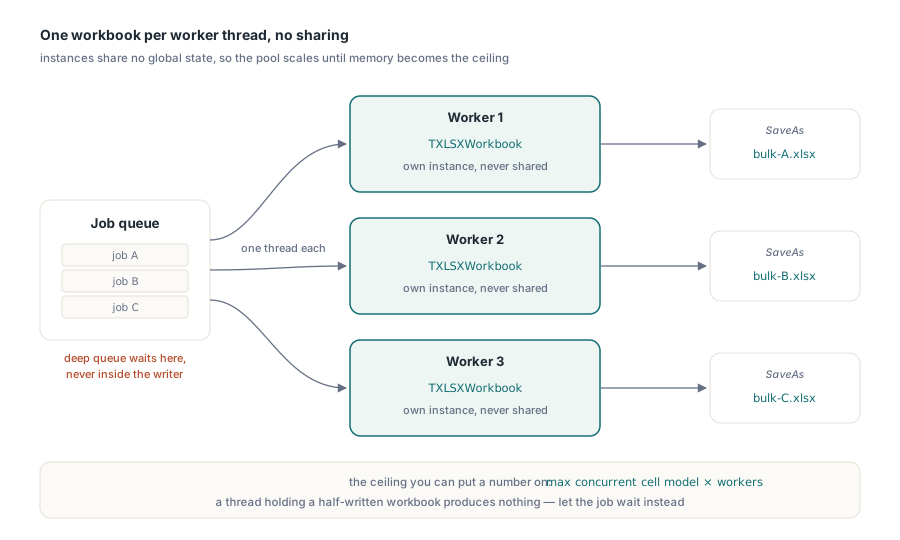
Die Objekte beider Fassaden sind nicht threadsicher, und der Entwurf hat nie etwas anderes behauptet. Da es zwischen Instanzen keinen gemeinsamen globalen Zustand gibt, lautet die Skalierungsregel schlicht: eine Arbeitsmappe je Worker-Thread, ohne eine Arbeitsmappe über Threads hinweg zu teilen. Ein Pool aus N Workern, von denen jeder seine eigene TXLSXWorkbook besitzt, skaliert nahezu linear, bis der Speicher zur Decke wird, und diese Decke lässt sich beziffern: das größte gleichzeitige Zellmodell multipliziert mit der Worker-Zahl, plus dem Aufwand beim Speichern, den StreamingWrite abgeflacht hat. Wenn die Warteschlange tief wird, üben Sie den Gegendruck an der Job-Warteschlange aus statt im Writer. Ein ausgehungerter Thread, der eine Arbeitsmappe halb geschrieben hat, hat nichts Brauchbares erzeugt, während ein Job, der ein paar Sekunden auf einen freien Worker gewartet hat, unversehrt fertig wird
Das weitere Bild zur Feinabstimmung, einschließlich gemeinsamer Formeln, des Überspringens von Grafiken auf der Leseseite und der XLS-spezifischen Hebel, finden Sie im Leitfaden zur Leistung großer Arbeitsmappen. Batchjobs, deren Zeilen direkt aus einer Abfrage stammen, behandeln gesondert die Muster für Datenbankexporte in Delphi-Berichten
HotXLS kompiliert als natives Object Pascal ohne externe Abhängigkeiten in Ihren Delphi- oder C++Builder-Dienst; Editionen und Lizenzierung finden Sie auf der Produktseite der HotXLS Delphi Component