Ein Abfrageergebnis in einen Excel-Bericht zu verwandeln sind drei Probleme in einem Gewand. Jeder Delphi-Feldtyp muss als der richtige Excel-Typ in einer Zelle landen, die Kopfzeile muss sich wie ein Bericht lesen und nicht wie ein Schema-Dump, und Zahlen, Datumswerte und Geldbeträge müssen Formate tragen, die den Weg überstehen. Lässt man auch nur eines davon aus, öffnet sich die Datei trotzdem, sieht plausibel aus und versagt in dem Moment, in dem ein Nutzer aus der Finanzabteilung eine Spalte markiert und auf eine Summe wartet, die nie erscheint. Die Werte wurden als Text geschrieben, Excel behandelt sie als Beschriftungen, und keine Exception hat je gewarnt
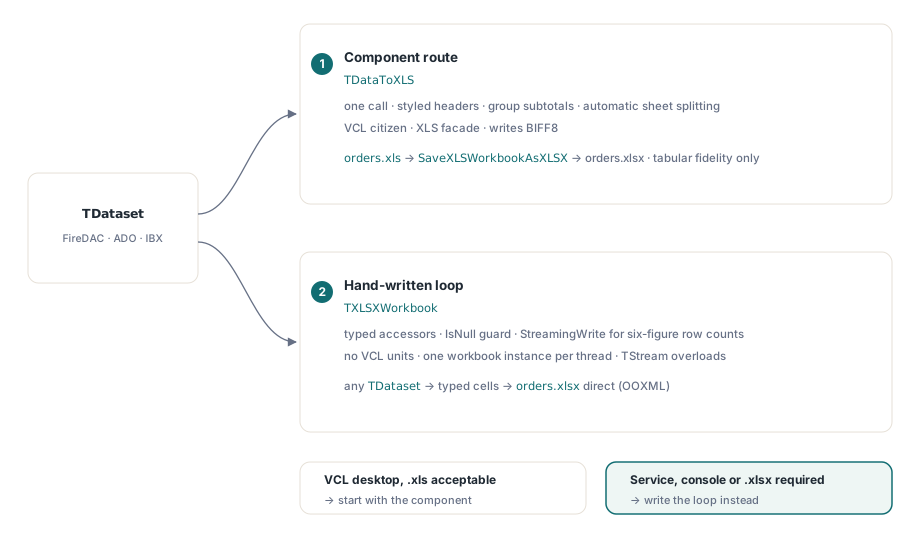
HotXLS ist eine native Object-Pascal-Tabellenkalkulationsbibliothek, die XLS- und XLSX-Dateien direkt aus Delphi und C++Builder schreibt, ganz ohne Excel-Automatisierung. Sie bietet zwei Wege von einem TDataset zu einer Arbeitsmappe: die fertige Komponente TDataToXLS und eine handgeschriebene Schleife gegen die Workbook-API. Die beiden sind nicht austauschbar. Die Komponente ist ein VCL-Bürger auf Basis der XLS-Fassade, daher hängt die richtige Wahl davon ab, wo der Code läuft und welches Dateiformat der Abnehmer erwartet. Im Folgenden werden beide Wege beschrieben, die Grenze, an der die Komponente nicht mehr das richtige Werkzeug ist, und wie Feldtypen auf beiden Wegen intakt bleiben
Feldtypen sind der eigentliche Exportvertrag
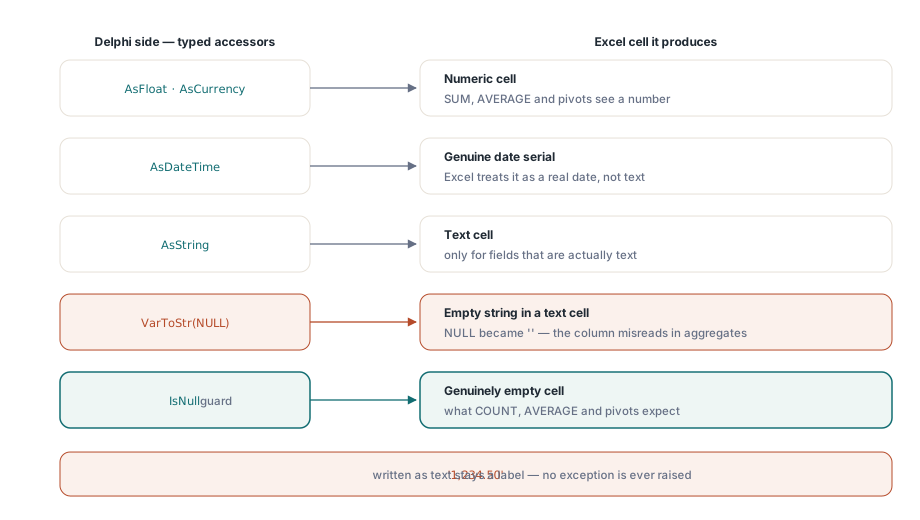
Vor jedem API-Aufruf sollte entschieden werden, wie jeder Delphi-Feldtyp in einer Zelle landet. Eine Zelle, die einen Delphi-String erhält, bleibt ein String. HotXLS rät nicht, dass '1,234.50' als Zahl gemeint war, und das sollte es auch nicht, denn gebietsschemaabhängiges Neuparsen ist genau der Weg, auf dem ein deutsches Dezimalkomma auf einem englischen Server zum Tausendertrennzeichen wird. Das zuverlässige Muster ist die Zuweisung über die typisierten Accessoren: AsFloat oder AsCurrency für numerische Felder, AsDateTime für Datumswerte, damit die Zelle eine echte Excel-Datumsseriennummer statt eines formatierten Strings enthält, und AsString nur für Felder, die tatsächlich Text sind
Die Behandlung von NULL verdient eine explizite Entscheidung statt eines Standardverhaltens. Wer einen Feldwert mit VarToStr umwandelt, macht aus SQL-NULL einen leeren String, also eine Textzelle, während das Auslassen der Zuweisung die Zelle wirklich leer lässt, was AVERAGE, COUNT und PivotTable-Abnehmer erwarten. Bei Geldspalten sollte vor dem Schreiben der Schleife feststehen, ob NULL null oder unbekannt bedeutet. Beide sehen identisch aus, sobald jemand die Spalte formatiert, und der Unterschied verändert jedes nachgelagert berechnete Aggregat
Der Komponentenweg: TDataToXLS in VCL-Anwendungen
Für eine klassische VCL-Anwendung mit einer bereits in ein Datenmodul eingebundenen Abfrage ist TDataToXLS der Ein-Aufruf-Weg. Die Komponente durchläuft jeden TDataset-Nachfahren, ob FireDAC, ADO, IBX oder irgendetwas anderes, das die abstrakte Dataset-Schnittstelle implementiert, und erzeugt ein gestaltetes Arbeitsblatt mit Kopfzeilenbeschriftungen, Schriftarten, Rahmen, optionalen Gruppenzwischensummen und automatischer Blattaufteilung für große Ergebnismengen
var
  Exporter: TDataToXLS;
begin
  Exporter := TDataToXLS.Create(nil);
  try
    Exporter.Dataset := OrdersQuery;          // beliebiger TDataset-Nachfahre
    Exporter.WorksheetName := 'Orders';
    Exporter.HeaderSource := hsDisplayLabel;  // Beschriftungen statt roher Spaltennamen
    Exporter.GroupFields.Add('CustomerID');   // Zwischensummenblock je Kunde
    Exporter.RowsPerSheet := 50000;           // unter der BIFF8-Zeilengrenze bleiben
    Exporter.VisibleFieldsOnly := True;             // Field.Visible beachten
    Exporter.SaveDatasetAs('orders.xls');
  finally
    Exporter.Free;
  end;
end;
Zwei Eigenschaften tragen hier den Großteil der Produktionslast. HeaderSource := hsDisplayLabel schreibt das DisplayLabel jedes Feldes statt des rohen SQL-Spaltennamens, sodass in der Arbeitsmappe „Customer Name" steht und nicht CUST_NM. RowsPerSheet existiert, weil die Komponente BIFF8 schreibt, dessen Raster bei 65.536 Zeilen mal 256 Spalten endet; ein Wert von 50.000 verteilt eine große Ergebnismenge auf mehrere Blätter, bevor die Formatgrenze sie abschneidet. Das Erscheinungsbild regeln die Eigenschaften HeaderFont, DetailFont, GroupColor und die Rahmenstil-Eigenschaften, und die Menge DisableFormat schaltet ganze Formatierungskategorien ab, wenn der Abnehmer schlichte Zellen wünscht. Für alles Maßgeschneiderte reichen die Ereignisse AfterCell und AfterRow den gerade geschriebenen Bereich zur Nachbearbeitung weiter
Wo die Komponente endet
Drei Einschränkungen sind in TDataToXLS bewusst eingebaut, und wer sie vorab kennt, erspart sich zwei Sprints später ein unangenehmes Redesign
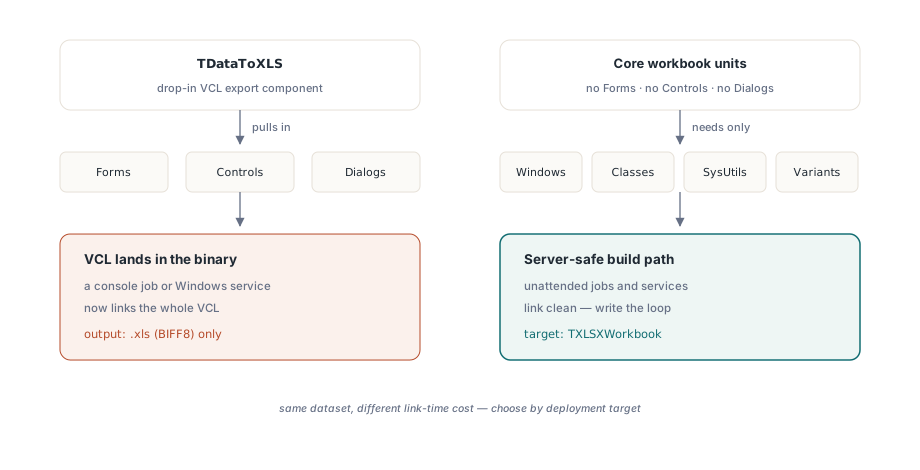
- Sie ist eine VCL-Komponente im vollen Sinn. Ihre Unit zieht
Forms,ControlsundDialogsherein, sodass das Linken in einen Konsolenjob oder einen Windows-Dienst die VCL in die Binärdatei schleppt. Die Kern-Workbook-Units haben keine solche Abhängigkeit. Sie benötigen nurWindows,Classes,SysUtilsundVariants, weshalb serverseitiger Code stattdessen die unten gezeigte Schleife verwenden sollte - Sie baut auf der XLS-Fassade auf. Die Komponente befüllt ein
IXLSWorkbookund schreibt .xls (BIFF8). Es gibt keine Eigenschaft, die sie auf OOXML-Ausgabe umschaltet - Ihre Ereignisse sprechen den XLS-Dialekt. Der Parameter
Cell: IXLSRangeinAfterCellgehört zum XLS-Objektmodell, sodass dort geschriebene Anpassungen je Zelle XLS-Code sind, selbst wenn die Datei anschließend nach .xlsx konvertiert wird
.xlsx aus der Ausgabe der Komponente erzeugen
Wenn der Abnehmer auf .xlsx besteht, die Exportlogik aber bereits in TDataToXLS lebt, konvertiert die Brückenfunktion in der Unit lxXlsxExport die befüllte Arbeitsmappe mit einem Aufruf:
uses lxXlsxExport;

Exporter.SaveDatasetAs('orders.xls');
// die Komponente stellt das befüllte IXLSWorkbook bereit
SaveXLSWorkbookAsXLSX(Exporter.Workbook, 'orders.xlsx');
Die Brücke sollte als Träger tabellarischer Daten verstanden werden, nicht als Konverter mit voller Wiedergabetreue. Sie kopiert Werte, Formeln, Zahlenformate, Füllfarben, Schriftattribute, Spaltenbreiten und Ansichtseinstellungen. Rahmen, verbundene Bereiche, Kommentare, Diagramme und bedingte Formate kopiert sie bewusst nicht. Für ein flaches Raster aus Kopfzeile plus Datenzeilen reicht das genau aus. Für einen gestalteten Bericht reicht es nicht, und die ehrliche Lösung ist, die XLSX-Datei direkt zu erzeugen, statt die konvertierte Datei nachzubessern
Die handgeschriebene Schleife für Dienste und Batchjobs
Serverseitiger Code sollte direkt auf TXLSXWorkbook zielen. Vor dem Kopieren eines Beispiels lohnt ein Blick auf den Unterschied in der Lebensdauer der beiden Fassaden. Das TXLSWorkbook der XLS-Seite wird über eine referenzgezählte Schnittstelle gehalten und darf nicht manuell freigegeben werden, während TXLSXWorkbook eine gewöhnliche Klasse ist, die try..finally Free verlangt. Beide Konventionen zu vermischen ist ein zuverlässiger Weg, entweder ein Leck oder ein doppeltes Free zu produzieren
procedure ExportOrders(Q: TDataSet; const FileName: string);
var
  Book: TXLSXWorkbook;
  Sheet: TXLSXWorksheet;
  Row: Integer;
begin
  Book := TXLSXWorkbook.Create;
  try
    Sheet := Book.Sheets.Add('Orders');
    Sheet.Cells[1, 1].Value := 'Order No';
    Sheet.Cells[1, 2].Value := 'Customer';
    Sheet.Cells[1, 3].Value := 'Ordered';
    Sheet.Cells[1, 4].Value := 'Amount';

    Row := 2;
    Q.First;
    while not Q.Eof do
    begin
      Sheet.Cells[Row, 1].Value := Q.FieldByName('OrderNo').AsInteger;
      Sheet.Cells[Row, 2].Value := Q.FieldByName('Customer').AsString;
      if not Q.FieldByName('Ordered').IsNull then
        Sheet.Cells[Row, 3].Value := Q.FieldByName('Ordered').AsDateTime;
      Sheet.Cells[Row, 4].Value := Q.FieldByName('Amount').AsFloat;
      Inc(Row);
      Q.Next;
    end;

    Book.StreamingWrite := True;  // Blatt-XML direkt in das Zip streamen
    Book.SaveAs(FileName);
  finally
    Book.Free;
  end;
end;
Die entscheidenden Zeilen sind die typisierten Zuweisungen und die IsNull-Absicherung. Datumswerte kommen als Datumsseriennummern an, Beträge als Doubles, und NULL-Bestelldaten bleiben wirklich leer, statt zu leeren Strings zu werden. StreamingWrite := True ändert nur den Speicherpfad: Das Arbeitsblatt-XML wird direkt in den Zip-Container gestreamt, statt zuerst als ein großer String zusammengesetzt zu werden, was die Speicherspitze beim SaveAs bei sechsstelligen Zeilenzahlen glättet. Jede Speichermethode hat außerdem eine TStream-Überladung, sodass die Arbeitsmappe ohne Umweg über die Festplatte direkt in eine HTTP-Antwort wandern kann. Der Artikel zu Streaming-Schreiben und Batchjobs führt durch dieses Bereitstellungsmuster, und der Artikel zur Leistung großer Arbeitsmappen behandelt, was zu tun ist, wenn die Zeilenzahlen weiter steigen
Diese Schleife ist auch der Weg, der über Threads skaliert. Beide Engines sind native Object-Pascal-Writer, BIFF8-Record-Streams auf der einen Seite und OOXML-Zip plus XML auf der anderen, sodass kein Teil eines Exports COM-Automatisierung berührt oder eine Excel-Lizenz auf dem Server braucht. Das bringt Parallelität ohne Einzelinstanz-Engpass, sofern jeder Thread seine eigene Arbeitsmappe aufbaut. Die Workbook-Objekte sind für gemeinsame Nutzung nicht threadsicher, daher lautet die Regel: eine Instanz je Export, niemals eine geteilte Instanz hinter einem Lock
Eine Grenze sollte bekannt sein, bevor man darum herum entwirft. Das XLSX-Raster endet bei 1.048.576 Zeilen mal 16.384 Spalten, sodass die Blattaufteilung, die RowsPerSheet auf der XLS-Seite übernimmt, hier selten nötig ist. Eine Arbeitsmappe mit einer Million Zeilen ist ohnehin selten das, was ein menschlicher Abnehmer will. Wenn die Ergebnismenge wirklich so groß ist, ist eine Datei mit Trennzeichen meist der bessere Vertrag, und der Artikel zum CSV- und TSV-Export behandelt Trennzeichen, BOM-Verhalten und den Vorbehalt zur Formelauswertung, der dort gilt
Einen Ausgangspunkt wählen
Wenn der Export in einem VCL-Desktopwerkzeug lebt und .xls-Ausgabe akzeptabel ist, sollte man mit TDataToXLS und seiner Gruppierungsunterstützung beginnen. Das ist der geringste Code, und die Brücke über SaveXLSWorkbookAsXLSX steht bereit, wenn später jemand nach .xlsx fragt, sofern man die bereits beschriebenen Grenzen der Wiedergabetreue akzeptiert. Läuft der Code unbeaufsichtigt oder verlangt der Abnehmer von Anfang an .xlsx, schreibt man die Schleife. Beide Wege werden mit funktionierenden Demoprojekten ausgeliefert und sind Teil des Pakets HotXLS Delphi Component