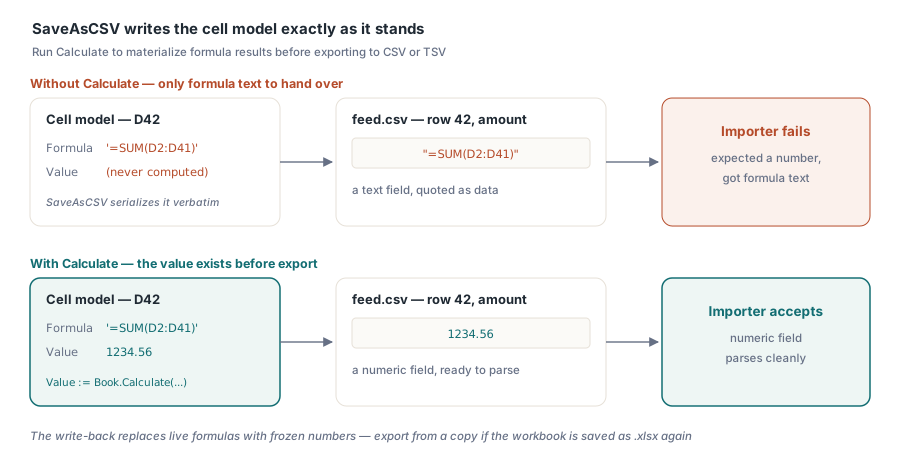
Stellen Sie sich einen nächtlichen Lauf vor, der im Code eine Rechnungsarbeitsmappe baut und sie als CSV herausschreibt, damit ein nachgelagertes System sie importiert. Die Zahlen sehen in Excel richtig aus. Die CSV öffnet sich sauber in einem Texteditor. Dann verschluckt sich der Importeur an der Summenspalte, weil das Betragsfeld in Zeile 42 =SUM(D2:D41) lautet, die Formel als wörtlicher Text, nicht die Zahl, zu der sie sich berechnen sollte. Nichts ist kaputt. Das ist dokumentiertes Verhalten, und es ist das Erste, was man am Export aus HotXLS verstehen muss: Der Schreiber serialisiert das Zellmodell genau so, wie es dasteht, und eine Formelzelle, deren Wert nie berechnet wurde, hat nur ihren Formeltext zu übergeben
Warum in Ihrer CSV Formeln statt Zahlen stehen
HotXLS speichert Formeltext und berechneten Wert als zwei getrennte Dinge. SaveAsCSV lässt auf dem Weg nach draußen absichtlich nicht die Berechnungs-Engine laufen: Ein Export sollte die Arbeitsmappe nicht verändern und nicht riskieren, an einer krankhaften Formelkette hängen zu bleiben. Dateien, die Excel selbst gespeichert hat, tragen zwischengespeicherte Ergebnisse neben den Formeln, ein erneuter Export solcher Dateien verhält sich also wie erwartet. Die Falle betrifft eigens von Ihrem Code erzeugte Arbeitsmappen, in denen Formeln geschrieben, aber nie ausgewertet wurden. Die Abhilfe besteht darin, die Werte vor dem Export entstehen zu lassen, mit derselben Calculate-Engine, die auch blattübergreifende Bezüge und eigene Funktionen auflöst:
var
  Book: TXLSXWorkbook;
  Sheet: TXLSXWorksheet;
  R: Integer;
begin
  Book := TXLSXWorkbook.Create;
  try
    Book.Open('invoice-run.xlsx');
    Sheet := Book.Sheets[0];

    // Formelergebnisse materialisieren, damit die CSV Zahlen trägt, keinen Formeltext
    for R := 2 to 41 do
      if Sheet.Cells[R, 4].Formula <> '' then
        Sheet.Cells[R, 4].Value := Book.Calculate(Sheet.Cells[R, 4].Formula);

    Book.SaveAsCSV('feed.csv', 0, ',');    // Blatt 0, Komma
    Book.SaveAsCSV('feed.tsv', 0, #9);     // dasselbe Blatt als TSV
  finally
    Book.Free;
  end;
end;
Achten Sie darauf, was die Schleife tatsächlich tut: Sie überschreibt die Formelzellen mit ihren berechneten Werten. Das ist für einen Wegwerf-Exportdurchgang genau richtig und falsch, wenn Sie die Arbeitsmappe danach wieder als .xlsx speichern wollen, denn Sie haben soeben lebende Formeln durch eingefrorene Zahlen ersetzt. Exportieren Sie aus einer Kopie, oder begrenzen Sie das Zurückschreiben so, dass es nur den Exportlauf betrifft. Die Engine hinter Calculate kann mehr als das, unter anderem eigene Funktionen registrieren, was Thema von der HotXLS-Formel-Engine und benutzerdefinierten Funktionen ist
Was der Schreiber für Trennzeichenformate zusichert
Der CSV-Weg erzeugt UTF-8 mit Byte Order Mark, CRLF-Zeilenenden und Zitierung nach RFC 4180. Jedes Feld, das das Trennzeichen, ein Anführungszeichen oder einen Zeilenumbruch enthält, wird eingefasst, und eingebettete Anführungszeichen werden verdoppelt. Datumsangaben erscheinen als yyyy-mm-dd hh:nn:ss, unabhängig vom Anzeigeformat der Zelle. Das ist für einen maschinellen Konsumenten die richtige Entscheidung, überrascht aber jeden, der die Formatierung vom Bildschirm erwartet hatte. Rich-Text-Zellen werden durch Aneinanderhängen ihrer Runs verflacht
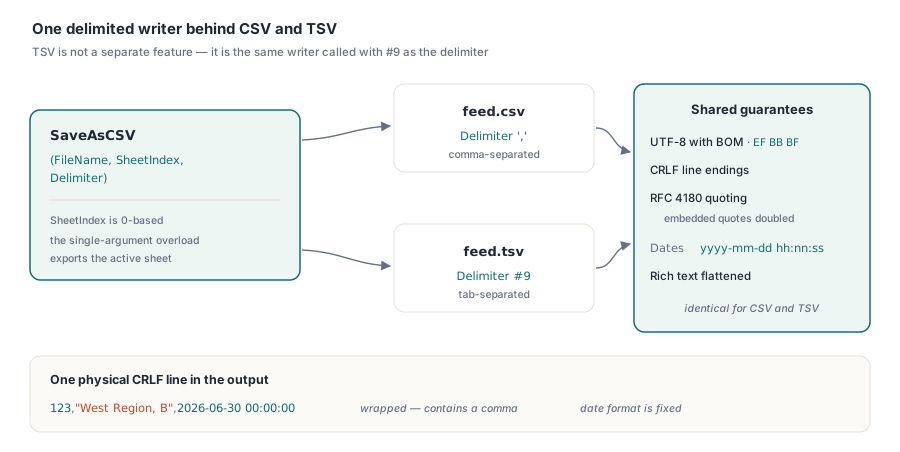
Diese Vorgaben klären die meisten Streitfälle mit einem Importeur, bevor sie beginnen, aber zwei davon gehören trotzdem in Ihren Schnittstellenvertrag. Der erste ist die BOM. Sie ist es, die Excel die Datei mit unversehrten Akzentzeichen öffnen lässt, doch eine Handvoll strenger Parser behandelt diese drei Bytes als Daten; ist Ihrer einer davon, entfernen Sie sie bei der Übergabe. Das Zweite ist TSV. Es ist überhaupt keine eigene Funktion, sondern derselbe Schreiber, aufgerufen mit #9 als Trennzeichen, alles Obige gilt also unverändert dafür. Das zu exportierende Blatt wird in der Überladung mit mehreren Argumenten über einen 0-basierten Index gewählt, während die Kurzform SaveAsCSV(FileName) mit einem Argument das aktive Blatt nimmt
Der HTML-Export ist eine Momentaufnahme, kein Austauschformat
Während CSV alles außer den Werten wegwirft, versucht SaveAsHTML, das Aussehen zu bewahren: eine <table> je Blatt, verbundene Bereiche ausgedrückt als colspan und rowspan, grundlegende Zellgestaltung als CSS eingebettet. Designbezogene Farben werden übersprungen statt aufgelöst, eine Vorlage, die sich auf Designplätze stützt, kommt also schlichter heraus, als sie in Excel aussieht. Setzen Sie ausdrückliche RGB-Farben auf allem, was die Reise überstehen muss. Das Optionsobjekt steuert die Hülle:
var
  Opts: TXLSXHtmlExportOptions;
begin
  Opts := TXLSXHtmlExportOptions.Create;
  try
    Opts.Title := 'Weekly settlement';
    Opts.TableClass := 'report-grid';     // Anknüpfpunkt für das Stylesheet der Hostseite
    Opts.WriteDocument := True;           // vollständige Seite, kein Fragment
    if Book.SaveAsHTML('settlement.html', 0, Opts) <> 0 then
      raise Exception.Create('Sheet index out of range');
  finally
    Opts.Free;
  end;
end;
Zwei Details in diesem Ausschnitt lohnen Aufmerksamkeit. Setzen Sie WriteDocument auf False, und die Ausgabe wird ein nacktes Tabellenfragment statt einer vollständigen Seite, was Sie wollen, wenn Sie eine Vorschau in ein bestehendes Layout einspielen: Setzen Sie TableClass und lassen Sie das Stylesheet der Hostseite die Gestaltung übernehmen. Auch die Rückgabekonvention ist umgekehrt zu den meisten HotXLS-Aufrufen. SaveAsHTML gibt bei Erfolg 0 zurück und -1 bei einem falschen Blattindex, eine aus Gewohnheit geschriebene Prüfung auf = 1 meldet also jeden erfolgreichen Export als Fehlschlag. Wenn Sie einen Bereich statt eines ganzen Blattes brauchen, etwa um einen einzelnen Block zu mailen oder einzubetten, exportiert TXLSXRange.SaveAsHTML jeden rechteckigen Bereich nach denselben Darstellungsregeln
RTF-Ausgabe und wo sie sich noch lohnt
Das vierte Ziel schreibt RTF-1.6-Tabellen, ein Blatt je Aufruf über SaveAsRTF. Spaltenbreiten werden mit ungefähr 96 Twips je Zeichen Spaltenbreite angenähert. Die strukturelle Einschränkung, die man kennen muss, ist, dass verbundene Zellen in der Ausgabe nicht überspannen: Nur die Ankerzelle trägt ihren Inhalt, und die überdeckten Zellen kommen leer heraus. Damit scheidet RTF für layoutlastige Vorlagen aus. Es behält seinen Platz als Weg des geringsten Widerstands, um tabellarische Ergebnisse in eine Textverarbeitung oder in ein altes Dokumentenmanagementsystem zu bringen, das älter ist als die HTML-Einspeisung
Rundlauf: Der CSV-Import ist von Haus aus zerstörend
Das Zurücklesen von CSV hat seinen eigenen Vertrag. OpenCSV leert die gesamte Arbeitsmappe und baut sie als ein einzelnes Blatt namens Sheet1 neu auf. Es ist dem Geist nach ein Konstruktor, kein Zusammenführen, rufen Sie es also nie auf einer Arbeitsmappe auf, die noch ungespeicherte Inhalte hält. Die Übergabe von #0 als Trennzeichen löst die automatische Trennzeichenerkennung aus. Das Flag ADetectTypes steuert die Typumwandlung: Ist es an, werden numerische Strings zu Zahlen, ISO-8601-Strings zu Datumsangaben und true/false zu Wahrheitswerten. Schalten Sie es aus, wenn die Einspeisung Bezeichner mit führenden Nullen, Postleitzahlen oder Produktcodes trägt, die die Umwandlung allesamt still zu Zahlen verstümmelt (eine führende Null ist schlicht weg, sobald aus 00123 die 123 wird). Beide Fassaden stellen denselben Import bereit. Paaren Sie ihn mit den obigen Exportaufrufen, und Sie haben eine Formatbrücke, die nirgends in der Pipeline ein installiertes Excel braucht, also genau das Szenario aus Berichtserzeugung von der Datenbank nach Excel mit HotXLS
Direkt in einen Stream exportieren
Jeder Schreiber hier hat neben der Variante mit Dateinamen eine Stream-Überladung: CSV, HTML, RTF und die Arbeitsmappenformate selbst. In Servercode sind diese Überladungen die richtige Wahl. Ein Web-Endpunkt, der einen CSV-Download ausliefert, kann in einen TMemoryStream schreiben und diesen direkt an das Antwortobjekt übergeben, ohne temporäre Datei, ohne Aufräumjob und ohne Kollision zwischen zwei Anfragen, die zufällig denselben erzeugten Namen gewählt haben. Dasselbe gilt für das Ablegen von Exporten in einem Blob-Speicher oder das Anhängen an ausgehende Post. Das Dateisystem fällt vollständig aus dem Bild
Dieses Muster verstärkt sich durch die Art, wie die Bibliothek ausgerollt wird. Beide Fassaden sind native Object-Pascal-Leser und -Schreiber, es gibt also keine Excel-Installation, keine COM-Automatisierung und keinen Engpass je Prozess, der Anfragen auf dem Server serialisiert. Jede Anfrage kann ihr eigenes Arbeitsmappenobjekt besitzen, das Zurückschreiben der Berechnung aus dem ersten Abschnitt ausführen und ihren Export parallel zu ihren Nachbarn streamen. Der Speicher ist die eine Ressource, die man im Auge behalten muss. Das Arbeitsmappenmodell lebt für die Dauer des Exports im RAM, ein Dienst, der sehr große Dateien nur öffnet, um sie als CSV wieder auszugeben, sollte also gleichzeitige Aufträge begrenzen oder die übergroßen einreihen, statt eine Lastspitze über die Arbeitsmenge entscheiden zu lassen
Ein kleinerer Regler: Setzen Sie IncludeBOM in den HTML-Optionen, wenn das Fragment als eigenständige Datei gespeichert wird, die ein nachgelagertes Werkzeug auf die Kodierung hin beschnuppert. Wenn Sie HTML direkt über HTTP ausliefern, überlassen Sie die Zeichensatzangabe stattdessen den Antwortkopfzeilen
Wenn die Bytes trotzdem falsch herauskommen
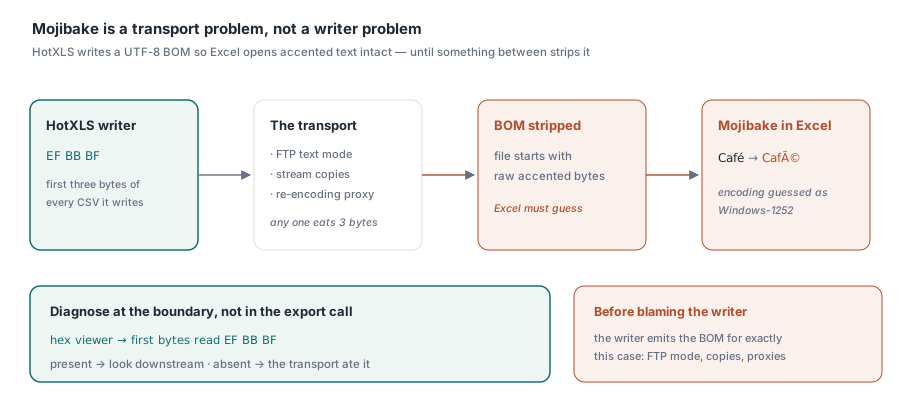
Die häufigste Supportfrage zum CSV-Export ist das Eingangsproblem in anderem Kostüm: Excel zeigt Zeichensalat statt Akzentzeichen. Der Reflex ist, den Schreiber zu beschuldigen, doch der gibt genau deshalb eine UTF-8-BOM aus, und die Datei ist fast immer korrekt, wenn sie Ihren Code verlässt. Irgendetwas zwischen dort und Excel hat die BOM gefressen. Eine FTP-Übertragung im Textmodus, eine Stream-Kopie, die die ersten drei Bytes überspringt, ein Proxy, der unterwegs neu kodiert: Jedes davon entfernt die Markierung und lässt Excel die Kodierung raten, was es schlecht tut. Stellen Sie das an der Grenze fest, nicht im Exportaufruf. Öffnen Sie die ausgelieferte Datei in einem Hex-Betrachter und bestätigen Sie, dass EF BB BF immer noch als Erstes darin steht
Das ist der rote Faden für alle vier Formate. Der Exportaufruf ist der leichte Teil, und HotXLS trifft bei jeder Entscheidung, vor der der Schreiber steht, eine vertretbare Wahl. Die Fehlschläge wohnen an den Nahtstellen, wo Formeltext auf einen Parser trifft, der eine Zahl wollte, wo eine BOM auf einen Transportweg trifft, der sie nicht erhält, wo eine verbundene Zelle auf das flache Tabellenmodell von RTF trifft. Jedes davon ist eine Tatsache, die in den Vertrag zwischen Ihrem Exporteur und dem gehört, was ihn konsumiert, denn der Konsument kann Ihre Absichten nicht aus den Bytes lesen. Die vollständige Methodenliste für beide Arbeitsmappenfassaden trägt die Produktseite der HotXLS Delphi Component