Eine Tabellenkalkulationsbibliothek, die nur Formelstrings speichert, und eine Bibliothek mit funktionierender Formel-Engine sind zwei verschiedene Produkte, die bis zu dem Moment identisch aussehen, in dem man eine von ihnen nach einer Zahl fragt. Der meiste Delphi-Tabellenkalkulationscode bemerkt die Lücke nie, weil Excel sie überdeckt: Man schreibt SUM(B2:B501) in eine Zelle, speichert, und Excel berechnet die Summe in dem Augenblick neu, in dem ein Mensch die Datei öffnet. Nimmt man den Menschen aus der Schleife und schickt dieselbe Arbeitsmappe durch eine Server-Pipeline, die direkt nach CSV exportiert, hört der Unterschied auf, akademisch zu sein. Die CSV-Datei enthält den wörtlichen Text =SUM(B2:B501), wo eine Zahl hingehörte, weil zu keinem Zeitpunkt irgendetwas die Formel tatsächlich ausgewertet hat
Das ist die Linie, auf deren richtiger Seite HotXLS steht. Es behandelt eine Formel so, wie die Dateiformate es tun, als gespeicherten Text plus ein optionales zwischengespeichertes Ergebnis, sodass ein bloßer CSV-Export das Rezept wiedergibt statt des Gerichts. Aber es bringt auch eine Berechnungs-Engine mit, die Sie direkt aufrufen können, dieselbe Engine in der XLS- wie in der XLSX-Fassade, plus einen Hook zum Auflösen von Funktionsnamen, die die Engine noch nie gehört hat. HotXLS ist eine native Object-Pascal-Bibliothek, die XLS und XLSX aus Delphi und C++Builder ohne Excel-Automatisierung liest und schreibt, und die Berechnungshälfte davon ist es, die gespeicherte Formeln bei Bedarf wieder in Werte verwandelt
Formeln werden gespeichert, nicht sofort ausgewertet
Eine Formel in eine Zelle zu schreiben berechnet nichts. Beim Speichern hält die Arbeitsmappe den Formeltext fest. Auf der XLS-Seite hält sie außerdem Flags fest, die von RecalcOnSave gesteuert werden, das standardmäßig True ist und Excel anweist, beim Öffnen neu zu berechnen. Dieses Modell ist richtig für Dateien, die für Excel bestimmt sind, und falsch für Pipelines, die Zellwerte direkt konsumieren, sei es CSV-Export, HTML-Export oder eigener Code, der Zellen zurückliest. Für diese wertet man explizit mit Calculate aus. Es gibt vier Einstiegspunkte: TXLSWorkbook, IXLSWorksheet, TXLSXWorkbook und TXLSXWorksheet stellen alle function Calculate(const Formula: WideString): Variant bereit
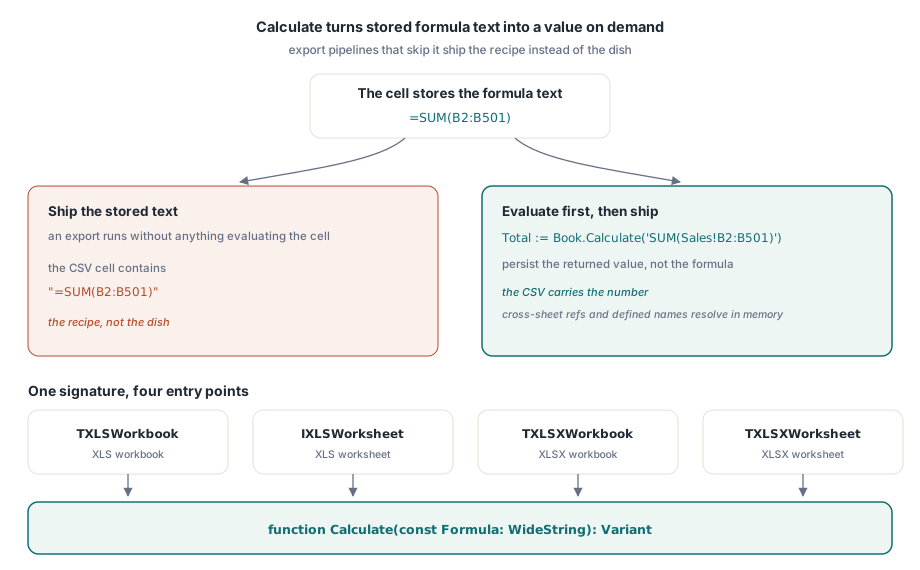
// im Prozess auswerten, dann den Wert statt des Rezepts ausliefern
Total := Book.Calculate('SUM(Sales!B2:B501)');
Sheet.Cells[502, 2].Value := Total;
Book.SaveAsCSV('sales.csv', 0, ',');   // die CSV-Datei enthält jetzt die Zahl
Der an Calculate übergebene Ausdruck ist gewöhnlicher Excel-Formeltext. Blattübergreifende Referenzen, definierte Namen und verschachtelte Funktionen werden alle gegen die aktuelle Arbeitsmappe im Speicher aufgelöst, was den Aufruf weit über das Flicken von CSV-Exporten hinaus nützlich macht. Man sollte ihn als Assertion-Mechanismus betrachten. Ein Generator, der gerade fünfhundert Detailzeilen geschrieben hat, kann die Arbeitsmappe nach ihrer eigenen Gesamtsumme fragen und diese mit der Zahl vergleichen, die er unabhängig in Pascal berechnet hat, und so einen Bereichsfehler um eins erwischen, bevor es der Wirtschaftsprüfer eines Kunden tut
Das gibt auch die richtige Teststrategie für formellastige Ausgaben vor. Excel bleibt die Referenzimplementierung der Formelsprache, daher sollte man für die Handvoll Formeln mit geschäftlichen Konsequenzen eine freigegebene Fixture-Datei pflegen, deren erwartete Werte von Excel selbst erzeugt wurden, und die Build-Pipeline die Formeln der generierten Arbeitsmappe mit Calculate gegen diese Fixtures auswerten lassen. Abweichungen tauchen dann als fehlschlagende Tests in Delphi auf und nicht als Diskrepanzen, die ein Kunde beim Vergleich zweier Berichte entdeckt
Geschäftsfunktionen mit OnUserFunction ergänzen
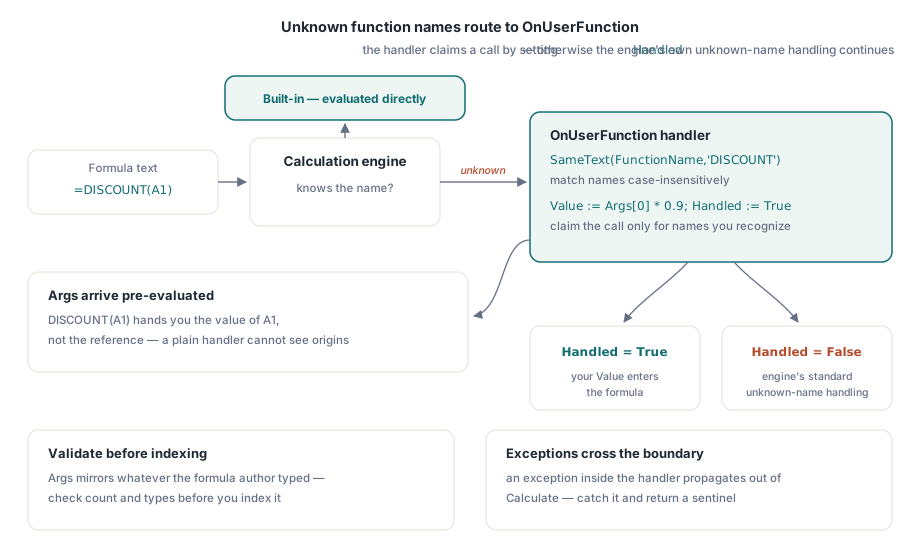
Trifft die Engine auf einen Funktionsnamen, den sie nicht kennt, löst sie ein Ereignis aus, statt rundweg zu scheitern. Weist man OnUserFunction auf einer der beiden Workbook-Klassen zu, kann man den Aufruf selbst auflösen:
procedure TReportBuilder.HandleUserFunction(Sender: TObject;
  const FunctionName: WideString; const Args: Variant;
  var Value: Variant; var Handled: Boolean);
begin
  if SameText(FunctionName, 'DISCOUNT') then
  begin
    Value := Args[0] * 0.9;   // Args kommt als Variant-Array an
    Handled := True;
  end;
end;

// Verdrahtung und Verwendung
Book.OnUserFunction := HandleUserFunction;
Sheet.Cells[1, 1].Value := 200;
Sheet.Cells[1, 2].Formula := 'DISCOUNT(A1)';
Net := Book.Calculate('DISCOUNT(A1) + SUM(A1:A1)');
Drei Details verdienen Aufmerksamkeit. Erstens: Handled := True nur dann setzen, wenn der Name tatsächlich erkannt wurde. Bleibt es False, setzt die Engine ihre normale Behandlung unbekannter Funktionen fort, sodass ein einzelner Handler mehrere Arbeitsmappen bedienen kann, ohne alles zu beanspruchen, was durchläuft. Zweitens: Namen mit SameText ohne Beachtung der Groß-/Kleinschreibung vergleichen, denn Formelautoren tippen discount( und DISCOUNT( beliebig durcheinander. Drittens: Argumente kommen vorab ausgewertet an: DISCOUNT(A1) übergibt den Wert von A1, nicht die Referenz, sodass eine Funktion nicht erkennen kann, woher ihre Eingaben stammen. Dieser letzte Punkt leitet zu der Einschränkung über, um die es im nächsten Abschnitt geht
Der Handler-Rumpf sollte mit derselben Vorsicht behandelt werden wie jeder externe Einstiegspunkt. Das Args-Array spiegelt wider, was der Formelautor getippt hat, daher sollte man Anzahl und Typen der Argumente prüfen, bevor man hineinindiziert, und vorab entscheiden, was ein ungültiger Aufruf zurückgibt: einen Variant-Fehlerwert oder eine ausgelöste Exception. Die Wahl ist wichtig, weil eine im Handler ausgelöste Exception durch den Calculate-Aufruf nach außen dringt, der die Auswertung angestoßen hat. Das ist in einem eng kontrollierten Generator akzeptabel und in einem Dienst, der von Nutzern erstellte Arbeitsmappen auswertet, unhöflich, weil dort eine einzige fehlerhafte Formel die gesamte Anfrage zu Fall bringen würde. In diesem Umfeld fängt man im Handler ab und gibt einen Sentinel zurück, den der umgebende Workflow erkennen und protokollieren kann
Positionsabhängige Funktionen brauchen die Ex-Variante
Manche Funktionen hängen berechtigterweise davon ab, wo sie ausgewertet werden. Ein Satz, der je Blatt verschieden ist, ein zeilenrelatives Nachschlagen, ein Multiplikator je Region, der nur auf den Regionalblättern gilt: Nichts davon lässt sich allein aus Argumentwerten beantworten. Das einfache Ereignis kann das nicht ausdrücken, daher bietet die Engine OnUserFunctionEx, identisch bis auf einen zusätzlichen Parameter:
procedure TReportBuilder.HandleUserFunctionEx(Sender: TObject;
  const FunctionName: WideString; const Args: Variant;
  const Context: TXLSUserFunctionContext;
  var Value: Variant; var Handled: Boolean);
begin
  if SameText(FunctionName, 'REGIONRATE') then
  begin
    // dieselbe Formel liefert auf jedem Regionalblatt einen anderen Satz
    Value := RateForSheet(Context.SheetIndex) * Args[0];
    Handled := True;
  end;
end;
TXLSUserFunctionContext trägt SheetIndex, Row und Col der auswertenden Zelle. Wenn das Ergebnis einer Funktion auch nur geringfügig von ihrem Ort abhängt, sollte man das Ex-Ereignis von Anfang an verdrahten. Kontext nachträglich in einen Handler einzubauen, den dreißig Formeln bereits aufrufen, ist weit unsauberer, als am ersten Tag die richtige Signatur zu wählen, und die beiden Ereignisse sind sich ansonsten so ähnlich, dass wenig dafür spricht, mit dem engeren zu beginnen
Benutzerdefinierte Funktionen reisen nicht nach Excel
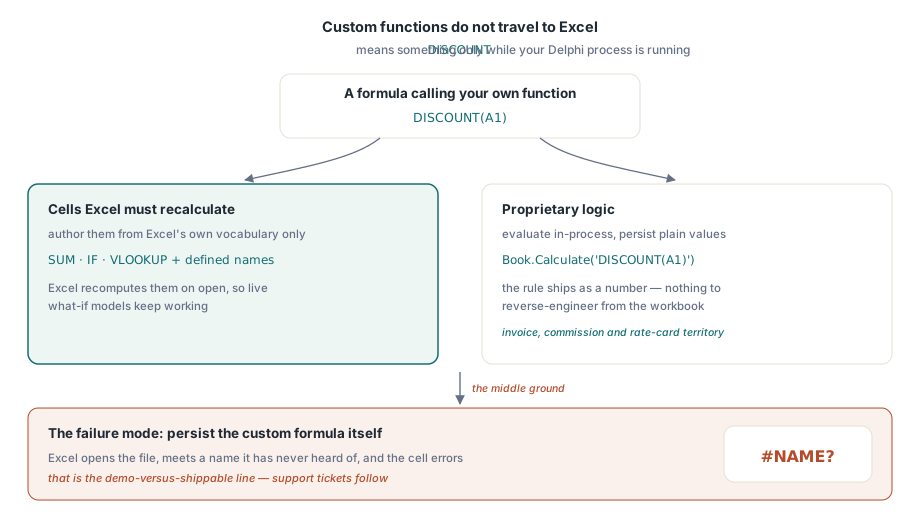
Eine benutzerdefinierte Funktion lebt vollständig in Ihrem Prozess. Der Name DISCOUNT bedeutet nur etwas, solange Ihr Delphi-Code und sein Ereignis-Handler laufen. Öffnet man die gespeicherte Datei in Excel, ist DISCOUNT nur ein unbekannter Name; die Zelle zeigt #NAME?, sofern nicht zufällig eine passende VBA-Funktion oder ein Add-in auf dem Rechner des Nutzers existiert. Das ist die Designtatsache, die eine Demo von einem auslieferbaren Produkt trennt, und sie erzwingt eine Entscheidung, die man bewusst treffen muss, statt sie später zu entdecken
Man entscheidet je Zelle, welchen der beiden Verträge man ausliefert. Zellen, die der Nutzer in Excel neu berechnen sehen soll, müssen aus Excels eigenem Funktionsvokabular und nichts anderem gebaut sein. Zellen, deren Logik proprietär ist, sollten im Prozess mit Calculate ausgewertet und als schlichte Werte persistiert werden, sodass sich die benutzerdefinierte Funktion wie eine interne Berechnungsregel verhält und nicht wie Dateiinhalt. Der Fehlermodus, der zuverlässig Support-Tickets erzeugt, ist der Mittelweg: eine Formel mit benutzerdefinierter Funktion zu persistieren und zu erwarten, dass Excel sie beachtet
Der Nur-Werte-Vertrag hat einen stillen Vorteil: Er schützt geistiges Eigentum. Eine Preisregel, die in Ihrem Delphi-Prozess ausgewertet und als Zahl ausgeliefert wird, lässt sich nicht aus der Arbeitsmappe zurückentwickeln, wie es eine sichtbare Formel erlaubt, und ein Nutzer kann sie nicht durch Bearbeiten einer Zwischenzelle zerstören. Rechnungsgeneratoren, Provisionsabrechnungen und Preislisten gehören fast immer in dieses Lager. Der Fall, der wirklich lebendige Formeln braucht, ist das interaktive Was-wäre-wenn-Modell, bei dem der Kunde Eingaben ändern und zusehen soll, wie sich Summen bewegen, und solche müssen aus Excels eigenem Vokabular plus definierten Namen gebaut werden
Berechnungsmodi, Iteration und R1C1: die Regler der XLS-Fassade
Die XLS-Fassade stellt die Berechnungseinstellungen auf BIFF-Ebene bereit, die Excel aus der Datei liest. CalculationMode akzeptiert xlCalcManual, xlCalcAutomatic (der Standard) oder xlCalcAutomaticExceptTables und bestimmt, wie sich Excel verhält, sobald die Datei geöffnet ist. Eine Modell-Arbeitsmappe mit Tausenden Formeln ist oft angenehmer im manuellen Modus ausgeliefert, sodass der Empfänger entscheidet, wann der Neuberechnungssturm losbricht. EnableIteration (Standard False) schaltet zusammen mit MaxIterations (Standard 100) und MaxIterationChange (Standard 0.001) die absichtlichen Zirkelbezüge der iterativ konvergierenden Art frei, die in manchen Finanzmodellen vorkommen. ReferenceStyle wechselt zwischen A1- und R1C1-Darstellung, und UseFullPrecision spiegelt Excels Option „Genauigkeit wie angezeigt" wider
Diese Eigenschaften leben auf der XLS-Fassade, weil sie auf BIFF-Records abbilden; beim Erzeugen von .xlsx sollte man Formeln so planen, dass sie nicht von Iterationseinstellungen abhängen, oder die konvergierten Werte in Delphi berechnen und die Ergebnisse schreiben
Array-Formeln: Der öffentliche Einstiegspunkt ist XLSX
Klassische Array-Formeln im CSE-Stil werden über TXLSXRange.SetArrayFormula erzeugt:
// eine Array-Formel über A2:A4
Sheet.RCRange[2, 1, 4, 1].SetArrayFormula('A1*{1;2;3}');
Die entsprechende Methode existiert in der XLS-Klassenhierarchie, liegt aber in einem privaten Abschnitt, sodass es keinen unterstützten Weg gibt, neue Array-Formeln in .xls-Dateien zu schreiben. Vorhandene in geöffneten Dateien überstehen den Round-Trip intakt; was nicht geht, ist sie anzulegen. Die daraus folgende Regel ist einfach genug: Wenn Array-Semantik Teil der Anforderung ist, zielt man auf .xlsx. Wenn eine alte .xls-Lieferung wirklich Array-Verhalten braucht, ist der pragmatische Weg, das Array-Ergebnis in Delphi zu berechnen und die einzelnen Werte in die Zellen zu schreiben
Zwei verwandte Artikel auf dieser Website: Definierte Namen und blattübergreifende Formeln behandelt die Namensauflösung, die die Engine vornimmt, und der Artikel zum CSV- und TSV-Export beschreibt das Exportverhalten, das die explizite Berechnung nötig macht. Die vollständige Engine-Referenz einschließlich des unterstützten Funktionsumfangs wird mit der HotXLS Delphi Component ausgeliefert