Ein definierter Name ist eine Bezeichnung, die für eine Konstante, einen Zellbereich oder einen Formelausdruck steht, einmal in der Arbeitsmappe gespeichert und überall dort symbolisch referenziert wird, wo sie gebraucht wird. Schreibt man TaxRate in eine Formel, löst die Engine den Namen zu dem auf, was seine Definition enthält, sei es das Literal 0.08 oder der Bereich Data!$A$2:$D$100. Eine blattübergreifende Referenz ist die dazu orthogonale Idee: Data!D2 erreicht eine Zelle auf einem anderen Blatt, indem die Adresse mit einem Blattnamen qualifiziert wird. Kombiniert man beides, kann ein Übersichtsblatt ein Detailblatt über einen Namen summieren, der nie eine wörtliche Adresse nennt, und genau das will man in einer Arbeitsmappe, die ein Generator zusammenbaut und ein Buchhalter später prüft
HotXLS, die native Delphi-Bibliothek von losLab für XLS- und XLSX-Dateien, stellt die Namenstabelle beider Formate mit Zugriff zum Anlegen, Suchen und Löschen bereit, dazu eine Formel-Engine, die Namen und blattübergreifende Referenzen im Prozess auflöst. Die beiden Formate behalten getrennte Klassenhierarchien, und die Unterschiede zwischen ihren Namens-APIs sind der Teil, der Code stolpern lässt, der von einem Format auf das andere portiert wird
Zwei Namensspeicher ohne gemeinsame Schnittstelle
Auf der XLS-Seite gibt TXLSWorkbook.GetNames eine IXLSNames-Sammlung zurück, deren Überladung Add(Name, RefersTo, Visible) einen Namen in die BIFF-Namenstabelle schreibt. Einzelne Einträge kommen als IXLSName-Objekte zurück, die Name, RefersTo, ein aufgelöstes RefersToRange und eine Delete-Methode tragen. Auf der XLSX-Seite ist TXLSXWorkbook.DefinedNames eine TXLSXDefinedNames-Sammlung mit Add, FindByName und DeleteByName
Die Nachschlagekonventionen weichen auf eine Weise voneinander ab, die beim Portieren auffällt und nicht beim Kompilieren. Die Standard-Eigenschaft Item der XLS-Sammlung nimmt ein Variant entgegen, sodass sowohl Names[0] als auch Names['TaxRate'] dagegen aufgelöst werden. Die XLSX-Sammlung hat keine solche Standard-Eigenschaft; man ruft FindByName('TaxRate') auf, das nil zurückgibt, wenn der Name fehlt. Code, der für eine Fassade geschrieben wurde, kompiliert gegen die andere nur zufällig, und der Fehler zeigt sich eher als nil-Zugriff zur Laufzeit denn als rote Wellenlinie in der IDE
Der Gültigkeitsbereich ist die erste Entscheidung, kein später ergänztes Flag
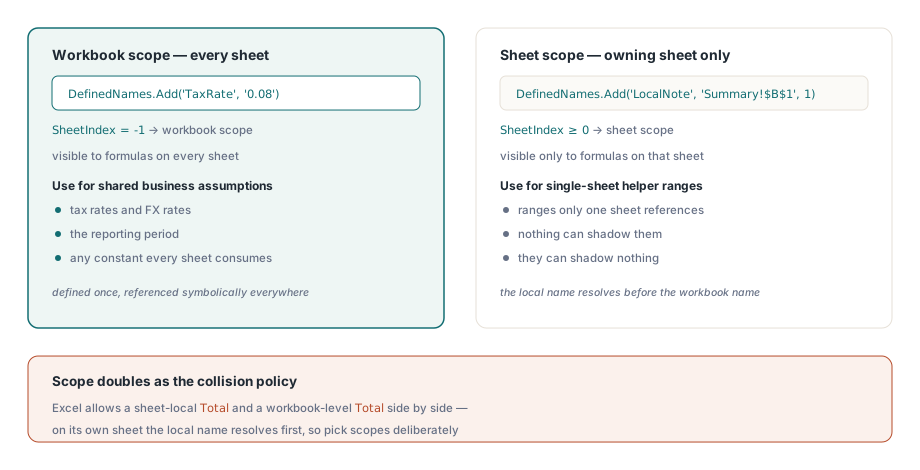
Ein definierter Name ist entweder auf Arbeitsmappenebene gültig, also für Formeln auf jedem Blatt sichtbar, oder auf Blattebene, also nur für Formeln auf seinem eigenen Blatt sichtbar. In der XLSX-API ist die Unterscheidung ein einziger optionaler Parameter. DefinedNames.Add(AName, AFormula) erzeugt einen Namen auf Arbeitsmappenebene, während Add(AName, AFormula, ASheetIndex) ihn an ein Blatt bindet. Beim Zurücklesen gibt TXLSXDefinedName.SheetIndex für Arbeitsmappenebene -1 zurück und ansonsten den 0-basierten Blattindex
Der Gültigkeitsbereich dient zugleich als Kollisionsregel, und das ist der Grund, ihn festzulegen, bevor der erste Name geschrieben wird. Excel erlaubt ein blattlokales Total auf jedem Blatt plus ein Total auf Arbeitsmappenebene, und eine Formel auf einem bestimmten Blatt löst zuerst das lokale auf. Generierte Arbeitsmappen sollten sich bewusst darauf stützen. Geschäftsannahmen, die mehrere Blätter konsumieren, etwa Steuersätze, Wechselkurse und der Berichtszeitraum, gehören auf Arbeitsmappenebene. Hilfsbereiche, auf die nur die Formeln eines einzigen Blatts verweisen, sind auf Blattebene sicherer, wo nichts sie verdecken kann und sie nichts verdecken
var
  Book: TXLSXWorkbook;
  Data, Summary: TXLSXWorksheet;
begin
  Book := TXLSXWorkbook.Create;
  try
    Data := Book.Sheets.Add('Data');
    Summary := Book.Sheets.Add('Summary');
    // ... Data!A2:D100 mit Detailzeilen füllen ...

    Book.DefinedNames.Add('TaxRate', '0.08');                // Arbeitsmappenebene, eine Konstante
    Book.DefinedNames.Add('DataBlock', 'Data!$A$2:$D$100');  // Arbeitsmappenebene, ein Bereich
    Book.DefinedNames.Add('LocalNote', 'Summary!$B$1', 1);   // nur auf Blattindex 1 gültig

    // XLSX-Formeln bekommen kein führendes '='
    Summary.Cells[2, 2].Formula := 'SUM(Data!D2:D100)*TaxRate';
    Book.SaveAs('model.xlsx');
  finally
    Book.Free;
  end;
end;
Ein definierter Name muss nicht auf einen Bereich zeigen. TaxRate oben verweist auf die nackte Konstante 0.08, und das ist der sauberste Weg, eine Geschäftsannahme zu veröffentlichen. Sie erscheint einmal im Namens-Manager von Excel, jede Formel referenziert sie symbolisch, und die Satzänderung im nächsten Quartal ist eine Einzeiler-Änderung am Generator statt einer Suche über vierzehn zusammengesetzte Formelstrings
Das Gleichheitszeichen, das nur auf eine Seite gehört
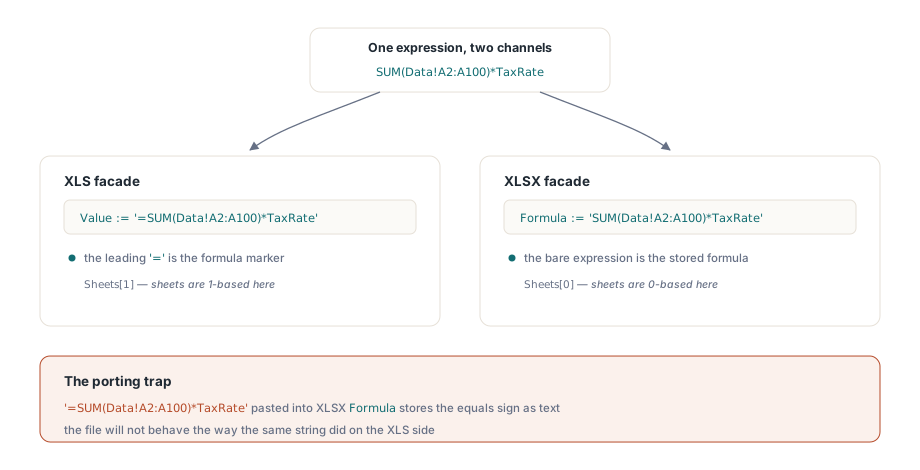
Der Eingabekanal für Formeln ist die Stelle, an der portierter Code am häufigsten bricht, weil die beiden Fassaden sich über das Gleichheitszeichen uneins sind. XLS-Zellen erhalten Formeln über Value mit führendem =. XLSX-Zellen haben eine eigene Eigenschaft Formula, die den Ausdruck ohne das Präfix entgegennimmt. Schreibt man '=SUM(A1:A10)' in TXLSXCell.Formula, wird das Gleichheitszeichen Teil des gespeicherten Ausdruckstexts statt eines Markers, und die Datei verhält sich nicht so, wie derselbe String es auf der XLS-Seite tat
var
  Book: IXLSWorkbook;   // referenzgezählt: nicht freigeben
  Names: IXLSNames;
begin
  Book := TXLSWorkbook.Create;
  // angenommen, ein Blatt namens 'Data' enthält bereits die Detailzeilen
  Names := Book.GetNames;
  Names.Add('TaxRate', '0.08');
  Names.Add('Helper', 'Data!$A$2:$A$100', False);  // False = im Namens-Manager verborgen

  // XLS-Formeln gehen über Value, mit dem Präfix '='
  Book.Sheets[1].Cells.Item[2, 2].Value := '=SUM(Data!A2:A100)*TaxRate';
  Book.SaveAs('model.xls');
end;
Dieser Ausschnitt zeigt zwei weitere Eigenheiten der XLS-Seite. Die Blattsammlung ist 1-basiert, sodass Sheets[1] das erste Blatt ist, gegenüber dem 0-basierten Sheets[0] bei XLSX. Und der dritte Parameter von Add erzeugt einen verborgenen Namen: in der Datei vorhanden und von Formeln nutzbar, aber im Namens-Manager von Excel unsichtbar. Verborgene Namen sind das richtige Mittel für generatorinterne Verdrahtung, die Endnutzer nie versehentlich bearbeiten oder löschen sollten
Blattübergreifende Referenzen, und was passiert, wenn Zeilen wandern
Beide Formel-Engines akzeptieren die übliche blattübergreifende Syntax. Einfache Blattnamen qualifizieren direkt als Data!A1; ein Name mit Leerzeichen oder Satzzeichen braucht einfache Anführungszeichen, wie in 'Sheet With Space'!A1. Innerhalb des RefersTo-Texts eines Namens sollte man fast immer zu absoluten Referenzen wie Data!$A$2:$D$100 greifen. Eine relative Referenz in einem definierten Namen wird relativ zu der Zelle aufgelöst, die ihn verwendet, was ein beabsichtigtes Excel-Merkmal und eine verlässliche Quelle von Verwirrung ist, wenn es unbeabsichtigt greift
Strukturelle Bearbeitungen sind der Ort, an dem sich die blattübergreifende Buchführung bezahlt macht, und die XLSX-Seite hält Namen dabei konsistent. InsertRows und DeleteRows verschieben die Bereiche definierter Namen zusammen mit Zellen, Verbünden, Hyperlinks und Diagrammankern, sodass ein Name, der auf Data!$A$2:$D$100 zeigt, den Datenblock weiterhin abdeckt, nachdem der Generator darüber eine Lücke geöffnet hat. Für Formeln gilt ein dokumentierter Vorbehalt: Das Einfügen von Zeilen passt nur die Referenzen an, die auf das bearbeitete Blatt zielen. Eine Formel auf Summary, die Data!D2:D100 referenziert, wird umgeschrieben, wenn Zeilen in Data eingefügt werden, was meist der gewünschte Fall ist. Man sollte das prüfen statt annehmen, denn die Engine gibt günstig Auskunft:
// die Berechnungs-Engine löst Namen und blattübergreifende Referenzen im Prozess auf
V := Book.Calculate('SUM(Data!D2:D100)*TaxRate');
if VarIsNumeric(V) then
  Log('net total checks out: ' + FloatToStr(V));
Calculate wertet einen beliebigen Ausdruck gegen den aktuellen Zustand der Arbeitsmappe aus, ohne irgendetwas zu speichern, was es zum natürlichen Assertion-Primitiv für Generatortests macht. Man berechnet das erwartete Aggregat aus den Quelldaten in Pascal, wertet die eigene Formel der Arbeitsmappe aus und vergleicht beides. Der Artikel zur Formel-Engine behandelt, was die Engine auswertet, wann, und wie sie um benutzerdefinierte Funktionen erweitert wird
Die _xlnm-Namen, die der Eigenschaftsschicht gehören
Öffnet man die Namenstabelle einer generierten Datei in einem Low-Level-Inspektor, findet man Einträge, die man nie geschrieben hat: _xlnm.Print_Area, _xlnm.Print_Titles und ihre Verwandten. So speichert OOXML (ECMA-376 / ISO 29500) Druckbereiche und Wiederholungszeilen, nämlich als definierte Namen mit reservierten Bezeichnern. HotXLS verwaltet sie über eigene Arbeitsblatt-Eigenschaften, sodass das Setzen von PrintArea oder PrintTitleRows den entsprechenden _xlnm.*-Eintrag für Sie schreibt
Die Falle besteht darin, von Hand in diesen reservierten Namensraum zu greifen. Fügt man einen _xlnm.Print_Area-Eintrag über DefinedNames.Add hinzu und setzt zugleich die Eigenschaft PrintArea, trägt die Arbeitsmappe zwei widersprüchliche Definitionen für einen reservierten Namen, ein Zustand, den Excel auf eine Weise auflöst, auf die sich kein Produkt verlassen sollte. Jeder Bezeichner, der mit _xlnm. beginnt, sollte als Eigentum der Eigenschaftsschicht gelten. Um die Druckeinrichtung zu prüfen, liest man die Eigenschaften, nicht die Namenstabelle. Der Artikel zu Schutz und Seiteneinrichtung behandelt die Druckbereichs-Eigenschaften im Zusammenhang
Zwei Grenzen, die man vor dem Festlegen eines Designs kennen sollte
Definierte Namen reisen nicht über die bequeme XLS-zu-XLSX-Brücke mit. SaveXLSWorkbookAsXLSX kopiert Zellinhalte und grundlegende Formatierung, und die Namenstabelle steht nicht auf seiner dokumentierten Kopierliste, sodass eine Arbeitsmappe, die von ihren Namen abhing, sie beim Übergang verliert. Die Namen sollten nach der Konvertierung über DefinedNames.Add neu angelegt werden. Dieser Schritt ist weniger lästig, als er klingt, denn er bietet die Gelegenheit, die Gültigkeitsbereiche zu normalisieren, statt zu übernehmen, was die XLS-Datei zufällig enthielt
Die andere Grenze ist die Drift zwischen Formelstrings und Blattnamen. Excel schreibt Blattreferenzen in Formeln und Namen bei einer interaktiven Umbenennung um, sodass Dateien, die ein Nutzer in Excel bearbeitet, von selbst konsistent bleiben. Das Risiko liegt auf der Generatorseite: Wenn Pascal-Code Formelstrings aus einem Blattnamen-Literal zusammensetzt, erzeugt das Umbenennen des Blatts an einer Stelle und das Vergessen der anderen eine Referenz auf ein Blatt, das nicht mehr existiert. Hält man den Blattnamen in einer einzigen Delphi-Konstante und speist sie sowohl in Sheets.Add als auch in die Formelzusammensetzung ein, können die beiden nie voneinander abweichen. Das ist derselbe Instinkt, der dafür spricht, die Ausgabezellen eines Berichts zu benennen, statt Adressen fest zu verdrahten: Eine Vorlage, deren Summenzelle benannt ist, funktioniert weiter, nachdem ein Designer drei Zeilen darüber eingefügt hat, während ein Generator, der auf ein wörtliches B17 schreibt, seine Zahl stillschweigend an der falschen Stelle ablegt. Der Artikel zur vorlagenbasierten Berichtserzeugung baut genau auf diesem Muster auf
Die vollständige API für definierte Namen in beiden Formaten wird zusammen mit der Referenz der Formel-Engine mit der HotXLS Delphi Component ausgeliefert