Der verlässliche Weg, aus Delphi einen gestalteten Excel-Bericht zu erzeugen, führt über eine Arbeitsmappe, die ein Gestalter bereits gebaut hat. Jemand in der Buchhaltung legt die Rechnung in Excel an: das Logo, die Spaltenüberschriften, die Rahmen des Detailbands, die fette Summenzeile, die Währungsformate. Ihr Code öffnet diese Datei, setzt Live-Daten in die Zellen, die der Gestalter dafür reserviert hat, und speichert das Ergebnis. Das Aussehen gehört ihm, die Zahlen gehören Ihnen. HotXLS, eine native Delphi- und C++Builder-Bibliothek, die XLS- und XLSX-Arbeitsmappen liest und schreibt, ohne Excel zu steuern, liefert Ihnen die drei Operationen, die dieser Ansatz braucht: eine Zelle über ihren Text suchen, einen Bereich mitsamt Stilen und Formeln kopieren und Zeilen so einfügen, dass alles darunter mit den Daten nach unten rückt
Die eine Regel, die einen Generator, der Vorlagenänderungen übersteht, von einem trennt, der an der ersten zerbricht, lautet: Sprechen Sie Zellen niemals über wörtliche Zeilen- und Spaltennummern an. Eine Vorlage ist ein Dokument, das andere Menschen bearbeiten. Das Finanzteam ergänzt eine Steuerzeile, erhöht die Höhe der Logozeile, ordnet den Adressblock um, und das Dateiformat hilft Ihnen kein bisschen: Ein BIFF- oder OOXML-Speichervorgang gelingt, ob Zeile 10 noch bedeutet, was sie im letzten Quartal bedeutete, oder nicht. Ein Generator, der die erste Detailzeile in eine fest verdrahtete Zeile 10 schreibt, wird beim ersten Mal, wenn jemand einen Block oberhalb des Detailbereichs einfügt, Positionen über die falschen Zellen stempeln und einen Summenbereich bilden, der die Daten nicht mehr abdeckt. Nichts löst eine Exception aus, jedes Speichern meldet Erfolg, und das einzige Signal ist ein Kunde, dem eine falsche Rechnung auffällt
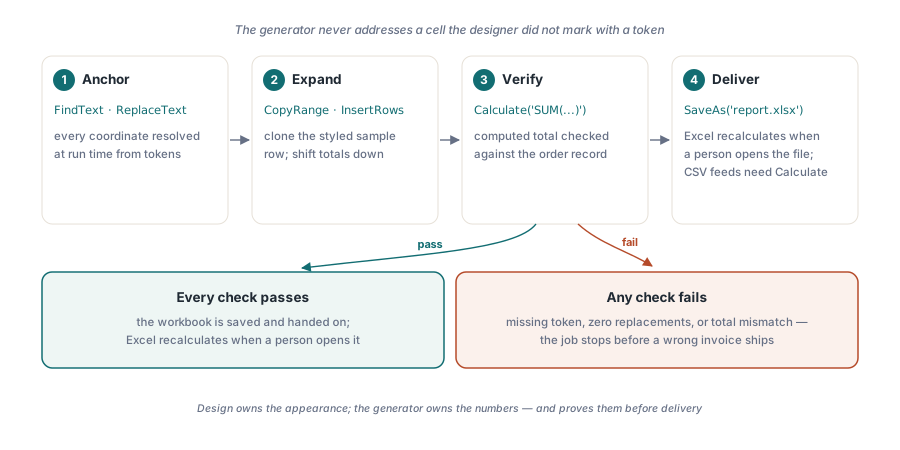
Jede Koordinate an einem Platzhalter-Token verankern
Die Lösung besteht darin, die Vorlage ihre eigenen Koordinaten tragen zu lassen. Der Gestalter schreibt Tokens wie {{CUSTOMER}}, {{DATE}} und {{DETAIL_START}} in die Zellen, die der Generator anfassen muss, und der Generator ermittelt zur Laufzeit jede Position daraus, wo er diese Tokens findet. Layoutänderungen spielen keine Rolle mehr, weil das Token mit der Zelle wandert, in der es sitzt. Die zweite Hälfte des Vertrags ist die Fehlerregel: Fehlt ein benötigtes Token, hält der Job an, bevor Kundendaten in die Datei gelangen. Eine Vorlage, die abgedriftet ist, sollte ein Fehlerticket erzeugen, kein ausgeliefertes Dokument
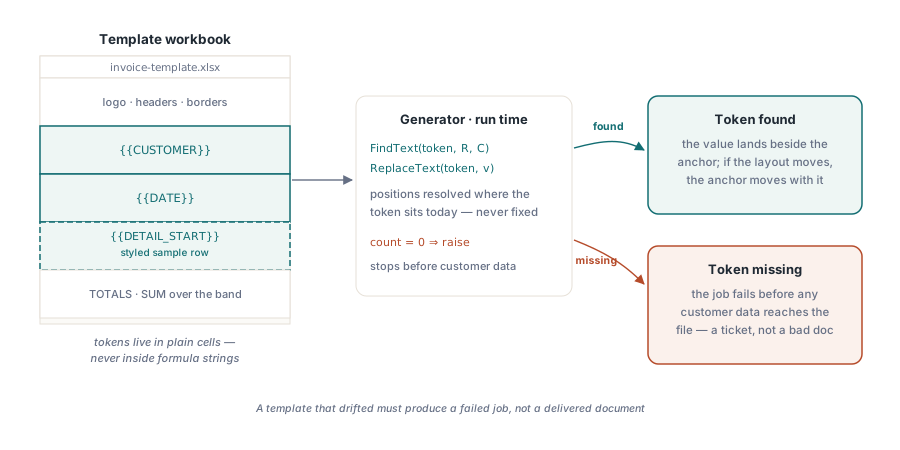
Die Tokens finden: FindText und ReplaceText
Beide HotXLS-Klassenfamilien bieten Suche auf Arbeitsblattebene. FindText gibt Zeile und Spalte der ersten Zelle zurück, deren Text passt, mit einer Überladung, die Groß- und Kleinschreibung berücksichtigt. ReplaceText tauscht jedes Vorkommen aus und gibt zurück, wie viele es geändert hat. Die beiden decken die zwei Token-Arten ab, die man üblicherweise hat. Einen einzelnen Anker wie den Kundennamen suchen Sie einmal und schreiben daneben; ein Token, das genau einmal vorkommen soll, etwa das Berichtsdatum, ersetzen Sie und prüfen die Anzahl. Auf der XLSX-Seite sieht eine Befüllung, die sich so verankert, folgendermaßen aus:
var
  Book: TXLSXWorkbook;
  Sheet: TXLSXWorksheet;
  R, C: Integer;
begin
  Book := TXLSXWorkbook.Create;
  try
    if Book.Open('invoice-template.xlsx') <> 1 then
      raise Exception.Create('Cannot open invoice template');
    Sheet := Book.Sheets[0];               // TXLSXSheets.Items ist 0-basiert

    if not Sheet.FindText('{{CUSTOMER}}', R, C) then
      raise Exception.Create('Template drift: {{CUSTOMER}} anchor missing');
    Sheet.Cells[R, C].Value := 'ACME Corp';

    if Sheet.ReplaceText('{{DATE}}',
         FormatDateTime('yyyy-mm-dd', Date)) = 0 then
      raise Exception.Create('Template drift: {{DATE}} token missing');
    // Detailerweiterung und Speichern folgen unten
  finally
    Book.Free;
  end;
end;
Zwei Details zählen. Erstens vergleichen FindText und ReplaceText den Textwert einer Zelle; ein Token, das in einem Formelstring steckt, ist für sie unsichtbar, Platzhalter-Tokens gehören also in gewöhnliche Zellen, niemals in Formeln. Zweitens ist die Zahl der Ersetzungen Ihr Drift-Melder. Eine Vorlage, die genau ein {{DATE}}-Token enthalten sollte, aber null Ersetzungen meldet, wurde bearbeitet, und in genau diesem Moment eine Exception auszulösen ist es, was stillen Layout-Drift in ein sichtbares Scheitern verwandelt
Die Detailzeile klonen, ohne Stile oder Formeln zu verlieren
Der Detailbereich einer Rechnung wächst mit den Daten. Werte direkt in leere Zeilen unterhalb der Musterzeile zu schreiben wirft alles weg, was der Gestalter vorbereitet hat: die Rahmen, die Zahlenformate, die Formeln je Zeile. Das Muster, das all das bewahrt, besteht darin, eine vollständig formatierte Musterzeile in der Vorlage zu belassen und sie für jede Position zu klonen. CopyRange dupliziert Stile und Formeln in einem einzigen Aufruf, danach überschreibt der Generator nur die Wertzellen
const
  DetailRow = 10;            // die formatierte Musterzeile in der Vorlage
var
  I: Integer;
begin
  // Zuerst Platz vor dem Summenblock schaffen, damit sich der SUM-Bereich
  // unterhalb des Detailbands mit den Daten mitdehnt.
  if Length(Items) > 1 then
    Sheet.InsertRows(DetailRow + 1, Length(Items) - 1);

  for I := 0 to High(Items) do
  begin
    if I > 0 then              // Stile + Formeln aus der Musterzeile klonen
      Sheet.CopyRange(DetailRow, 1, DetailRow, 5, DetailRow + I, 1);
    Sheet.Cells[DetailRow + I, 1].Value := Items[I].Name;
    Sheet.Cells[DetailRow + I, 2].Value := Items[I].Qty;
    Sheet.Cells[DetailRow + I, 3].Value := Items[I].UnitPrice;
    Sheet.Cells[DetailRow + I, 4].Formula :=
      Format('B%d*C%d', [DetailRow + I, DetailRow + I]);  // kein '='-Präfix
  end;
end;
Achten Sie genau auf die Formelzuweisung. Die XLSX-Eigenschaft Formula nimmt den Ausdruck ohne führendes Gleichheitszeichen, während die XLS-Fassade '=B10*C10' erwartet, zugewiesen über Value. Die beiden Konventionen zu vermischen ist der häufigste Portierungsfehler zwischen den Klassenfamilien, und er scheitert lautlos: Die Zelle hält dann schlicht einen wörtlichen String, den Excel als Text anzeigt. Wenn die Vorlage das Detailband mit verbundenen Titelzeilen schmückt, denken Sie daran, dass nur die Zelle links oben eines verbundenen Bereichs einen Wert trägt. Die Layoutregeln in dem begleitenden Artikel zu verbundenen Zellen in layoutgetriebenen Berichtsvorlagen erklären, warum Verbundbereiche vollständig außerhalb des Datenbands gehören
Was InsertRows verschiebt und was es zurücklässt
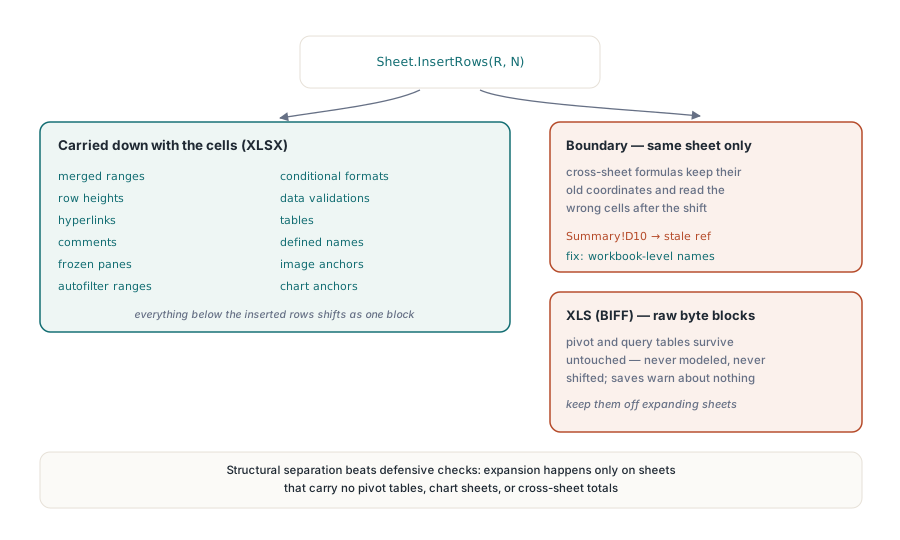
Zeilen vor dem Summenblock einzufügen ist das, was einen SUM-Bereich mitwachsen lässt, während der Detailbereich wächst. Auf der XLSX-Seite trägt InsertRows eine lange Liste abhängiger Strukturen mit den Zellen nach unten: verbundene Bereiche, Zeilenhöhen, Hyperlinks, Kommentare, fixierte Fenster, Autofilterbereiche, bedingte Formate, Datenprüfungen, Tabellen, definierte Namen sowie Bild- und Diagrammanker. In dieser Liste gibt es eine Grenze, die Sie sich merken sollten. Das Umschreiben von Formeln reicht nur bis zu Referenzen innerhalb desselben Blatts. Eine Formel auf einem Übersichtsblatt, die in den verschobenen Bereich zeigt, behält ihre alten Koordinaten und liest still die falschen Zellen, weshalb blattübergreifend gezogene Summen sicherer über Namen auf Arbeitsmappenebene ausgedrückt werden. Der begleitende Artikel zu definierten Namen und blattübergreifenden Formeln arbeitet dieses Muster durch
Das alte XLS-Format zieht die Grenze an einer härteren Stelle. HotXLS bewahrt Pivot-Tabellen, Abfragetabellen und externe Datenverbindungen in BIFF-Dateien als rohe Byte-Blöcke. Sie überstehen Öffnen und Speichern unverändert, sind aber nicht modelliert, sodass das Einfügen von Zeilen sie nie anrührt. Eine Vorlage, die eine Pivot-Tabelle unter einem wachsenden Detailblock parkt, speichert völlig ohne Warnung, während das Quellrechteck der Pivot-Tabelle von den Daten abdriftet. Der Ausweg ist strukturell, nicht defensiv: Halten Sie Pivot- und Abfrageinhalte auf Blättern, in die der Generator nie einfügt, dann kann die Veraltung gar nicht erst eintreten
Vor der Auslieferung neu rechnen, oder wissen, warum Sie es übersprungen haben
HotXLS wertet Formeln während SaveAs nicht aus. Wenn ein Mensch die Datei öffnet, berechnet Excel alles neu (die XLS-Fassade bietet CalculationMode und RecalcOnSave, falls Sie das steuern müssen), ein Bericht für einen menschlichen Posteingang braucht also nichts weiter von Ihnen. Das Bild ändert sich in dem Moment, in dem die Arbeitsmappe ein anderes Programm speist. Der CSV-Export schreibt Formeln als ihren wörtlichen Text heraus und berechnet sie nie, und jeder nachgelagerte Parser, der zwischengespeicherten Werten vertraut, liest veraltete Zahlen oder Leerstellen. Für diese Wege rechnen Sie auf dem Server mit Calculate, das einen beliebigen Ausdruck gegen die geladene Arbeitsmappe auswertet und das Ergebnis zurückgibt:
var
  Total: Variant;
  LastDetail: Integer;
begin
  LastDetail := DetailRow + Length(Items) - 1;
  Total := Book.Calculate(Format('SUM(Invoice!D%d:D%d)',
    [DetailRow, LastDetail]));
  if (not VarIsNumeric(Total)) or
     (Abs(Total - ExpectedTotal) > 0.005) then
    raise Exception.Create('Invoice total does not match the order record');

  if Book.SaveAs('invoice-2026-0611.xlsx') <> 1 then
    raise Exception.Create('Save failed: check output path and permissions');
end;
Die berechnete Summe vor dem Speichern gegen den Auftragsdatensatz zu prüfen ist eine billige Versicherung mit gutem Ertrag. Sie verwandelt eine falsche Rechnung in einen gescheiterten Job. Ein Bediener kann einen gescheiterten Job in Sekunden wiederholen; eine falsche Rechnung, die schon im Postfach eines Kunden liegt, kostet einen Kundenbetreuer eine Entschuldigung und eine Korrektur
Zwei Klassenfamilien, ein Algorithmus
Dieselbe Logik lässt sich zwischen den Formaten übertragen, derselbe Code nicht. TXLSWorkbook für das alte .xls ist schnittstellenbasiert und referenzgezählt, mit 1-basierter Blattindizierung, und Sie geben es nie von Hand frei. TXLSXWorkbook für .xlsx ist ein gewöhnliches Objekt, das Sie in einem try..finally freigeben müssen, mit 0-basierter Blattindizierung und der oben gezeigten Formelkonvention. FindText, ReplaceText, CopyRange und InsertRows gibt es auf beiden Seiten, sodass sich die Form aus Verankern, Klonen und Neuberechnen sauber überträgt. Der praktische Rat lautet, sich je Pipeline auf ein Format festzulegen oder die beiden Objektlebenszyklen hinter einem eigenen dünnen Adapter zu verbergen, statt den Unterschied durch den ganzen Generator zu streuen
Die Größe spielt für die Art von Bericht, die dieses Muster erzeugt, selten eine Rolle. Eine gestaltete Zeile ein paar tausend Mal zu klonen ist für heutige Hardware nichts. Der Speicherpfad wird erst zum Engpass, wenn ein Detailband in sechsstellige Zeilenzahlen läuft, und an diesem Punkt schickt das Setzen von StreamingWrite das Arbeitsblatt-XML direkt in das Ausgabepaket, statt es zu puffern; der Artikel zu Streaming-Writes für Server-Batchjobs behandelt, wann sich dieser Kompromiss lohnt. Diagramme verhalten sich wie der Rest des Layouts: Auf der XLSX-Seite wandern sowohl der Diagrammanker als auch seine Serienreferenzen mit, wenn InsertRows oberhalb von ihnen läuft, sodass ein Diagramm unter der Summenzeile an die richtigen Daten gebunden bleibt, während Diagramme auf der XLS-Seite auf eigenen Diagrammblättern sitzen und, wie Pivot-Tabellen, nie verrutschen. Das ist ein weiteres Argument dafür, Präsentationsblätter von dem Blatt freizuhalten, das der Generator erweitert
Dieser Ansatz aus Verankern, Klonen und Neuberechnen lässt einen Gestalter besitzen, wie eine Arbeitsmappe aussieht, während Ihr Code besitzt, was sie aussagt, und meist ist genau das der Grund, warum erzeugte Excel-Ausgaben pflegenswert werden. Die hier gezeigten Aufrufe zum Suchen, Kopieren und Einfügen sowie die Formel-Engine für die Summenprüfung vor der Auslieferung werden mit der HotXLS Delphi Component für Delphi und C++Builder ausgeliefert