İki form aynı alanları taşıyabilir ve hiç birbirine benzemeyen şekilde davranabilir. Bir AcroForm, alanlarını gerçek sayfa içeriğinin üzerinde oturan sıradan PDF nesneleri olarak tutar, bu yüzden uyumlu herhangi bir okuyucu onu çizer. Dinamik bir XFA formu ise neredeyse hiçbir şeyi PDF olarak tutmaz: alanlar, düzen, hatta sayfa geometrisi bir XML paketinde yaşar ve görünür sayfalar, açılış anında yalnızca Adobe'nin yaygın olarak gönderdiği bir düzen motoru tarafından üretilir. Bu dosyayı bir web görüntüleyicisine, bir arşiv render motoruna veya bir metin çıkarıcıya verirseniz formu elde edemezsiniz. "Please wait... If this message is not eventually replaced by the proper contents of the document, your PDF viewer may not be able to display this type of document" yazan tek bir gri sayfa elde edersiniz. Devlet veya sigorta evrakı içe alan herkes o sayfayı görür görmez tanır
Yer tutucu bir bozulma değildir. Hiçbir XFA işlemcisi bulunmadığında biçimin gerçekleşmesini belirttiği tam olarak budur ve 2026 itibarıyla bu, masaüstü Acrobat dışındaki neredeyse her görüntüleyiciyi tarif eder. Bu yüzden pratik hamle, dinamik formu aşağı akıştaki herhangi bir şeye ulaşmadan önce düz bir AcroForm'a dönüştürmektir. Delphi ve C++Builder için losLab PDF kütüphanesi olan HotPDF, bu dönüşümü kodda yapar ve XML formunu yerel sayfalar üzerinde yerel alanlar olarak yeniden kurar
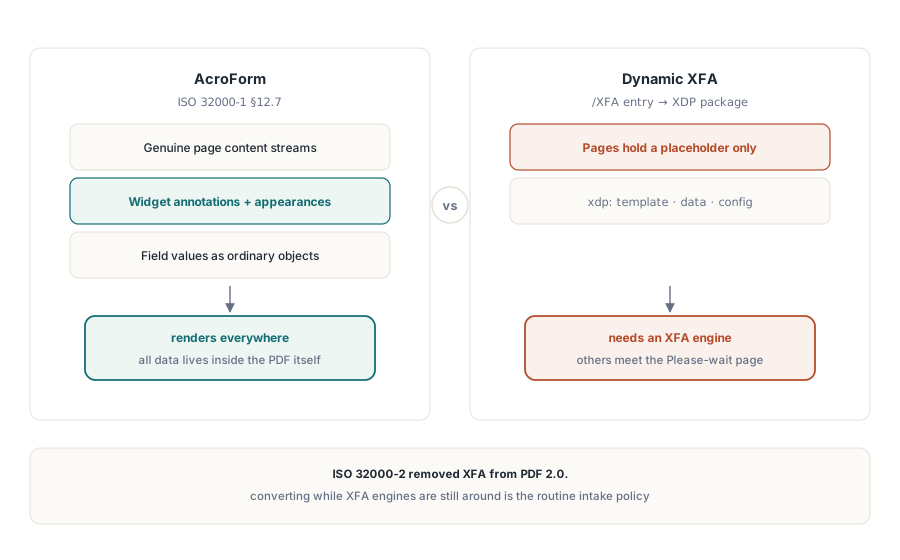
İki modelin bir arada var olamamasının nedeni
AcroForm, ISO 32000-1 §12.7'de tanımlanır. Her alan, bir widget açıklaması ve bir görünüm akışına sahip bir PDF nesnesidir, sayfa gerçek PDF içeriğidir ve veri onun üzerinde biner. XFA bunu tersine çevirir: form bir XML belgesidir, AcroForm sözlüğünün /XFA girdisinde saklanan bir XDP paketidir ve dinamik bir formun PDF sayfaları yalnızca "Please wait" yer tutucusunu tutar, başka hiçbir şeyi değil, çünkü gerçek içerik hiçbir zaman PDF olarak serileştirilmemiştir. Bir okuyucu bir dosyayı ya bir modele ya da diğerine göre işler. /XFA girdisini görmezden gelirseniz boş kabuğu görürsünüz; bir XFA motoru olmadan ona uyarsanız uyarıyı görürsünüz. ISO 32000-2, XFA'yı PDF 2.0'dan düşürerek tartışmayı bitirdi ve "hâlâ yapabiliyorken dönüştür"ün bir uç durumdan rutin bir alım politikasına dönüşmesinin ana nedeni de budur
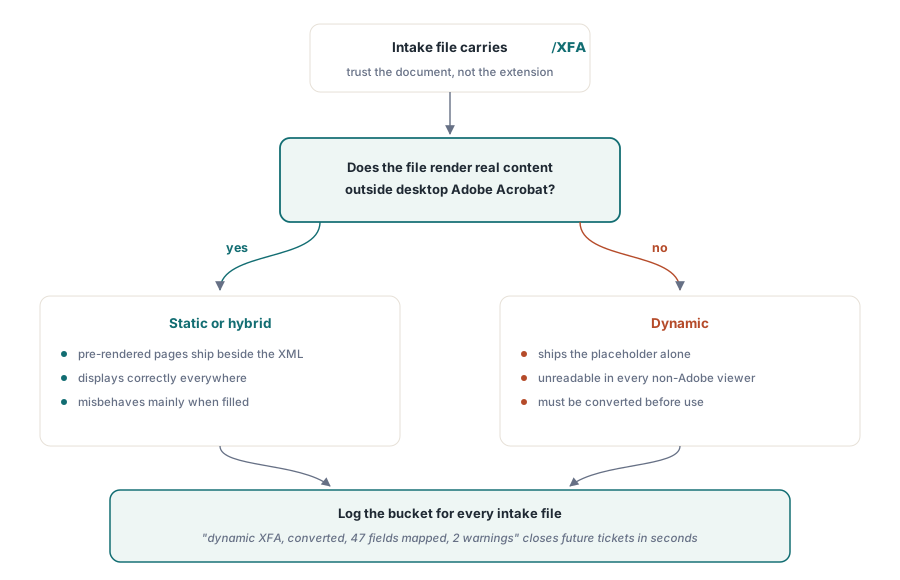
Herhangi bir şeyi dönüştürmeden önce sınıflandırın, çünkü her XFA dosyası yer tutucuyu göstermez. Statik XFA formları, XML'in yanında önceden render edilmiş PDF sayfaları gönderir, bu yüzden her yerde görüntülenirler ve yalnızca doldurulduklarında yanlış davranırlar. Dinamik formlar ise yalnızca yer tutucuyu gönderir ve dönüştürülene kadar kullanılamazlar. Güvenilecek şey belgedir, asla uzantı veya gönderen değil. Adobe olmayan bir görüntüleyicide gerçek içerik render eden ama yine de bir /XFA girdisi taşıyan bir dosya statik veya melezdir; uyarı sayfasını gösteren bir dosya dinamiktir. Her alım dosyasının hangi kovaya düştüğünü kaydedin. İki tür daha sonra farklı şekillerde bozulur ve alım günlüğü zaten "dinamik XFA, dönüştürüldü, 47 alan eşlendi, 2 uyarı" diye okunduğunda, boş bir arşivlenmiş form hakkındaki bir destek talebi saniyeler içinde kapanır
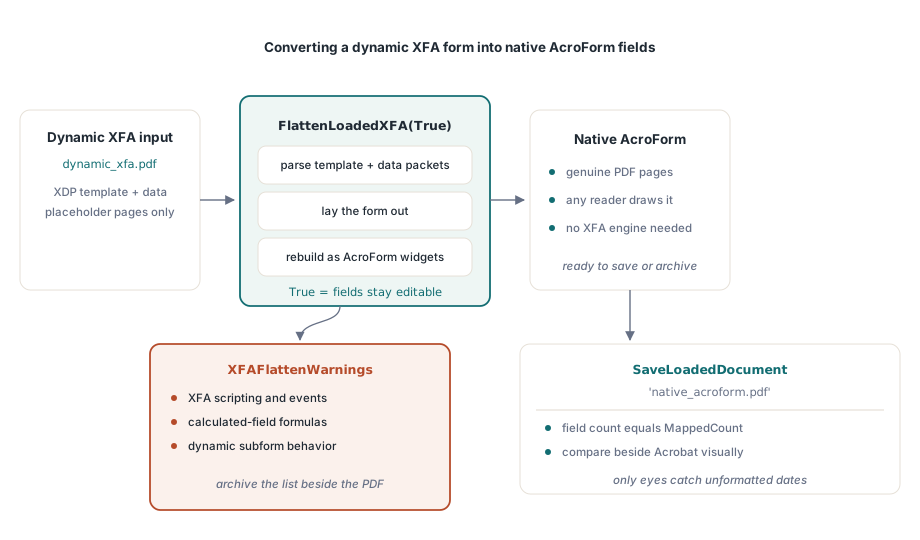
Yüklü bir XFA belgesini yerel alanlara dönüştürmek
Dönüşüm, zaten bellekte olan bir belgeye karşı çalışır. FlattenLoadedXFA, XFA şablonunu ve veri paketlerini ayrıştırır, formu yerleştirir ve onu gerçek PDF sayfalarında AcroForm alanları olarak yeniden kurar:
var
  Pdf: THotPDF;
  MappedCount, I: Integer;
  Warnings: TStrings;
begin
  Pdf := THotPDF.Create(nil);
  try
    Pdf.LoadFromFile('dynamic_xfa.pdf');
    MappedCount := Pdf.FlattenLoadedXFA(True);   // True = alanlar düzenlenebilir kalır
    Warnings := Pdf.XFAFlattenWarnings;
    for I := 0 to Warnings.Count - 1 do
      Log('XFA flatten warning: ' + Warnings[I]); // eşlenmemiş öğeler
    Pdf.SaveLoadedDocument('native_acroform.pdf');
    Log(Format('Mapped %d fields', [MappedCount]));
  finally
    Pdf.Free;
  end;
end;
Dönüş değeri ve uyarı listesi, hata ayıklama gürültüsü değil, çıktıdır; bu yüzden ikisini de saklayın. Dönüşüm, doğası gereği bilgi kaybeder: XFA betiklemesi, hesaplanan alanlar ve dinamik alt-form davranışının AcroForm karşılığı yoktur ve XFAFlattenWarnings, eşlenmeyen her şablon öğesini adlandırır. Dönüştürülmüş dosyayı uyarı listesi olmadan arşivlerseniz, bir gün arşivlenmiş bir kopyada neden olduğuna dair hiçbir kayıt olmadan boş bir toplam kutusuna bakakalırsınız. Editable bayrağı, yeni alanların doldurulabilir kalıp kalmayacağını kontrol eder. İnsanlar formla daha sonra çalışmaya devam edecekse True geçirin ve hedef dondurulmuş bir kayıtsa değerleri kilitleyin
Bir dönüşümü kontrol etmek kısmen görsel, kısmen yapısaldır ve her iki yarıya da ihtiyacınız vardır. Yapısal yarı kolaydır: alan sayısının MappedCount ile eşleştiğini doğrulayın. Gerçek hasarı yakalayan görsel yarıdır. Kaynak formu, hâlâ XFA motorunu çalıştıran tek görüntüleyici olan masaüstü Acrobat'ta, dönüştürülmüş dosyanın yanında sıradan bir okuyucuda açın ve şablon başına en az bir doldurulmuş örnekte değerleri ve düzeni karşılaştırın. XFA motorunun 2026-06-11 olarak gösterdiği bir tarih, AcroForm kopyasında ham, biçimlendirilmemiş bir değer olarak inebilir ve bunu yalnızca sizin gözleriniz yakalar
Girdi bir XDP paketi olduğunda
Her iş doldurulmuş bir PDF'ten başlamaz. Bazen XDP paketini tek başına, bir form tasarım aracından dışa aktarılmış veya bir ortak sistem tarafından teslim edilmiş olarak alırsınız. ApplyXFAAsAcroForm, yükleme adımını atlar ve paketi doğrudan mevcut belgeye uygular:
XDPBytes := TFile.ReadAllBytes('benefit-claim.xdp');
MappedCount := Pdf.ApplyXFAAsAcroForm(XDPBytes, True);
Aynı çağrı grubu, XFA'yı tüketmek yerine üretmeniz gereken daha nadir durum için diğer yönde de çalışır. AddXFAPacket, 'xdp' veya 'config' gibi adlandırılmış tekil paketleri ekler. SetXFADocument, tam bir tek-akışlı yükü tek bir çağrıda kurar. ClearXFAPackets, baştan başlayabilmeniz için kaydı siler ve AddXFASignaturePacket, XML form verisini doğrudan imzalayan iş akışları için XAdES malzemesini gömer. 2026'da XFA üretmek nişe bir ihtiyaçtır, neredeyse her zaman başka hiçbir şeyi reddeden tek bir eski tüketici tarafından zorlanır, ama bir sözleşme bunu adlandırdığında bu çağrılar onu ayrı bir araç yerine bir yapılandırma seçimine indirger
Düzleştirmenin diğer anlamı
"Düzleştirme" kelimesi birçok konuşmayı tökezletir, çünkü tamamen ikinci bir işlemi de adlandırır: hiçbir etkileşimli nesne kalmayana kadar AcroForm alan görünümlerini sayfa içerik akışına yakmak. HotPDF'in bugün bunun için hiçbir API'si yok ve bunu bir projenin yarısında değil şimdi bilmek istersiniz. Kütüphanenin bunun yerine size verdiği şey, alan oluşturulduğunda alan düzeyinde kilitleme, belge izinleriyle desteklenmiş olarak:
// Değeri alan oluşturulurken kilitleyin: salt okunur metin alanı
Pdf.CurrentPage.AddTextField('CaseNumber', 'BC-2026-0117',
  Rect(50, 700, 220, 720), 0, [ffReadOnly]);

// Çifte güvence: form doldurmayı belge genelinde kısıtlayın
Pdf.ActivateProtection := True;
Pdf.CryptKeyLength := aes256;
Pdf.OwnerPassword := 'records-owner';
Pdf.ProtectOptions := [prPrint, prInformationCopy, prExtractContent];
// doldurma izni verilmedi: prFillAnnotations kümede yok
Bunun size ne kazandırdığı ve ne kazandırmadığı konusunda net olun. Salt okunur bir alan yine de bir form nesnesidir. Görüntüleyicinin alan panelinde görünür, değeri form API'si üzerinden okunabilir ve dosyayı yeniden yazan bir araç salt okunur bayrağını yeniden temizleyebilir. İzin bayrakları çıtayı yükseltir ama görüntüleyicinin onlara uymayı seçmesine bağlıdır; bu, ISO 32000-1'in açıkça belirttiği bir sınırlamadır. Bir düzenleyici kurum, arşivlenmiş bir kaydın hiçbir form nesnesi içermemesini ısrarla istediğinde, HotPDF ile bugünkü dürüst cevap, belgeyi yeniden inşa etmektir: değerleri okuyun, ardından onları salt okunur bayraklarını düzleştirme gibi göstermek yerine taze bir sayfada sıradan TextOut içeriği olarak çizin. İzinler yolunda hatırlanması gereken bir şey, CryptKeyLength'in BeginDoc'tan önce ayarlanması gerektiğidir; gerisi AES-256 şifreleme ve izinler makalemizde
XFA'nın arşivsel uygunluk için anlamı
PDF/A ve PDF/X, XFA'yı ikisi de doğrudan reddeder. Bu yüzden bir ISO 19005 arşivini besleyen bir işlem hattının önce dönüştürmesi gerekir ve sıra pazarlık konusu değildir: yükle, FlattenLoadedXFA, kaydet, ardından arşivsel üretimi veya doğrulamayı AcroForm sonucu üzerinde çalıştır. Dönüşümü uygunluğun kanıtı olarak ele almayın. Form modelini düzeltir ve yazı tiplerini, rengi ve meta veriyi tam olarak oldukları gibi bırakır, bu yüzden ona güvenmeden önce çıktıyı veraPDF ile doğrulayın. Form AcroForm tarafına geçtiğinde, davranışı kendi kontrol kümesini kazanır. JavaScript tetikleyicileri, gönder eylemleri ve doğrulama betikleri HotPDF AcroForm alanları ve eylemleri makalesinde ele alınır
Burada gösterilen XFA kayıt, dönüşüm ve form API'leri, belgelendirmesi son sürümler boyunca büyüyen XFA özellik kümesini izleyen, Delphi ve C++Builder için HotPDF Delphi Component ile birlikte gelir