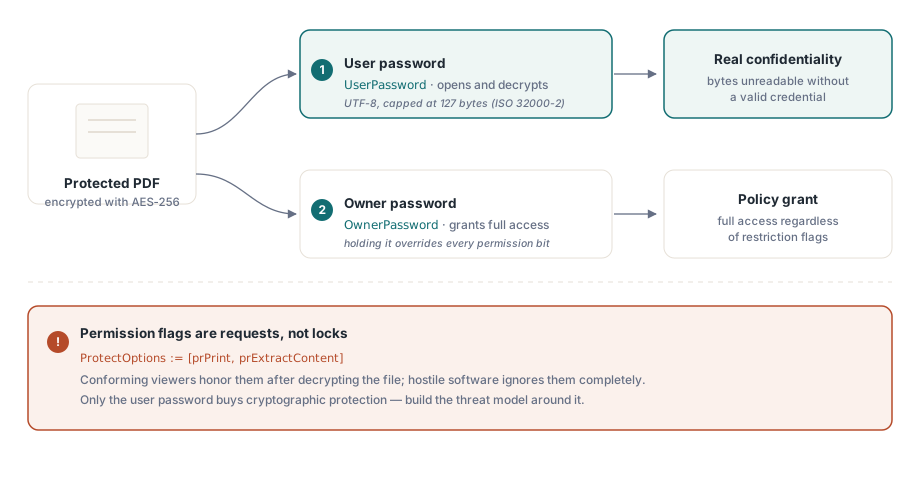
Bir PDF izin bayrağı bir kilit değildir. Dosyanın, onu her açan şeyden yaptığı bir ricadır ve bir görüntüleyici bunu görmezden gelmekte özgürdür. Bu tek gerçek, bu sayfadaki diğer her seçimi nasıl değerlendirmeniz gerektiğini belirler. Gerçek gizlilik yalnızca tek bir yerden gelir: okuyucunun sahip olmadığı bir şifreyle anahtarlanan AES-256 şifrelemesi. Geri kalan her şey, "yazdırma yok" ve "kopyalama yok" onay kutuları, uyumlu yazılımın uymayı kabul ettiği ama düşman yazılımın uymadığı bir politikadır. Bu iki katmanı birbirine karıştırırsanız, bir demoda güvenli hissettiren ama sahada sızdıran bir şey göndermiş olursunuz
HotPDF, Delphi ve C++Builder için yerel bir VCL PDF bileşenidir ve ISO 32000 koruma modelini küçük bir özellik kümesi üzerinden sunar. Özellikleri ayarlamak kolaydır. Zor olan kısım, hangisinin size kriptografik koruma, hangisinin ise sadece kibar bir öneri sağladığını bilmek ve atama sırasını doğru yaparak istediğiniz şifrelemenin gerçekten aldığınız şifreleme olmasını sağlamaktır
İki şifrenin gerçekte vadettiği şey
PDF şifrelemesi, farklı görevlere sahip iki kimlik bilgisi tanımlar ve bunları birbirine karıştırmak, korumalı çıktı kodundaki en yaygın tasarım hatasıdır. Kullanıcı şifresi, şifre çözmenin kapısını tutar. O olmadan, ya da sahip şifresi olmadan, uyumlu bir okuyucu dosya anahtarını yeniden oluşturamaz ve içerik kriptografik olarak okunamaz kalır. Sahip şifresi ise bunun yerine izin ayarlarının kapısını tutar: sahip şifresini alan bir okuyucuya, kısıtlama bayrakları ne derse desin tam erişim verilir
İzin bitleri daha zayıf bir zeminde durur. Yazdırma, içerik çıkarma, form doldurma: her biri bir görüntüleyicinin okuduğu ve uymayı seçtiği bir bayraktır (ISO 32000-2 §7.6.4). Şifreleme baytları korur. İzin bayrakları yalnızca uyumlu yazılıma talimat verir ve bunu olay gerçekleştikten sonra yapar. Belgeyi kullanıcı şifresiyle açan herkes şifresi çözülmüş içeriği zaten bellekte tutar; bu yüzden "kopyalama yok" ve "yazdırma yok", iyi davranan bir görüntüleyici için bir şey ifade eder, kararlı biri için hiçbir şey ifade etmez. Tehdit modelinizi bu çizgi etrafında kurun. Gizlilik kullanıcı şifresinde yaşar. İzinler ana akım görüntüleyicilerin sunduklarını şekillendirir ve yaptıkları şeyin tamamı budur
Yapılandırma sırası: BeginDoc'tan önceki her şey
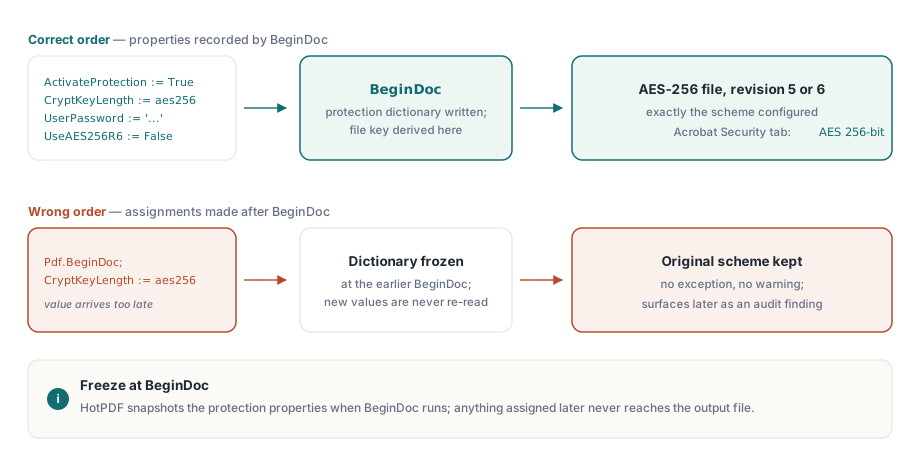
HotPDF, şifreleme sözlüğünü BeginDoc çalıştığı anda kurar ve dosya anahtarını o anda türetir. O andaki koruma özelliklerinin ne tuttuğu, belgenin alacağı şey budur ve bunları sonradan değiştirmek hiçbir şeyi değiştirmez. Burada en çok önem taşıyan özellik, THPDFKeyType değerleri k40, k128, aes128 ve aes256 arasından şemayı seçen CryptKeyLength'tir. Onu BeginDoc'tan sonra atarsanız hiçbir istisna, hiçbir uyarı almazsınız; yalnızca başladığı şeyi sessizce koruyan bir dosya elde edersiniz. Bu türden sessiz bir sapma en kötüsüdür: her yerel testi geçer ve aylar sonra bir müşterinin masasında bir uyumluluk bulgusu olarak ortaya çıkar
var
  Pdf: THotPDF;
begin
  Pdf := THotPDF.Create(nil);
  try
    Pdf.FileName := 'statement.pdf';
    Pdf.ActivateProtection := True;
    Pdf.CryptKeyLength := aes256;        // BeginDoc'tan önce ayarlanmalıdır
    Pdf.UserPassword := 'open-secret';
    Pdf.OwnerPassword := 'admin-secret';
    Pdf.UseAES256R6 := False;            // R=5: en geniş görüntüleyici desteği
    Pdf.BeginDoc;
    Pdf.CurrentPage.SetFont('Arial', [], 11);
    Pdf.CurrentPage.TextOut(50, 720, 0, 'Account statement, June 2026');
    Pdf.EndDoc;
  finally
    Pdf.Free;
  end;
end;
Şifreler UTF-8'dir ve AES-256 şemaları için ISO 32000-2 sınırı olan 127 bayt ile sınırlıdır. Şifre politikanız size daha uzun gizli değerler veriyorsa, kesme işlemini kendiniz, kesin nereden yapılacağını tam olarak kontrol ettiğiniz kendi tarafınızda yapın. Bunu şansa bırakırsanız, kütüphane ile gelecekteki bir görüntüleyici kesme noktası konusunda anlaşmazlığa düşebilir; bu da sizde açılan ama başka bir yerde aynı şifreyi reddeden bir dosya üretir
Revizyon 5 mi revizyon 6 mı: tek bir boole, iki ekosistem
UseAES256R6, iki AES-256 el sıkışması arasında seçim yapar ve bu seçim, boole türünün ima ettiğinden daha sonuçludur. Onu False bırakırsanız HotPDF, PDF 1.7'ye bir uzantı olarak gelen ve on beş yıla yakın süredir görüntüleyicilerin açabildiği AES-256 şeması olan revizyon 5'i yazar. Onu True yaparsanız, revizyon 5'in şifreyi doğrulama biçimindeki bilinen bir zayıflığı kapatan, ISO 32000-2'de PDF 2.0 için standartlaştırılmış sertleştirilmiş anahtar türetmesi olan revizyon 6'yı elde edersiniz
Yani revizyon 6, kriptografik olarak daha iyi bir hikayedir. Aynı zamanda işleri bozan da odur. Bir revizyon 6 dosyası, PDF 1.7 Extension Level 3 veya PDF 2.0 için oluşturulmuş bir görüntüleyiciye ihtiyaç duyar ve dağıtımdaki yazılımların çoğu ikisi de değildir: kayıt yönetimi arşivleri, başka ürünlerdeki gömülü render motorları, yıllardır kimsenin dokunmadığı iş hattı araçları. Bunlar dosyayı doğrudan reddedecektir ve bunu müşterinin makinesinde yapacaktır, sizinkinde asla. Bu yüzden pratik varsayılan revizyon 5'tir. Revizyon 6'ya yalnızca bir güvenlik politikası ISO 32000-2'yi revizyona göre adlandırdığında ve her tüketicinin onu okuyabildiğini gerçekten doğruladığınızda başvurun. Hangisini seçerseniz seçin, hangisini ve neden seçtiğinizi yazın, çünkü bu koda dokunacak bir sonraki kişi merak edecektir
Eski anahtar türleri, onları atlamanız gerektiğini bilmeniz için bir cümleyi hak ediyor. THPDFKeyType hâlâ k40, k128 ve aes128'i listeler, ama bunlar yeni arşivleri korumak için değil, tarihsel arşivleri yeniden üretmek için vardır. 40 bitlik RC4, sıradan donanıma karşı düşer ve 128 bitlik şemalar, herhangi bir güncel güvenlik incelemesinin bekleyeceği AES-256 revizyonlarından öncedir. 2026'da oluşturduğunuz bir belge için gerçek soru yalnızca revizyon 5'e karşı revizyon 6'dır; yeni bir tasarımda kendinizi eski türlere uzanırken bulursanız, yukarı akışta bir şeyler ters gitmiştir
Açık şifre olmadan izin bayrakları
Çoğu zaman gereksinim gizliliğin tam tersidir. Herkes belgeyi okuyabilmelidir, ama yazdırma veya çıkarma sınırlı olmalıdır. Bunu, PDF'in açık şifre modu dediği boş bir kullanıcı şifresi ve boş olmayan bir sahip şifresiyle ifade edersiniz ve izin vermek istediğiniz işlemleri ProtectOptions içinde listelersiniz
Pdf.ActivateProtection := True;
Pdf.CryptKeyLength := aes256;
Pdf.UserPassword := '';                      // dosyayı herkes açabilir
Pdf.OwnerPassword := 'rotate-me-quarterly';  // izin kümesini korur
Pdf.ProtectOptions := [prPrint, prPrint12bit, prExtractContent];
Pdf.BeginDoc;
// ... sayfa içeriği ...
Pdf.EndDoc;
THPDFProtectOptions kümesi, ISO izin bitleriyle eşleşir: yüksek çözünürlüklü yazdırma için prPrint ve prPrint12bit, genel kopyalama ve çıkarma için prInformationCopy, yardımcı teknoloji çıkarması için prExtractContent, ayrıca prModifyStructure, prEditAnnotations, prFillAnnotations ve prAssemble. Bunlardan ikisi bir uyarıyı hak ediyor. Oluşturduğunuz hemen her profilde prExtractContent'i açık bırakın. Bu, bir ekran okuyucunun metne ulaşmak için ihtiyaç duyduğu bittir ve onu temizlemek, bir hak kararını, engelli birinin karşılaştığı ama sizin asla görmediğiniz bir erişilebilirlik kusuruna sessizce dönüştürür. Diğer tuzak ise prPrint12bit olmadan tek başına prPrint'tir: birçok görüntüleyici, yazdırma kalitesini düşürerek yanıt verir ve kullanıcılarınız bunu aslında bir izin ayarı olduğu halde bir render hatası olarak bildirir
Doğrulama beş dakika sürer ve sürüm kontrol listenizde yer almalıdır. Her profilden bir örneği Acrobat'ta açın, Belge Özellikleri'ni açın ve algoritmayı ("AES 256-bit") açıkça belirten ve izin verilen işlemleri tek tek listeleyen Güvenlik sekmesini okuyun. Ardından aynı dosyayı, kendi makinenizdeki en yeni değil, müşterilerinizin gerçekten kullandığı en eski görüntüleyicide açın. Bu ikinci açma, bir revizyon 6 dosyasının geliştirmeyi sorunsuzca geçip hiç güncelleme yapmamış bir müşteride ölmesine karşı ucuz bir sigortadır
Mevcut dosyalardan korumayı kaldırmak
Şifre çözme, aynı özellik modelini tersine çalıştırır. Belgeyi geçerli bir kimlik bilgisiyle yükleyin, korumayı kapatın ve sonucu onsuz kaydedin
var
  Pdf: THotPDF;
  PageCount: Integer;
begin
  Pdf := THotPDF.Create(nil);
  try
    PageCount := Pdf.LoadFromFile('encrypted.pdf', 'open-secret');
    if PageCount > 0 then
    begin
      Pdf.ActivateProtection := False;   // kaydederken şifrelemeyi kaldır
      Pdf.SaveLoadedDocument('plain.pdf');
    end;
  finally
    Pdf.Free;
  end;
end;
Bu yol, tüm belgeyi belleğe ayrıştırır; bu, sıradan dosyalar için sorun değildir ama devasa olanlar için israftır. Girdi yüzlerce megabayta ulaştığında, DecryptFile daha ucuz bir seçenektir: dosya düzeyinde bir kopyalama sırasında şifreyi çözer ve girdinin izin verdiği her durumda tam nesne ağacını kurmayı atlayan doğrudan bir AES-256 yeniden yazma yolu izler. Bu, Delphi'den büyük PDF'leri işleme konulu yoldaş makalede ele alınan Direct File API'nin bir parçasıdır
Şifrelemeyle etkileşen kısıtlamalar
İki sınırı, şifreleme etrafında tasarım yapmadan sonra değil önce bilmeye değer. Birincisi arşivsel uygunluktur. ISO 19005, PDF/A'da şifrelemeyi yasaklar; bu yüzden bir belgeyi şifreleyen ve aynı zamanda PDF/A uygunluğu iddia eden herhangi bir iş akışı yapı gereği çelişkilidir; HotPDF ikisine tek bir dosyada birden sahip olmanıza izin vermez. İkisine gerçekten ihtiyaç duyduğunuzda cevap iki eserdir: dağıtım için şifreli bir kopya ve arşiv için ayrı, şifresiz bir kopya
İkinci sınır daha çetindir. PDF şifrelemesinin ne emaneti ne de kurtarma yolu vardır. Bir R5 veya R6 dosyasında kullanıcı şifresini kaybederseniz seçenekleriniz kaba kuvvet ya da vazgeçmektir. Bu yüzden sahip ve kullanıcı gizli değerlerini herhangi bir üretim kimlik bilgisine davrandığınız gibi ele alın. Onları üretin, bir kasada saklayın, bir takvime göre döndürün. Asla yapılmaması gereken tek şey, onları bir birim içinde sabit değerler olarak koda gömmektir; bu, doğrudan sürüm kontrolüne biner ve her geliştiricinin çalışma kopyasında sonsuza dek kalır
Geliştirmeye değer son bir refleks. Kendi oluşturmadığınız bir dosyanın korumasını değiştirmek, ayrı bir özellik değil şifre çözmeyle aynı mekanizmadır: onu şifresiyle LoadFromFile üzerinden yükleyin, ProtectOptions'ı veya şifreleri yerinde düzenleyin ve SaveLoadedDocument ile geri yazın. Bir dosyanın şifresini çözebiliyorsanız izinlerini de yeniden ayarlayabilirsiniz ve kod, yukarıdaki örnekle neredeyse aynı görünür
Burada gösterilen koruma özellikleri, Delphi ve C++Builder için standart HotPDF Delphi Component'in bir parçasıdır; ürün sayfası, tam izin numaralandırması dahil olmak üzere eksiksiz şifreleme referansını taşır