Bir AcroForm eylemi, bir widget'a eklenmiş ve o widget'a bir şey olduğunda görüntüleyicinin ne yapacağını söyleyen bir sözlüktür. Bir düğmeye tıklarsınız ve görüntüleyici onun eylem sözlüğünü okur: bir URI eylemi bir web adresi açar, bir JavaScript eylemi betik çalıştırır, bir SubmitForm eylemi toplanan alan değerlerini bir uç noktaya gönderir, bir ResetForm eylemi onları varsayılanlara geri döndürür. Eylem veridir, dosyaya gömülü bir davranış değildir. ISO 32000-1 §12.6, sözlük biçimini tanımlar; onu yorumlayan motoru görüntüleyici sağlar. Bu ayrım önemlidir, çünkü PDF'e mükemmel biçimde yazılmış bir eylem, karşı taraftaki okuyucunun onun için bir motoru yoksa yine de hiçbir şey yapmaz ve AcroForm ile ilgili sıkıntının çoğu, bozuk bir alandan çok bu boşluğa geri izlenir
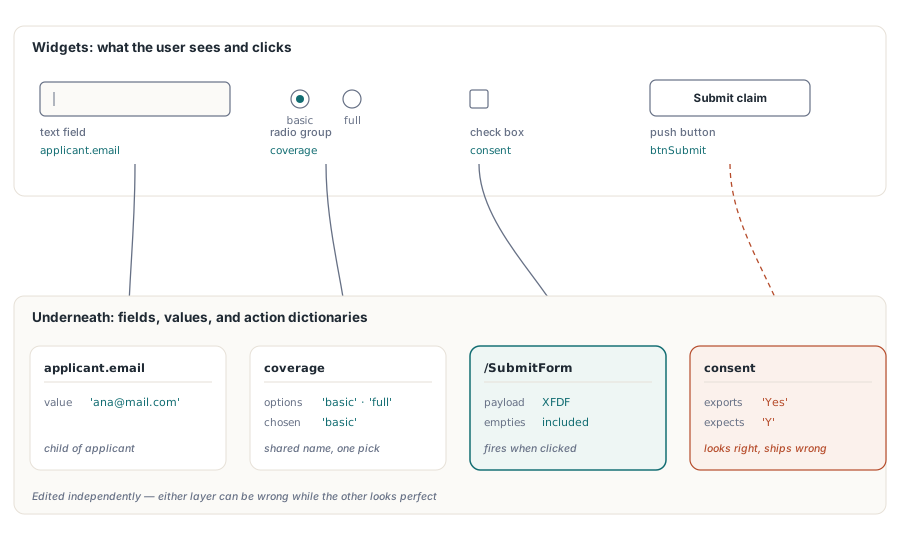
HotPDF, bu sözlükleri, asılı oldukları alan widget'larıyla birlikte doğrudan Delphi ve C++Builder'dan yazar. Her etkileşimli form için iki yapı devrededir: kullanıcının sayfada gördüğü widget ve verinin ve bağlantıların altında taşındığı alan artı eylem mekanizması. Bunlar bağımsız olarak düzenlenir ve biri yanlışken diğeri iyi görünebilir. Aşağıdaki bölümler, alan adlandırmasını, düğme eylemlerinin kendisini, alan düzeyinde JavaScript'i ve tamamen ikinci yapıda yaşadığı için görsel bir kontrolü atlatan kusur sınıfını ele alır
Alan adları, başlık değil yönlendirme anahtarlarıdır
Her AcroForm alanı tam nitelikli bir ad taşır. ISO 32000-1 §12.7.3, görünür başlığı değil bu adı, form dışa aktarıldığında veya gönderildiğinde alanın değerinin altında seyahat ettiği anahtar yapar. VCL tasarımından gelen geliştiriciler, bir kontrolün adını özel bir kod tanımlayıcısı olarak ele alma eğilimindedir ve burada öyle bir şey değildir. Kablo biçimidir
Bundan çıkan ilk sonuç, aynı tam nitelikli ada sahip iki alanın iki alan olmadığıdır. PDF, bunları tek bir alanın iki widget açıklaması olarak ele alır, tek bir değeri paylaşırlar, bu yüzden birine yazmak diğerini yerinde günceller. Bir müşteri adının bir sözleşmenin her sayfasında tekrarlanması gerektiğinde istediğiniz tam olarak budur. Bir üretim döngüsünün 'Field1''i üç sayfa boyunca yanlışlıkla yeniden kullanması ise bir hatadır. Hiçbir görsel inceleme ikinci durumu yakalamaz. Her sayfa yine de kendi kutusunu çizer ve bağlantı yalnızca biri yazmaya başladığında ortaya çıkar
applicant.email gibi noktalı adlar bir hiyerarşi kurar. Ebeveyn düğüm applicant, çocuklarını gruplar ve bir sıfırlamanın veya gönderimin formun yalnızca bir kısmını hedeflemesini sağlayan da budur. Alanları baştan bu şekilde adlandırmak hiçbir şeye mal olmaz ve alıcı sistem yalnızca applicant bloğunu istediği ilk anda kendini amorti eder
Radyo düğmelerinin kendine ait bir kuralı vardır. Birlikte değişmesi gereken düğmeler bir grup adını paylaşmak zorundadır. HotPDF'te, aynı grup adını geçiren AddRadioButton çağrıları widget'larını tek bir ebeveyn alana ekler ve her düğmenin dışa aktarma değeri ('basic' veya 'full') seçilen seçeneği tanımlar. Her düğmeye ayrı bir ad verirseniz, birbirini dışlayan tek bir grup yerine, özdeş render edilen ama yanlış davranan bağımsız açma/kapama anahtarlarından oluşan bir sıra elde edersiniz
Alan kümesini sayfa sayfa oluşturmak
HotPDF, alanları THPDFPage yöntemleri üzerinden yerleştirir, bu yüzden her alan onu oluşturan sayfa nesnesine aittir. Dikkat edilmesi gereken sıralama tuzağı AddPage'dir. Döndüğü anda CurrentPage'i yeni sayfaya yeniden işaret ettirir, bu yüzden ondan sonraki herhangi bir alan çağrısı, alan mantıksal olarak az önce ayrıldığınız sayfaya ait olsa bile yeni sayfaya iner. AddPage'i çağırmadan önce her sayfayı, çizilen içerik ve alanlarla birlikte, bitirin
procedure BuildClaimForm(Pdf: THotPDF);
begin
  // Sayfa 1: başvuru sahibi bloğu
  Pdf.CurrentPage.AddTextField('applicant.name', '', Rect(50, 70, 300, 92));
  Pdf.CurrentPage.AddTextField('applicant.email', '', Rect(50, 110, 300, 132));
  Pdf.CurrentPage.AddCheckBox('consent', 'Y', Rect(50, 152, 70, 172), False);
  Pdf.CurrentPage.AddRadioButton('coverage', 'basic', Rect(50, 192, 70, 212), True);
  Pdf.CurrentPage.AddRadioButton('coverage', 'full', Rect(90, 192, 110, 212), False);
  Pdf.CurrentPage.AddComboBox('plan', 'Standard',
    ['Basic', 'Standard', 'Premium'], Rect(50, 227, 200, 252));

  Pdf.AddPage;  // CurrentPage artık sayfa 2'yi gösteriyor
  Pdf.CurrentPage.AddListBox('riders', 'None',
    ['None', 'Flood', 'Earthquake'], Rect(50, 192, 200, 292));
end;
Koordinatlar, TextOut ve diğer sayfa çizim çağrılarıyla aynı üst-sol çerçeveyi kullanır: X sağa doğru, Y üst kenardan aşağı doğru nokta cinsinden büyür ve her TRect VCL geleneğine göre okunur; Top daha küçük Y, Bottom daha büyüğüzdür. HotPDF, widget'ın /Rect değerini yazarken dikdörtgeni alttan yukarıya PDF kullanıcı uzayına çevirir, dolayısıyla Rect(50, 100, 200, 120) bir Letter sayfasının altına değil üstüne yakın oturur. Ham PDF koordinatlarından, Y'nin zaten alt kenardan yukarı doğru sayıldığı bir yerden aktarılan bir düzen tablosu dikey olarak aynalanmış çıkar, her alan sayfanın yanlış ucuna düşer. Tüm formu tek bir çerçevede tutun ve dönüşümü HotPDF'e bırakın. İstisna, mevcut bir dosyaya alan ekleyen AddLoaded* ailesidir: bunlar, orijini sol altta olan PDF kullanıcı uzayı köşeleri alır
Düğmeleri URI, JavaScript ve gönderim eylemlerine bağlamak
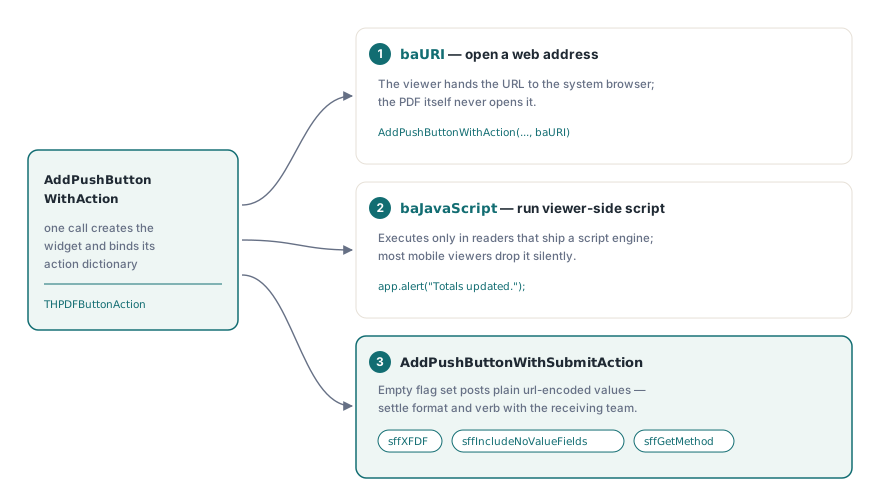
Bir basmalı düğme, ona bir eylem eklenene kadar hareketsizdir. HotPDF, ISO 32000-1 §12.6.4'teki eylem türlerini THPDFButtonAction numaralandırması (baURI, baJavaScript, baSubmitURL, baResetForm, baHide, baShow, baNamed) üzerinden yüzeye çıkarır ve düğmeyi oluşturup eylemini tek bir çağrıda bağlayan iki yöntem sağlar
// Sistem tarayıcısında bir yardım sayfası aç
Pdf.CurrentPage.AddPushButtonWithAction('btnHelp', 'Help',
  'https://www.example.com/claims-help', Rect(320, 62, 420, 92), baURI);

// Görüntüleyici tarafında JavaScript çalıştır
Pdf.CurrentPage.AddPushButtonWithAction('btnRecalc', 'Recalculate',
  'app.alert("Totals updated.");', Rect(320, 102, 420, 132), baJavaScript);

// XFDF olarak gönder ve boş alanları yükte tut
Pdf.CurrentPage.AddPushButtonWithSubmitAction('btnSubmit', 'Submit claim',
  'https://api.example.com/claims', Rect(320, 142, 420, 172),
  [sffXFDF, sffIncludeNoValueFields]);
Gönderim bayrakları, genellikle aldıklarından daha fazla düşünmeyi hak eder. AddPushButtonWithSubmitAction, bir THPDFSubmitFormFlags kümesi alır ve boş bir küme, birçok örnek uç noktanın kabul ettiği ama birçok üretim uç noktasının reddettiği biçim olan düz url-kodlanmış bir post üretir. sffXFDF eklemek, yükü XFDF'e geçirir. sffGetMethod, HTTP fiilini değiştirir. sffIncludeNoValueFields, boş alanları sessizce düşürmek yerine yükte tutar; bu da tüketici "yok" ile "boş"u ayırt ettiği anda önem kazanır. Bayrak kümesi, alıcı uç noktayla arayüz sözleşmenizin bir parçasıdır, bu yüzden onu ilk reddedilen partiden sonra değil, gönderimi ayrıştıran ekiple birlikte kararlaştırın
Alan düzeyinde JavaScript: tuş vuruşu, biçim, doğrula
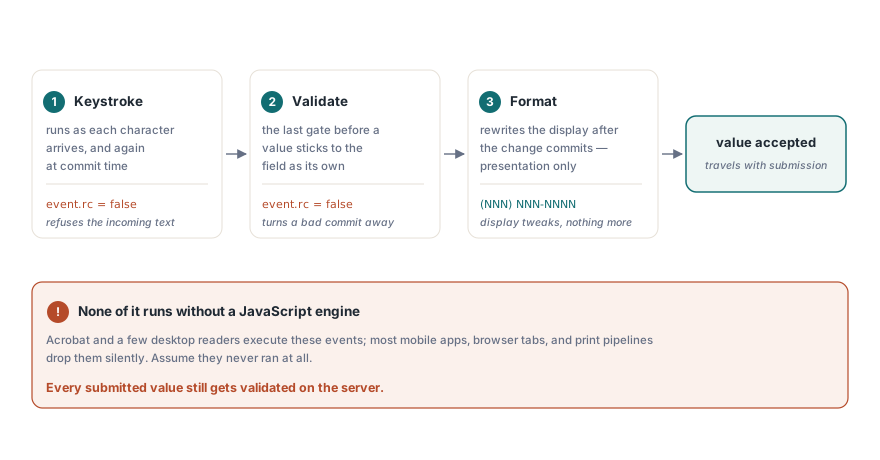
Eylemlerin yaşadığı tek yer düğme tıklamaları değildir. HotPDF ayrıca, betik çalıştırabilen görüntüleyicilerin bir kullanıcı veri girerken tetiklediği alan başına olaylara JavaScript ekler. Üç tetikleyici vardır ve bunlar girdi yaşam döngüsünün farklı noktalarında tetiklenir. Bir tuş vuruşu eylemi her karakter geldiğinde ve yine işlem onaylandığında çalışır. Bir biçim eylemi, bir değişiklik onaylandıktan sonra görüntülenen değeri, tamamen sunum için yeniden yazar. Bir doğrulama eylemi ise son sözü söyler; onaylanan değeri alanın değeri olmadan önce kabul eder veya reddeder
// Makul e-posta adresi olmayan onaylanan değerleri reddet
Pdf.AttachFieldKeyStrokeAction('applicant.email',
  'if (event.willCommit && !/^[\w.-]+@[\w.-]+\.\w+$/.test(event.value)) event.rc = false;');

// ABD telefon numaralarını (NNN) NNN-NNNN olarak göster
Pdf.AttachFieldFormatAction('applicant.phone',
  'event.value = event.value.replace(/(\d{3})(\d{3})(\d{4})/, "($1) $2-$3");');

// Onay anında 18 yaşından küçük başvuru sahiplerini reddet
Pdf.AttachFieldValidateAction('applicant.age',
  'if (parseInt(event.value) < 18) event.rc = false;');
Bir tuş vuruşu veya doğrulama betiğinin içinde event.rc = false ayarlamak, görüntüleyiciye girdiyi reddetmesini söyler. İncelik şudur: görüntüleyici bir JavaScript motoru göndermedikçe bunların hiçbiri çalışmaz. Acrobat ve birkaç masaüstü ürünün bir tanesi vardır. Çoğu mobil okuyucu, tarayıcı içine gömülü render motoru ve yazdırma işlem hatlarının yoktur ve bunlar betikleri şikayet etmeden yere düşürür. Bu yüzden alan betikleri, okuyucusu onları çalıştıran kullanıcı alt kümesi için veri kalitesini iyileştirir ve yaptıkları şeyin tamamı budur. Bir güvenlik sınırı değildirler. Her gönderilen değer, geldiğinde yine de sunucuda doğrulanmak zorundadır, çünkü istemcinin herhangi bir şeyi kontrol ettiğini varsayamazsınız
Görsel incelemeyi geçen kusurlar
Yakalanması en zor AcroForm kusurları, render etmede değil veri yapısında yaşayanlardır, çünkü dosyayı açıp bakmak size hiçbir şey söylemez. Dördü, adlandırılmaya değecek kadar sık ortaya çıkar ve her birinin, sürümden önce onu bulan mekanik bir testi vardır
- Dışa aktarma değeri kayması.
AddCheckBox('consent', 'Yes', ...)olarak oluşturulan bir onay kutusuYesgönderir.Yile eşleşen bir tüketici, sayfa kusursuz görünürken her gönderimi reddeder. Formu doldurun, Acrobat'tan XFDF olarak dışa aktarın ve değerleri tüketicinin gerçekte beklediği şemayla karşılaştırın - Kazara değer aynalaması. Tam nitelikli bir adı paylaşan iki alan bire birleşir. Belirti, üretim zamanında değil veri girişi zamanında ortaya çıkar, bu yüzden test, formu render edip sonucu göz kararı incelemek değil, forma yazmaktır
- Seçenek listesi dışındaki açılır kutu değerleri.
AddComboBox'a geçirilen mevcut değer listelenen seçeneklerden biri değilse, görüntüleyiciler onu gösterme, boşaltma veya işaretleme konusunda anlaşmazlığa düşer. Varsayılanı liste içinde tutun, anlaşmazlık ortadan kalkar - İş akışı kapandıktan sonra hâlâ düzenlenebilir alanlar. HotPDF'in AcroForm alanları için bir görünüm-düzleştirme çağrısı yoktur. Tamamlanmış bir formu dondurmanın desteklenen yolu, alanları
ffReadOnlybayrağıyla oluşturmaktır; bu, düzenlemeleri reddederken değeri alanın kendi görünüm akışı üzerinden görünür tutar. Alan, aşağı akıştaki montaj ve imzalama araçlarının bulmayı beklediği canlı bir form nesnesi olarak kalır
Hiçbir kod değişikliğinin ele almadığı bir görüntüleyici tarafı davranışı, bir regresyon notunu hak eder. Kurumsal Acrobat dağıtımları, politika gereği JavaScript'i devre dışı bırakabilir veya gönderim hedeflerini kısıtlayabilir; bu yüzden her geliştirme derlemesinde çalışan bir eylem, kilitlenmiş bir müşteri masaüstünde ölü oturabilir. Düğmenin hiçbir şey yapmadığı durum için görünür bir geri düşüş planlayın; bu geri düşüş yalnızca kullanıcıya bunun yerine ne yapması gerektiğini söyleyen basılı bir talimat olsa bile
Form işinin belgenin geri kalanına bağlandığı yer
Bir imza alanı, kendisi bir AcroForm alan türüdür. Daha sonra onaylanacak veya karşı imzalanacak bir form, o alanı sonradan yamalatmak yerine üretim sırasında ayırmakla daha iyi durumdadır ve bunun bayt düzeyindeki nedenleri HotPDF ile dijital imzalar ve PAdES imzalama konulu yoldaş makalede yer alır. Yerel AcroForm yerine XFA paketleri olarak gelen girdiler farklı bir durumdur: XFA'yı AcroForm alanlarına düzleştirmek, iki form teknolojisi tek bir dosyada bir arada var olamadığı için kendi kayıp modeline sahip kendi başına bir iş akışıdır
Burada gösterilen alan, eylem ve tetikleyici yöntemleri, Delphi ve C++Builder için standart HotPDF Delphi Component API'sinin bir parçasıdır; ürün sayfası, alan-bayrağı aşırı yüklemeleri ve eksiksiz gönderim-bayrağı numaralandırması dahil olmak üzere tam referansa bağlantı verir