PDF/A, PDF/X ve PDF/UA, üç farklı sorunu çözen üç farklı standarttır: uzun vadeli arşivleme, baskı değişimi ve erişilebilirlik. Bunlar tek bir uyumluluk formundaki üç onay kutusu değildir ve en yaygın hata, onları öyleymiş gibi ele almaktır. Bir dosya kusursuz bir PDF/A olup bir matbaa için kullanışsız olabilir; kusursuz bir baskı master'ı bir ekran okuyucu için okunamaz olabilir. Daha kötüsü, üçü de dosyanın nasıl göründüğüne değil, iç yapısına ilişkin kısıtlamalardır. Sahip olduğunuz her görüntüleyicide temiz açılan bir belge, yine de ilk denemede doğrulamayı geçemeyebilir ve genellikle geçemez
losLab'ın yerel VCL PDF kütüphanesi olan HotPDF, uygunluğu ilk sayfa var olmadan önce beyan ettiğiniz bir şey olarak ele alır. Bir uyumluluk özelliği ayarlarsınız, standardın gerektirdiği yapıları eklersiniz ve kütüphane, kayıt anında profille çelişen yapılandırmaları reddeder. Bu, bir dosya oluşturup bir son-işlemcinin bunu sonradan uyarlayabileceğini ummaktan daha iyi bir modeldir, çünkü bu standartların gerektirdiği şeylerin çoğu sonradan eklenemez
Üç ISO standardı, üç farklı vaat
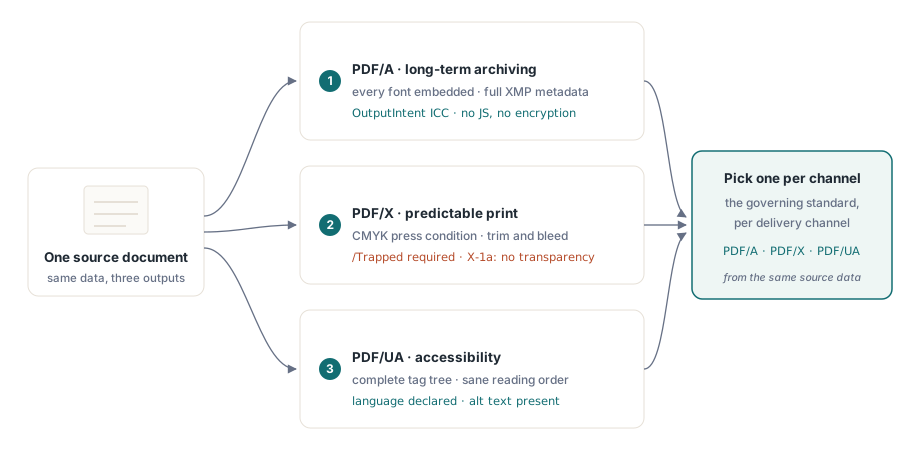
PDF/A (ISO 19005), zamanla ilgilidir. Bir dosyanın onlarca yıl sonra da aynı şekilde render edileceğini vaat eder, bu yüzden tam bir kendine yeterliliği talep eder: her yazı tipi gömülü, her renk bir OutputIntent üzerinden aygıttan bağımsız bir anlam kazanmış, tam XMP meta verisi ve davranışı ortama bağlı olan her şeyin yasaklanması. Şifreleme ve JavaScript devre dışıdır, çünkü kimse şifre çözücünün veya betik motorunun 2050'de var olacağını garanti edemez
PDF/X (ISO 15930), kağıt üzerindeki renkle ilgilidir. Bir tasarımcının, ikisinin de tartışmak zorunda kalmadığı bir dosyayı bir matbaaya teslim edebilmesi için vardır; bu da karakterize edilmiş baskı koşulları, zorunlu bir /Trapped anahtarı, tanımlı kesim ve taşma geometrisi ve X-1a türünde, RIP'in tahmin etmesi gereken canlı şeffaflığın olmaması anlamına gelir. PDF/UA (ISO 14289) ise sonucu kimin okuyabileceğiyle ilgilidir. Yardımcı teknoloji, eksiksiz bir etiket ağacı, akla yatkın bir okuma sırası, beyan edilmiş bir belge dili ve metin olmayan her şey için metin alternatifleri gerektirir
Üçü farklı yönlere çektiği için, hepsini birden karşılayan tek bir dosyanın peşinden koşmak yerine, çıktı kanalı başına yönetici standardı seçin. Yalnızca CMYK olan bir baskı master'ı, rengi hiç görmeyen bir ekran okuyucu kullanıcısına vermek için tam olarak yanlış şeydir ve arşivsel profilin dinamik davranış üzerindeki kilidi, herhangi bir etkileşimli şeyle çatışır. Aynı kaynak veriden kanal başına üretim yapın ve tüm çatışmayı bertaraf edin
PDF/A: herkesin unuttuğu kısım OutputIntent'tir
Bir PDF/A dosyası doğrulamayı geçemezse, kontrol edilecek ilk şey OutputIntent'tir. Bu, üreticilerin en sık atladığı yapıdır, çünkü tam olarak görünür hiçbir şey ona bağlı değildir. ISO 19005 bir tane gerektirir: belgenin aygıt renklerinin gerçekte ne anlama geldiğini sabitleyen gömülü bir ICC profili. HotPDF bu profili sonradan akla gelen bir şey değil, açık bir girdi haline getirir:
var
  Pdf: THotPDF;
  ICC: TFileStream;
begin
  Pdf := THotPDF.Create(nil);
  try
    Pdf.FileName := 'invoice-archival.pdf';
    Pdf.PDFACompliance := 'B';            // düzey B: görsel sadakat
    Pdf.Lang := 'en-US';
    Pdf.StandardFontEmulation := False;   // gerçek yazı tiplerini göm, Base-14 emülasyonu yok
    ICC := TFileStream.Create('sRGB.icc', fmOpenRead);
    try
      Pdf.AddPDFAOutputIntent('sRGB IEC61966-2.1', '', ICC, 3, 'DeviceRGB');
    finally
      ICC.Free;
    end;
    Pdf.BeginDoc;
    Pdf.CurrentPage.SetFont('Arial', [], 11);
    Pdf.CurrentPage.TextOut(50, 760, 0, 'Archival invoice body');
    Pdf.EndDoc;
  finally
    Pdf.Free;
  end;
end;
Burada birkaç ayrıntı geçip geçmeyeceğinize karar verir. StandardFontEmulation kapalı olmak zorundadır: emüle edilmiş Base-14 yazı tipleri gömülü değildir ve gömme, ISO 19005 altında pazarlık konusu değildir. Şifreleme devre dışı kalmak zorundadır, bu yüzden PDFACompliance'ı asla ActivateProtection ile birleştirmeyin; şifrelenmiş bir arşiv dosyası, doğrulayıcının hemen yakaladığı bir çelişkidir. AddPDFAOutputIntent'teki bileşen sayısı profille eşleşmelidir; bu, sRGB IEC61966-2.1 gibi bir RGB profili için 3, CMYK için ise 4'tür. HotPDF, yazarken DeviceRGB ve DeviceCMYK kullanımını beyan edilen amaca karşı izler; bu yüzden RGB amaçlı bir belgedeki başıboş bir CMYK dolgusu, sessiz kalmak yerine bildirilen bir soruna dönüşür
ICC profili hakkında söylenmeye değer bir şey: onu, birinin bir zamanlar derleme sunucusuna bıraktığı bir dosya değil, sürümlenmiş bir dağıtım eseri olarak ele alın. Baytları oluşturduğunuz her belgeye gömülür, bu yüzden kırpılmış veya bozuk bir profil sessizce koca bir partiyi zehirler ve bunu yalnızca doğrulama anında öğrenirsiniz. Onu yükleyicinizle birlikte gönderin, sağlama toplamını çalışma günlüğüne kaydedin ve yukarıda gösterilen TFileStream örüntüsü üzerinden yükleyin; böylece eksik bir dosya, arşiv kapısında sessizce değil, üretim sırasında gürültüyle başarısız olur
Baskı için PDF/X: Trapped, CMYK ve baskı profili
Baskı master'ları renk hikayesini tersine çevirir. Baskı makinesi karakterize edilmiş CMYK ister ve standart, dürüst cevabınız hiçbir fikriniz olmasa bile tuzaklamanın uygulanıp uygulanmadığını belirtmenizi zorunlu kılar. /Trapped anahtarı yine de zorunludur:
Pdf.PDFXCompliance := 'X-1a';
Pdf.Trapped := 'Unknown';        // ISO 15930 altında zorunlu anahtar
ICC := TFileStream.Create('FOGRA39.icc', fmOpenRead);
try
  Pdf.AddPDFXOutputIntent('FOGRA39 (ISO 12647-2:2004)', '', ICC, 4, 'DeviceCMYK');
finally
  ICC.Free;
end;
Pdf.BeginDoc;
// CMYK-güvenli renklerle çiz, şeffaflık yok, şifreleme yok
Pdf.EndDoc;
Bileşen sayısı artık CMYK baskı profili için 4'tür. X-1a ayrıca canlı şeffaflığı yasaklar, bu yüzden yarı saydam öğeleri katmanlayan herhangi bir çizim kodunu denetleyin; bir görüntüleyicinin ekranda birleştirdiği her şey, tam olarak bir RIP'in yorumlamayı reddedeceği şeydir. Matbaanız farklı bir karakterizasyon gönderdiğinde, profil baytlarını ve tanımlayıcı dizesini değiştirin ama çevredeki yapıyı olduğu gibi bırakın
PDF/UA: yapı üretilir, asla sonradan uyarlanmaz
Erişilebilirlik, ekiplerin en sık sona eklemeye çalıştığı standarttır ve bu yaklaşımı diğer ikisinden daha sert cezalandırır. Etiket ağacı, içeriğin mantıksal olarak oluşturulduğu sırayı yansıtmak zorundadır; dosya yazıldıktan sonra artık elinizde bulunmayan bir bilgidir bu. PDFUACompliance'ı ayarlamak etiketli çıktıyı açar ve yapı API'si, ilerledikçe her çizim çağrısını kendi anlamsal rolüyle bağlar:
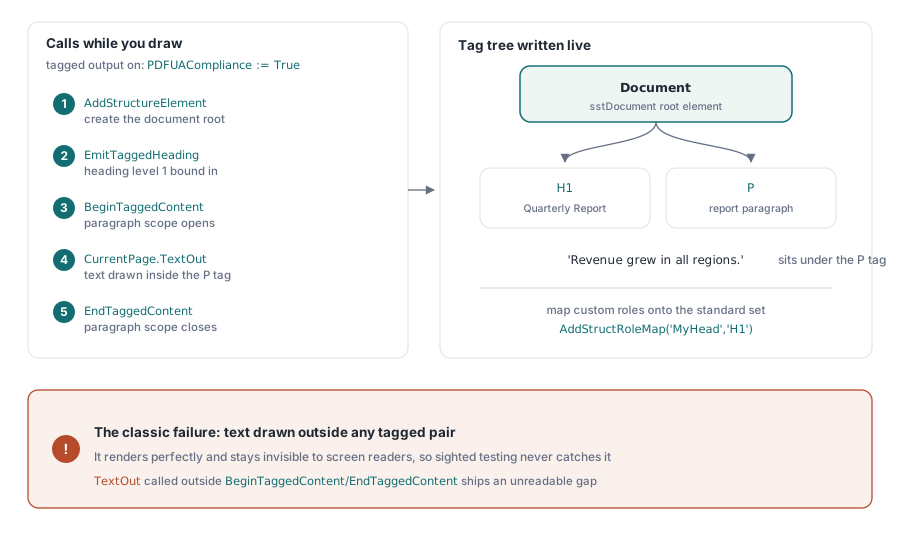
Pdf.PDFUACompliance := True;     // etiketli PDF'yi otomatik olarak etkinleştirir
Pdf.Lang := 'en-US';             // açıkça ayarlayın; boşsa 'en'e düşer
Pdf.BeginDoc;

Root := Pdf.AddStructureElement(sstDocument, nil);
H1 := Pdf.EmitTaggedHeading(1, Root, 50, 700, 'Quarterly Report');
Para := Pdf.BeginTaggedContent('P', Root);
Pdf.CurrentPage.TextOut(50, 650, 0, 'Revenue grew in all regions.');
Pdf.EndTaggedContent;

Pdf.EndDoc;
Dikkat edilmesi gereken hata, herhangi bir BeginTaggedContent/EndTaggedContent çiftinin dışında çizilen metindir. Kusursuz render edilir ve bir ekran okuyucu için görünmez kalır, bu yüzden hiçbir görebilen test uzmanı bunu asla yakalayamaz; hata gönderilir ve yalnızca gerçek bir yardımcı teknoloji kullanıcısı boşluğa çarptığında ortaya çıkar. Şablonlarınız özel yapı rolü adları taşıdığında, uyumlu okuyucuların ne anlama geldiklerini bilmesi için bunları AddStructRoleMap('MyHead', 'H1') ile standart kümeye eşleyin. ISO 14289 ayrıca beyan edilmiş bir dil gerektirir. HotPDF, Lang boş olduğunda 'en''e düşer, ama bu bir güvenlik ağıdır, gerçek belge dilini ayarlanmamış bırakmak için bir gerekçe değildir
Doğrulama: görüntüleyiciye değil doğrulayıcıya güvenin
Dosyanızı açan bir görüntüleyici, uygunluk hakkında hiçbir şey kanıtlamaz, bu yüzden doğrulama, render etmek yerine yapıyı kontrol eden araçlarla sürüm sürecine aittir. PDF/A ve PDF/UA için veraPDF, referans düzeyinde açık doğrulayıcıdır; başarısızlıkları ISO maddesine göre bildirir ve bu, doğrudan yukarıdaki yapılandırmaya geri eşlenir. PDF/X için Adobe Acrobat'ın Preflight profilleri hâlâ pratik kontroldür, çünkü baskı uygunluğu, sözdizimi kadar renk amacıyla da ilgilidir
Üretici kendi payına düşeni yapar. Kayıt anında HotPDF, özellik bayraklarını yapılandırılmış PDF sürümüne karşı uzlaştırır ve sürümün ifade edemediği şeyi sessizce düşürür, PDF 1.7'nin altında AES-256'nın AES-128'e düşmesi gibi. EndDoc'taki uyumluluk kapıları daha da ileri gider ve PDFACompliance'ı şifrelemeyle birlikte istemek gibi sert çelişkilerde doğrudan hata fırlatır. Bunların hiçbiri harici doğrulayıcının yerini tutmaz. Yalnızca imkansız yapılandırmaların ona hiç ulaşmasını engellerler
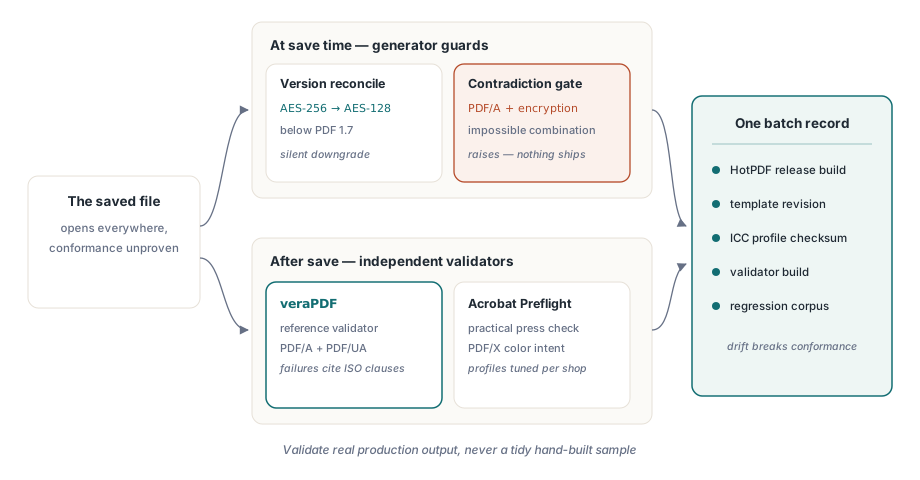
Bir alışkanlık defalarca kendini gösterir: tüm uyumluluk kurulumunu tek bir birim olarak sürümleyin. HotPDF sürümü, şablon revizyonu, ICC profili sağlama toplamı, onay veren doğrulayıcı derlemesi. Bunlardan herhangi biri diğerlerinin altında değiştiği anda uygunluk kayar ve en çirkin denetimler, kimsenin beş yıllık bir arşiv dosyasını hangi kombinasyonun ürettiğini yeniden kuramadığı denetimlerdir. Parti başına tek bir yapılandırma kaydı bunu kalıcı olarak çözer
Son olarak, doğrulayıcıyı düzenli, elle kurulmuş bir örnek üzerinde değil, gerçek üretim çıktısı üzerinde çalıştırın. Isıran başarısızlıklar, kimsenin öngörmediği veriden gelir: amaç RGB derken CMYK olarak gelen bir müşteri logosu, gömülü olmayan bir yazı tipini içeri sızdıran bir şablon ayarı, etiket ağacının dışında metin çizen yeni bir kod yolu. Geçmişteki her olaydan bilinen-kötü bir dosyayı regresyon girdisi olarak saklayın ve uyumluluk kapısı zaman içinde dürüst kalsın. Bu işlem hatlarının render tarafı için HotPDF ile rapor çıktısı, yazı tipleri ve görüntüler makalemize bakın; doğrulayıcıları bir derlemeye bağlamak için PDF ön kontrolünü otomatikleştirme konulu yoldaş yazı mevcuttur
Bu örneklerde kullanılan uyumluluk özellikleri, çıktı amaçları ve etiketleme API'si, Delphi ve C++Builder için HotPDF Delphi Component ile birlikte gelir; ürün sayfası burada gösterilen her çağrı için tam referansa bağlantı verir