Bir rapor oluşturmak, sonuçta bir sayfaya üç şeyi yerleştirmeye ve bunların nerede durduğu konusunda anlaşmasını sağlamaya iner: bilinen koordinatlarda metin, sunucuda masaüstünüzdeki ile aynı şekilde render edilen yazı tipleri ve sığacak boyuta getirilmiş görüntüler. Bir rapor kütüphanesinin yaptığı geri kalan her şey bu üçünün etrafında düzenlenir. Delphi ve C++Builder için losLab'ın PDF oluşturma kütüphanesi olan HotPDF, her birini sayfa nesnesi üzerinde doğrudan bir çağrı olarak verir ve tek gerçek sürtünme, alıştığınız VCL tuvalinin tam tersi yönde çalışan alttaki koordinat sistemidir. Bu yönü önce netleştirin, düzen çalışmasının geri kalanı sizinle savaşmayı bırakır
Metin yerleşimi ve sol alt orijin
Hemen herkesin ilk raporu baş aşağı çıkar. Başlık alt kenara yakın bir yere düşer ve altındaki her satır yukarı doğru tırmanır. Hiçbir şey arızalı değildir. ISO 32000-1 §8.3'te tanımlanan PDF kullanıcı uzayı, orijini Y'nin yukarı doğru büyüdüğü sol alt köşeye koyar; bu, Y'nin sol üstten aşağı doğru büyüdüğü GDI tuvalinin ayna görüntüsüdür. Buna beş dakika ayırıp barışmak, sayılar anlamsızlaşmaya başladığında aksi takdirde yeniden yazacağınız bir düzeni kurtarır
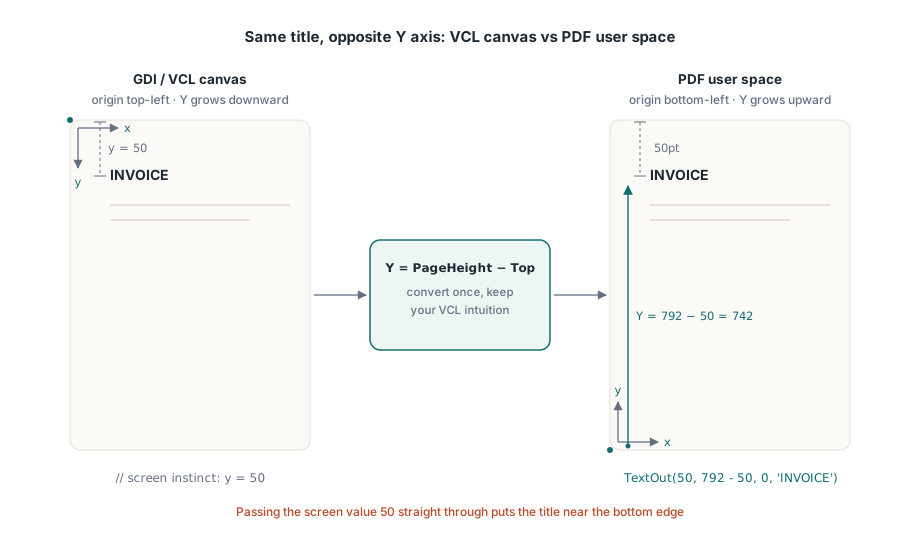
Sayfa nesnesinin merkezi çağrısı TextOut(X, Y, Angle, Text)'tir. X ve Y, metni sol alt köşeden punto cinsinden konumlandırır ve Angle onu derece cinsinden döndürür; diyagonal bir DRAFT veya COPY damgası da hiçbir özel destek olmadan böyle çizilir. VCL'ye alışmış sezginizin çalışmaya devam etmesini sağlayan hile, Y'yi sayfa yüksekliği eksi üstten istediğiniz mesafe olarak ifade etmektir:
var
  Pdf: THotPDF;
begin
  Pdf := THotPDF.Create(nil);
  try
    Pdf.FileName := 'invoice-0001.pdf';
    Pdf.BeginDoc;
    Pdf.CurrentPage.SetFont('Arial', [fsBold], 16);
    Pdf.CurrentPage.TextOut(50, 792 - 50, 0, 'INVOICE');       // Letter'ın üstünden 50pt
    Pdf.CurrentPage.SetFont('Arial', [], 10);
    Pdf.CurrentPage.TextOut(50, 792 - 70, 0, 'Date: 2026-06-11');
    Pdf.CurrentPage.TextOut(300, 400, 45, 'COPY');              // döndürülmüş damga
    Pdf.AddPage;                                                // CurrentPage artık burayı gösteriyor
    Pdf.CurrentPage.SetFont('Arial', [], 10);                   // yazı tipi durumu taşınmaz
    Pdf.CurrentPage.TextOut(50, 742, 0, 'Page 2 detail rows');
    Pdf.EndDoc;
  finally
    Pdf.Free;
  end;
end;
Bu listedeki iki durum bilgili davranış, yalnızca ikinci sayfada ortaya çıkan hataların çoğundan sorumludur. AddPage, CurrentPage'i az önce oluşturduğu sayfaya yeniden işaret ettirir; bu yüzden daha önce önbelleğe aldığınız bir sayfa referansı artık beklediğiniz yere çizmez. Yazı tipi seçimi de belge başına değil sayfa başınadır. AddPage'den sonra SetFont'u atlarsanız, taze sayfadaki ilk TextOut, üç sayfa önce ayarladığınız kalın başlık yazı tipine değil, sayfanın başladığı varsayılana geri döner. Güvenli alışkanlık, "yeni bir sayfa başlat" ile "metin durumunu yeniden kur"u rapor döngüsünde ayrılmaz tek bir adım olarak ele almaktır
Yalnızca masaüstünüzde değil sunucuda da var olan yazı tipleri
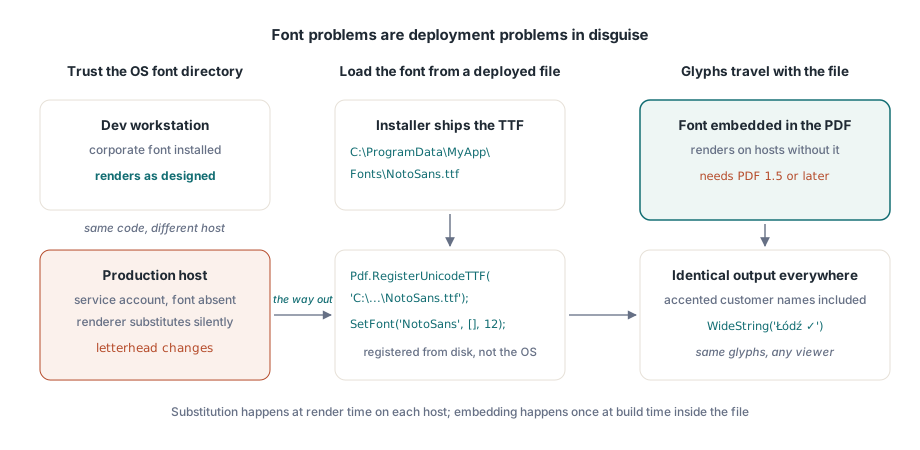
Yazı tipi sorunlarının çoğu, aslında kılık değiştirmiş dağıtım sorunlarıdır. Geliştirme makinenizde kurumsal yazı tipi yüklüdür, bu yüzden rapor ekranınızda doğru görünür ve gönderilir. Üretim sunucusu, işi bu yazı tipinin hiç yüklü olmadığı bir servis hesabı altında çalıştırır, render motoru sessizce bulabildiği bir şeyle değiştirir ve bundan ilk haberi olan kişi, antetli kağıdın neden değiştiğini soran bir müşteridir. Çıkış yolu, işletim sistemi yazı tipi dizinine güvenmeyi bırakmak ve yazı tipini yükleyicinizin diske koyduğu bir dosyadan yüklemektir. HotPDF'in Unicode kayıt çağrısı bir yol alır ve tam olarak bunu yapar:
Pdf.RegisterUnicodeTTF('C:\ProgramData\MyApp\Fonts\NotoSans.ttf');
Pdf.CurrentPage.SetFont('NotoSans', [], 12);
Pdf.CurrentPage.TextOut(50, 700, 0, WideString('Łódź - Ünïcode test ✓'));TextOut, doğrudan bir WideString kabul eder ve bu, ilk bakışta göründüğünden daha önemlidir. Aksanlı bir müşteri adı, bir Alman sokağı, bir Polonya şehri: bunlar uç durumlar değildir, bir müşteri tablosunun sıradan içerikleridir ve kayıtlı yazı tipi glifleri gerçekten içerdiği sürece, koda gömdüğünüz ASCII etiketlerle aynı çağrıdan geçerler. Gömülü yazı tipleriyle birlikte bir sürüm kısıtlaması gelir: belgenin PDF 1.5 veya üzeri olması gerekir; bu yüzden ilgisiz bir gereksinim sizi daha eski bir sürüme sabitliyorsa, sessizce bozulacak şey odur. Arapça ve İbranice gibi sağdan sola yazı sistemleri, düz bir glif aramasından ziyade gerçek biçimlendirme gerektirir ve bunun kendi işlem hattı vardır; bkz. HotPDF ile karmaşık yazı sistemi metin biçimlendirme makalemiz
Yüklü hiçbir yazı tipi ihtiyacınızı ifade edemediğinde, bir çek üzerindeki MICR karakterlerini veya özel bir sembol kümesini düşünün, Type 3 yazı tipleri bu boşluğu doldurur. Her glifi RegisterType3Font ve AddType3Glyph üzerinden küçük bir içerik akışı olarak tanımlarsınız. Bu, API'nin özelleşmiş bir köşesidir ve ona nadiren başvurursunuz, ama bir sayfaya yüzlerce küçük sembol bit eşlemi saçmaktan çok daha temizdir
Görüntüler: ortadaki bağımsız değişkenler bir köşe değil, bir genişlik ve yüksekliktir
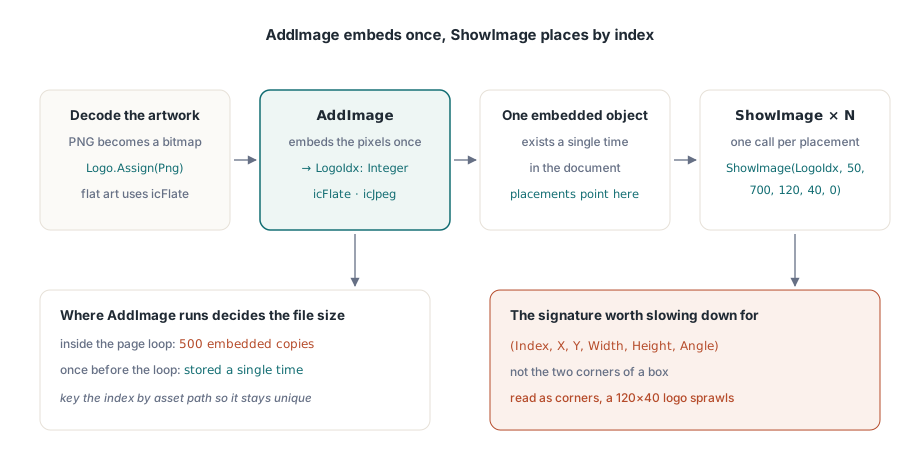
Görüntü işleme iki adıma ayrılır ve bunları ayrı tutmak tüm meselenin kendisidir. AddImage bir TBitmap veya TJPEGImage alır, onu bir kez gömer ve bir indeks döndürür. PNG çalışması oraya varmadan önce bir bit eşleme çözülmelidir. ShowImage ardından o indeksi istediğiniz kadar çok, istediğiniz yerde çizer. ShowImage'daki bağımsız değişken sırası, yavaşlayıp okumaya değer tek yerdir:
var
  Png: TPngImage;
  Logo: TBitmap;
  LogoIdx: Integer;
begin
  Png := TPngImage.Create;
  Logo := TBitmap.Create;
  try
    Png.LoadFromFile('brand-logo.png');
    Logo.Assign(Png);                       // PNG'yi bir bit eşleme çöz
    LogoIdx := Pdf.AddImage(Logo, icFlate); // düz renkli çalışmalar için kayıpsız
  finally
    Logo.Free;
    Png.Free;
  end;
  // (Index, X, Y, Width, Height, Angle): (X1, Y1, X2, Y2) değil
  Pdf.CurrentPage.ShowImage(LogoIdx, 50, 700, 120, 40, 0);
end;
Konumdan sonraki iki sayı bir genişlik ve bir yüksekliktir. Karşı köşenin koordinatları değildir ve sondaki bağımsız değişken, derece cinsinden bir döndürme açısıdır. İmzayı bir X1/Y1/X2/Y2 kutusu olarak okursanız, (50, 700)'e yerleştirilen 120x40'lık bir logo, oradan (120, 40)'a kadar uzanarak sayfanın çoğuna yayılır. Çıktı hatayı belirgin kılarken kaynak kod tamamen makul görünür; bir öğleden sonrayı boşa harcatan da tam olarak budur. KeepImageAspectRatio varsayılan olarak True'dur, bu yüzden yanlış oranlara sahip bir kutu, görüntüyü bozmak yerine görüntüyü sinema-şeridi biçiminde çerçeveler; gerçekten germeyi kastettiğinizde onu False'a çevirin
Kaydetme ile yerleştirme arasındaki ayrım, uzun koşularda kendini gösterir. AddImage pikselleri bir kez gömdüğü ve o indeksle her ShowImage aynı gömülü nesneye geri işaret ettiği için, AddImage'ı nerede çağırdığınız dosya boyutunu belirler. 500 sayfalık bir ekstre için sayfa döngüsünün içinde çağırırsanız aynı logo 500 kez gömülür. Döngüden önce bir kez çağırın, indeksi saklayın ve logo tek bir kez depolanır. Varlık yoluyla anahtarlanan küçük bir sözlük, her farklı görüntünün tam olarak bir kez kaydedilmesini sağlamaya yeter
Kodek seçimi diğer boyut kaldıracıdır. Fotoğrafik içerik, taranan ekler ve benzerleri JPEG'e aittir: AddImage'a icJpeg'i geçirin ve JpegQuality'yi yaklaşık 85'e düşürün, çünkü özellik 100'den başlar ve 85'teki fark basılı bir sayfada görünmezdir. Logolar, grafikler ve çizgi çizimleri gibi düz renkli çalışmalar icFlate'e aittir; burada kayıpsız sıkıştırma zaten kompakttır ve JPEG, sert kenarların çevresinde görünür bir halka bulaşması yaratırdı. Her sayfaya tam kaliteli bir fotoğraf iten bir ekstre koşusu gigabaytlara şişebilir; aynı içerik JPEG 85'te boyutun onda biri kadarına iner ve hiçbir okuyucu farkı anlayamaz
Path ilkelleriyle çizgiler, kutular ve gölgelendirme
Bir tablo başlığının altındaki yatay çizgi ve bir toplam rakamının arkasındaki gri kutu, görüntü olmak zorunda değildir. Onları vektör olarak çizin, her yakınlaştırmada keskin kalırlar, net basılırlar ve dosyaya neredeyse hiçbir şey eklemezler. HotPDF, ham PDF içerik akışlarının kullandığı aynı modeli izler: bir path oluşturun, ardından onu boyayan bir operatörü çağırın
// Tablo başlığının altındaki yatay çizgi
Pdf.CurrentPage.SetLineWidth(0.75);
Pdf.CurrentPage.MoveTo(50, 660);
Pdf.CurrentPage.LineTo(545, 660);
Pdf.CurrentPage.Stroke;

// Gölgeli toplam kutusu: X, Y, genişlik, yükseklik
Pdf.CurrentPage.SetRGBFillColor(RGB(235, 235, 235));
Pdf.CurrentPage.Rectangle(395, 120, 150, 40);
Pdf.CurrentPage.Fill;
Sıra isteğe bağlı değildir: boyama durumunu ayarlayın, path'i oluşturun, ardından Stroke veya Fill'i çağırın. Oluşturduğunuz ama hiç boyamadığınız bir path sayfaya hiçbir şey katmaz; bir çizginin "görünmemesinin" cevabı hemen her zaman budur. SetRGBFillColor tek bir TColor alır, bu yüzden clNavy ve clBlack gibi tanıdık VCL sabitleri doğrudan girer ve Rectangle, iki köşe yerine görüntü yerleşimiyle aynı genişlik-ve-yükseklik bağımsız değişkenlerini kullanır. İnce çizgiler hakkında bir uyarı: kabaca yarım puntonun altındaki her şey bir monitörde zarif görünüp 600 dpi'lik bir ofis yazıcısında kaybolabilir, bu yüzden 0,75pt, basılmayı atlatmak zorunda olan herhangi bir çizgi için makul bir taban değerdir
Örnek veriye değil, gerçek veriye karşı sayfalama
Düzen oturmadan önce doğru yapılması gereken bir ayrıntı: sayısal sütunlar sağ kenarlarına hizalanmalıdır ve bunu yapmanın yolu, dizeyi baştaki boşluklarla doldurmak değil, her değerin render edilmiş genişliğini ölçüp sütun sınırından geriye konumlandırmaktır. Boşlukla doldurma yalnızca sabit genişlikli bir yazı tipinde hizalanır ve kimse bir finansal raporu sabit genişlikli bir yazı tipinde ayarlamaz. Değerleri önce FormatFloat gibi Delphi'nin yerel ayara duyarlı rutinlerinden geçirin, böylece genişliğini ölçtüğünüz binlik ayırıcı, müşterinin yerel ayarının gerçekte göstereceği ayırıcıyla aynı olur
Sayfalamadaki tehlike, onu on kısa satırın bir sayfaya sığdığı ve döngünün hiç kırılmak zorunda kalmadığı demo veri kümesine karşı yazmanızdır. Üretim size, şirket adı 140 karakter süren bir müşteri ve 4.000 satır kalemli bir ekstre verir ve artık döngünün her seferinde doğru kırılması gerekir. Ayakta kalan örüntü, her satırın yüksekliğini çıkardıkça aşağı doğru hareket eden tek bir Y imleci ve imleç alt kenar boşluğunu geçeceği anda yeni bir sayfa başlatan bir kontrolüdür. Buradaki aşağı, azalan Y anlamına gelir; bu, sol alt orijinin sezgiye aykırı kalmaya devam ettiği tek yerdir. Bunların hepsini, aynı zamanda SetFont'u yeniden yayınlayan ve yeni sayfada devam eden başlığı yeniden çizen tek bir rutinde tutun, böylece bir-sayfa-kayması hataları hiç tutunamaz. Aynı raporların arşivleme veya erişilebilirlik kurallarını da karşılaması gerektiğinde, tam burada yaptığınız seçimler, hangi yazı tiplerini gömdüğünüz, çıktının etiketli olup olmadığı, hangi renk uzaylarını kullandığınız, o standartların denetlediği seçimlerdir; şablon kesinleşmeden önce HotPDF PDF/A, PDF/X ve PDF/UA kılavuzunu okumaya değer
Burada gösterilen her çağrı, metin konumlandırma, yazı tipi kaydı, görüntü gömme ve path çizimi, Delphi ve C++Builder için HotPDF Delphi Component ile birlikte gelir; referansı, yanında duran formlar, şifreleme ve imzalama özellikleriyle birlikte tam çıktı API'sini belgeler