Dosya makinenizde temiz açılır. Acrobat onu gösterir, baskı önizlemesi doğru görünür, her sayfa oradadır. Sonra baskı bürosuna ya da aylık toplu işinizi alan arşiv sistemine gider ve reddedilmiş olarak geri döner: bir CMYK işinde RGB görüntüler, /Trapped anahtarı yok, matbaayla eşleşmeyen bir çıktı amacı. Kimsenin görebileceği bir şey belgede yanlış değildi. Bir profile karşı yanlıştı ve profil sizin olmadığınız bir yerde kontrol edildi. Preflight (ön kontrol), matbaa öncesi dünyanın bu kontrole verdiği addır ve gerçek soru, PDF'ler bir tasarımcının masaüstünden değil de kendi Delphi kodunuzdan çıktığında bunun nereye ait olduğudur
HotPDF size çağırabileceğiniz bir preflight fonksiyonu vermez. Bileşen GUI demosunda bir preflight rapor penceresi taşır, ama bir servisin veya bir derleme betiğinin çağırabileceği arkasında bir API yoktur ve aksini varsaymak sizi orada olmayan bir metodu aramaya gönderir. Bu, kendi ürettiğiniz dosyalar için, kendi çıktınızda bir doğrulayıcıyı çağırmanın zaten yanlış biçim olduğunu fark edene kadar bir boşluk gibi görünür. Bir doğrulayıcının inceleyeceği her özelliği zaten kontrol ediyorsunuz. Faydalı ayrım, üreticiyi kötü bir dosya yayınlamaktan aciz hale getirmek, sonra bunu yazmadığınız bir araçla kanıtlamaktır
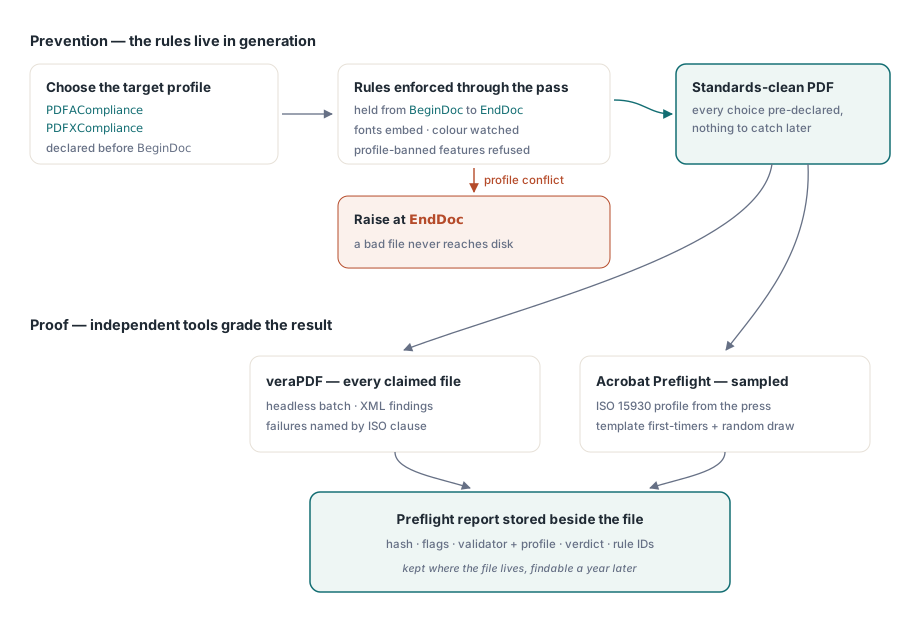
Kendi çıktınızı neden farklı kontrol edersiniz
Geleneksel preflight bir yabancının dosyasını varsayar. Bir tasarımcı, başka bir uygulama, bilinmeyen bir düzenleme zinciri onu üretti ve içinde ne olduğu hakkında hiçbir fikriniz olmadığı için onu incelersiniz. Kodunuzun ürettiği bir belge bir yabancı değildir. Font gömme, renk uzayı, çıktı amacı, meta veri bloğu: programınız bunların hepsine dosya diske çarpmadan birkaç milisaniye önce karar verdi. Bunu sonradan, az önce verdiğiniz kararları keşfetmek için incelemek angarya işidir. Daha ucuz hamle, uygunsuz bir dosyanın hiç var olup yakalanmayacak şekilde bu kararları kısıtlamaktır
Doğrulamayı harici tutmanın bir de güvenilirlik nedeni var. Kendi çıktısını kutsayan bir kütüphane kendi sınavını notlandırıyordur. Bir müşterinin arşiv sistemi ya da bir matbaanın RIP'i dosyanızı reddettiğinde, "bileşenimiz sorun yok diyor" hiçbir ağırlık taşımaz. veraPDF'den ya da Acrobat'tan gelen bir karar taşır, çünkü karşı taraf aynı araçları çalıştırır
Uyumluluğu bir kontrol listesi değil bir ayar yapın
Önleme katmanı yalnızca yapılandırmadır. PDFACompliance veya PDFXCompliance'ı BeginDoc'tan önce ayarlayın, HotPDF tüm üretim geçişi için ilgili kuralları tutar: fontları gömer, DeviceRGB ve DeviceCMYK kullanımını beyan ettiğiniz çıktı amacına karşı izler ve profilin yasakladığı özellikleri reddeder. Çelişkiler EndDoc'ta yüzeye çıkar, uyumluluk kapıları, aşağı akışta başarısız olacak bir şeyi sessizce göndermek yerine hata fırlatır. Dosya kaydedildikten sonra, aynı özellikler gerçekte neyin uygulandığını geri okur, ki bu da hattınızın günlüğünün en çok ihtiyaç duyduğu tek gerçektir:
// EndDoc'tan sonra: uygulanan profilleri çalıştırma meta verisiyle kaydet
if Pdf.PDFACompliance <> '' then
  Log('Generated as PDF/A level ' + Pdf.PDFACompliance);
if Pdf.PDFXCompliance <> '' then
  Log('Generated as PDF/X profile ' + Pdf.PDFXCompliance);
Bu bayrakları girdi veri özetiyle ve HotPDF sürümüyle aynı günlük satırına koyun. Bir doğrulayıcı ile üreticinizin bir dosya hakkında anlaşamadığı gün, o satır size hangi şablonun onu ürettiğini ve kütüphanenin hangi derlemesinin yüklendiğini söyler ve aksi halde bir öğleden sonrayı yiyecek tartışma bir grep'e dönüşür. Bu bayrakların arkasında duran çıktı amaçları, ICC profilleri ve etiketleme, HotPDF ile PDF/A, PDF/X ve PDF/UA çıktısı rehberinde ayrıntılandırılmıştır
Sizin üretmediğiniz dosyalar için ucuz bir ilk kapı
Her hat saf üretken değildir. Müşteriler PDF yükler, tarayıcılar onları bir klasöre bırakır, ortaklar onları e-postaya eklerler. Bunların her birini tam bir yapısal doğrulayıcıdan geçirmek, hiç açılmayacak dosyalarda kuyruk süresini boşa harcar. HotPDF'in Direct File API'si, tüm nesne ağacını yüklemeden "bu hiç kullanılabilir bir PDF mi" sorusunu yanıtlayacak kadar bir dosyanın yapısını okur, ki bu da onu hızlı başarısız olmak için iyi bir yer yapar:
function TriagePdf(Pdf: THotPDF; const FileName: string): Boolean;
var
  Handle, Pages: Integer;
begin
  Result := False;
  Handle := Pdf.DAOpenFileReadOnly(FileName, '');
  if Handle <= 0 then
    Exit;  // yapısal olarak okunamaz: karantinaya al, doğrulama
  try
    Pages := Pdf.DAGetPageCount(Handle);
    Result := Pages > 0;
  finally
    Pdf.DACloseFile(Handle);
  end;
end;
Bu API hakkında iki gerçek, onu nasıl sarmaladığınıza karar verir. Düz-bellek kısayolu yalnızca şifrelenmemiş girdi için geçerlidir; DAOpenFileReadOnly'e bir parola verin, sessizce tam bir ayrıştırmaya düşer, bu yüzden şifreli olduğunu bildiğiniz bir dosya, triyajdan önce DecryptFile aracılığıyla düz bir çalışma kopyasına geçmelidir. Ve DAGetPageCount, temiz açılmamış bir tutamaç üzerinde hiçbir şey ifade etmez, bu yüzden tutamaç kontrolü sıkı kalır ve pozitif olmayan bir sonuç bir yeniden deneme değil, bir reddir. Bu kalıpların daha fazlası büyük PDF iş akışları için Direct File API makalesinde bulunur
Derlemenin bir parçası olarak çalışan veraPDF
PDF/A veya PDF/UA olarak iddia ettiğiniz her şey için veraPDF, bağlanacak doğrulayıcıdır. Başsız çalışır, bir toplu iş alır, XML veya JSON yayar ve her başarısızlığı ISO maddesiyle adlandırır, bu yüzden ISO 19005-1 madde 6.2.2'ye karşı bir kural başarısızlığı, sizi tahmin etmeye bırakmak yerine doğrudan bir üretici ayarına geri işaret eder. Onu Delphi'den yönlendirmek düz süreç kontrolüdür:
function RunVeraPdf(const PdfFile, ReportFile: string): Cardinal;
var
  Cmd: string;
  SI: TStartupInfo;
  PI: TProcessInformation;
begin
  Cmd := Format('cmd /c verapdf.bat --format xml "%s" > "%s"',
    [PdfFile, ReportFile]);
  FillChar(SI, SizeOf(SI), 0);
  SI.cb := SizeOf(SI);
  if not CreateProcess(nil, PChar(Cmd), nil, nil, False,
      CREATE_NO_WINDOW, nil, nil, SI, PI) then
    RaiseLastOSError;
  try
    WaitForSingleObject(PI.hProcess, 120000);  // dosya başına bekleme süresini sınırla
    GetExitCodeProcess(PI.hProcess, Result);
  finally
    CloseHandle(PI.hThread);
    CloseHandle(PI.hProcess);
  end;
end;
O zaman aşımı hakkını verir. Bozuk bir dosya herhangi bir ayrıştırıcıyı asla çıkamayacağı bir köşeye sürebilir ve bir kuyruk işçisinin içindeki açık uçlu bir bekleme, kuyruğun geri kalanını da kendisiyle birlikte aşağı çeker. Beklemeyi sınırlayın, bir zaman aşımına kendi hata koduyla verin ve dosyayı bir insan için kenara ayırın. Sonucu okurken, XML'i insan okunabilir metin için değil, kural tanımlayıcıları için ayrıştırın. Kural ID'leri doğrulayıcı yükseltmelerinde hayatta kalır; mesajların ifadesi kalmaz ve kararlı bir kod, bir destek mühendisinin eski biletlere karşı arayabileceği bir şeydir
Toplu işi nasıl çalıştırdığınız, her dosyanın geçip geçmediği kadar önemlidir. Toplu iş başına bir değil, dosya başına bir süreç, böylece zehirli bir girdi size yalnızca o dosyanın zaman aşımına mal olur, başka hiçbir şeye değil. Doğrulayıcı süreçlerinin sayısını çekirdek sayısıyla sınırlayın, çünkü XML raporunu oluşturmak CPU'ya bağlıdır ve aşırı abonelik yalnızca çalkalanmaya neden olur. Ve alımda bir boyut tavanı koyun, çünkü iki gigabaytlık taranmış bir kitap, ayrıştırıcı ne kadar sabırlı olursa olsun kuyruğa sahip olur. Bunların hiçbiri katı anlamda preflight değildir. Ayın sonu hacminde yaşayan bir kapı ile gece saat 2'de hattı ilk durduğu gece kapatılan bir kapı arasındaki farktır

PDF/X, bunun kısa kaldığı yerdir. veraPDF onu doğrulamaz, bu yüzden çalışan kontrol hâlâ yazıcınızın adlandırdığı ISO 15930 profiliyle Acrobat'ın Preflight'ıdır. Acrobat bir insan ister, bu da tam kapsama yerine örnekleme anlamına gelir: yeni bir şablondan çıkan ilk dosya, artı otomatik kapının bir tane olmadan ele alabileceği her şeyi ele alırken her toplu işten küçük bir rastgele çekiliş. Gerçekten çalışan örneklenmiş bir kontrol, sonsuza kadar yarım kalan eksiksiz bir otomasyonu geride bırakır
Bir yıl sonra yine ihtiyaç duyacağınız bir rapor
Bir preflight kapısı iki kez kazandırır. Bir kere kapıda kötü bir dosyayı durdurduğunda, bir daha çok sonra biri belirli bir dosyanın neden geçtiğini sorduğunda. O ikinci an, biçimi belirlemesi gereken andır, çünkü sizi çaresiz bırakan an, ince bir raporun olduğu andır. Kontrol edilen her dosya için, yukarıdaki günlük satırından girdi özetini, üreticinin uyumluluk bayraklarını ve kütüphane sürümünü, doğrulayıcı adını ve sürümünü, karşı kontrol edildiği profili, geçti ya da kaldı sonucunu ve doğrulayıcının verdiği her yerde sayfa numaralarıyla birlikte başarısız kural ID'lerini tutun. Bu raporu tanımladığı dosyanın yanına saklayın. Onu ayrı bir sisteme koyun, o sistem, belgelediği arşivden önce hizmet dışı bırakılır
İstisnalar da yazılmalıdır. Bir müşteri kapının hoşlanmadığı bir dosyayı göndermekte ısrar ettiğinde, cevap kuralı herkes için gevşetmek değildir. Bu dosyayı kimin, hangi gerekçeyle ve hangi tarihe kadar onayladığını kaydedin, ardından bu feragati raporuna ekleyin. Adı ve son kullanma tarihi olan bir feragat, birinin sahip olduğu bir karardır. "Geçici olarak" yorum satırına alınmış bir kontrol, tarihini bekleyen bir olaydır
Kendini amorti eden bir alışkanlık daha: bir dosya başarısız olduğunda, kimse ona dokunmadan önce onu adlandırılmış bir regresyon klasörüne kopyalayın. Hata ayıklamaya değer preflight sorunlarının neredeyse tamamı belirli bir girdiye kadar izlenir ve bu girdileri saklayan ekipler, üretimde yeniden ortaya çıkmasını beklemek yerine tekrarı bir saat içinde düzeltir. Burada gösterilen uyumluluk özellikleri ve Direct File API, belgelemesi her çağrıyı eksiksiz olarak ele alan, Delphi ve C++Builder için HotPDF Delphi Component'in bir parçasıdır