En uppläsningsfunktion har ett synligt jobb utöver rösten: när varje ord uttalas måste det lyfta fram det ordet på sidan och hålla det i sikte. För det behöver du begränsningsrutan för varje ord, indexerad mot samma teckensträm som talmotorn läser ifrån. Få rutorna men missa indexeringen och markeringen halkar ett eller två ord efter ljudet; få indexeringen men hantera sidtillståndet fel och markeringen landar på helt fel sida. Taldelen, själva syntesizern, är den del som sällan går sönder. SAPI rapporterar ordbegränsningar till teckennivå. Det som går sönder är det tunna mappningsskiktet mellan en teckenförskjutning i talströmmen och en rektangel på den renderade sidan
PDFium Component levererar den mappningen för Delphi, C++Builder och Lazarus, med ordbegränsningsrutor tillgängliga sedan v1.53 och spårningsmarkören sedan v1.56. Ytan är avsiktligt smal: ett anrop som returnerar ordbegränsningsrutorna för en sida, en spårare som omvandlar en teckenförskjutning till en målad markering och ett par egenskaper för färg och autoscroll. Smal som den är bestämmer ordningen du anropar saker i om funktionen fungerar, och de flesta av misslyckandena nedan kommer av att anropa rätt funktioner i fel ordning
Tecken är inte ord, och TTS-motorer talar i tecken
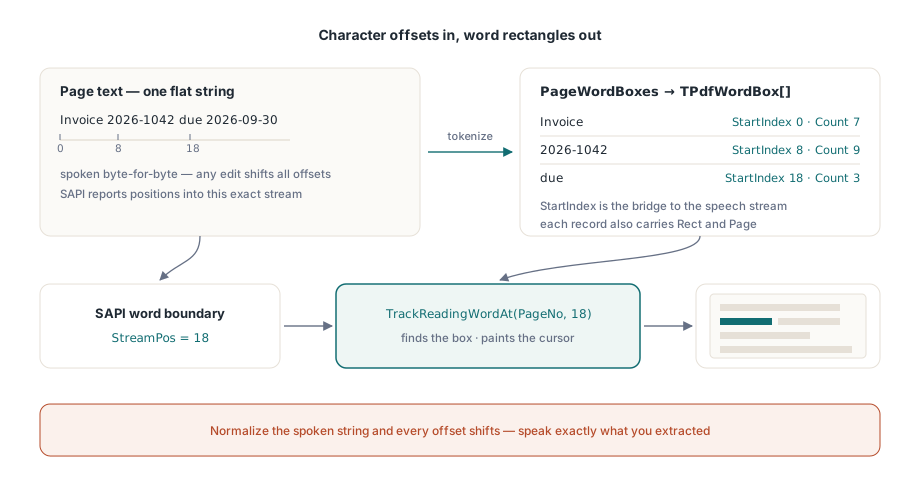
En talmotor konsumerar en platt sträng och rapporterar framsteg som teckenpositoner inom den strängen. En PDF-sida har glyfer placerade i sidrymden, där ett "ord" är ett heuristiskt kluster av glyfkörningar. De två koordinatsystemen delar ingenting såvida inte texten du ger syntesizern är byte-för-byte samma text som ordbegränsningsrutorna beräknades från. Det är regel ett, och den är obarmhärtig. Normalisera blanksteg, ta bort mjuka bindestreck eller på annat sätt "rensa upp" den extraherade texten innan du talar den, och varje efterföljande förskjutning är tyst fel. Tala exakt vad du extraherade, eller behåll en explicit tabell för förskjutningsommappning. Det finns inget tredje alternativ som överlever riktiga dokument
Ommapningstabellen är inte ett hypotetiskt gränsfall. I det ögonblick ditt gränssnitt infogar ett talat sidmeddelande ("sida fem") eller expanderar en förkortning för syntesizern, avviker den talade strängen från den extraherade. Registrera varje infognings position och längd och subtrahera sedan den ackumulerade justeringen före varje spårningsanrop. Det är kanske tjugo rader bokföring, och det är skillnaden mellan en markering som överlever nästa funktionsbegäran och en som går sönder första gången någon ber om talade rubriker
Vad en ordbegränsningsruta ger dig
Varje TPdfWordBox-post bär ordets text, dess StartIndex och tecken-Count inom sidtexten, en Rect i sidrymden och det 1-baserade Page-numret. Fältet StartIndex är bryggan mellan de två koordinatsystemen: det är samma förskjutning som SAPI returnerar när det läser. PageWordBoxes returnerar hela arrayen för den aktiva sidan:
procedure TReaderForm.PreparePage(PageNo: Integer);
begin
  PdfView.PageNumber := PageNo;   // visarens ordrutor följer dess visade sida

  FWords := PdfView.PageWordBoxes;
  FPageText := BuildSpeechText(FWords);   // sammanfoga Word.Text i ordning

  if Length(FWords) = 0 then
    HandleImageOnlyPage(PageNo);          // en skanning utan textlager
end;
Ordningskommentaren är viktig. Visarens PageWordBoxes tokeniserar textlagret på den sida som vyn för närvarande visar, så navigera vyn först och extrahera sedan; ingen rendering krävs, bara ett öppet dokument. (Dokumentkomponenten, TPdf, exponerar sina egna PageWordBoxes kopplade till Pdf.PageNumber för headless-användning. De två sidnumren är oberoende, vilket är sin egen fälla.) Ett tomt resultat på en sida som synligt bär innehåll innebär en bildskanning utan textlager. Dirigera den till OCR eller tillkännage åtminstone fallet ("sida 4 innehåller ingen läsbar text"), i stället för att låta rösten tystna utan förklaring
Koppla SAPI-ordbegränsningar till spåraren
TrackReadingWordAt, på visaren, är gångjärnet för hela funktionen. Ge den ett sidnummer och ett teckendindex; den hittar ordbegränsningsrutan som innehåller det tecknet, målar läsmarkören på den och returnerar ordindexet, eller -1 när indexet faller mellan ord. SAPI:s ordbegränsningsavisering levererar exakt den teckenpositon den vill ha:
procedure TReaderForm.OnSpeechWordBoundary(StreamPos: Integer);
var
  WordIdx: Integer;
begin
  // Mappar offseten till en ordruta och flyttar markeringen i ett anrop
  WordIdx := PdfView.TrackReadingWordAt(FPageNo, StreamPos);
  if WordIdx < 0 then
    Exit;                     // gräns föll utanför varje ord: behåll senaste markering
end;
Två defensiva detaljer tjänar sin plats här. För det första håller TrackReadingWordAt sin egen cache för ordbegränsningsrutor för den spårade sidan, automatiskt återbyggd när sidan ändras, så kostnaden per begränsning förblir konstant oavsett hur snabbt begränsningarna anländer. För det andra kontrollerar den inte gränser generöst. Ett index vid eller bortom sidans teckenantal returnerar -1 snarare än att begränsa till det sista ordet. Behandla -1 som "behåll den föregående markeringen", aldrig som ett fel, eftersom interpunktionskörningar och mellanord legitimt producerar begränsningar som inte tillhör något ord. Att logga varje -1 kommer att begrava dig. Räkna dem per sida istället och titta noga på sidor där kvoten ökar, eftersom det vanligtvis innebär en textormaliseringsavvikelse tillbaka till regel ett
Markören själv: färg, följ och städning
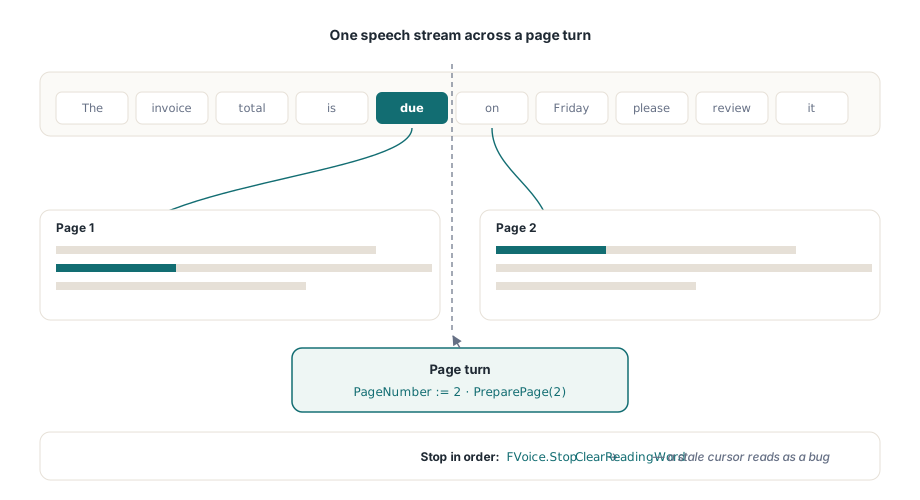
SetReadingWord målar markeringen direkt när du håller ordbegränsningsrutan själv, ReadingWordColor stilar den och ReadingWordFollow := True scrollar vyn precis tillräckligt för att hålla det talade ordet synligt. Den sista egenskapen förtjänar sin plats. En handskriven "centrera det aktuella ordet"-scroll får sidan att rycka till vid varje radbrytning, och rörelsekänsliga läsare stänger av hela funktionen inom en minut. Markeringen renderas bara på den sida som för närvarande visas i den aktiva TPdfView, så läsning över flera sidor måste avancera PageNumber i takt med talet och sedan köra om förberedelsesteget för den nya sidan innan dess första begränsningshändelse anländer. Hoppa över det och de första markeringarna på varje sida pekar på inaktuella koordinater
procedure TReaderForm.StopReading;
begin
  FVoice.Stop;                // stoppa SAPI-uppspelning först
  PdfView.ClearReadingWord;   // ta sedan bort markeringen; en inaktuell markör läses som en bugg
end;
Symmetri vid nedstängning är vad som håller markeringen ärlig. Varje paus-, stopp- och sidvändningsväg måste sluta i ClearReadingWord. Lämna det ute och en bärnstensfärgad rektangel sitter på en stoppad sida och ser exakt ut som en defekt, vilket är den typ av sak som varje testare rapporterar även om ingenting faktiskt är trasigt
Talhastighetens stress på denna pipeline är hårdare än dokumentstorlekens. Vid 300 ord per minut anländer begränsningshändelserna var 200:e ms, och vid de snabbaste SAPI-hastigheterna kommer de snabbare än ögat bekvämt kan följa. Det rätta svaret är att sammanföra, inte köa. Om en ny begränsning anländer medan en markeringsuppdatering fortfarande är väntande, kasta den inaktuella och måla den senaste. En markör som besöker varje ord i ordning men halkar en halv sekund efter känns trasig; en som ibland hoppar över ett ord men håller sig synkroniserad med rösten gör det inte
Gränsfall som skiljer demos från produkter
Några dokumentkategorier avslöjar sömmarna. Kombinerande tecken är de mest subtila: Unicode-sekvenser som ett bastecken plus ett kombinerat diakritiskt tecken kan uppta fler teckendindex än det visuella ordet antyder, så all förskjutningsaritmetik som antar ett index per glyf driver sakta iväg. Det är det starkaste argumentet för att låta TrackReadingWordAt äga mappningen snarare än att beräkna ordnummer för hand. Avstavning är mer vardaglig men vanligare: ett ord brutet över ett radbryt blir två rutor, och om du talar det som en enda token löser begränsningshändelsen för dess andra hälft till den första rutan. Det är vanligtvis okej, men det är ett beslut, så fatta det medvetet i stället för att upptäcka det. Taggning ändrar läsordningen själv. När ett dokument bär rätta strukturtaggar (territoriet för ISO 14289, PDF/UA), följer ordsekvenseringen den logiska strukturen; utan dem faller det tillbaka på layoutheuristik, och en tvåkolumns otaggad sida kan läsa rakt över båda kolumnerna. Roterade sidor är den sista vanliga: varje ords Rect begränsar det fortfarande korrekt i sidrymden, men en viewport-följningspolicy anpassad för horisontellt flöde scrollar ryckigt när texten löper vertikalt, så behåll åtminstone ett rotat dokument i regressionsinsamlingen. För hantering av läsordning, meningsnivåenheter via ReadingUnits och den bredare hjälpmedels-stacken, se att bygga en tillgänglig PDF-läsare i Delphi
En plattformsbegränsning formar driftsättning. SAPI är bara för Windows. API:et för ordbegränsningsrutor och spårning är byte-för-byte identiskt under Lazarus och FPC, men Linux- och macOS-byggen behöver en annan syntesizer kopplad bakom samma begränsningshändelser; den inställningen täcks i att köra visaren under Lazarus och FPC. Markeringskostnaden interagerar också med din sidcache när talhastigheter ökar, och budgetaritmetiken i rendercaching och zoomprestanda gäller här utan förändring
När markering på enskilda ord är fel granularitet
Ord-för-ord-karaoke är inte alltid vad en läsare vill ha. Vid höga talhastigheter blir markören som flimrar ord för ord sin egna visuella störning, och vissa lyssnare följer en mening mer bekvämt än ett stroboskop av enstaka ord. För det fallet exponerar komponenten en grövre enhet. ReadingUnits returnerar menings- och blocknivåenheter, var och en med sina egna markeringsrektanglar, och du målar dem med SetReadingHighlight i stället för SetReadingWord. Kopplingen är samma form: en begränsningsförskjutning driver fortfarande vilken enhet som lyser upp, men enheten du markerar sträcker sig över en sats eller en rad snarare än en enda token. Långsamma läsare och uppspelning med hög hastighet föredrar båda det, och ingenting hindrar dig från att erbjuda båda lägena bakom en inställning
Versionsgolven är värda att fastslå innan du bygger mot detta: ordbegränsningsrutor kräver PDFium Component v1.53 eller senare, och spårningsmarkören kräver v1.56. Det fullständiga läsnings-API:et, meningsnivåenheterna och en fungerande uppläsningsdemo finns på produktsidan för PDFium Component