En blind användare öppnar en kvartalsrapport i din nya, blänkande Delphi-visare, slår på NVDA och hör sidfoten, sedan en kolumn med siffror, sedan titeln som en seende läsare skulle ha läst först. Eller hör ingenting alls. Sidan ser perfekt ut på skärmen, och det är precis fällan: rendering och uppläsning är olika problem lösta av olika kod. Ordningen i vilken en PDF ritar sina glyfer har ingen skyldighet att matcha ordningen en person bör höra dem i, så en visare byggd enbart på renderingsanrop ger en felfri bild och en oanvändbar uppläsning. PDFium Component, VCL/LCL-omslaget kring PDFium-motorn för Delphi, C++Builder och Lazarus, bär en separat uppsättning uppläsnings-API:er av just den anledningen. Rit-API:erna kan inte återskapa en läsordning de aldrig fått
En tillgänglig läsare står och faller med tre saker. Den måste extrahera en ordning en skärmläsare kan tala, hålla en synlig läsmarkör fastnålad vid vad rösten än säger för tillfället, och erkänna när ett dokument aldrig taggades i stället för att gissa och låtsas. Var och en har ett tydligt API att ta till och ett misslyckande som biter om du hoppar över detaljen
Läsordningen bor i strukturträdet, inte i ritordningen
ISO 32000-1 §14.8 definierar logisk struktur som ett träd av element lagrat ovanpå sidinnehållet. PDF/UA (ISO 14289-1) går längre och gör det trädet obligatoriskt: varje del av verkligt innehåll måste kunna nås genom det i läsordning, med sidartefakter markerade som sådana och överhoppade. En korrekt taggad rapport vet att "Quarterly Results" är en rubrik på nivå två och att totalsummerutnätet är en tabell med rubrikceller. En otaggad rapport är en hög positionerade glyfkörningar som råkar se ut som ett dokument
ReadablePageContent går igenom det trädet när det finns och lämnar tillbaka fragment taggade med en semantisk Kind, värden som cfHeading och cfParagraph, så att gränssnittet kan säga "rubrik" före orden i stället för att läsa en fetstilt rad som vanlig brödtext. Utan ett användbart träd faller samma anrop tillbaka på heuristisk layoutanalys: upptäck spalter, klustra baslinjer, ordna vänster till höger och uppifrån och ned. Den reservlösningen fungerar bra för ett enspaltigt memo och är skakig för ett nyhetsbrev, ett flerspaltigt formulär, allt med en sidopanel eller ett citat. Det som spelar roll är att veta vilket resultat du fick, och API:et talar om det rakt ut. Posten TPdfReadableContent bär ett Source-fält satt till rosStructure när ordningen kom från det taggade trädet, eller rosHeuristic när den härleddes från geometrin. Visa en gissad ordning som om den vore verifierad och du har levererat tillgänglighetsversionen av en godkänd-märkning på en build ingen körde
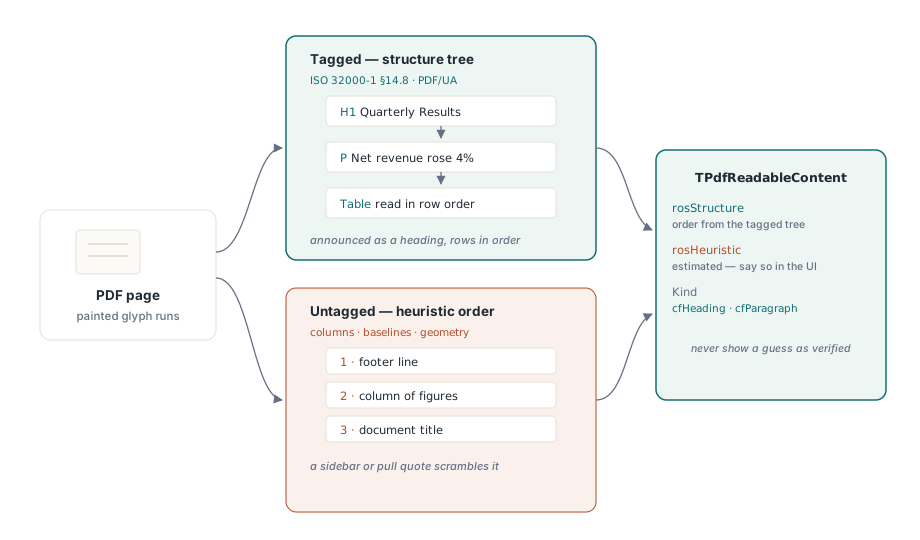
Det billiga draget vid öppning är att läsa IsTagged och anropa ValidatePdfUa en gång, och sedan cacha svaret. Ett misslyckat PDF/UA-test är inte skäl att avvisa filen. Det är skäl att sätta "uppskattad läsordning" i statusraden, så att när en kund mejlar in ett klagomål om osammanhängande uppläsning vet supporten redan om de tittar på ett taggningsproblem i filen eller en bugg i din kod
Från sida till talkö med ReadingUnits
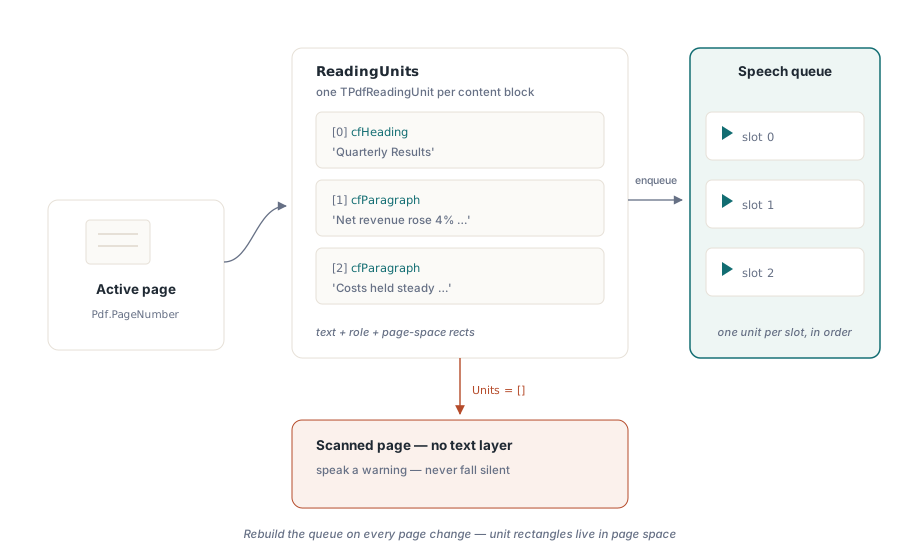
För text-till-tal gör ReadingUnits det tunga jobbet. Den returnerar en array med TPdfReadingUnit-poster för den aktiva sidan, var och en bärande texten som ska talas, dess semantiska roll och de rektanglar som lokaliserar den på sidan. Det finns en dokumentomfattande motsvarighet, DocumentReadingUnits, när du vill ha kontinuerlig uppläsning över sidor. En enhet faller rakt in i en plats i en talkö:
procedure TReaderForm.QueuePageSpeech(PageNumber: Integer);
var
  Units: TPdfReadingUnits;
  i: Integer;
begin
  Pdf.PageNumber := PageNumber;   // ReadingUnits verkar på den aktiva sidan
  Units := Pdf.ReadingUnits;
  FSpeechQueue.Clear;
  for i := Low(Units) to High(Units) do
    FSpeechQueue.Add(Units[i]);  // text + semantik + markeringsrektanglar
  FCurrentPage := PageNumber;
  SpeakNextUnit;
end;
Två saker i den loopen är lätta att göra fel. Håll kön per sida och bygg om den varje gång användaren navigerar, eftersom läsenheter bär rektanglar i sidrymden; en kö som blivit kvar från sida tre kommer att måla sina markeringar på sida fyra. Och behandla en tom Units-array på en sida som uppenbart har innehåll som din detektor för bildendast-sidor. En skannad sida är pixlar utan textlager under, och rätt svar är att tala en varning ("den här sidan har ingen text att extrahera") snarare än att tystna på ett sätt lyssnaren inte kan skilja från en hängning
En läsmarkör som följer rösten
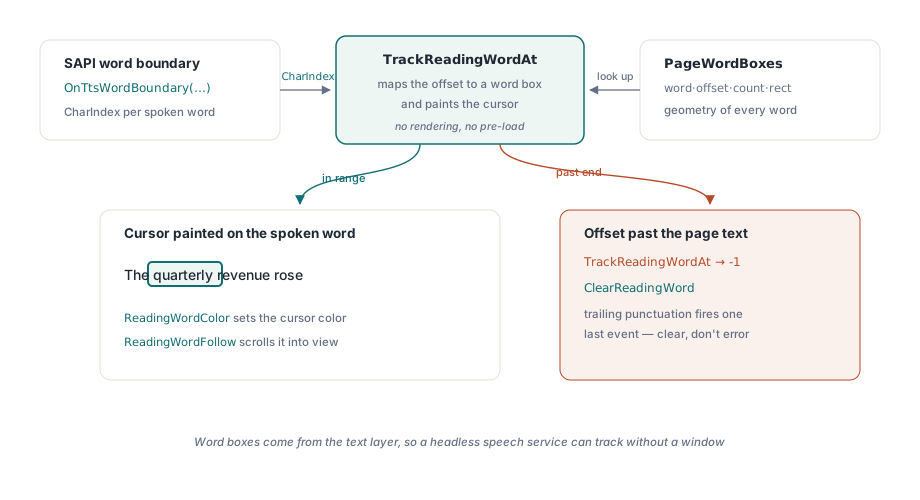
Att markera ett helt stycke i taget känns trögt för en synsvag användare som följer orden med blicken medan de läses upp. Markering på ordnivå, karaoke-effekten, behöver två delar: geometrin för varje ord, och ett sätt att mappa talmotorns framstegsrapporter mot den geometrin. PageWordBoxes ger dig geometrin som TPdfWordBox-poster, var och en med ordets text, dess teckenförskjutning, dess teckenantal och en rektangel i sidrymden. TrackReadingWordAt ger dig mappningen. Mata den med den teckenposition som SAPI:s ordgränshändelse redan rapporterar, och den löser den förskjutningen till ett index i ordbegränsningsrutans array och målar markören på det matchande ordet i ett enda anrop
procedure TReaderForm.PrepareKaraoke(PageNumber: Integer);
begin
  // Vyns ordbegränsningsrutor kommer från sidan vyn visar.
  // Att bara sätta Pdf.PageNumber skulle inte flytta vyn
  PdfView.PageNumber := PageNumber;
  FWordBoxes := PdfView.PageWordBoxes;
end;

procedure TReaderForm.OnTtsWordBoundary(Sender: TObject; CharIndex: Integer);
var
  WordIdx: Integer;
begin
  // TrackReadingWordAt mappar förskjutningen OCH målar läsmarkören
  WordIdx := PdfView.TrackReadingWordAt(FCurrentPage, CharIndex);
  if WordIdx < 0 then
    PdfView.ClearReadingWord;  // gränsen gick förbi sidtexten
end;
Kontraktet är generöst på en punkt och obarmhärtigt på en annan. Den generösa delen: TrackReadingWordAt håller sin egen cache med ordbegränsningsrutor för sidan den spårar, så det finns inget att förladda, och ingen rendering sker alls eftersom ordbegränsningsrutorna kommer från textlagret. En huvudlös taltjänst utan synligt fönster kan fortfarande spåra positioner. Den obarmhärtiga delen: teckenindexet måste peka in i texten komponenten extraherade, inte in i någon uppstädad sträng du byggde själv. När CharIndex går förbi slutet av sidtexten returnerar funktionen -1 i stället för att kasta ett undantag, vilket händer hela tiden när en talmotor avfyrar en sista gränshändelse för avslutande skiljetecken. Läs -1 som "rensa markören", aldrig som ett fel
På visningssidan sätter ReadingWordColor markörens färg. Standardfärgen bärnsten håller för de flesta sidbakgrunder, men testa den under varje visningsfilter din visare erbjuder. En bärnstensfärgad markör kan försvinna helt under färginvertering, och invertering som körs samtidigt med tal är precis hur en synsvag användare arbetar, så den enda kombination du mest behöver få rätt är den en snabb demo aldrig övar på. Sätt ReadingWordFollow till True och vyn rullar det talade ordet i sikte på egen hand, vilket du inte klarar dig utan på en zoomad sida som sträcker sig över flera skärmar. Tänk på en avgränsningsregel: SetReadingWord målar bara på den aktiva TPdfView-sidan. Bestäm i förväg om manuell rullning pausar talet eller om följbeteendet överstyr det, för att välja ingetdera lämnar rösten läsande medan markören sitter någonstans utanför skärmen
Dokumenten som knäcker din läsare
En handfull indataformer besegrar en naiv implementation tillförlitligt nog att de hör hemma som permanenta exempel i regressionssviten, inte som engångsbuggar du fixar och glömmer
- Otaggade men textrika filer. Heuristisk ordning brukar vara rätt för en linjär rapport och fel i samma stund en sidopanel eller ett citat dyker upp. Flagga ordningen som uppskattad, både i gränssnittet och i din diagnostiklogg, så att felet går att läsa av senare
- Skanningar med enbart bild. Inget textlager alls. Fånga dem via tomma läsenheter och peka användaren mot ett OCR-steg tidigare i flödet i stället för att låta läsaren läsa upp en tom sida
- Kombinerande tecken och blandade skriftsystem. Unicodes kombinerande märken kollapsar inte alltid ett-till-ett till visuella ord, så antalet ordbegränsningsrutor kan glida från vad din egen tokeniserare förväntar sig. Indexera inte ordbegränsningsrutans array med förskjutningar du beräknat genom att dela upp text själv; använd bara de index
TrackReadingWordAtreturnerar
Testa det som en granskare, inte som en demo
"Den läste upp mitt exempel" bevisar ingenting. Ett godkänt resultat du kan försvara kör tre filer genom den färdiga byggen med NVDA anslutet: en känt taggad fil, där rubriker tillkännages som rubriker och en tabell läses i radordning; en känt otaggad fil, där indikatorn för uppskattad ordning syns; och en skanning, där no-text-varningen faktiskt talas. Var och en övar en väg lyckofallet hoppar över
Bekräfta därifrån att läsmarkören håller sig låst vid dubbel taltakt och vid halv, och att ReadingWordFollow-rullningen inte brottas med användarens egen rullning. Kör sedan tal medan du bläddrar igenom varje färgfilter och håll koll på att markören aldrig försvinner. Artikeln om färgfilter för synsvaga täcker den renderingsvägen i detalj, och den fördjupande genomgången av läsmarkören för tal plockar isär TTS-timingen
API:erna för läsenheter och ordbegränsningsrutor som används ovan levereras med PDFium Component för Delphi och C++Builder (VCL) samt Lazarus/FPC (LCL). Produktsidan länkar den fullständiga API-referensen, inklusive postlayouterna för läsenheter och ordbegränsningsrutor bakom dessa exempel