En synsvag läsare kan inte urskilja svart text på en vit sida vid standardkontrast, så de ber om ett mörkt läge. Det naiva svaret är att invertera varje pixel på den renderade sidan. Det levereras på en vecka och går sönder nästa dag: inskannade fotografier kommer tillbaka och ser ut som filmnegativ, läsarens gula överstrykningsmarkeringar förvandlas till en oläslig blå fläck, och någon frågar varför utskriften kom ut helt svart. Funktionen är verkligen värd att bygga och verkligen lätt att få halvrätt, och gapet mellan de två utfallen är en enda idé: varje färgbeslut hör hemma vid en specifik punkt i renderingspipelinen, och invertering är fel verktyg applicerat i fel steg. Koden här använder PDFium Component, den PDFium-baserade visaren för Delphi, C++Builder och Lazarus, vars renderings-API exponerar de stegen separat
Filter är presentationstillstånd, aldrig dokumenttillstånd
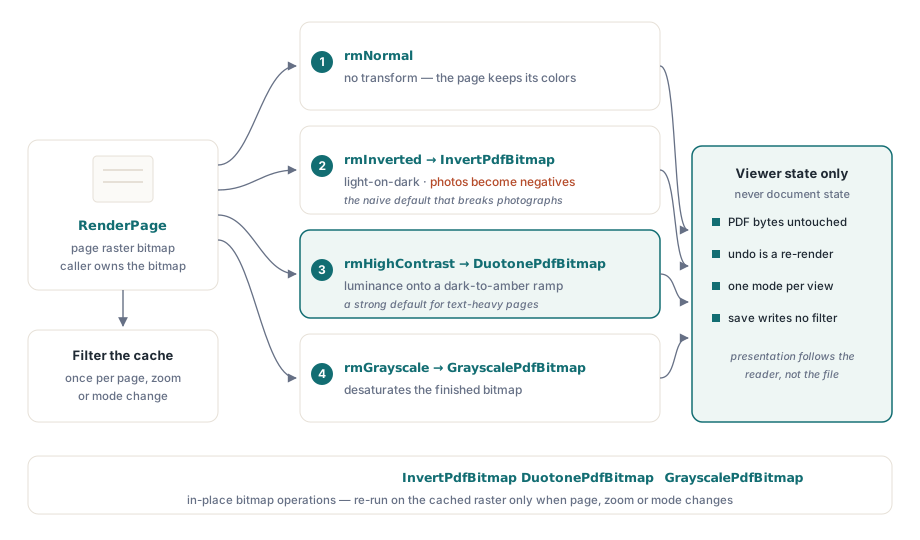
En regel förhindrar den värsta kategorin av bugg här: ett läsläge ändrar hur bitmappen produceras eller efterbehandlas, och inget annat. PDF-byten förblir orörda, varje läge är reversibelt genom omrendering, och "spara" skriver aldrig tillbaka ett filtrerat utseende till filen. Det här låter uppenbart tills en juridisk granskare skriver ut ett kontrakt under ett aktivt filter och arkiverar den inverterade versionen. Vid den punkten visar det sig att frågan "använder utskrift dokumentets eget utseende eller skärmens" förtjänar ett explicit svar i din specifikation, inte en olycka i kodvägen. Håll filterinställningen i visartillstånd, applicera det vid renderingstillfället, och låt varje exportväg deklarera vilket utseende den använder
Regeln betalar sig själv två gånger. Reversibilitet kommer gratis, eftersom att växla läge omrenderar från den oförändrade källan: det finns ingen ångra-stack att underhålla och inget sätt för en serie lägesändringar att försämra sidan. Scenarier med flera fönster förblir sammanhängande av samma anledning. Två vyer av ett dokument kan köra olika lägen, eftersom varje vy äger sitt eget presentationstillstånd medan dokumentobjektet förblir delat
Rendera först, transformera sedan
Det stödda mönstret är bitmappsbearbetning efter rendering: RenderPage producerar sidans raster, sedan justerar ett transformationssteg den. Komponenten levererar tre transformationer som bitmappsoperationer på plats, InvertPdfBitmap, DuotonePdfBitmap och GrayscalePdfBitmap, vilket gör lägesväxlingen till en ren tvåstegsfunktion:
function TViewerForm.RenderWithMode(W, H: Integer): TBitmap;
begin
  Result := Pdf.RenderPage(0, 0, W, H, ro0, [reAnnotations]);
  case FReadingMode of
    rmInverted:     InvertPdfBitmap(Result);
    rmHighContrast: DuotonePdfBitmap(Result, clBlack, $0000C8FF);  // mörk bakgrund, gulbrun text
    rmGrayscale:    GrayscalePdfBitmap(Result);
  end;
  // rmNormal faller igenom: dokumentet behåller sina egna färger
end;
Två saker följer av den här designen. För det första är transformationskostnaden proportionell mot bitmappsstorleken, så arbetet hör hemma där dina renderingsresultat cachas: filtrera den cachade bitmappen en gång, inte vid varje målning. För det andra, eftersom transformationen körs på den färdiga rastern, träffar den text, vektorgrafik, bilder och kommentarsutseenden på samma sätt. Den enhetligheten är precis det ren invertering får fel för fotografier. Det är anledningen till att duoton-transformationen gör ett bättre standardval för textintensiva dokument, eftersom den mappar luminans till en vald mörk-till-ljus färgramp i stället för att negera nyanser; invertering finns fortfarande tillgänglig som ett explicit val för läsare som vill ha det. Skarpare glyfkanter är en separat spak. Renderingsalternativet reNoSmoothText stänger av textutjämning vid renderingstillfället och passar bra ihop med högkontrastläge vid stor zoom
Två gråskalor som är oense
Renderingsalternativen inkluderar reGrayscale, som ser ut som en genväg förbi efterbehandlingssteget. Det är inte samma operation:

// Motornivå: gråskala applicerad under rasteriseringen
GrayA := Pdf.RenderPage(0, 0, W, H, ro0, [reGrayscale]);

// Efterbehandling: rendera i färg, konvertera den färdiga bitmappen
GrayB := Pdf.RenderPage(0, 0, W, H);
GrayscalePdfBitmap(GrayB);
Alternativet på motornivå gäller för rasterutdatan av bildinnehåll men når inte vektorfyllningar eller textfärger, så en sida med färgade rubriker kan komma tillbaka med gråa fotografier och envist blåa rubriker. GrayscalePdfBitmap på den färdiga bitmappen konverterar allt, ovillkorligt. Renderingsalternativet förtjänar ändå sin plats när du vill ha avmättade bilder samtidigt som textfärgen behålls som en signal, vilket vissa synsvaga läsare specifikt föredrar. Men om kravet lyder "gråskalesida" är efterbehandling versionen som uppfyller det. Vilken väg du än väljer, håll båda överlagringsstilarna för RenderPage i minnet. Funktionsformen returnerar en bitmapp som anroparen äger och måste frigöra, och det spelar roll så fort filter mångfaldigar antalet renderade bitmappar i omlopp
Bakgrunder, markeringar och PageColor-fällan
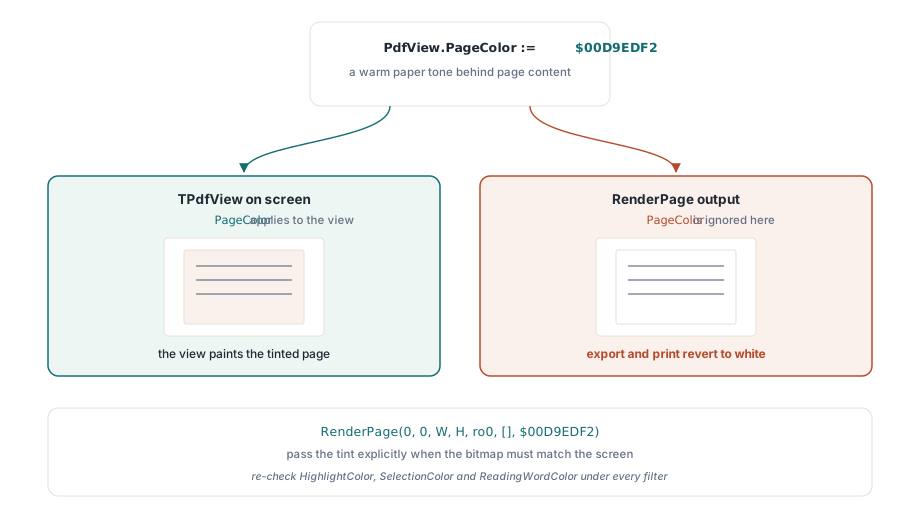
Inte varje komfortjustering är en transformation. Att ersätta den vita sidbakgrunden med en varm ton räcker ofta i sig för bländningskänsliga läsare, och det har en egen dedikerad egenskap. Egenskapen bär en omfångsregel som fångar folk:
// Påverkar bara vyn på skärmen
PdfView.PageColor := $00D9EDF2;  // varm papperston bakom sidinnehållet

// RenderPage-utdata ignorerar PageColor; skicka färgen explicit
Bmp := Pdf.RenderPage(0, 0, W, H, ro0, [], $00D9EDF2);
PageColor ändrar vad TPdfView visar, men bitmappar producerade via RenderPage behåller standardvitt om inte parametern Color säger något annat. Symptomet är pålitligt: skärmen visar den tonade sidan, användaren exporterar eller skriver ut, och utdatan återgår till vitt. Placera det under samma exportpolicybeslut från det första avsnittet
De återstående färgegenskaperna definierar överlagringsmarkeringar: HighlightColor för sökträffar, SelectionColor för användarens textmarkering, ReadingWordColor för den talade ords-markören. Var och en av dem måste kontrolleras på nytt under varje filter du erbjuder. En gulbrun läsmarkör som fungerar på vitt försvinner efter invertering; en blek blå markering försvinner in i en högkontrastbakgrund. Underhåll överlagringspaletter per läge i stället för en global uppsättning, och testa kombinationerna med avsikt. Filter plus text-till-tal är en normal konfiguration för läsarna den här funktionen betjänar, inte ett specialfall. Själva överlagringsmaskineriet täcks i artikeln om tillgänglig läsare
Siffror, verifiering och utskriftsfrågan
WCAG 2.1 gör den här funktionen till något du kan mäta. Framgångskriterium 1.4.3 kräver ett kontrastförhållande på 4,5:1 för brödtext, och 1.4.6 höjer det till 7:1 för förstärkt kontrast. Stickprovskontrollera ditt högkontrastläge mot de förhållandena med en kontrastanalysator körd på faktisk renderad utdata. Text över bilder och text i formulärfält är där förhållandena tyst misslyckas även när brödtexten klarar sig
Utskrift förtjänar ett eget beslut, och det försvarbara standardvalet är dokumentets eget utseende, med "skriv ut som visat" erbjudet som ett explicit användarval. En utskriven sida är bevis i fler arbetsflöden än visarförfattare tenderar att förvänta sig, och en inverterad utskrift av ett kontrakt är en supportincident med juridisk krydda. Ännu en koppling spelar roll för prestanda: filtrerad rendering fördubblar bitmappsarbetet vid varje lägesväxling, så applicera inte en transformation vid varje målningsmeddelande. Cacha den filtrerade bitmappen och kör om transformationen bara när sidan, zoomen eller läget faktiskt ändras. Cachningsstrategin som gör det här billigt finns i artikeln om renderingscache och zoomprestanda
En sak att avgöra i ditt gränssnitt snarare än i din kod: vilket läge som är rätt standardval. Det finns inget enskilt svar, så erbjud uppsättningen och låt läsaren välja. Högkontrast passar det mesta av textintensiv läsning, invertering passar läsare som specifikt vill ha ljust på mörkt, gråskala skär bort färgbrus, och en bakgrundston hanterar bländningskänslighet. Spara valet per användare, återställ det vid uppstart, och behåll en väg tillbaka till normalt med ett enda tangenttryck, eftersom en läsare som hamnar i ett läge de inte kan läsa behöver en snabb väg ut
Renderingsalternativen, bitmappstransformationerna och vyns färgegenskaper som används här levereras med PDFium Component för Delphi, C++Builder och Lazarus/FPC, med fullständig källkod så att transformationsimplementationerna kan granskas eller utökas