Delphi och Lazarus kompilerar samma Object Pascal, och den ytliga likheten är precis det som gör att porta en visare mellan dem vilseledande. De två verktygskedjorna divergerar på tre punkter som spelar roll för PDF-arbete: den inbyggda string-typen är UTF-16 i Delphi och UTF-8 i en LCL-applikation; VCL och LCL är olika visuella ramverk med sina egna kontroller, dialoger och formulärströmningsformat; och en Delphi-binär riktar sig mot Windows medan en FPC-binär kan vara på väg mot Linux eller macOS. Ingen av dessa skillnader syns vid kompileringstillfället. En visare byggd på PDFium Component, som levererar VCL- och LCL-utgåvor från ett enda källträd, kompilerar rent under Lazarus efter en handfull enhetsnamnsbyten och några {$IFDEF FPC}-block. Felen dyker upp senare, när verklig data och en verklig driftsättning exponerar de antaganden Delphi-bygget tyst gjorde
Fyra av dessa antaganden står för det mesta av den förlorade tiden: textkodning vid gränssnittsgränsen, frestelsen att underhålla två kopior av formuläret, sättet en inbyggd motorbinär löses upp vid körtid, och ögonblicket text-till-tal tar slut på plattform så fort SAPI är borta. Vart och ett är billigt att hantera om du vet att det kommer och dyrt att jaga ner om du inte gör det
Samma Pascal, olika strängnyttolaster
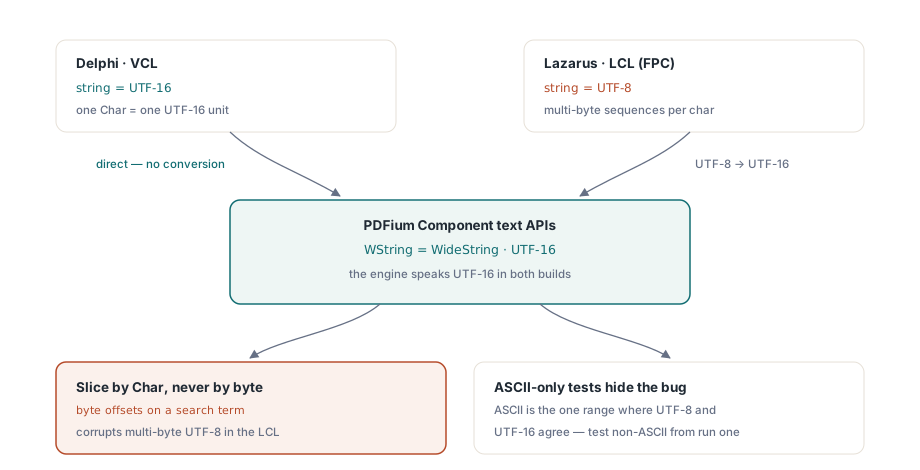
Delphis inbyggda string har varit UTF-16 sedan 2009. Lazarus och Free Pascal använder som standard UTF-8 i LCL-applikationer. Komponentens textvända API:er talar UTF-16 genom typen WString, som FPC-bygget aliaserar till WideString, så varje gräns där text korsar mellan ditt LCL-gränssnitt och PDF-motorn är en konverteringspunkt
Konverteringarna sker automatiskt vid enkla tilldelningar, och det mesta av koden behöver aldrig tänka på dem. Två vanor håller kodningsbuggarna borta. Skicka text rakt igenom utan bytenivåmanipulation: kod som skär en söksträng efter byteförskjutning fungerar i Delphi, där ett Char är en UTF-16-enhet, och korrumperar flerbyte-UTF-8 i LCL:en. Och testa med icke-ASCII-data från första körningen. Ett tyskt filnamn, en kyrillisk söksträng, ett accentuerat författarnamn i dokumentets metadata: ren ASCII-testdata döljer varje kodningsdefekt, eftersom ASCII är det enda intervall där UTF-8 och UTF-16 är överens byte för tecken. Buggen är verklig hela tiden; ASCII håller den bara osynlig tills en kund i München öppnar en fil du aldrig testade
Ett villkorsblock, inte en förgrening per IDE
Efter det första dussinet IFDEF:er börjar kodbasen kännas som två projekt som bär ett enda repository, och att förgrena den per IDE ser lockande ut. Det är fel drag. De genuina skillnaderna komprimeras till ett enda delat deklarationsblock, och en förgrening fördubblar kostnaden för varje buggfix från och med då. Håll det villkorliga lagret så här litet:
{$IFDEF FPC}
uses
  LCLType, Forms, Graphics, Controls;

type
  WString = WideString;   // komponentens text-API:er är UTF-16
  TBytes  = array of Byte;
{$ELSE}
uses
  Winapi.Windows, Vcl.Forms, Vcl.Graphics, Vcl.Controls;
{$ENDIF}
Allt under det blocket kompileras identiskt i båda IDE:erna. Dokumenthantering, sidnavigering, renderingsanrop: TPdf och TPdfView exponerar samma yta i VCL- och LCL-utgåvorna, så merparten av visaren ser aldrig ett kompilatorvillkor. Att hålla det så är en strukturell disciplin snarare än ett smart trick. Delad PDF-logik lever i enheter som inte drar in några ramverksspecifika dialoger eller paneler. Den handfull saker som genuint skiljer sig, som utskriftsdialoger och filväljare med sina plattformskonventioner, döljer sig bakom ett tunt gränssnitt implementerat en gång per ramverk. IFDEF-blocket blir den enda platsen framtida plattformsdivergens tillåts landa på, i stället för att läcka kompilatordirektiv över fyrtio enheter
Bygg formuläret i kod, inte i två designers
Formulärströmning är där dubbel-IDE-projekt tyst ruttnar. En .dfm och en .lfm som påstår sig beskriva samma formulär glider isär egenskap för egenskap tills de två byggena beter sig olika av skäl ingen kan diffa, eftersom de två filerna inte ens är i samma format. Att konstruera visaren vid körtid kringgår hela problemet. Det finns en enda konstruktorsekvens, versionshanterad som vanlig kod, och den läses likadant på båda plattformarna:
procedure TViewerForm.FormCreate(Sender: TObject);
begin
  Pdf := TPdf.Create(Self);

  PdfView := TPdfView.Create(Self);
  PdfView.Parent := Self;
  PdfView.Align := alClient;
  PdfView.Pdf := Pdf;
  PdfView.FitMode := pfmFitWidth;

  if ParamCount > 0 then
  begin
    Pdf.FileName := ParamStr(1);
    Pdf.Active := True;   // öppnar dokumentet; PageCount giltig efter det här
  end;
end;
Den exakta ordningen på dessa tilldelningar spelar mindre roll än den enda rad som gör det verkliga jobbet. PdfView.Pdf := Pdf binder den visuella kontrollen till dokumentkomponenten, och från den punkten svarar sidnavigering genom PageNumber och anpassningsbeteende genom FitMode identiskt under VCL och LCL. En kvirk över ramverksgränserna är värd att känna till innan en användare rapporterar den som en bugg: att tilldela Zoom för hand knäpper FitMode tillbaka till pfmNone på båda ramverken. Så om din verktygsrad behandlar "anpassa till bredd" som ett klistrigt val, måste du tilldela om anpassningsläget efter varje programmatisk zoom, annars slutar valet tyst att klistra sig fast första gången kod rör zoomnivån
Binären IDE:n aldrig varnade dig om
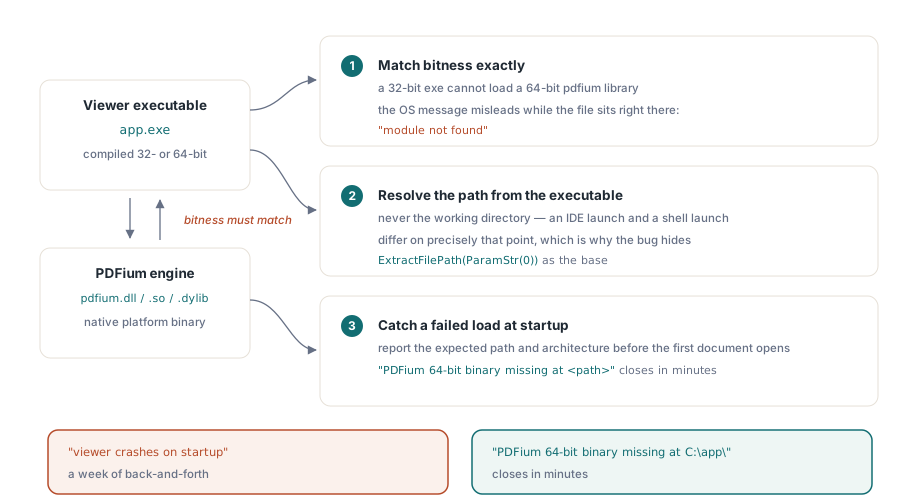
Komponenten omsluter PDFium-motorn, som levereras som en inbyggd plattformsbinär, och den binären är källan till nästan varje "fungerar i IDE:n, kraschar från den installerade genvägen"-rapport. Tre regler står för de flesta av dem. Bitbredden måste matcha exakt. En 32-bitars körbar fil kan inte ladda ett 64-bitars pdfium-bibliotek, och meddelandet operativsystemet lämnar tillbaka ("modulen hittades inte" på vissa Windows-versioner) vilseleder aktivt, eftersom filen sitter precis där bredvid den körbara filen. Lös upp bibliotekssökvägen relativt den körbara filen, aldrig arbetskatalogen; en IDE-start och en skalstart skiljer sig precis på den punkten, vilket är varför buggen döljer sig under utveckling. Och fånga en misslyckad laddning innan det första dokumentet öppnas, rapportera den sedan med den förväntade sökvägen och arkitekturen utskrivna. Ett supportärende som lyder "PDFium 64-bitars binär saknas vid <sökväg>" stängs på några minuter. Ett som lyder "visaren kraschar vid start" förvandlas till en vecka av fram och tillbaka
Versionshantera motorbinären tillsammans med den körbara filen medan du ändå håller på. PDFium rör sig snabbt, och en installationsrutin som uppdaterar applikationen men lämnar kvar ett föråldrat bibliotek på disk producerar krascher ingen på ditt kontor kan återskapa, av det enkla skälet att varje maskin på ditt kontor råkar hålla det matchande paret. Behandla biblioteket som en del av byggartefakten, med samma installationsrutin, samma versionsstämpel, och samma återställningsväg som den körbara fil den laddar
Registrera komponenter i Lazarus-IDE:n
Konstruktion vid körtid behöver ingen designtidsregistrering alls, vilket är den renaste uppsättningen för en visare som bygger sitt eget gränssnitt i kod. När du faktiskt vill ha komponenterna på Lazarus-paletten för designtidsarbete, installera paketet och låt dess dedikerade registreringsenhet, PDFiumLazReg i Lib/FPC/PDFiumLaz.lpk, sköta det. Den enheten är markerad som designtid med avsikt: den refererar till IDE:ns egenskapsredigerargränssnitt som aldrig får länkas in i din levererade körbara fil
Gör det här fel och symptomet är en applikation som oförklarligt beror på IDE-paket, vilket visar sig som ett driftsättningsfel på den första kundmaskinen som aldrig haft Lazarus installerat
Tal och skärmläsare bortom Windows
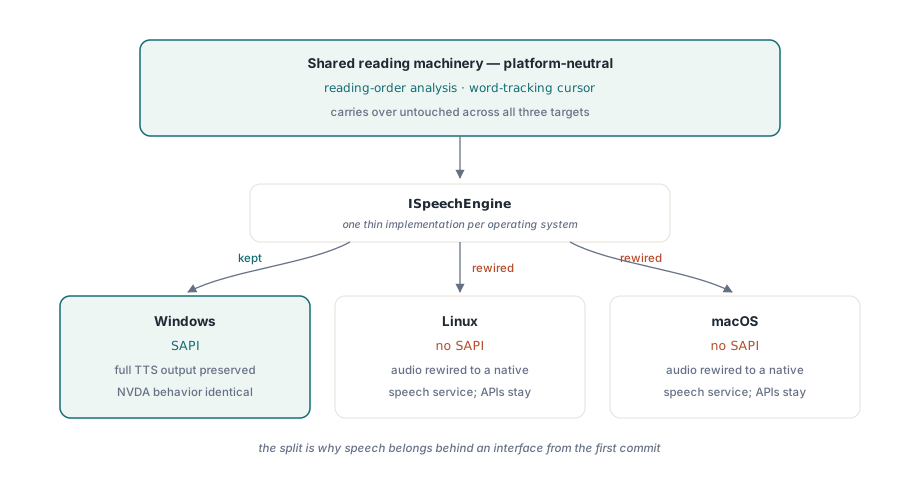
Text-till-tal är den enda funktionen där den plattformsoberoende historien brister, och den brister vid operativsystemet, inte komponenten. SAPI, den vanliga TTS-motorn på Windows, finns bara på Windows. Ett Lazarus-bygge som fortfarande riktar sig mot Windows behåller fullständig SAPI-utdata och samma NVDA-kompatibla beteende som Delphi-originalet hade, så en Windows-till-Windows-portning förlorar ingenting här, och en NVDA-användare kan inte skilja de två byggena åt
Ett Linux- eller macOS-mål är en annan sak. Det finns ingen SAPI att anropa, så ljudutdatan måste kopplas om till en inbyggd taltjänst medan läsnings-API:erna ovanför den ligger kvar. Den uppdelningen är argumentet för att placera tal bakom ett gränssnitt från den första commiten: analysen av läsordning och den ordspårande markören är plattformsneutrala och följer med orörda, och bara det tunna lagret som faktiskt producerar ljud behöver ändras per plattform. Artikeln om den tillgängliga läsaren täcker det läsmaskineriet på djupet
En paritetschecklista innan du kallar portningen klar
Följande genomgång har fångat verkliga regressioner, listade ungefär i den ordning fel brukar dyka upp. Öppna ett dokument vars sökväg innehåller icke-ASCII-tecken. Sök efter en term med icke-ASCII-tecken och bekräfta att träffarna markeras där de ska. Öva musrullscrollning, dragmarkering och tangentbordssidnavigering på varje widgetuppsättning du levererar, eftersom fokushantering och rullbeteende är de mest widgetuppsättningsberoende hörnen av LCL:en. Kontrollera rendering vid 100 %, 150 % och 200 % skärmskalning. Kör sist det installerade bygget, inte IDE-bygget, på en maskin som aldrig haft IDE:n på sig, eftersom det är det enda testet som utövar binärupplösning ärligt. Allt annat kan klara sig medan just det tyst misslyckas
Renderingsgenomströmning följer med oförändrad mellan de två utgåvorna, så cachningsmetoden från artikeln om rendercache och zoomprestanda tillämpas på LCL-visaren precis som den skrevs för VCL-varianten
Inget av det här gör LCL-utgåvan sämre. Kärnytan är identisk på båda sidor: TPdf, TPdfView, rendering, formulär, textextraktion, och tillgänglighets-API:erna beter sig likadant oavsett vilken IDE som kompilerade dem. Varje skillnad värd att hålla koll på är plattformsbunden snarare än utgåvebunden. SAPI-tal är endast för Windows, dialoger följer varje ramverks konventioner, och binären måste matcha den arkitektur den laddas in i. Få kodningsgränserna, körtidsformuläret och binärupplösningen rätt, så är resten av portningen det mekaniska arbete kompilatorn redan skötte åt dig
VCL- och LCL-utgåvorna som beskrivs här levereras tillsammans som PDFium Component, med källkod och identiska publika API:er för Delphi, C++Builder och Lazarus/FPC