Ett batch-preflightverktyg är ett konsolprogram utan fönster, riktat mot en mapp med PDF-filer, som validerar varje fil mot de konformitetsstandarder du anger och lämnar maskinläsbar dokumentation av vad det hittade. Ingen sitter och tittar på det. Det körs klockan två på natten under cron eller Windows Task Scheduler, eller som en grindkontroll i en CI-pipeline, och nästa person som bryr sig om dess utdata är antingen en schemaläggare som läser en slutkod eller en revisor som öppnar en rapport veckor senare. Det ändrar vad "korrekt" betyder. Preflightmotorn i PDFium Component, ett PDF-bibliotek med källkod för Delphi, C++Builder och Lazarus, gör valideringsanropen i sig nästan triviala. Det arbete som avgör om verktyget håller måttet sitter runt dessa anrop: vilken profil du kontrollerade, vad slutkoden berättade för schemaläggaren och om den rapport som skulle ha fångat ett misstag fortfarande finns kvar när någon går och letar efter den
Kontraktet: vad en schemaläggare faktiskt kan se
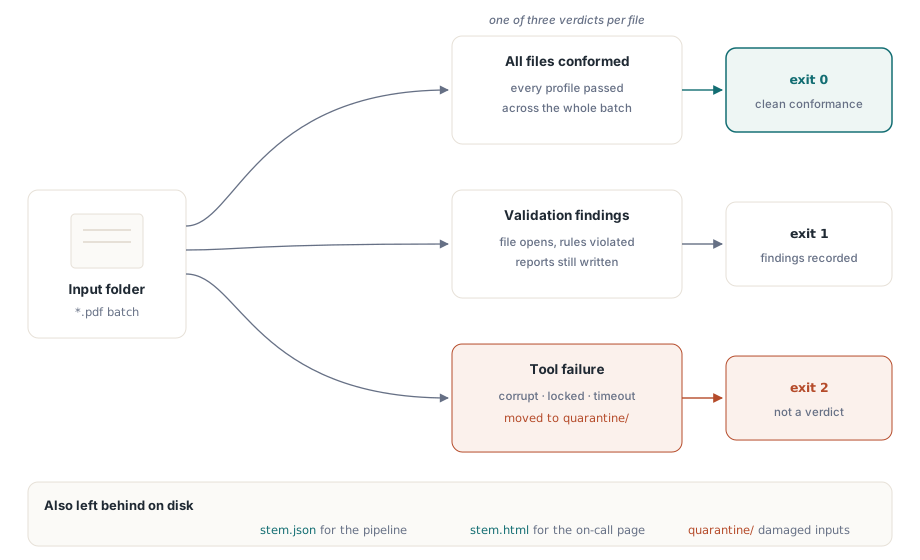
En CI-körare eller Windows Task Scheduler ser exakt två saker från ditt verktyg: slutkoden och de filer det lämnade efter sig. Loggrader, konsolfarger, förloppsutdata: allt det är för en människa som tittar live, och klockan två på natten gör ingen det. Så sätt upp slutkodsvokabulären innan du rör API:et och håll den tråkig:
0: varje fil stämde överens med varje begärd profil1: minst en fil producerade valideringsresultat2: verktyget självt misslyckades på minst en fil (skadat indata, låsning, krasch)
Skillnaden mellan kod 1 och 2 är den som team hoppar över och senare ångrar. En skadad PDF som inte går att öppna är inte ett valideringsmisslyckande. Lägg ihop det med kod 1 och ett lass skadade skanningar dyker upp i dina dashboards som en plötslig konformitetskollaps och sätter någon att jaga en standardsregression som aldrig hände, när den verkliga historien är en trasig skanner uppströms
Ytterligare två punkter hör till kontraktet. Den första är en tidsgräns per fil. En patologisk PDF, tusentals sidor med djupt nästade objektstrukturer, kan hålla ett enda valideringspass i flera minuter, och ett nattligt fönster har inget tålamod för det. Avbryt den filens jobb vid tidsgränsen, räkna det som ett verktygsfel och håll batchen igång. Den andra är en karantänkatalog: flytta varje tidsgränsat eller omöjligt att öppna indata åt sidan i stället för att låta det ligga kvar. Över några månader samlar den katalogen tyst på sig de värsta dokument dina riktiga kunder skickar, och det korpuset är värt mer för relesstestning än vilket syntetiskt prov du än kan skriva för hand
Välja standarder, och varför konformitetsnivån spelar roll
Uppräkningen TPdfPreflightStandard täcker de familjer som dyker upp i praktiken: ppsPdfA för ISO 19005 arkivkonformitet, ppsPdfUa för ISO 14289 tillgänglighet, ppsPdfX för utbyte vid tryck, plus ppsPdfE, ppsPdfR och ppsPdfVT för teknisk-, raster- och variabeldata-arbete. Inom en familj läser motorn den konformitetsnivå som dokumentet gör anspråk på och rapporterar den per standard i resultats ConformanceName. Att namnge familjen räcker sällan, för nivån är där den verkliga skillnaden finns. PDF/A-2b lovar visuell reproducerbarhet och inget mer. PDF/A-3a lägger till ett krav på logisk strukturtaggning och tillåter inbäddade källfiler, vilket är en betydligt svårare tröskel att klara för skannat material som inte har något taggträd alls. Gör fel i endera riktning och batchen ljuger för dig. Om din bevarandepolicy egentligen vill ha PDF/A-2b men du underkänner filer för saknad strukturtaggning, fylls rapporten med resultat som ingen någonsin kommer att åtgärda. Acceptera valfri PDF/A-etikett utan att kontrollera nivån och du godkänner dokument som uppfyller en lägre nivå än du lovade. Tillgänglighetskrav från statliga köpare staplar allt oftare PDF/UA ovanpå allt detta, vilket inte kostar något extra för körningen eftersom BuildPdfPreflightReport (från enheten FPdfPreflightReport) tar en uppsättning standarder:
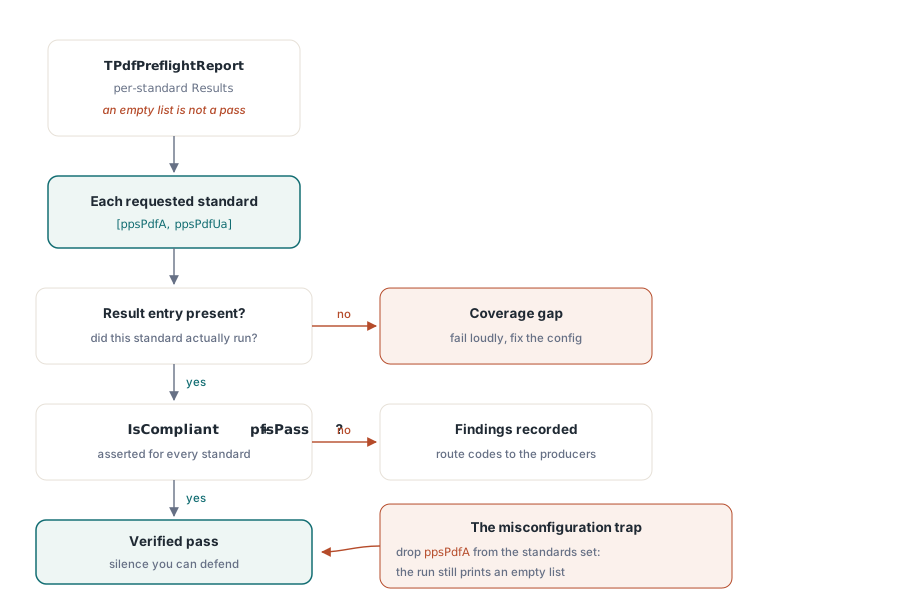
Report := BuildPdfPreflightReport(Pdf, [ppsPdfA, ppsPdfUa]);Ett anrop utvärderar båda standarderna och returnerar ett enda konsoliderat rapportpost
Varför en tom resultatlista inte är ett godkänt
Rapporten räknar upp resultat per standard, och en tom ärendelista betyder bara "inga problem hittades i de standarder som faktiskt kördes." Det är ett snävare påstående än "filen stämmer överens med den standard du bryr dig om," och klyftan mellan de två är där batch-preflight tyst ruttnar. Ett konfigurationsskrivfel som tar bort ppsPdfA från uppsättningen producerar exakt samma tomma ärendelista som en genuint ren fil. Så behandla tystnad som misstänkt. Gå igenom Report.Results och hävda två saker för varje standard du avsåg att kontrollera: att en resultatpost för den finns överhuvudtaget, och att dess IsCompliant-flagga, stödd av Status = pfsPass, är sann. Ett nattjobb som likställer "inga resultat" med "redo för arkivering" utan att någonsin bekräfta vilka standarder som utvärderades är det klassiska sättet en mapp med icke-konforma filer seglar igenom i månader, tills en extern revisor öppnar en med veraPDF och hela arkivet ifrågasätts
En andra fälla gömmer sig i vad ett resultat ens är. Varje TPdfPreflightIssue bär en Code, en Category, en Description och en Recommendation, och den namnger regeln som bröts, inte en sida eller ett objekt. Det är ett designval med konsekvenser för återkopplingsslingan. Rapporten berättar för det producerande teamet vilken klass av defekt som finns, ett ej inbäddat teckensnitt eller en saknad XMP-identifierare, och att hitta det specifika felande objektet är reparationsverktygets jobb nedströms, inte validatorns. Bygg dina rapportkonsumenter mot de stabila Code-värdena, aldrig mot den mänskligt läsbara beskrivningstexten, som kan omformuleras mellan versioner utan förvarning
Rapportfiler för maskiner och för den person som är i beredskap
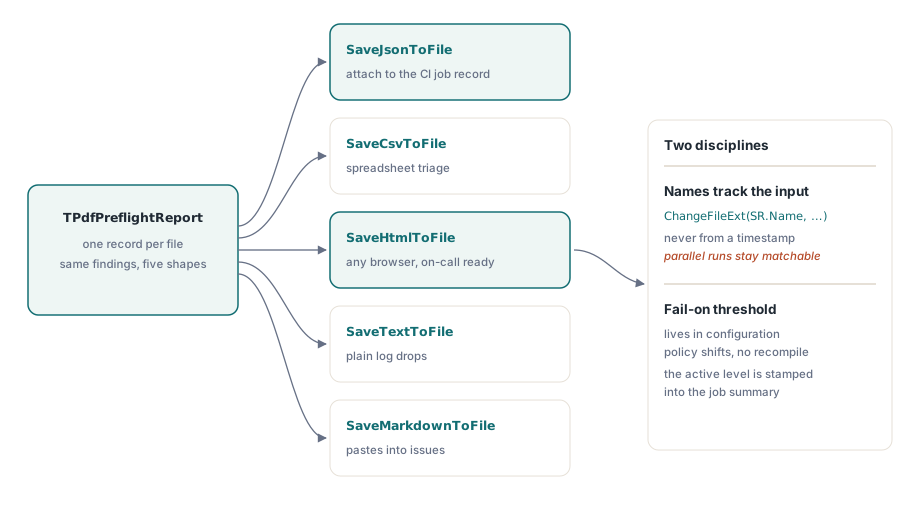
Rapportposten skriver samma resultat i fem format: SaveJsonToFile, SaveCsvToFile, SaveHtmlToFile, SaveTextToFile och SaveMarkdownToFile, var och en med en matchande ToJson-stilfunktion när du vill ha strängen i minnet i stället för på disk. Motstå frestelsen att välja ett. Skriv JSON för pipeline, så CI kan bifoga det till jobbposten och tolka ärendekoder och per-standard-statuser utan att skrapa text. Skriv HTML för den människa som blir uppringd, för det öppnas i valfri webbläsare utan verktyg alls. De två tillsammans kostar en extra rad per fil och skonar din jour-ingenjör från den enda värsta uppgiften i batchbearbetning, vilket är att bakåtkonstruera ett råa JSON-klump klockan två på natten för att ta reda på vilken fil som kraschade. En disciplin spelar större roll än formvalet: härleda varje rapportnamn från indatafilens namn, aldrig från en tidsstämpel, annars blandar två parallella körningar samman rapporter som du inte längre kan matcha tillbaka till sina indata
Allvarlighetsgränser hör hemma i konfigurationen snarare än i koden. En anteckning utan alternativ beskrivning är ett hårt misslyckande för en PDF/UA-inlämningsportal och en ignorerbar notering för ett internt arkiv, ändå är det ett identiskt resultat i båda. Exponera en fel-vid-nivå per profil så att policyn kan förändras utan en omkompilering och stämpla nivån som var i kraft i jobbsammanfattningen själv. Nästa kvartal minns ingen vilken tröskel förra oktobers batch körde under, och sammanfattningen är den enda plats där det minnet överlever
Isolera filer så att en dålig PDF inte kan sänka batchen
procedure RunPreflightBatch(const InputDir, ReportDir: string;
  out FilesWithFindings, ToolFailures: Integer);
var
  SR: TSearchRec;
  Pdf: TPdf;
  Report: TPdfPreflightReport;
begin
  FilesWithFindings := 0;
  ToolFailures := 0;
  if FindFirst(InputDir + '*.pdf', faAnyFile, SR) = 0 then
  try
    repeat
      Pdf := TPdf.Create(nil);   // färsk instans per fil: inget tillståndsläckage
      try
        try
          Pdf.FileName := InputDir + SR.Name;
          Pdf.Active := True;
          if not Pdf.Active then  // läsfel är tysta, inte kastade
            raise EPdfError.Create('Cannot open ' + SR.Name);
          Report := BuildPdfPreflightReport(Pdf, [ppsPdfA, ppsPdfUa]);
          Report.SaveJsonToFile(ReportDir + ChangeFileExt(SR.Name, '.json'));
          Report.SaveHtmlToFile(ReportDir + ChangeFileExt(SR.Name, '.html'));
          if Report.TotalIssueCount > 0 then
            Inc(FilesWithFindings);
        except
          on E: Exception do
          begin
            Inc(ToolFailures);   // exit-kod-2-område, inte en valideringsdom
            WriteLn(ErrOutput, SR.Name + ': ' + E.Message);
          end;
        end;
      finally
        Pdf.Free;
      end;
    until FindNext(SR) <> 0;
  finally
    FindClose(SR);
  end;
end;
Tre avsiktliga val finns i den loopen. En ny TPdf per fil garanterar att ett dokument som korrupterar motorns tillstånd inte kan förgifta de filer som följer det. Den explicita Active-kontrollen tjänar sin plats eftersom Active := True sväljer laddningsfel i stället för att kasta dem; ta bort skyddet och en trunkerad fil driver vidare in i valideringsanropet innan den misslyckas någonstans nedströms med ett vilseledande meddelande. Det inre try..except lever inuti per-fil-scopet med avsikt, så att ett enda undantag ökar felräknaren och loopen fortsätter. Du vill ha rena rapporter för de 4 999 bra filerna även när fil 5 000 är söndertrasad. Och båda rapportformaten skrivs till disk innan utslaget räknas, vilket innebär att bevisunderlaget överlever även om en bugg senare i sammanfattningslogiken räknar fel
Slutkodsmappningen reduceras sedan till ett par rader i projektfilen:
begin
  RunPreflightBatch(ParamStr(1), ParamStr(2), Findings, Failures);
  if Failures > 0 then
    Halt(2)
  else if Findings > 0 then
    Halt(1);
  // faller man igenom avslutas det med 0: alla filer var konforma
end.
Vad preflight inte gör åt dig
Motorn detekterar; den reparerar inte. Ett resultat om ett ej inbäddat teckensnitt eller ett enhetsberoende färgrymdsspace är en arbetsorder för den som producerar filerna, och validatorn har inget sätt att laga det på plats. Planera därför återkopplingsslingan medvetet. Rapporter måste hamna där det producerande teamet faktiskt läser dem, annars dyker samma resultat upp varje natt tills någon till slut frågar varför konformitetsgraden aldrig förbättras. Det lönar sig också att korskontrollera ett urval av utslag mot en oberoende validator, veraPDF för PDF/A eller Acrobats preflight för PDF/X, innan en extern revisor gör det åt dig. När två motorer är oense om en riktig kundfil är det dokumentet inte ett besvär; det är precis det regressionsfall din relesstestning saknade. Behåll det, namnge det och kör det på varje bygge
Ytterligare en koppling är värd att känna till. Samma valideringsmotor driver de interaktiva kontrollerna i ett granskningsgränssnitt, så denna headless CLI och ett analytiker-vänt PDF-inleveransgranskningsmiljö kan dela ett enda valideringsvokabulär i stället för att drifta isär över tid. Och eftersom [ppsPdfA, ppsPdfUa] utvärderar tillgänglighet i samma pass, stämmer PDF/UA-sidan av batchen väl överens med visarsidigt arbete som att bygga en tillgänglig PDF-läsare i Delphi. Profiler, rapportformat och det fullständiga preflight-API:et finns dokumenterat på produktsidan för PDFium Component