En granskningsarbetsbänk för PDF-intag är ett litet program med ett jobb: titta på varje fil innan något nedströms tillåts röra den. För att göra det jobbet måste den sätta samman en handfull förmågor i en enda passering. Den öppnar filen (utan att lita på den), läser vad filen påstår om sig själv, letar efter innehåll som kommer att vilseleda en naiv extraktor eller bära en attack, bestämmer om det finns någon extraherbar text alls, och dirigerar sedan dokumentet till en kö baserat på vad den hittade. Hoppa över inspektionen och felen blir tysta: en ägarlösenordskrypterad PDF som omsluter ett XFA-formulär seglar genom en textextraktor som tomma strängar, indexeras som ett tomt dokument, och ingen märker det förrän någon nedströms letar efter innehåll som aldrig lästes. PDFium Component är ett källkods-VCL/LCL-visnings- och inspektionsbibliotek för Delphi, C++Builder och Lazarus, och det exponerar introspektionsanropen den här arbetsbänken behöver. Avsnitten nedan går igenom vilket anrop som besvarar vilken fråga, och de två platserna där det uppenbara anropet ger dig ett självsäkert felaktigt svar
Fem frågor att besvara innan en fil dirigeras
Skala bort rutnätet och miniatyrremsan, och intagstriage reduceras till fem frågor:
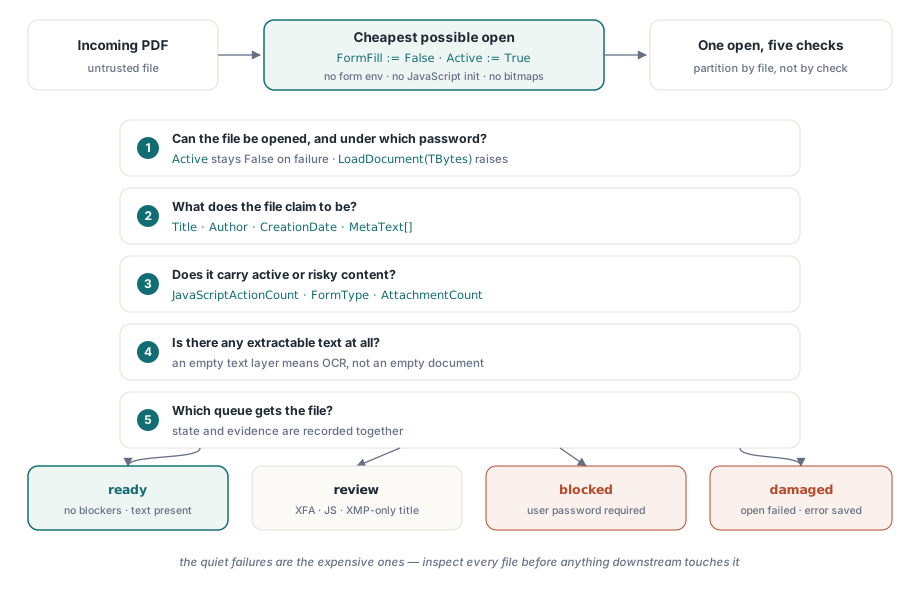
- Kan filen överhuvudtaget öppnas, och under vilket lösenord?
- Vad påstår den sig vara: titel, författare, skapandedatum?
- Bär den aktivt eller riskabelt innehåll som JavaScript, ett XFA-formulär, eller inbäddade filer?
- Finns det extraherbar text, eller är det en skanning på väg mot OCR?
- Givet allt det, vilken kö får den: direktbearbetning, manuell granskning, eller karantän?
Varje fråga mappar mot ett eller två PDFium Component-anrop. Två av de mappningarna har vassa hörn som står för de flesta av de feldirigerade filerna jag har behövt felsöka i produktion. Dokumentmetadata bor på två olika platser som kan vara oense, och kryptering hindrar inte nödvändigtvis ett dokument från att öppnas
Öppna billigt: formulärifyllning av, noll sidor renderade
Triage bör vara den billigast möjliga öppningen. Att sätta FormFill := False före Active := True talar om för komponenten att hoppa över formulärifyllningsmiljön helt. Det förkortar laddningstiden, och (lika viktigt för filer av okänt ursprung) det hindrar allt JavaScript på dokumentnivå från att initieras. Ingen av inspektionsegenskaperna som används nedan kräver rendering av en sida, så en triage-passering behöver aldrig producera en enda bitmapp
procedure InspectIncoming(const IncomingPath: string; var Rec: TIntakeRecord);
var
  Pdf: TPdf;
begin
  Pdf := TPdf.Create(nil);
  try
    Pdf.FileName := IncomingPath;
    Pdf.FormFill := False;     // ingen formulärmiljö, ingen JavaScript-initiering
    Pdf.Active := True;        // misslyckande är tyst: Active förblir helt enkelt False

    if not Pdf.Active then
    begin
      Rec.OpenFailed := True;  // skadad fil eller användarlösenordslås
      Exit;                    // finally-blocket körs ändå
    end;

    Rec.PageCount := Pdf.PageCount;
    CollectIdentity(Pdf, IncomingPath, Rec);
    CollectRiskSignals(Pdf, Rec);
  finally
    Pdf.Active := False;
    Pdf.Free;                  // läck aldrig instansen vid en felformad fil
  end;
end;
Kontrollen efter tilldelningen är inte valfri, och det är en kontroll snarare än en undantagshanterare av ett skäl. När motorn inte kan ladda filen sväljer komponenten det interna EPdfError och lämnar Active vid False i stället för att förmedla det vidare. Kod som väntar på ett undantag kommer glatt läsa PageCount från ett dokument som aldrig öppnades. Om avvisningsarbetsflödet behöver motorns faktiska feltext, läs filen till en bytearray och anropa LoadDocument-overloaden som tar TBytes; den vägen höjer verkligen EPdfError med meddelandet, inklusive lösenordsfallet. try..finally förtjänar fortfarande sin plats. Intagstjänster körs obevakade i veckor, och inget senare undantag får läcka TPdf-instansen eller hålla ett lås som återförsöksomgången snubblar över
Genomströmning blir sällan flaskhalsen. Med formulärifyllning inaktiverad och ingen rendering domineras en triage-öppning av I/O, och en enda arbetare inspekterar bekvämt flera filer per sekund från lokal disk. Om intagsvolymen någonsin skulle växa ur en arbetare, partitionera arbetet efter fil snarare än efter kontroll. De fem frågorna delar en öppning, och att dela upp dem över processer skulle multiplicera det dyraste steget i stället för att fördela ut det
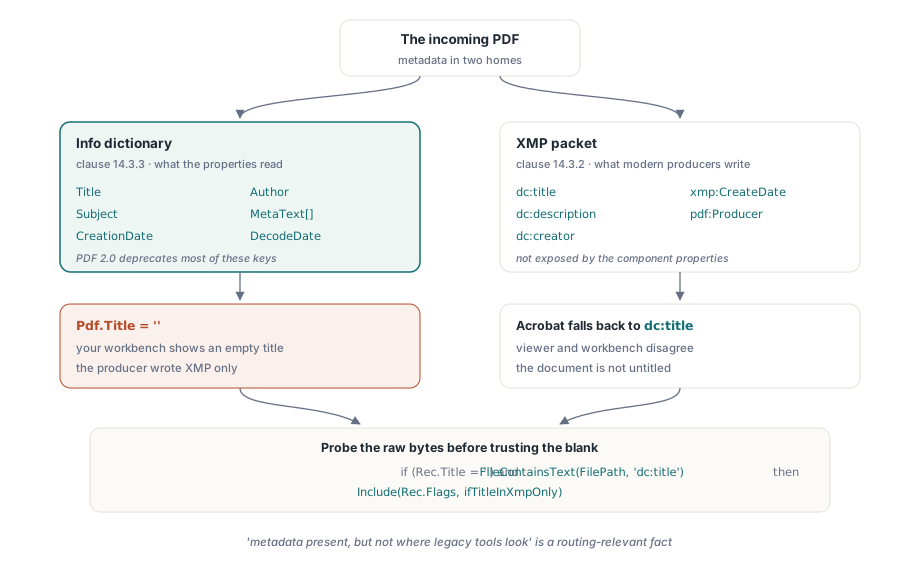
Metadata bor på två platser, och de är oense
ISO 32000-1 definierar två hem för dokumentmetadata: dokumentinformationsordboken (klausul 14.3.3) och ett XMP-paket fäst vid katalogen (klausul 14.3.2). Egenskaperna Title, Author, Subject och CreationDate läser Info-ordboken, med MetaText[] för alla andra nycklar och DecodeDate för att parsa datumsträngen D:YYYYMMDD.... Haken är att moderna producenter i allt högre grad bara skriver XMP, en riktning ISO 32000-2 gör officiell genom att fasa ut de flesta Info-ordboksnycklar i PDF 2.0. Symptomet i ett intagsverktyg är konkret. Din arbetsbänk visar en tom titel medan Adobe Acrobat visar en, eftersom Acrobat föll tillbaka på dc:title inuti XMP-paketet, vilket Info-ordboksegenskaperna aldrig rör
procedure CollectIdentity(Pdf: TPdf; const FilePath: string;
  var Rec: TIntakeRecord);
begin
  Rec.Title := Pdf.Title;             // Info-ordbokens värde
  Rec.Author := Pdf.Author;
  Rec.CreatedAt := Pdf.CreationDate;  // rå PDF-datumsträng ("D:2026...")

  // En tom Info-titel betyder inte att dokumentet saknar titel.
  // Komponenten exponerar inte XMP-paketet, så sondera de råa fil-
  // byten efter dc:title-elementet innan du litar på den tomma
  if (Rec.Title = '') and FileContainsText(FilePath, 'dc:title') then
    Include(Rec.Flags, ifTitleInXmpOnly);
end;
Även den råa delsträngssonden ovan förtjänar sin plats: "metadata finns, men inte där äldre verktyg letar" är ett dirigeringsrelevant faktum för varje arkivpipeline som indexerar på titel eller författare. Om ditt nedströmsindex bara läser Info-ordboken kommer filer flaggade på det här sättet tyst att bli osökbara
Krypterade filer som öppnas ändå
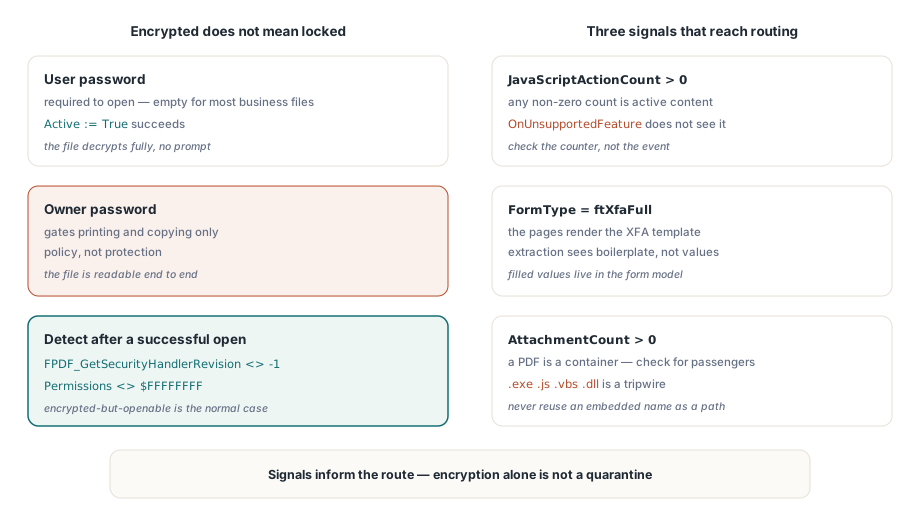
Ett krypterat dokument misslyckas inte nödvändigtvis med att öppnas. Standardsäkerhetshanteraren (ISO 32000-1 klausul 7.6.3) skiljer på ett användarlösenord, som krävs för att öppna dokumentet, från ett ägarlösenord som bara spärrar behörigheter som utskrift och kopiering. En stor andel "skyddade" affärsdokument är krypterade med ett ägarlösenord och ett tomt användarlösenord. De öppnas utan att fråga, dekrypterar fullständigt, och förlitar sig på att visare frivilligt respekterar behörighetsflaggorna. Det är policy, inte skydd, och dina intagstillstånd bör återspegla skillnaden
Att upptäcka kryptering efter en lyckad öppning tar ett motoranrop plus en reservlösning. FPDF_GetSecurityHandlerRevision(Pdf.Document) returnerar -1 för oskyddade filer och hanterarrevisionen annars, och att Pdf.Permissions returnerar något annat än masken $FFFFFFFF med alla bitar satta är den bekräftande signalen. För genuint användarlösenordslåsta filer, tilldela Password före du sätter Active := True; om öppningen fortfarande misslyckas, dirigera filen till ett blockerat tillstånd som begär autentiseringsuppgifter från avsändaren via en säker kanal snarare än att försöka igen blint. Och stå emot frestelsen att behandla "krypterad" som automatisk karantän. I de flesta dokumenttunga branscher är krypterade-men-öppningsbara filer normalfallet, inte det misstänkta
Aktivt innehåll: JavaScript, XFA och inbäddade filer
Tre fynd bör alltid nå dirigeringsbeslutet. Först, JavaScript: händelsen OnUnsupportedFeature rapporterar strukturella funktioner som XFA eller 3D-innehåll när motorn stöter på dem, men den upptäcker inte JavaScript. Kontrollera JavaScriptActionCount i stället och behandla ett resultat skilt från noll som aktivt innehåll. För det andra, XFA: när FormType returnerar ftXfaFull är de synliga sidorna ofta inte mycket mer än en rendering av XFA-mallen, och konventionell textextraktion kommer att se schablontext snarare än de ifyllda värdena. För det tredje, bilagor: en PDF är ett containerformat, och AttachmentCount talar om för dig om den här bär passagerare
procedure CollectRiskSignals(Pdf: TPdf; var Rec: TIntakeRecord);
var
  i, PageNo: Integer;
  Ext: string;
begin
  Rec.IsEncrypted := Assigned(FPDF_GetSecurityHandlerRevision) and
    (FPDF_GetSecurityHandlerRevision(Pdf.Document) <> -1);
  Rec.HasForms := Pdf.FormType <> ftNone;
  Rec.IsXfa := Pdf.FormType = ftXfaFull;
  Rec.HasJavaScript := Pdf.JavaScriptActionCount > 0;

  // AnnotationCount är en per-sida-egenskap; gå igenom sidorna för att
  // summera det. Att ladda ett sidobjekt renderar ingenting, så det förblir billigt
  Rec.Annotations := 0;
  for PageNo := 1 to Pdf.PageCount do
  begin
    Pdf.PageNumber := PageNo;
    Inc(Rec.Annotations, Pdf.AnnotationCount);
  end;

  Rec.Attachments := Pdf.AttachmentCount;

  for i := 0 to Rec.Attachments - 1 do
  begin
    Ext := LowerCase(ExtractFileExt(string(Pdf.AttachmentName[i])));
    if (Ext = '.exe') or (Ext = '.js') or (Ext = '.vbs') or (Ext = '.dll') then
      Include(Rec.Flags, ifDangerousAttachment);
  end;
end;
Två detaljer i den loopen förtjänar uppmärksamhet. Bilagsnamnet kommer inifrån dokumentet, så återanvänd det aldrig som en utdatasökväg utan att sanera det först; ett inbäddat namn som ..\..\start.exe är en sökvägstraversering som väntar på ett oaktsamt sparningsanrop. Och en blocklista över filändelser är en snubbeltråd, inte en garanti. Dess jobb är att tvinga fram ett mänskligt beslut, inte att intyga att filen är ren
Att omvandla signaler till dirigeringstillstånd
En användbar tillståndsmodell behöver färre tillstånd än de flesta team förväntar sig: ready (inga hinder, text närvarande), review (öppning lyckades men något behöver ögon, som ett XFA-formulär, JavaScript, ett tomt textlager, eller en titel bara i XMP), blocked (användarlösenord krävs), och damaged (öppning misslyckades). Registrera beviset tillsammans med tillståndet. Filhashen, sidantalet, de exakta flaggorna, och motorns felmeddelande för skadade filer spelar alla roll, eftersom personen som ifrågasätter ett dirigeringsbeslut kommer att göra det veckor senare, mot en fil som sedan dess kan ha ersatts eller ändrats
När en operatör faktiskt behöver titta på en karantänsatt fil, ge den inte till standardskalvisaren. Rendera den inuti en härdad panel med skriptning och länkhantering inaktiverad, tillvägagångssättet beskrivet i att bygga en säker PDF-förhandsgranskningsyta i Delphi. Och om ditt intag matar ett arkiv med efterlevnadskrav, är triage-passeringen den naturliga platsen att schemalägga en djupare kontroll; batchpreflight-validering mot PDF/A- och PDF/UA-profiler tar vid precis där den här inspektionen slutar
Komponentens produktsida täcker licensiering, det fullständiga inspektions-API:et, och de medföljande demonstrationerna, inklusive en dokumentinspektör i intagsstil: PDFium Component