Att förhandsgranska en icke betrodd PDF inuti din egen applikation är ett exekveringsbeslut, och den del som spelar roll är inte visarens fasad utan vad panelen vägrar göra på egen hand. Skriv inte filen till disk. Låt inte dess länkar starta ett skal. Ge inte dess bilagor en sökväg. Det mesta av skadan från ett fientligt dokument kommer inte från en motorexploatering utan från en visare som gör fullkomligt vanliga saker med angriparförsedd indata: öppna en file://-länk till en UNC-delning som läcker NTLM-autentiseringsuppgifter, lämna kvar en mellanlagrad kopia i temp-katalogen, kopiera inbäddade nyttolaster till vart en filnamnssträng än säger åt den. PDFium Component är en källkods-PDF-visare för Delphi, C++Builder och Lazarus, och den placerar de relevanta reglagen där du kan nå dem: en laddningstidsflagga som dödar skriptning, länkklickhändelser du kan lägga in veto mot, bilagsåtkomst som körs genom din egen kod, och behörighetsbitar du kan läsa. Ordningen nedan följer ett dokument från ögonblicket det landar till ögonblicket en användare klickar på något i det
Hotmodellen för en förhandsgranskningspanel
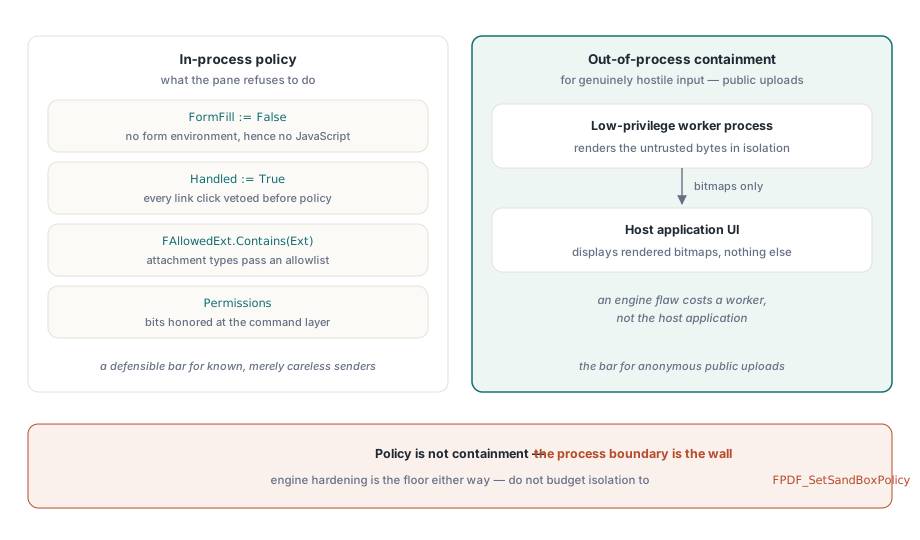
Var ärlig om vad "säker förhandsgranskning" faktiskt köper dig. Renderaren parsar icke betrodda byte oavsett vad du gör, och motorns egen härdning är golvet du står på. Allt ovanför det golvet är applikationspolicy: om skript initieras, vad ett länkklick gör, om inbäddade filer kan nå disk, om urklipp och skrivare är dörrar eller väggar. En sak att skriva av tidigt är motorns FPDF_SetSandBoxPolicy-reglage. De flesta motorbegränsningar är inkompilerade, reglaget ändrar litet i praktiken, och att budgetera någon del av din isoleringsberättelse på det producerar bara en falsk känsla av att ha gjort något. När indatan är genuint fientlig, säg en offentlig uppladdningsportal, är den enda verkliga isoleringen att rendera i en separat lågprivilegierad process och skicka bitmappar till gränssnittet. In-process-flaggor är policy. De är inte inneslutning
Två ytor är lätta att glömma just för att inget klick någonsin rör dem. Den första är temporära filer. Om din pipeline mellanlagrar inkommande dokument till disk före förhandsgranskning, överlever de mellanlagrade kopiorna sessionen om inte något verifierbart raderar dem, och en fil som är "återställbar från temp-katalogen" har tyst besegrat varje kontroll panelen själv upprätthåller. Ladda från minnet via TPdfStreamAdapter i stället, så att de fientliga byten aldrig får en egen sökväg. Den andra är urklipp. En förhandsgranskning som tillåter markera-och-kopiera har redan exporterat dokumentet, en skärmfull i taget, och ingen länkavlyssning fångar det
Döda JavaScript vid laddningstillfället, inte i gränssnittet
Dokumentets JavaScript i PDFium Component initieras bara tillsammans med formulärifyllningsmiljön. Att ladda med FormFill := False inaktiverar därför skriptning vid roten i stället för att undertrycka dess symptom:
procedure TPreviewPane.LoadUntrusted(const FilePath: string);
begin
  Pdf.FileName := FilePath;
  Pdf.FormFill := False;     // ingen formulärmiljö, alltså ingen JavaScript-motor
  Pdf.Active := True;

  FPermissions := Pdf.Permissions;   // rått flaggord; alla bitar satta = obegränsad
end;
Avvägningen är verklig och hör hemma i din spec. Med formulärifyllning inaktiverad är legitim AcroForm-interaktion och valideringsskript också borta; fält återges med sitt senast sparade utseende men kan inte redigeras. För en förhandsgranskningspanel är det vanligtvis rätt beslut, eftersom förhandsgranskning betyder titta, inte fylla i. Men om samma fönster dubblar som en formulärifyllningsyta för betrodda interna dokument, är svaret två laddningsvägar med ett explicit förtroendebeslut mellan dem, inte en väg med en kompromissinställning som är för lös för det fientliga fallet och för stram för det betrodda. Formulärifyllningssidan av den uppdelningen har egna fällor, täckta i fältnavigering och regenerering av utseenden
Länkar: standardhanteraren startar ett skal
Lämnade orörda går länkklick rakt till operativsystemet. Visarens standard-LinkOptions inkluderar loAutoOpenURI, vilket är file://-till-UNC-delning-läckan som väntar på att hända. Två händelser bildar flaskhalsen: OnWebLinkClick för URL:er upptäckta i sidtext, och OnAnnotationLinkClick för länkannoteringar som bär URI- eller startåtgärder. Sätt Handled := True i båda, ovillkorligt, innan du beslutar något, och tillåt sedan bara på nytt vad policyn tillåter. Som ett andra lager, ta bort loAutoOpenURI från LinkOptions för fientlig indata och se till att loAutoLaunch, av som standard, aldrig smyger sig tillbaka genom en kopierad konfiguration:

procedure TPreviewPane.PdfViewWebLinkClick(Sender: TObject;
  const Url: WString; var Handled: Boolean);
begin
  Handled := True;   // falla aldrig igenom till standardskalbeteendet

  if (AnsiStartsText('https://', Url) or AnsiStartsText('http://', Url))
    and HostIsAllowed(Url) then
    OpenInBrowser(Url)
  else
    FAudit.LogBlockedLink(FDocumentId, Url);
end;
Två detaljer avgör om det här faktiskt håller. För det första måste schemakontrollen vara en prefixkontroll på den råa strängen före all parsning, eftersom file://, UNC-sökvägar och exotiska scheman är precis de värden som kraschar en naiv URL-parser eller smiter förbi en som normaliserar för ivrigt. För det andra, logga varje blockering med dokumentidentiteten bifogad. En handfull blockerade file://-länkar är bakgrundsbrus; en explosion av dem över många inkommande dokument på en kort tidsperiod är en incident ditt säkerhetsteam hellre hör om från dig än från någon annanstans
Bilagor: filändelsepolicy och filnamnet du inte valde
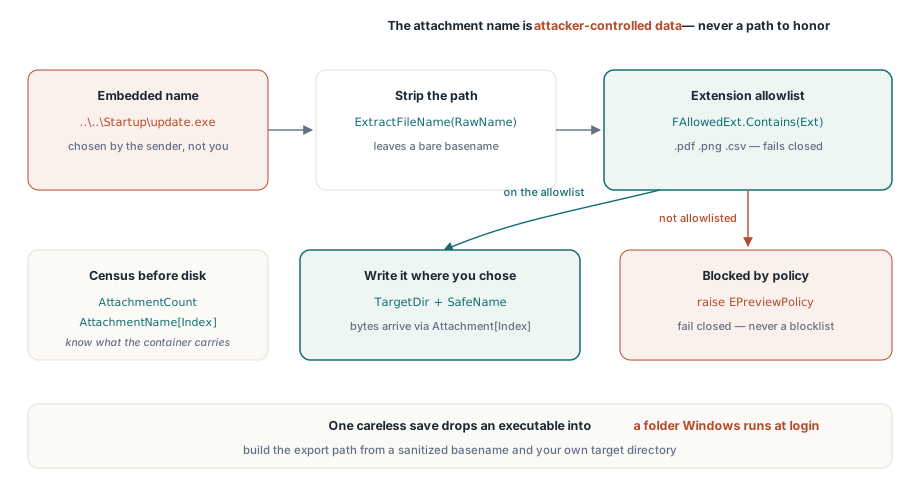
En PDF är en container, och AttachmentCount med egenskapen AttachmentName[] talar om för dig vad den bär innan något rör disken. Två separata kontroller spelar roll här, och bara en av dem är uppenbar. Den uppenbara är typpolicy: en tillåtelselista över filändelser som någonsin får exporteras. Den subtila är att bilagans namn är angriparkontrollerad data, punkt slut. Ett inbäddat namn som ..\..\Startup\update.exe förvandlar en oaktsam sparning till en sökvägstraversering som släpper en körbar fil i en mapp Windows kör vid inloggning. Komponenten ger dig nyttolasten som byte via Attachment[] och låter din kod välja sökvägen, så bygg den sökvägen från ett saniterat basnamn och aldrig från den råa inbäddade strängen:
procedure TPreviewPane.ExportAttachment(Index: Integer; const TargetDir: string);
var
  RawName, SafeName, Ext: string;
  Data: TBytes;
begin
  RawName := string(Pdf.AttachmentName[Index]);
  SafeName := ExtractFileName(RawName);    // tar bort alla sökvägskomponenter
  Ext := LowerCase(ExtractFileExt(SafeName));

  if not FAllowedExt.Contains(Ext) then    // tillåtelselista, inte blocklista
    raise EPreviewPolicy.CreateFmt('Attachment type %s blocked by policy', [Ext]);

  Data := Pdf.Attachment[Index];           // inbäddad nyttolast som råa byte
  TFile.WriteAllBytes(
    IncludeTrailingPathDelimiter(TargetDir) + SafeName, Data);
end;
Föredra tillåtelselisteriktningen. En blocklista över "farliga" filändelser är en kapplöpning du förlorar den dag någon vapeniserar en filändelse du aldrig hört talas om; en tillåtelselista över .pdf, .png och .csv fallerar stängt
Vad krypteringsbehörigheter faktiskt lovar
Standardsäkerhetshanteraren i ISO 32000-1 kodar behörighetsflaggor för utskrift, innehållskopiering och modifiering, och egenskaperna Permissions och UserPermissions exponerar dem som råa bitmasker när dokumentet öppnas. ISO 32000-1 Tabell 22 definierar bitarna, och en okrypterad fil rapporterar varje bit satt. Läs dem och respektera dem i ditt kommandolager, men var tydlig med vad de är. För ett dokument krypterat med ett ägarlösenord och ett tomt användarlösenord dekrypteras innehållet fullständigt vid öppning, och flaggorna är en begäran till visare som följer standarden, inte en verkställighetsmekanism. Det har två konsekvenser, och de drar åt motsatta håll. Presentera aldrig behörighetsflaggor för användare som en säkerhetsegenskap hos dokumenten de tar emot, eftersom de inte är det. Samtidigt, respektera hjälpmedelsextraktionsbiten (bit 10) även där allmän kopiering (bit 5) nekas; skärmläsaråtkomst är avsiktligt särskild i behörighetsmodellen, och att strippa den för att "kopiering är av" bryter hjälpmedelsteknik utan någon säkerhetsvinst
Verkställ nekade åtgärder på kommandonivå, inte genom att gömma verktygsradsknappar. Ctrl+C, snabbmenyer och dra-markera kringgår alla en verktygsrad; en enda behörighetskontroll inuti kopieringskommandot kringgår ingenting
För dokument som verkligen kräver ett användarlösenord, tilldela Password före Active := True och behandla värdet som den hemlighet det är: hämta det från ditt autentiseringsuppgiftsförråd per session, håll det borta från loggar och kraschrapporter, och spara det aldrig bredvid dokumentet. En förhandsgranskningspanel som cachar lösenord "för bekvämlighets skull" har tyst blivit en lösenordsdatabas utan någon av dess skydd
Utskrift förtjänar sitt eget beslut snarare än att ärva vad kopieringsregeln landade på. En fysisk utskrift är per definition ogranskad, men att blockera utskrift rakt av tenderar att driva användare mot skärmdumpar, vilket är sämre på varje axel. En vanlig medelväg är att tillåta utskrift men stämpla varje sida med användarens identitet och en tidsstämpel, verkställt inuti utskriftskommandot. Håll bara rätt förväntning för det: en vattenstämpel är avskräckning och attribution. Den är inte förebyggande
Vad intag redan borde ha talat om för dig
En förhandsgranskningspanel fattar bättre beslut när filen dyker upp med en dossier redan bifogad: krypterad eller inte, JavaScript närvarande eller frånvarande, en bilagsräkning, formulärtypen. Den inspektionsomgången hör hemma uppströms om visaren, och mönstret i att bygga en granskningsarbetsbänk för PDF-intag producerar exakt de flaggor en förhandsgranskningspolicy vill konsumera. Filer som intaget markerade som riskabla öppnas genom den härdade vägen automatiskt; rutinmässiga dokument behåller sina bekvämligheter. Bind de två stegen till ett delat policyobjekt i stället för två konfigurationsskärmar, som kommer att glida isär till den andra releasen oavsett hur noggrant du skriver dem första gången
Var gränsen faller mellan in-process och out-of-process beror på vem som skickar dig filer. För vanligt affärsintag är personerna som skickar dokument kända och bara oaktsamma, och in-process-förhandsgranskning med skriptning av och länkar avlyssnade är en försvarbar ribba. För anonyma offentliga uppladdningar är den inte det, och ingen mängd in-process-flaggsättning gör den till en; rendera de dokumenten i en separat lågprivilegierad arbetare och skicka bitmappar till gränssnittet, så att en motorbrist kostar dig en arbetare snarare än värdapplikationen. Bestäm den uppdelningen avsiktligt och skriv ner vilken hink varje intagsväg faller in i, eftersom kostnaden för att gissa fel är asymmetrisk
Licensiering, den säkerhetsrelaterade API-ytan och en demo av den härdade visaren finns på produktsidan: PDFium Component