Att räkna sidorna i ett 1,4 GB skannat arkiv borde vara billigt. Anropa LoadFromFile på den filen och det slutar vara billigt: HotPDF parsar korsreferensdatan och bygger ett minnesobjekt för vart och ett av dokumentets flera hundra tusen indirekta objekt, och en 32-bitars arbetare slår i taket på 2 GB adressutrymme någonstans mitt i den parsningen. Operationen du ville ha, sidantalet, behövde aldrig något av de objekten. Den behövde sidträdet och inget annat. Den klyftan, mellan vad ett jobb begär och vad en full laddning levererar, är hela skälet till att Direct File API finns
Direct File API ger Delphi och C++Builder filnivåsåtkomst till en PDF: sidantal, kopior, dekryptering, inkrementella tillägg, allt läsande från disk det de faktiskt behöver i stället för att rekonstruera hela dokumentmodellen i RAM. Konsten är att matcha varje jobb mot den lättaste nivå som kan besvara det. Får du den matchningen rätt håller en tjänst platt minne över vilken indatastorlek som helst. Får du den fel tar den första överdimensionerade filen ner arbetaren
Vad en full laddning kostar dig
LoadFromFile är inte fienden. Den förtjänar sitt minne: när trädet väl är i RAM har du slumpmässig åtkomst till varje sida och varje objekt, vilket är precis vad InsertPagesFromDocument, MovePage och omserialisering via SaveLoadedDocument kräver. Det finns ingen genväg för genuin omstrukturering; du måste hålla dokumentet för att kunna ordna om det
Problemen börjar när indatastorlekar inte är dina att styra över. Kunduppladdningar, skannerutdata och arkiv från ett decennium sedan struntar i vad ditt testkorpus antog. Ladda varje indata ovillkorligt och ditt minnestak sätts av den enskilt största filen någon någonsin kommer att skicka in. Parsningstid följer objektantal, och resident minne slår sig ner på flera gånger filstorleken när objektstrukturer och avkodade strömmar räknas in, så en gigabyte på disk kan betyda flera gigabyte resident
Att kompilera om för 64-bitar lyfter adressutrymmestaket men lämnar räkningen intakt. Arbetaren bränner fortfarande sekunder av CPU och en multipel av filen i RAM för att besvara en fråga filens egen struktur kunde ha besvarat på millisekunder. Under samtidighet blir matematiken fientlig: fyra stora laddningar som körs samtidigt delar en minnesbudget, och genomströmningen kraschar precis när kön är som djupast och du minst har råd med det
Att läsa en fil via ett handtag
Den skrivskyddade nivån öppnar en fil som ett handtag, besvarar strukturella frågor om den, och stänger den. Inget objektträd, ingen sidrendering, inget minne som växer med indatan
var
  Pdf: THotPDF;
  Handle, PageCount: Integer;
begin
  Pdf := THotPDF.Create(nil);
  try
    Handle := Pdf.DAOpenFileReadOnly('archive-2026-06.pdf', '');
    if Handle > 0 then
    try
      PageCount := Pdf.DAGetPageCount(Handle);
      RouteByPageCount('archive-2026-06.pdf', PageCount);
    finally
      Pdf.DACloseFile(Handle);
    end;
  finally
    Pdf.Free;
  end;
end;
Tre vanor håller den här nivån ärlig. Först, kontrollera returvärdet. Ett icke-positivt handtag betyder att öppningen misslyckades, och att avfyra DAGetPageCount mot ett dött handtag är den sortens bugg som förblir dold till den dag en kund skickar en felformad fil. För det andra, para ihop varje lyckad öppning med DACloseFile inuti ett finally-block; en tjänst som läcker handtag kraschar inte, den bara ruttnar, vilket är värre. För det tredje, respektera vad lösenordsparametern faktiskt gör. DAOpenFileReadOnly accepterar en, men för krypterade indata faller den tyst tillbaka till en full parsning för att läsa sidantalet, så det platta minnesgarantiet avdunstar. Dirigera skyddade filer via DecryptFile först och resten av pipelinen förblir billig
Samma sond dubblar som en triagegrind. Filer dyker upp felmärkta, halvuppladdade, eller omdöpta från ett helt annat format, och en DAOpenFileReadOnly-kontroll avvisar alla dessa vid ytterdörren på millisekunder, med felet fastnålat vid den skyldiga filen. Alternativet är att låta en skräpfil rida djupt in i en köarbetare och explodera där, där det kan kosta en eftermiddag att reda ut vilken indata som orsakade det
Kopiera, dekryptera och kryptera hela filer
Den andra nivån flyttar och omvandlar kompletta filer utan att någonsin exponera deras insidor. Det här är anropen intagspipelines lutar sig mest mot
// Strukturell kopia: validera-och-flytta utan att parsa objektträdet
Status := Pdf.DACopyFile('incoming\statement.pdf', 'verified\statement.pdf');
LogDirectFileStatus('copy', Status);

// Dekryptera under kopiering: Direct File-vägen in i skyddad indata
Status := Pdf.DecryptFile('incoming\protected.pdf',
  'verified\plain.pdf', 'batch-password');
LogDirectFileStatus('decrypt-copy', Status);

// Kryptera under kopiering: skydda en utdata utan en full laddning
Status := Pdf.EncryptFile('verified\statement.pdf',
  'outbound\statement.pdf', 'owner-secret', '', aes256, [prPrint]);
LogDirectFileStatus('encrypt-copy', Status);
Varje anrop förtjänar sin plats. DACopyFile är den validerade kopian från en karantänkatalog in i hanterad lagring: den öppnar och indexerar PDF-strukturen allteftersom, så en trunkerad eller icke-PDF-indata misslyckas precis här snarare än tre steg nedströms. DecryptFile skriver en dekrypterad kopia längs en direkt AES-256-omskrivningsväg som hoppar över objektträdet närhelst indatan tillåter det, storfilsmotsvarigheten till ladda-och-spara-om-dekrypteringsflödet som täcks i artikeln om AES-256-kryptering. EncryptFile kör samma rörelse baklänges, och applicerar lösenordsskydd under en kopiering på filnivå med samma nyckeltyp- och behörighetsparametrar som minnesvägen redan använder
Att lägga till ändringar i stället för att skriva om
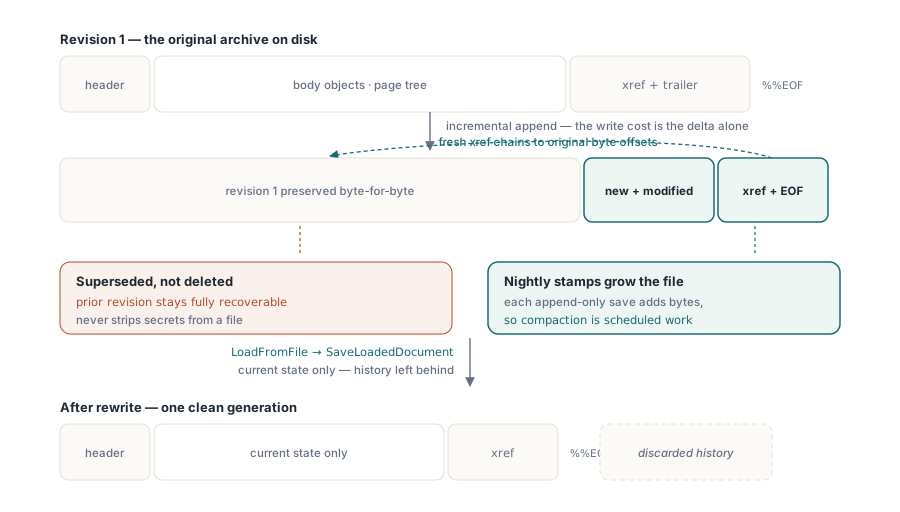
Inkrementell uppdatering, definierad i ISO 32000-1 §7.5.6, är den tredje nivån. De ursprungliga byten stannar där de är på disk, och alla nya eller ändrade objekt läggs till efter dem, följt av ett färskt korsreferensavsnitt som kedjar tillbaka till originalet. För ett 900 MB-arkiv som behöver en enda sida tillagd är skrivkostnaden deltat, inte hela filen
// Lägg till en granskningssida i ett stort arkiv utan att skriva om det
Pdf.BeginIncrementalUpdate('archive-2026-06.pdf');
Pdf.AddPage;
Pdf.CurrentPage.SetFont('Arial', [], 10);
Pdf.CurrentPage.TextOut(50, 760, 0, 'Processed by intake service 2026-06-11');
Pdf.SaveIncrementalUpdate('archive-2026-06-stamped.pdf');  // ursprungliga byte + delta
Två disciplinpunkter spelar roll här. BeginIncrementalUpdate måste peka på originalfilen, eftersom den tillagda korsreferensdatan kedjar tillbaka till byteförskjutningar inuti den. Och modellen är append-only av design: varje inkrementell sparning växer filen, krymper den aldrig. Ett dokument stämplat varje natt sväller obegränsat tills en periodisk omserialisering, att ladda det och skriva tillbaka det via SaveLoadedDocument, komprimerar det. Samma append-only-natur är det som gör inkrementell uppdatering till det enda säkra sättet att röra ett digitalt signerat dokument, en begränsning som undersöks i artikeln om digitala signaturer och PAdES. Det underliggande korsreferensmaskineriet får sin egen behandling i artikeln om objektströmmar och inkrementella uppdateringar
Det finns en fälla i append-only-sparningar som slinker förbi de flesta granskningar. De ursprungliga byten stannar kvar i filen, läsbara för vem som helst villig att titta. En inkrementell uppdatering som "ersätter" en sida raderar inte den gamla; den ersätter den i den aktuella revisionen medan den föregående revisionen ligger kvar, fullt återställningsbar. Så inkrementella uppdateringar är fel verktyg för att strippa känsligt innehåll. För att genuint släppa historik en mottagare aldrig ska se, behöver du en full omserialisering: LoadFromFile följt av SaveLoadedDocument, som bara skriver ut det aktuella tillståndet och lämnar de begravda revisionerna bakom sig
Att matcha nivån mot operationen
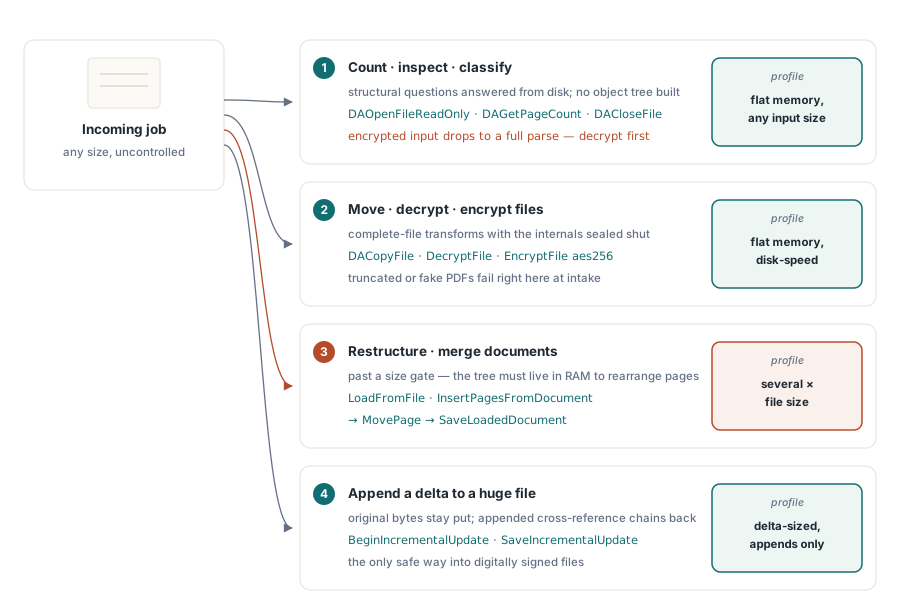
Urvalslogiken är kort nog att hålla i huvudet, och det lönar sig att koda den som ett explicit dirigeringsbeslut högst upp i en pipeline i stället för att låta varje jobb improvisera sin egen väg. Operationen du behöver avgör nivån:
- Räkna, inspektera eller klassificera öppnar ett handtag:
DAOpenFileReadOnly,DAGetPageCount,DACloseFile - Att flytta, dekryptera eller kryptera en hel fil stannar på filnivå med
DACopyFile,DecryptFileellerEncryptFile - Att omstrukturera sidor eller slå ihop dokument behöver den fulla laddningen:
LoadFromFile, sedanInsertPagesFromDocumentellerMovePage, sedanSaveLoadedDocument - Att lägga till ett litet delta i en enorm eller signerad fil anropar
BeginIncrementalUpdateoch sparar
Blandade pipelines gör klokt i att sätta en storlekströskel framför den fulla laddningsvägen. Skicka allt förbi några hundra megabyte genom Direct File-nivåerna, och reservera den fulla laddningen för genuin omstrukturering på en 64-bitars arbetare med en verklig minnesbudget. Tröskeln omvandlar en minnesslutkrasch till ett dirigeringsbeslut du kan se och justera
Oavsett vilken nivå som hanterar ett jobb, skriv dess utdata till ett temporärt namn och byt namn på plats bara när resultatet validerats. En halvskriven fil som ligger under det slutgiltiga namnet ser precis ut som en bra en för pipelinens nästa steg, och Direct File-anropen gör kontrollen billig: att bekräfta en utdata är en enrads handtagssond
Direct File API levereras som en del av HotPDF Delphi Component för Delphi och C++Builder. Produktsidan länkar den fullständiga funktionsreferensen, inklusive de inkrementella uppdateringsanropen som visas här