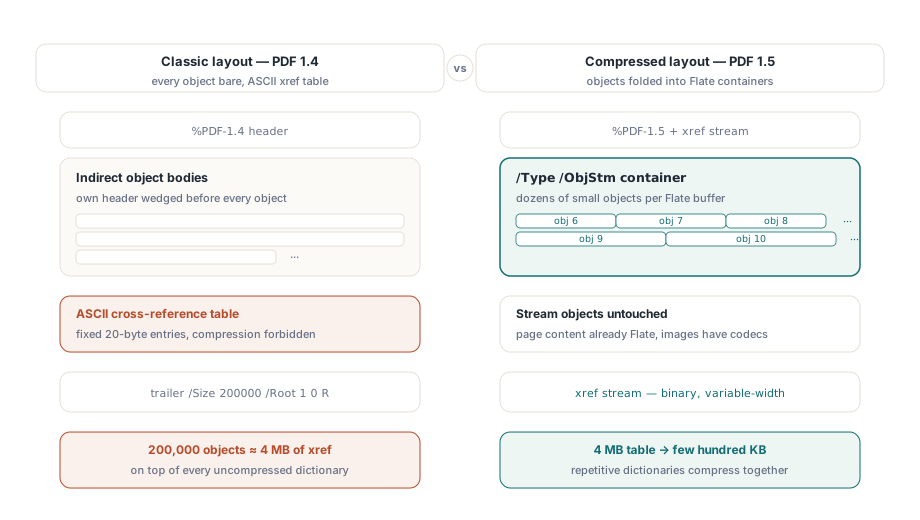
PDF 1.5 införde två lagringsstrukturer som det tidigare filformatet inte hade något sätt att uttrycka: objektströmmen och korsreferensströmmen. En objektström är en enda Flate-komprimerad behållare, märkt /Type /ObjStm, som håller många små indirekta objekt packade kant i kant istället för att sprida ut dem genom filkroppen. En korsreferensström är filens uppslagstabell omskriven som komprimerad binärdata med fält av variabel bredd, i stället för den ASCII-tabell med fast bredd som avslutade varje PDF till och med version 1.4. De färdas tillsammans. När objekt väl vikts in i en ström kan den gamla texttabellen inte längre adressera dem, så den binära xref-tabellen måste följa med
Ställ det mot den klassiska layouten så är kostnaden den tar bort lätt att se. I en PDF 1.4-fil sitter varje indirekt objekt okomprimerat bakom sin egen obj-rubrik, och tabellen i svansen lägger exakt 20 byte ASCII per post, komprimering förbjuden. Ett dokument med 200 000 objekt bär runt ungefär 4 MB korsreferensdata innan en enda glyf ritats, med alla de okomprimerade ordbokskropparna staplade ovanpå. PDF 1.5 angriper båda siffrorna på en gång: ordböckerna viks in i Flate-behållare, och 4 MB-tabellen krymper till några hundra kilobyte binärdata. ISO 32000-1 definierar de två strukturerna i §7.5.7 och §7.5.8
Var besparingen faktiskt landar
Objektströmmar rör bara objekt som inte är strömmar, så de komprimerar struktur, inte bildpunkter. Sidinnehåll var redan Flate-komprimerat före 1.5, och bilddata bär sina egna kodekar, vilket är varför en bildtung broschyr knappt rör sig. Filerna som kollapsar är de strukturtunga: AcroForm med tusentals fältordböcker, djupa dispositionsträd, strukturelement i taggad PDF. De objekten är små, talrika och nästan identiska med varandra, och just den upprepningen är vad Flate utnyttjar när de väl sitter i en enda buffert snarare än utspridda i kroppen med rubriker inkilade emellan
Det är lätt att underskatta hur mycket av en gammal fil som är överbyggnad. Ett formulärarkiv som absorberat år av redigeringar kan lägga långt över hälften av sina byte på ordboksrubriker, xref-utfyllnad och revisioner som ingen läsare någonsin kommer att titta på. De två funktionerna här återvinner de två första av dessa. Den tredje, ackumulerade revisioner, ger bara vika för kompaktering, när filen inte längre behöver minnas sin egen historia
I HotPDF slår du på båda genom ett par egenskaper, och hur de beror på varandra spelar större roll än i vilken ordning du skriver dem:
var
  Pdf: THotPDF;
begin
  Pdf := THotPDF.Create(nil);
  try
    Pdf.FileName := 'catalog-2026.pdf';
    Pdf.UseXRefStream := True;      // binär xref, förutsättning för ObjStm
    Pdf.UseObjectStreams := True;   // packa objekt i /Type /ObjStm
    Pdf.BeginDoc;
    Pdf.CurrentPage.SetFont('Arial', [], 11);
    Pdf.CurrentPage.TextOut(50, 760, 0, 'Compressed structure demo');
    Pdf.EndDoc;                     // avger XRefStm- + ObjStm-behållare
  finally
    Pdf.Free;
  end;
end;
UseObjectStreams kräver att UseXRefStream är satt till True. Ett komprimerat objekt nås genom en xref-post av typ 2, som registrerar ett objektströmsnummer plus ett index, och en klassisk 20-bytes textrad har ingen plats att lagra det paret. Så UseObjectStreams på egen hand gör ingenting synligt; båda flaggorna, satta före BeginDoc, är den konfiguration som fungerar. Sätt dem efter BeginDoc och HotPDF har redan bundit sig vid den äldre layouten
Varför båda är avstängda som standard
HotPDF lämnar båda egenskaperna False från början, och skälet dyker upp i integrationer med gammal nedströmskod. En läsare som bara förstår PDF 1.4 tillkännager inte att den inte klarar komprimerade objekt. Den möter en xref-ström, hittar inget av de trailer-nyckelord den väntar sig, och rapporterar en skadad korsreferenstabell eller vägrar helt enkelt öppna filen. Om din utdata flödar in i en åldrande faxgateway, en hårdvaruskrivare som kör en inbäddad tolk, eller en tolk som någon skrev mot 1.4-specifikationen för ett decennium sedan, håll båda flaggorna avstängda för den kanalen och lev med den större filen. För arkivlagring och webbleverans, där varje etablerad visare läst PDF 1.5 i tjugo år, är det komprimering du får nästan gratis genom att slå på dem
Det finns en andrahandseffekt värd att berätta för ditt supportteam om. När ordböcker väl är packade i objektströmmar slutar en jämförelse av två genererade filer byte för byte att betyda något, eftersom en ändring i ett enda fält kan Flate-koda om en hel behållare och blanda om allt efter den. Jämför sådana filer på objektinnehåll, inte med en binär jämförelse
Inkrementella uppdateringar och byteoffseten de skyddar
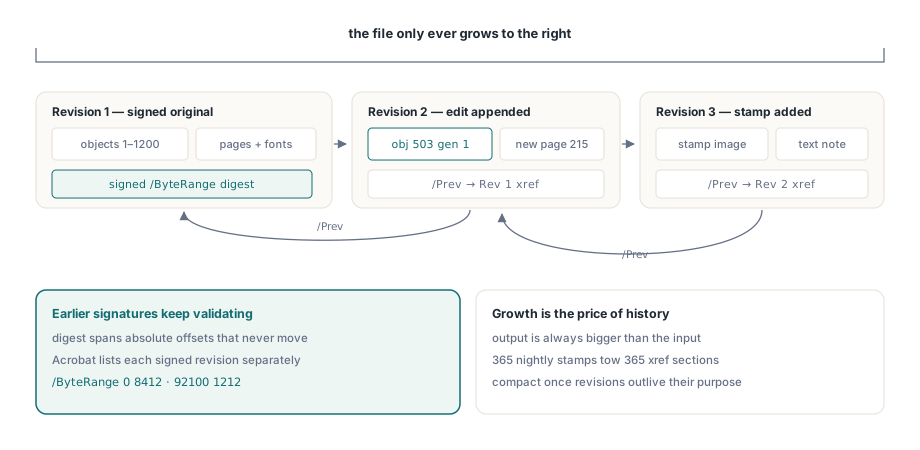
En digital signatur täcker ett uttryckligt /ByteRange: två spann av den fysiska filen, angivna som absoluta byteoffset, som CMS-sammandraget togs över. Skriv om filen, även till något som ser identiskt ut på skärmen, och alla de offseten flyttar sig. Sammandraget slutar stämma och signaturen läses som trasig. Det är precis det problem ISO 32000-1 §7.5.6 löser med inkrementella uppdateringar. Nya och ändrade objekt läggs till efter det befintliga %%EOF, sedan skrivs en färsk korsreferenssektion vars /Prev-post pekar tillbaka på den föregående. Originalbyten störs aldrig, så en signerad revision förblir verifierbar och Acrobat kan visa varje signerad revision för sig i signaturpanelen
HotPDF exponerar det här genom sin egen ingångspunkt:
Pdf.BeginIncrementalUpdate('contract-signed.pdf');
Pdf.AddPage;
Pdf.CurrentPage.SetFont('Arial', [], 10);
Pdf.CurrentPage.TextOut(50, 760, 0, 'Addendum recorded 2026-06-11');
Pdf.SaveIncrementalUpdate('contract-updated.pdf');  // lägger bara till deltat
Två saker snubblar folk på. BeginIncrementalUpdate måste få originalets filnamn, eftersom den tillagda xref-sektionen registrerar offset som bara är meningsfulla mot exakt de ursprungliga byten; peka den mot en omdöpt eller omsparad kopia så beskriver offseten en fil som inte längre finns. Och sparandet lägger till enligt sin konstruktion, så utdatan är alltid större än indatan. Den tillväxten är inget slöseri att trimma bort. Det är samma egenskap som lämnar tidigare signerade revisioner intakta
Att ändra en inläst fil går via LoadFromFile
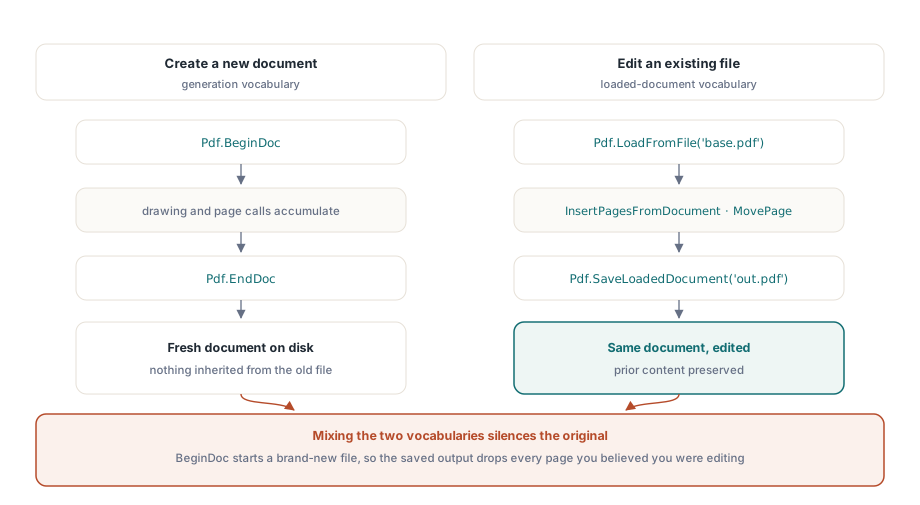
Utvecklare som först mötte HotPDF genom dess genererings-API brukar gå in i en särskild vägg. BeginDoc öppnar ett splitternytt dokument, vilket är fel verktyg när du menar att ändra ett som redan finns. Redigering av en befintlig fil går genom anropen för inlästa dokument istället:
PageCount := Pdf.LoadFromFile('base.pdf');
Pdf.InsertPagesFromDocument(OtherDoc, '1-3', 5);  // sidorna 1-3 efter sida 5
Pdf.MovePage(2, 5);
Pdf.SaveLoadedDocument('modified.pdf');
Blanda de två så är symtomet en utdatafil som håller ditt nya innehåll och inget av originalet, eftersom BeginDoc glatt byggde ett färskt dokument bredvid det du trodde att du redigerade. Läs LoadFromFile med SaveLoadedDocument som ett ordförråd och BeginDoc med EndDoc som ett annat. En rutin som tar till båda mot samma fil är nästan alltid fel
När en tillagd fil bör kompakteras
Att bara spara genom att lägga till bär en långsam kostnad. Ett nattligt jobb som stämplar en statusrad på samma PDF ger 365 revisioner under ett år, och varje revision drar en ny xref-sektion efter sig. När den historiken överlevt sin nytta, och ingen signatur i filen behöver överleva, kan du platta ut alltihop genom att serialisera om den via vägen för inlästa dokument:
Pdf.LoadFromFile('stamped.pdf');
Pdf.SaveLoadedDocument('compacted.pdf');
Den omsparningen är en fullständig omskrivning. Den kastar bort de tidigare revisionerna med flit och bryter varje signatur som ännu finns i filen, så lägg den bakom samma policygrind som du tillämpar på varje annat destruktivt steg. En produktionsregel som håller: kompaktera när antalet revisioner passerar ett tröskelvärde, eller när den tillagda överbyggnaden växer förbi någon andel av basfilen, och kompaktera aldrig ett dokument vars signaturpanel har något i sig
Att kontrollera utdatan innan den levereras
Att verifiera det här paret av funktioner är uppfriskande konkret. Öppna resultatet i Adobe Acrobat och bekräfta tre punkter: dokumentegenskaperna rapporterar PDF 1.5 eller senare när objektströmmar är på; signaturpanelen validerar fortfarande varje tidigare signerad revision efter en inkrementell uppdatering; och sidantal och bokmärken tog sig oskadda genom en cykel av inläsning, ändring och sparande. För arkivutdata, kör också filen genom veraPDF, eftersom en komprimerad xref är precis den sorts struktur som en strikt validerare granskar noggrannare än en förlåtande visare någonsin gör. Om ditt arbete också omfattar mycket stora indata passar inspektionsmetoderna i vår genomgång av Direct File API för arbetsflöden med stora PDF-filer naturligt ihop med inkrementellt sparande, och signaturmekaniken bakom byteintervallen ovan behandlas på djupet i artikeln om digitala signaturer och PAdES i HotPDF
Båda funktionerna levereras som en del av HotPDF Delphi Component för Delphi och C++Builder, bredvid API:erna för generering, formulär, kryptering och signering som täcks på annan plats i den här bloggen. Produktsidan länkar den fullständiga API-referensen om du vill ställa anropen ovan mot din egen dokumentpipeline