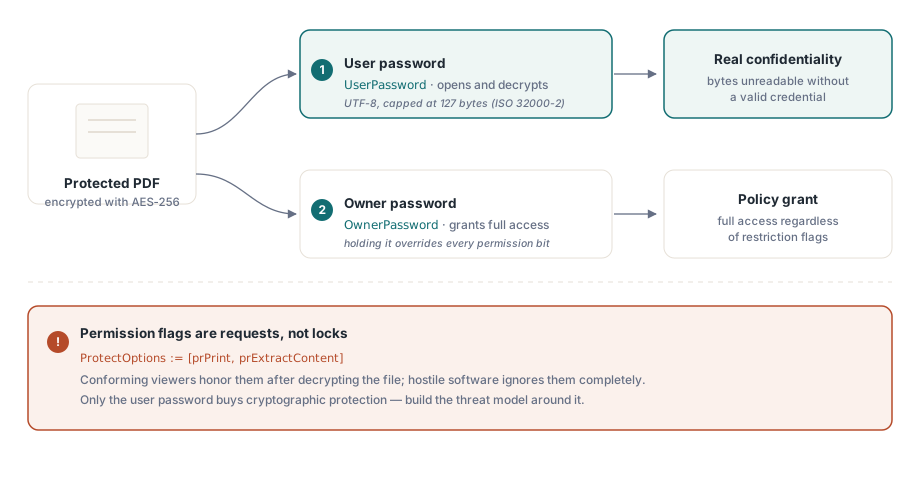
En PDF-behörighetsflagga är inte ett lås. Den är en begäran som filen riktar till det som öppnar den, och en visare är fri att ignorera den. Just det faktumet avgör hur du bör resonera kring alla andra val på den här sidan. Verklig konfidentialitet kommer bara från ett håll: AES-256-kryptering låst med ett lösenord som läsaren inte har. Allt annat, kryssrutorna "ingen utskrift" och "ingen kopiering", är policy som programvara som följer standarden går med på att respektera och som fientlig programvara inte gör. Blanda ihop de två lagren och du levererar något som känns säkert i en demo och läcker ute i verkligheten
HotPDF är en inbyggd VCL PDF-komponent för Delphi och C++Builder, och den exponerar ISO 32000:s skyddsmodell genom en liten uppsättning egenskaper. Egenskaperna är lätta att sätta. Den svåra delen är att veta vilken som köper kryptografiskt skydd och vilken som köper ett artigt förslag, och att få tilldelningsordningen rätt så att krypteringen du bad om faktiskt är den kryptering du får
Vad de två lösenorden faktiskt lovar
PDF-kryptering definierar två autentiseringsuppgifter med olika uppgifter, och att blanda ihop dem är det vanligaste designfelet i kod som producerar skyddad utdata. Användarlösenordet spärrar dekryptering. Utan det, eller ägarlösenordet, kan en läsare som följer standarden inte återskapa filnyckeln, och innehållet förblir kryptografiskt oläsligt. Ägarlösenordet spärrar i stället behörighetsinställningarna: en läsare som får ägarlösenordet beviljas full åtkomst oavsett vad begränsningsflaggorna säger
Behörighetsbitarna vilar på svagare grund. Utskrift, innehållsextraktion, formulärifyllning: var och en är en flagga som en visare läser och väljer att respektera (ISO 32000-2 §7.6.4). Krypteringen skyddar byten. Behörighetsflaggorna instruerar bara programvara som följer standarden, och de gör det i efterhand. Den som öppnar dokumentet med användarlösenordet har redan det dekrypterade innehållet i minnet, så "ingen kopiering" och "ingen utskrift" betyder något för en välartad visare och ingenting för en beslutsam sådan. Bygg hotmodellen kring den gränsen. Konfidentialitet bor i användarlösenordet. Behörigheter formar vad mainstream-visare erbjuder, och det är hela deras funktion
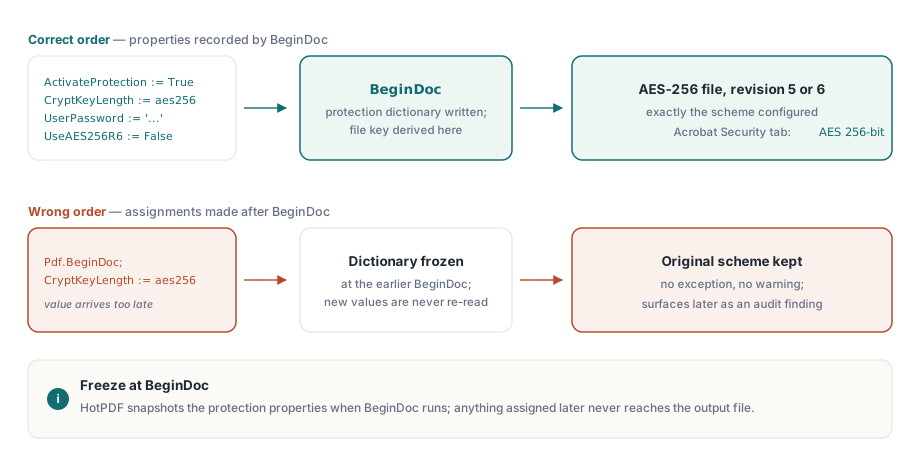
Konfigurationsordning: allt innan BeginDoc
HotPDF bygger krypteringsordboken och härleder filnyckeln i det ögonblick BeginDoc körs. Vad skyddsegenskaperna än innehåller i just det ögonblicket är vad dokumentet får, och att ändra dem efteråt ändrar ingenting. Egenskapen som betyder mest här är CryptKeyLength, som väljer schemat bland THPDFKeyType-värdena k40, k128, aes128 och aes256. Tilldela den efter BeginDoc och du får inget undantag, ingen varning, bara en fil som tyst behöll det den startade med. Den typen av tyst avvikelse är den värsta sorten: den klarar alla lokala tester och dyker upp månader senare som ett efterlevnadsfynd på en kunds skrivbord
var
  Pdf: THotPDF;
begin
  Pdf := THotPDF.Create(nil);
  try
    Pdf.FileName := 'statement.pdf';
    Pdf.ActivateProtection := True;
    Pdf.CryptKeyLength := aes256;        // måste sättas före BeginDoc
    Pdf.UserPassword := 'open-secret';
    Pdf.OwnerPassword := 'admin-secret';
    Pdf.UseAES256R6 := False;            // R=5: bredast visarstöd
    Pdf.BeginDoc;
    Pdf.CurrentPage.SetFont('Arial', [], 11);
    Pdf.CurrentPage.TextOut(50, 720, 0, 'Account statement, June 2026');
    Pdf.EndDoc;
  finally
    Pdf.Free;
  end;
end;
Lösenord är UTF-8 och begränsade till 127 byte, vilket är ISO 32000-2:s gräns för AES-256-scheman. Om din lösenordspolicy ger dig längre hemligheter, gör avkapningen själv, på din sida, där du kontrollerar exakt var snittet hamnar. Lämna det åt slumpen och biblioteket och någon framtida visare kan komma att vara oense om var gränsen går, vilket ger en fil som öppnas hos dig och avvisar samma lösenord någon annanstans
Revision 5 eller revision 6: en boolean, två ekosystem
UseAES256R6 väljer mellan de två AES-256-handskakningarna, och valet väger tyngre än dess boolean-typ antyder. Lämna den False och HotPDF skriver revision 5, AES-256-schemat som kom som en utökning till PDF 1.7 och som ungefär femton års visare kan öppna. Sätt den True och du får revision 6, den hårdare nyckelhärledningen som standardiserades i ISO 32000-2 för PDF 2.0, vilken stänger en känd svaghet i hur revision 5 verifierar lösenordet
Revision 6 är alltså kryptografiskt den bättre historien. Den är också den som får saker att sluta fungera. En revision 6-fil kräver en visare byggd för PDF 1.7 Extension Level 3 eller PDF 2.0, och gott om driftsatt programvara är varken eller: arkiv för dokumenthantering, inbäddade renderare i andra produkter, verksamhetsverktyg som ingen har rört på flera år. De kommer att vägra filen rakt av, och de gör det på kundens maskin, aldrig på din. Standardvalet i praktiken är därför revision 5. Ta fram revision 6 bara när en säkerhetspolicy namnger ISO 32000-2 efter revision, och när du faktiskt har bekräftat att varje mottagare kan läsa den. Hur som helst, skriv ner vilken du valde och varför, för nästa person som rör den här koden kommer att undra
De äldre nyckeltyperna förtjänar en mening så att du vet att hoppa över dem. THPDFKeyType listar fortfarande k40, k128 och aes128, men de finns för att återskapa historiska arkiv, inte för att skydda nya. 40-bitars RC4 faller för vanlig hårdvara, och de 128-bitars scheman föregår de AES-256-revisioner som varje aktuell säkerhetsgranskning kommer att förvänta sig. För ett dokument du skapar 2026 är den enda verkliga frågan revision 5 mot revision 6; om du finner dig själv sträcka dig efter de äldre typerna i en ny design har något gått fel längre upp
Behörighetsflaggor utan ett öppningslösenord
Ofta är kravet motsatsen till hemlighållande. Vem som helst ska kunna läsa dokumentet, men utskrift eller extraktion är tänkt att begränsas. Du uttrycker det med ett tomt användarlösenord och ett icke-tomt ägarlösenord, vilket PDF kallar öppet lösenordsläge, och du listar de operationer du vill tillåta i ProtectOptions
Pdf.ActivateProtection := True;
Pdf.CryptKeyLength := aes256;
Pdf.UserPassword := '';                      // vem som helst kan öppna filen
Pdf.OwnerPassword := 'rotate-me-quarterly';  // skyddar behörighetsuppsättningen
Pdf.ProtectOptions := [prPrint, prPrint12bit, prExtractContent];
Pdf.BeginDoc;
// ... sidinnehåll ...
Pdf.EndDoc;
Mängden THPDFProtectOptions mappar mot ISO:s behörighetsbitar: prPrint och prPrint12bit för högupplöst utskrift, prInformationCopy för allmän kopiering och extraktion, prExtractContent för extraktion via hjälpmedelsteknik, plus prModifyStructure, prEditAnnotations, prFillAnnotations och prAssemble. Två av dem förtjänar en varning. Lämna prExtractContent på i nästan varje profil du bygger. Det är biten en skärmläsare behöver för att nå texten, och att rensa den förvandlar i tysthet ett rättighetsbeslut till en tillgänglighetsbrist som någon med funktionsnedsättning drabbas av och du aldrig ser. Den andra fällan är prPrint ensamt, utan prPrint12bit: flera visare svarar genom att försämra utskriftskvaliteten, och dina användare kommer att rapportera det som en renderingsbugg snarare än den behörighetsinställning det faktiskt är
Verifiering tar fem minuter och hör hemma i din release-checklista. Öppna ett exemplar av varje profil i Acrobat, öppna Dokumentegenskaper och läs säkerhetsfliken, som anger algoritmen ("AES 256-bit") och listar de tillåtna operationerna en i taget. Öppna sedan samma fil i den äldsta visaren dina kunder faktiskt kör, inte den nyaste på din egen maskin. Den andra öppningen är den billiga försäkringen mot att en revision 6-fil seglar genom utvecklingen och dör hos en kund som aldrig uppgraderat
Ta bort skydd från befintliga filer
Dekryptering kör samma egenskapsmodell baklänges. Ladda dokumentet med en giltig autentiseringsuppgift, stäng av skyddet och spara resultatet utan det
var
  Pdf: THotPDF;
  PageCount: Integer;
begin
  Pdf := THotPDF.Create(nil);
  try
    PageCount := Pdf.LoadFromFile('encrypted.pdf', 'open-secret');
    if PageCount > 0 then
    begin
      Pdf.ActivateProtection := False;   // släpp krypteringen vid sparning
      Pdf.SaveLoadedDocument('plain.pdf');
    end;
  finally
    Pdf.Free;
  end;
end;
Den vägen parsar hela dokumentet till minnet, vilket fungerar bra för vanliga filer och är slösaktigt för enorma sådana. När indatan uppgår till hundratals megabyte är DecryptFile det billigare alternativet: den dekrypterar under en kopiering på filnivå och tar en direkt AES-256-omskrivningsväg som hoppar över att bygga hela objektträdet närhelst indatan tillåter det. Det är en del av Direct File API som täcks i följdartikeln om att bearbeta stora PDF-filer från Delphi
Begränsningar som samspelar med kryptering
Två begränsningar är värda att känna till innan du designar kring kryptering snarare än efteråt. Den första är arkivefterlevnad. ISO 19005 förbjuder kryptering i PDF/A, så alla arbetsflöden som krypterar ett dokument och samtidigt hävdar PDF/A-efterlevnad är motsägelsefulla till sin konstruktion; HotPDF låter dig inte ha båda i en och samma fil. När du verkligen behöver båda är svaret två artefakter: en krypterad kopia för distribution och en separat okrypterad kopia för arkivet
Den andra begränsningen är hårdare. PDF-kryptering har varken deposition eller återställning. Förlorar du användarlösenordet på en R5- eller R6-fil är dina alternativ brute force eller att ge upp. Behandla därför ägar- och användarhemligheter på samma sätt som du behandlar vilken produktionsautentiseringsuppgift som helst. Generera dem, lagra dem i ett valv, rotera dem enligt ett schema. Det enda du aldrig ska göra är att hårdkoda dem som konstanter i en enhet, där de rider rakt in i versionshanteringen och ligger kvar i varje utvecklares arbetskopia för evigt
En sista reflex värd att bygga upp. Att ändra skyddet på en fil du inte skapade är samma mekanik som dekryptering, inte en separat funktion: ladda den med dess lösenord via LoadFromFile, redigera ProtectOptions eller lösenorden på plats, och skriv tillbaka den med SaveLoadedDocument. Kan du dekryptera en fil kan du också ge den nya behörigheter, och koden ser nästan identisk ut med exemplet ovan
Skyddsegenskaperna som visas här är en del av standardversionen av HotPDF Delphi Component för Delphi och C++Builder; produktsidan innehåller den fullständiga krypteringsreferensen, inklusive den kompletta behörighetsuppräkningen