Функция чтения вслух имеет одну видимую задачу помимо голоса: по мере произнесения каждого слова оно должно подсвечиваться на странице и оставаться в поле зрения. Для этого нужен ограничивающий прямоугольник каждого слова, индексированный к тому же потоку символов, который читает речевой движок. Получите прямоугольники, но упустите индексацию - и подсветка отстанет от аудио на слово-два; получите индексацию, но неправильно обработайте состояние страницы - и подсветка окажется на совершенно другой странице. Речевая часть этого - сам синтезатор - редко ломается. SAPI сообщает границы слов с точностью до символа. Ломается тонкий уровень отображения между смещением символа в речевом буфере и прямоугольником на отрендеренной странице
PDFium Component поставляет это отображение для Delphi, C++Builder и Lazarus, причём word-боксы доступны с v1.53, а курсор отслеживания - с v1.56. Поверхность намеренно узкая: вызов, возвращающий word-боксы для страницы, трекер, превращающий смещение символа в закрашенную подсветку, и пара свойств для цвета и автопрокрутки. Узкая, как она есть, но порядок вызовов определяет, работает ли функция, и большинство описанных ниже сбоев возникают из-за вызова правильных функций в неправильной последовательности
Символы - не слова, а TTS-движки говорят символами
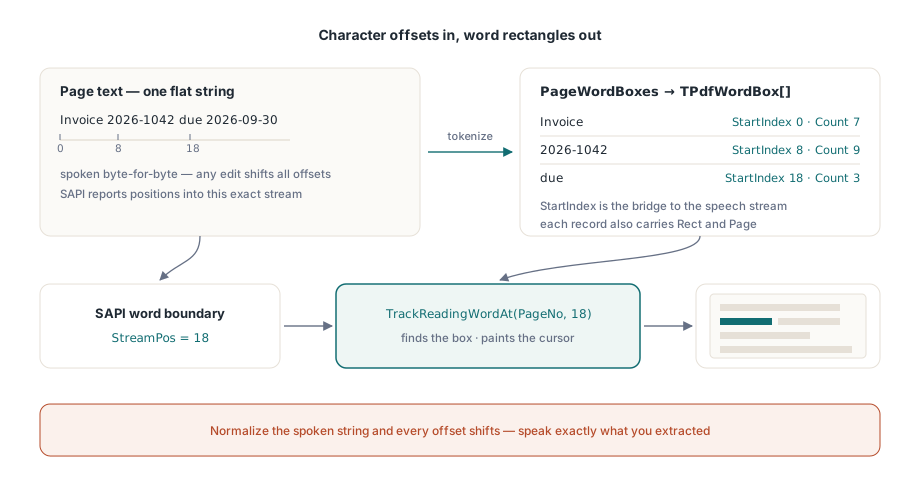
Речевой движок потребляет плоскую строку и сообщает о прогрессе как о позициях символов внутри этой строки. Страница PDF имеет глифы, расположенные в пространстве страницы, где «слово» - это эвристический кластер серий глифов. Две системы координат не имеют ничего общего, если только текст, который вы передаёте синтезатору, не является байт-за-байтом тем текстом, из которого были вычислены word-боксы. Это правило первое, и оно беспощадно. Нормализуйте пробелы, удалите мягкие переносы или иным образом «очистите» извлечённый текст перед произнесением - и каждое последующее смещение будет тихо неверным. Произносите именно то, что вы извлекли, или ведите явную таблицу переотображения смещений. Третьего варианта, способного пережить реальные документы, нет
Таблица переотображения - не гипотетический крайний случай. Как только ваш UI вставляет устное объявление страницы («страница пять») или разворачивает аббревиатуру для синтезатора, произносимая строка расходится с извлечённой. Записывайте позицию и длину каждой вставки, затем вычитайте накопленную поправку перед каждым вызовом отслеживания. Это примерно двадцать строк учёта, и это разница между подсветкой, которая переживает следующий запрос функции, и той, которая ломается при первой просьбе кого-либо произносить заголовки
Что даёт word-бокс
Каждая запись TPdfWordBox содержит текст слова, его StartIndex и количество символов Count внутри текста страницы, прямоугольник Rect в пространстве страницы и 1-индексированный номер Page. Поле StartIndex является мостом между двумя системами координат: это то же смещение, которое SAPI будет возвращать при чтении. PageWordBoxes возвращает полный массив для активной страницы:
procedure TReaderForm.PreparePage(PageNo: Integer);
begin
  PdfView.PageNumber := PageNo;   // word-боксы представления следят за его отображаемой страницей

  FWords := PdfView.PageWordBoxes;
  FPageText := BuildSpeechText(FWords);   // конкатенация Word.Text по порядку

  if Length(FWords) = 0 then
    HandleImageOnlyPage(PageNo);          // скан без текстового слоя
end;
Комментарий о порядке принципиален. PageWordBoxes просмотрщика токенизирует текстовый слой страницы, отображаемой в данный момент, поэтому сначала навигируйте к странице, затем извлекайте; рендеринг не требуется, только открытый документ. (Компонент документа, TPdf, предоставляет свои собственные PageWordBoxes, привязанные к Pdf.PageNumber, для использования без отображения. Два номера страниц независимы, что само по себе является ловушкой.) Пустой результат на странице, которая видимо содержит контент, означает скан без текстового слоя. Направьте его в OCR или хотя бы объявите об этом («страница 4 не содержит читаемого текста»), вместо того чтобы давать голосу умолкнуть без объяснений
Подключение границ слов SAPI к трекеру
TrackReadingWordAt на просмотрщике является осью всей функции. Передайте ему номер страницы и индекс символа; он найдёт word-бокс, содержащий этот символ, нарисует на нём курсор чтения и вернёт индекс слова или −1, если индекс попадает между словами. Уведомление о границе слова SAPI передаёт именно ту позицию символа, которую он ожидает:
procedure TReaderForm.OnSpeechWordBoundary(StreamPos: Integer);
var
  WordIdx: Integer;
begin
  // Сопоставляет смещение с word-боксом и перемещает подсветку одним вызовом
  WordIdx := PdfView.TrackReadingWordAt(FPageNo, StreamPos);
  if WordIdx < 0 then
    Exit;                     // граница не попала ни в одно слово: сохранить последнюю подсветку
end;
Две защитные детали здесь оправдывают себя. Во-первых, TrackReadingWordAt ведёт собственный кэш word-боксов для отслеживаемой страницы, автоматически перестраиваемый при смене страницы, поэтому стоимость на каждую границу остаётся постоянной независимо от скорости поступления границ. Во-вторых, он не проверяет границы щедро. Индекс на уровне или за пределами количества символов страницы возвращает −1, а не смещается к последнему слову. Трактуйте −1 как «сохранить предыдущую подсветку», никогда - как ошибку, потому что пунктуационные серии и межсловные пробелы законно производят границы, не принадлежащие ни одному слову. Логирование каждого −1 вас погребёт. Считайте их на страницу и внимательно смотрите на любую страницу, где соотношение резко возрастает, поскольку это обычно означает несоответствие нормализации текста на уровне первого правила
Сам курсор: цвет, следование и очистка
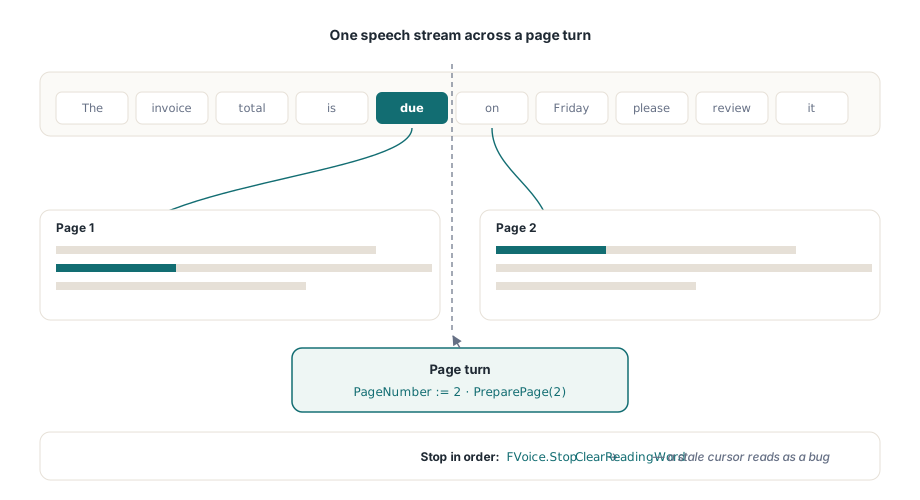
SetReadingWord рисует подсветку напрямую, когда вы держите word-бокс сами, ReadingWordColor стилизует его, а ReadingWordFollow := True прокручивает просмотр ровно настолько, чтобы произносимое слово оставалось видимым. Последнее свойство себя оправдывает. Самодельная прокрутка «центрировать текущее слово» заставляет страницу дёргаться при каждом переносе строки, и чувствительные к движению читатели отключат всю функцию в течение минуты. Подсветка рендерится только на странице, отображаемой в данный момент в активном TPdfView, поэтому при многостраничном чтении нужно продвигать PageNumber синхронно с речью, затем повторно выполнять шаг подготовки для новой страницы до прихода её первого события границы. Пропустите это - и первые несколько подсветок на каждой странице будут указывать на устаревшие координаты
procedure TReaderForm.StopReading;
begin
  FVoice.Stop;                // сначала остановить воспроизведение SAPI
  PdfView.ClearReadingWord;   // затем убрать подсветку; устаревший курсор читается как баг
end;
Симметрия при завершении работы - это то, что поддерживает честность подсветки. Каждый путь паузы, остановки и перелистывания должен завершаться вызовом ClearReadingWord. Пропустите это - и янтарный прямоугольник будет стоять на остановленной странице, выглядя в точности как дефект, что каждый тестировщик зафиксирует, хотя на самом деле ничего не сломано
Скорость речи нагружает этот конвейер сильнее, чем размер документа. При 300 словах в минуту события границ приходят каждые 200 мс, а при максимальных скоростях SAPI они приходят быстрее, чем глаз комфортно отслеживает. Правильная реакция - объединение, а не очередь. Если новая граница приходит, пока обновление подсветки ещё не завершено, отбросьте устаревшее и нарисуйте последнее. Курсор, посещающий каждое слово по порядку, но с отставанием в полсекунды, ощущается как сломанный; тот, что иногда пропускает слово, оставаясь синхронизированным с голосом, - нет
Крайние случаи, отделяющие демо от продукта
Некоторые категории документов обнажают швы. Комбинирующие символы наиболее тонки: последовательности Unicode, такие как базовая буква плюс комбинирующий диакритический знак, могут занимать больше индексов символов, чем предполагает визуальное слово, поэтому любая арифметика смещений, предполагающая один индекс на гляф, будет постепенно дрейфовать. Это самый весомый аргумент в пользу того, чтобы TrackReadingWordAt владел отображением, а не вычислял номера слов вручную. Перенос по слогам более банален, но более распространён: слово, разбитое переносом строки, становится двумя боксами, и если вы произносите его как единый токен, событие границы для его второй половины разрешается в первый бокс. Обычно это нормально, но это решение, поэтому принимайте его намеренно, а не обнаруживайте случайно. Теги изменяют сам порядок чтения. Когда документ несёт правильные структурные теги (территория ISO 14289, PDF/UA), последовательность слов следует логической структуре; без них она возвращается к эвристикам вёрстки, и двухколоночная страница без тегов может читаться прямо поперёк обеих колонок. Повёрнутые страницы - последний распространённый случай: Rect каждого слова по-прежнему правильно ограничивает его в пространстве страницы, но политика следования за видовым экраном, настроенная на горизонтальный поток, прокручивается рывками, когда текст идёт вертикально, поэтому держите хотя бы один повёрнутый документ в наборе для регрессий. Обработка порядка чтения, единицы уровня предложения через ReadingUnits и более широкий стек для людей с ограниченными возможностями рассмотрены в статье создание доступного PDF-ридера в Delphi
Одно ограничение платформы определяет развёртывание. SAPI является только Windows. API word-боксов и отслеживания байт-за-байтом идентичен под Lazarus и FPC, но сборки Linux и macOS нуждаются в другом синтезаторе, подключённом за теми же событиями границ; эта настройка рассмотрена в статье запуск просмотрщика под Lazarus и FPC. Стоимость подсветки также взаимодействует с вашим кэшем страниц при повышении скоростей речи, и арифметика бюджета из статьи кэширование рендеринга и производительность при масштабировании применима здесь без изменений
Когда пословная подсветка является неправильной гранулярностью
Пословное «каraoke» не всегда то, что нужно читателю. При высоких скоростях речи мерцание курсора слово за словом само по себе становится визуальным шумом, и некоторые слушатели комфортнее следят за предложением, чем за стробоскопом отдельных слов. Для этого случая компонент предоставляет более грубую единицу. ReadingUnits возвращает единицы уровня предложения и блока, каждая со своими прямоугольниками подсветки, и вы рисуете их с помощью SetReadingHighlight вместо SetReadingWord. Подключение имеет ту же форму: смещение границы по-прежнему определяет, какая единица подсвечивается, но подсвечиваемая единица охватывает предложение или строку, а не единственный токен. Более медленные читатели и высокоскоростное воспроизведение, как правило, предпочитают это, и ничто не мешает предложить оба режима за настройкой
Минимальные версии стоит зафиксировать до начала разработки: для word-боксов нужен PDFium Component v1.53 или более поздний, а для курсора отслеживания - v1.56. Полный API чтения, единицы уровня предложения и работающая демо-функция чтения вслух представлены на странице продукта для PDFium Component