Удерживайте нажатой кнопку масштабирования в обычном PDF-просмотрщике и посмотрите на график загрузки процессора. Одно нажатие кнопки масштабирования с автоповтором инициирует десятки изменений масштаба в секунду. Если каждый шаг запускает полный рендеринг видимой страницы в максимальном качестве, задачи рендеринга будут накапливаться быстрее, чем процессор успевает их выполнять. Страница сама по себе отрисовывается быстро — например, за 180 мс для скана формата A4. Но теперь вы выполняете десяток рендерингов по 180 мс для масштабов, которые пользователь уже проскочил. Окно зависает, ядро процессора загружается на 100%, а к моменту стабилизации интерфейс показывает масштаб, выбранный четыре шага назад. Решение кроется не в увеличении скорости растеризатора, а в кэше, мгновенно возвращающем готовые страницы, и в цикле рендеринга, способном отменять устаревшие задачи
Библиотека PDFium Component предоставляет все необходимые для этого инструменты. Вы получаете контроль над создаваемыми битмапами, прогрессивный рендеринг с поддержкой токенов отмены, автоматический расчет масштаба при изменении размеров окна и функции тайлового рендеринга для слишком больших страниц. Чего библиотека намеренно не содержит, так это готового механизма кэширования, поскольку правила очистки кэша зависят от области просмотра, доступного объема памяти и логики прокрутки в приложении. Эту логику вы должны реализовать самостоятельно, а ее отсутствие приведет к зависаниям и утечкам памяти
Расход миллисекунд и мегабайтов
Прежде чем проектировать архитектуру, оцените затраты ресурсов в цифрах. Страница формата A4 при разрешении 96 DPI составляет примерно 794 на 1123 пикселя — около 3.5 МБ в виде 32-битного битмапа. Увеличьте масштаб до 200%, и этот объем вырастет в четыре раза. При масштабе 400% на мониторе с высоким DPI один битмап страницы потребует от 50 до 60 МБ, а при непрерывной прокрутке программа просмотра держит в памяти несколько страниц одновременно. Сложность растеризации напрямую зависит от количества выводимых пикселей, поэтому каждое удвоение масштаба примерно в четыре раза увеличивает как время рендеринга, так и требования к памяти
Из этого следуют два важных правила. Во-первых, кэш, ключ которого не учитывает масштаб, бесполезен, так как именно операция масштабирования каждый раз создает новый битмап. Во-вторых, кэш без ограничений по объему исчерпает адресное пространство 32-битного процесса именно на тех документах, где пользователи масштабируют данные сильнее всего (чертежи, карты, плотные сканы документов). Кэш должен иметь правильную структуру ключей и строго контролируемый размер
Что должен содержать ключ кэша
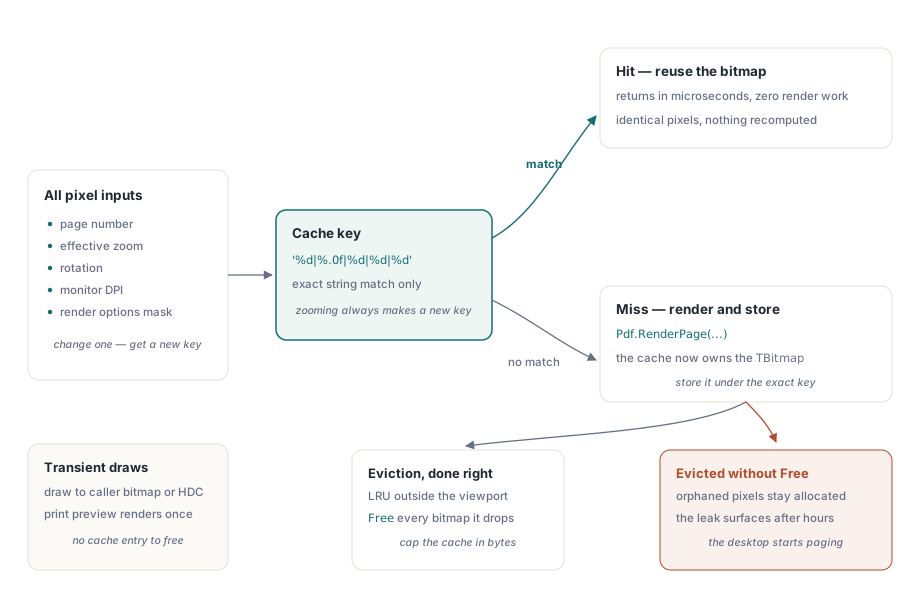
Кэшированный битмап можно использовать повторно только в том случае, если совпадают все параметры, определявшие его создание. Это означает номер страницы, эффективный масштаб (или физические размеры в пикселях), угол поворота, DPI монитора и активные опции рендеринга. Страница, отрисованная с флагом reAnnotations, отличается от изображения без аннотаций, а монохромный проход с reGrayscale дает совсем другой результат. Исключите любой из этих параметров из ключа, и баги гарантированы: например, слой аннотаций останется на экране после удаления комментария рецензентом, либо страница станет размытой, как только пользователь перетащит окно с экрана ноутбука на внешний 4K-монитор и DPI изменится под кэшированным битмапом
function TPageCache.Acquire(Pdf: TPdf; PageNo: Integer; ZoomPct: Single;
  Rotation: TRotation; Opts: TRenderOptions): TBitmap;
var
  Key: string;
begin
  Key := Format('%d|%.0f|%d|%d|%d',
    [PageNo, ZoomPct, Ord(Rotation), Screen.PixelsPerInch, OptionsMask(Opts)]);
  if FBitmaps.TryGetValue(Key, Result) then
    Exit;

  Pdf.PageNumber := PageNo;
  Result := Pdf.RenderPage(0, 0, OutputWidth(PageNo, ZoomPct),
    OutputHeight(PageNo, ZoomPct), Rotation, Opts);
  FBitmaps.Add(Key, Result);   // теперь этим bitmap владеет cache
end;
При попадании в кэш метод возвращает результат за микросекунды. Более сложный вопрос — что происходит с битмапами, которые удаляются из кэша. И это вопрос о том, кто владеет этими объектами
Кто освобождает битмап
Функция RenderPage возвращает объект TBitmap, владельцем которого становится вызывающий код. При разовом экспорте это владение очевидно и легко контролируется. Но внутри кэша это становится основной причиной утечек памяти в Delphi-программах: словарь словарей хранит единственную ссылку на каждый битмап, а стандартный класс TDictionary автоматически освобождает ключи и значения только для управляемых типов. Класс TBitmap к ним не относится. Удаление записи из словаря без вызова Free оставляет пиксели выделенными в памяти, к которой больше нет доступа
Эту проблему сложно заметить сразу. Короткий тест не требует масштабирования множества разных страниц; утечка проявляется только после того, как пользователь поработает со сложным документом пару часов. К этому моменту процесс будет удерживать сотни потерянных битмапов страниц, и система начнет сбрасывать данные в файл подкачки. Поэтому очистка памяти должна быть заложена в первой же версии кэша. Ограничьте размер кэша расчетным объемом памяти (ширина * высота * 4), удаляйте из него наименее используемые страницы (LRU-алгоритм), находящиеся за пределами области просмотра, и вызывайте метод Free для каждого удаляемого битмапа. Для временных отрисовок используйте перегрузки методов, выполняющие рендеринг в переданный вами TBitmap или прямо на контекст устройства HDC, что позволяет избежать сложностей с управлением временем жизни объектов. Предварительный просмотр печати — типичный пример, так как каждый лист отрисовывается один раз и кэшировать его нет смысла
Прогрессивный рендеринг и отмена задач
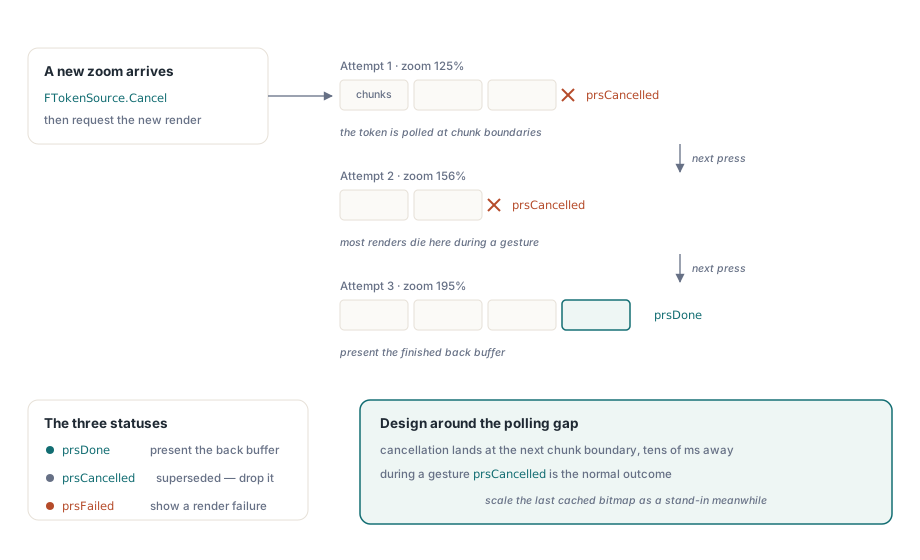
Стандартные перегрузки RenderPage блокируют выполнение до завершения рендеринга страницы, что неприемлемо во время изменения масштаба пользователем. В таких случаях следует использовать метод RenderPageProgressive. Он принимает интерфейс IPdfCancellationToken и возвращает один из статусов: prsDone, prsCancelled или prsFailed. Особенность этого подхода в том, что отмена происходит не мгновенно. Токен опрашивается на границах блоков отрисовки внутри процесса, поэтому сигнал отмены, отправленный в процессе обработки блока, сработает только по его завершении. На сложных страницах задержка отмены может достигать десятков миллисекунд. Учитывайте эту задержку в архитектуре: отменяйте предыдущий токен сразу при изменении масштаба, но не предполагайте, что старый рендеринг остановится сиюминутно
procedure TViewerForm.RequestRender(TargetZoom: Single);
var
  Status: TPdfProgressiveStatus;
begin
  if FTokenSource <> nil then
    FTokenSource.Cancel;           // отменить предыдущий рендеринг в процессе
  FTokenSource := TPdfCancellationTokenSource.New;  // FPdfAsync unit

  Status := Pdf.RenderPageProgressive(FBackBuffer, 0, 0,
    FBackBuffer.Width, FBackBuffer.Height, FTokenSource.Token,
    ro0, [reAnnotations]);

  case Status of
    prsDone:      PresentBackBuffer;
    prsCancelled: ;                // superseded by a newer request: drop silently
    prsFailed:    ShowRenderFailure;
  end;
end;
При интерактивном масштабировании статус prsCancelled является стандартным исходом, а не ошибкой. Большинство задач рендеринга, запущенных при быстром изменении масштаба, будут отменены до их завершения, поэтому обрабатывайте отмену штатно и не выводите предупреждений. Очередь рендеринга, записывающая каждую отмену как предупреждение в лог, быстро заполнит его тысячами строк шума. Чтобы экран не выглядел застывшим во время выполнения реального рендеринга, используйте простую хитрость: быстро масштабируйте предыдущий кэшированный битмап до нового размера и сразу выводите его на экран. Изображение будет выглядеть слегка размытым пару сотен миллисекунд, но интерфейс покажется отзывчивым, а фоновый рендеринг получит время на завершение или отмену новым действием пользователя
Автоматический масштаб, отключаемый вручную
Свойство FitMode (принимающее значения pfmFitPage или pfmFitWidth) автоматически пересчитывает масштаб при изменении размеров окна, обеспечивая укладку страницы. Особенность в том, что ручное изменение свойства Zoom сбрасывает FitMode в значение pfmNone. Это логично: пользователь, явно установивший масштаб 150%, не хочет, чтобы при изменении размеров окна это значение сбросилось. Но это неочевидно для разработчика, который вешает на кнопку масштабирования код Zoom := Zoom * 1.25 и не понимает, почему автоподбор ширины перестает работать после первого клика. Если интерфейс предлагает как автоподбор масштаба, так и ручной ввод, вам нужно сохранять выбор пользователя и восстанавливать режим автоподбора при повторном нажатии соответствующей кнопки. Компонент не станет восстанавливать режим, сброшенный явным изменением масштаба
Контролируемая квота памяти
Квота использования ресурсов должна быть четко определена в коде. Оцените стандартный сценарий: при непрерывной прокрутке в памяти удерживаются видимая страница, одна страница выше и одна ниже (для предпросмотра при прокрутке), а также лента миниатюр страниц. При разрешении 96 DPI эти три полноразмерных битмапа требуют около 3.5 МБ каждый, что незначительно. Но при масштабе 300% на 4K-мониторе те же три битмапа займут уже по 30 МБ каждый, и это до сохранения истории страниц в кэше. Рост объема памяти диктуется действиями пользователя, а не объемом файла
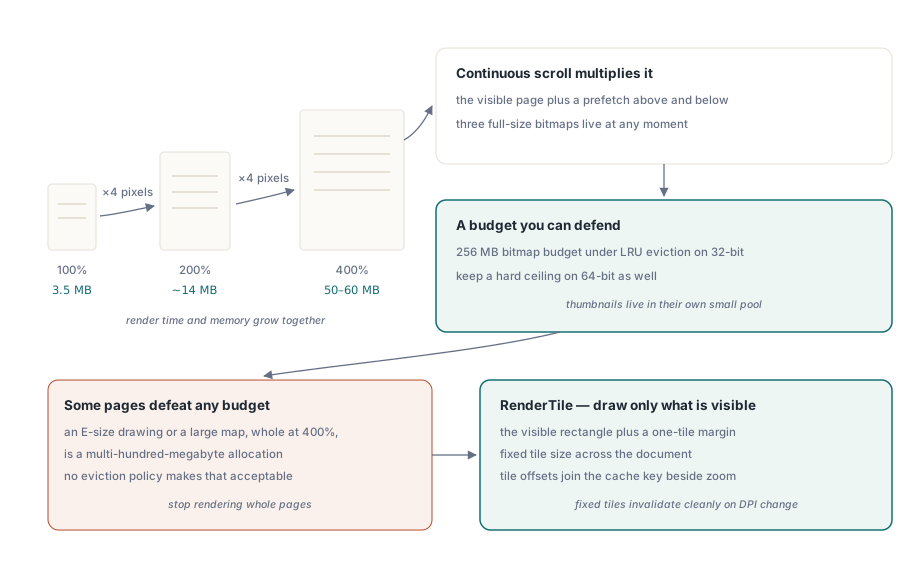
Для 32-битного процесса Delphi разумным ограничением кэша является квота в 256 МБ под управлением алгоритма LRU. В 64-битных приложениях этот лимит можно увеличить, но жесткое ограничение все равно необходимо. Цель ограничения — не просто предотвратить падение вашего процесса, а не допустить ситуации, когда операционная система начнет активно сбрасывать память в файл подкачки, замедляя работу всего компьютера. Кэш с жестким лимитом ведет себя предсказуемо, в отличие от безлимитного кэша, способного замедлить работу всей ОС. Для миниатюр страниц используйте отдельный пул памяти, который не затрагивает логика LRU-очистки основных страниц: перерисовка миниатюры размером 120 пикселей путем масштабирования 60-мегабайтного битмапа страницы — крайне неэффективный расход ресурсов
Некоторые страницы невозможно уместить в квоту целиком. Чертеж большого формата или детальная карта при масштабе 400% потребуют сотен мегабайт памяти. Для таких задач следует отказаться от рендеринга страницы целиком. Метод RenderTile выполняет рендеринг только выбранного прямоугольного фрагмента по смещению (Left, Top) на странице с виртуальными размерами PageWidth на PageHeight. Это позволяет отрисовывать только видимую область экрана плюс небольшой запас по краям для плавной прокрутки, а координаты фрагмента добавляются в ключ кэша наряду с масштабом. Сохраняйте размеры фрагментов (тайлов) фиксированными. Это позволит легко инвалидировать кэш при изменении DPI монитора, избегая видимых швов между фрагментами, отрисованными в слегка различающихся масштабах
Две смежные функции могут влиять на производительность. Фильтры цветокоррекции (например, монохромный режим или инверсия цвета) применяются после рендеринга и создают второй полноразмерный битмап, удваивая требования к памяти; этот вопрос описан в статье о фильтрах цветокоррекции для слабовидящих в Delphi. А подсветка слов при озвучивании текста инвалидирует изображение на каждом произнесенном слове, требуя оптимизации отрисовки, как описано в материале о подсветке слов при воспроизведении речи
Подробное описание методов рендеринга, прогрессивных статусов и самого компонента просмотра доступно на странице PDFium Component