Слабовидящий читатель не различает чёрный текст на белой странице при контрасте по умолчанию, поэтому он просит тёмную тему. Наивный ответ — инвертировать каждый пиксель отрисованной страницы. Это уходит в релиз за неделю и ломается на следующий день: отсканированные фотографии возвращаются похожими на негативы плёнки, жёлтые пометки маркером читателя превращаются в нечитаемое синее пятно, а кто-то спрашивает, почему распечатка вышла сплошь чёрной. Возможность действительно стоит того, чтобы её строить, и действительно легко сделать её наполовину верной, а разрыв между этими исходами укладывается в одну мысль: каждое решение о цвете принадлежит конкретной точке конвейера отрисовки, а инверсия — неверный инструмент, применённый не на той стадии. Код здесь использует PDFium Component — просмотрщик на базе PDFium для Delphi, C++Builder и Lazarus, чей API отрисовки открывает эти стадии по отдельности
Фильтры — состояние представления, а не документа
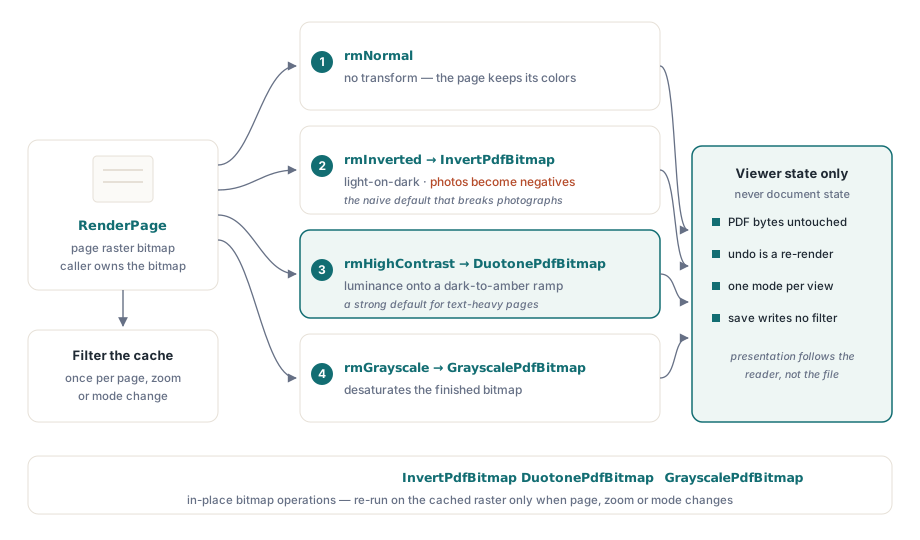
Одно правило предотвращает худшую категорию ошибок здесь: режим чтения меняет то, как производится или постобрабатывается растр, и больше ничего. Байты PDF остаются нетронутыми, любой режим обратим повторной отрисовкой, а «сохранить» никогда не пишет отфильтрованный вид обратно в файл. Звучит очевидно ровно до того момента, когда юрист-рецензент напечатает договор при активном фильтре и подошьёт инвертированную версию. В этот момент выясняется, что вопрос «использует ли печать собственный вид документа или экранный» заслуживает явного ответа в вашей спецификации, а не случайного исхода ветки кода. Держите настройку фильтра в состоянии просмотрщика, применяйте её во время отрисовки и заставьте каждый путь экспорта объявлять, какой вид он использует
Правило окупается дважды. Обратимость достаётся бесплатно, потому что переключение режимов заново отрисовывает из неизменённого источника: не нужно вести стек отмены, и никакая череда смен режима не способна ухудшить страницу. По той же причине остаются согласованными сценарии с несколькими окнами. Два вида одного документа могут работать в разных режимах, поскольку каждый вид владеет своим состоянием представления, а объект документа остаётся общим
Сначала отрисовать, потом преобразовать
Поддерживаемый шаблон — постобработка растра после отрисовки: RenderPage производит растр страницы, а затем проход преобразования его правит. Компонент поставляет три преобразования в виде операций над растром на месте — InvertPdfBitmap, DuotonePdfBitmap и GrayscalePdfBitmap, — что превращает смену режима в чистую двухстадийную функцию:
function TViewerForm.RenderWithMode(W, H: Integer): TBitmap;
begin
  Result := Pdf.RenderPage(0, 0, W, H, ro0, [reAnnotations]);
  case FReadingMode of
    rmInverted:     InvertPdfBitmap(Result);
    rmHighContrast: DuotonePdfBitmap(Result, clBlack, $0000C8FF);  // тёмный фон, янтарный текст
    rmGrayscale:    GrayscalePdfBitmap(Result);
  end;
  // rmNormal проваливается насквозь: документ сохраняет свои цвета
end;
Из такого устройства следуют две вещи. Во-первых, стоимость преобразования пропорциональна размеру растра, поэтому работе место там, где кэшируются результаты отрисовки: фильтруйте кэшированный растр один раз, а не при каждой перерисовке. Во-вторых, поскольку преобразование идёт по готовому растру, оно одинаково затрагивает текст, векторную графику, изображения и внешний вид аннотаций. Именно эта одинаковость и подводит простую инверсию на фотографиях. Из-за этого преобразование duotone оказывается лучшим значением по умолчанию для документов с обилием текста, ведь оно отображает яркость на выбранную шкалу от тёмного к светлому вместо отрицания оттенков; инверсия остаётся доступной как явный выбор для читателей, которым она нужна. Резкость краёв глифов — отдельный рычаг. Параметр отрисовки reNoSmoothText отключает сглаживание текста во время отрисовки и хорошо сочетается с высококонтрастным режимом при большом увеличении
Два несогласных между собой режима градаций серого
Среди параметров отрисовки есть reGrayscale, который выглядит коротким путём в обход шага постобработки. Это не та же операция:

// Уровень движка: градации серого применяются во время растеризации
GrayA := Pdf.RenderPage(0, 0, W, H, ro0, [reGrayscale]);

// Постобработка: отрисовать в цвете, преобразовать готовый растр
GrayB := Pdf.RenderPage(0, 0, W, H);
GrayscalePdfBitmap(GrayB);
Параметр уровня движка применяется к растровому выводу содержимого изображений, но не дотягивается ни до векторных заливок, ни до цветов текста, поэтому страница с цветными заголовками может вернуться с серыми фотографиями и упрямо синими заголовками. GrayscalePdfBitmap по готовому растру преобразует всё и безусловно. Параметр отрисовки всё же оправдывает своё место, когда вам нужно обесцветить изображения, сохранив цвет текста как сигнал, — а именно этого специально хотят некоторые слабовидящие читатели. Но если требование звучит как «страница в градациях серого», удовлетворяет ему именно постобработка. Какой бы путь вы ни выбрали, держите в уме оба стиля перегрузок RenderPage. Форма-функция возвращает растр, которым владеет вызывающая сторона и который она обязана освободить, и это становится важным, как только фильтры умножают число отрисованных растров в работе
Фон, отметки выделения и ловушка PageColor
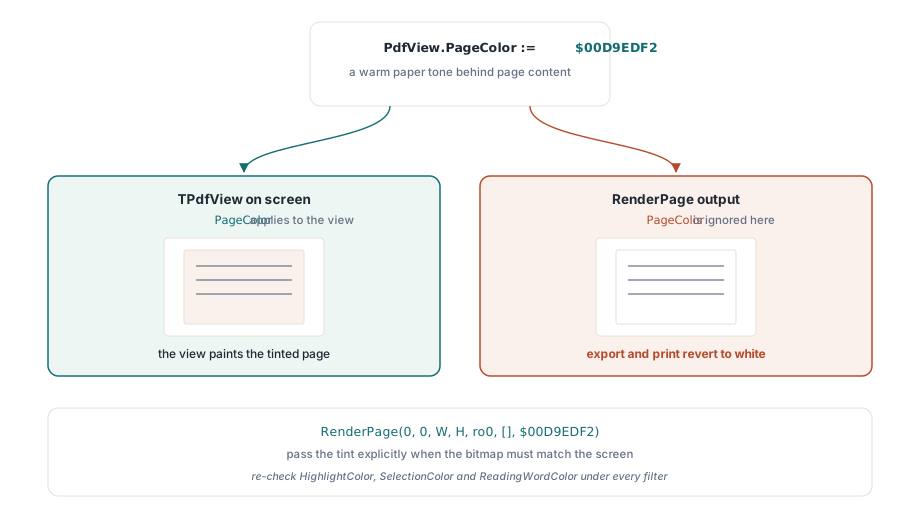
Не всякая настройка комфорта — это преобразование. Замены белого фона страницы тёплым тоном часто хватает саму по себе читателям, чувствительным к бликам, и для неё есть отдельное свойство. У свойства есть правило области действия, на котором люди попадаются:
// Влияет только на экранный вид
PdfView.PageColor := $00D9EDF2;  // тёплый бумажный тон за содержимым страницы

// Вывод RenderPage игнорирует PageColor; передайте цвет явно
Bmp := Pdf.RenderPage(0, 0, W, H, ro0, [], $00D9EDF2);
PageColor меняет то, что отображает TPdfView, но растры, произведённые через RenderPage, остаются белыми по умолчанию, пока параметр Color не скажет иного. Симптом воспроизводится надёжно: на экране страница с оттенком, пользователь экспортирует или печатает — и вывод возвращается к белому. Отнесите это к тому же решению о политике экспорта из первого раздела
Остальные цветовые свойства определяют отметки наложения: HighlightColor для попаданий поиска, SelectionColor для пользовательского выделения текста, ReadingWordColor для курсора произносимого слова. Каждое из них нужно перепроверить в каждом предлагаемом вами фильтре. Янтарный курсор чтения, работающий на белом, исчезает после инверсии; бледно-голубое выделение растворяется в высококонтрастном фоне. Ведите палитры наложений отдельно для каждого режима, а не один глобальный набор, и проверяйте сочетания намеренно. Фильтры вместе с синтезом речи — нормальная конфигурация для тех читателей, которым служит эта возможность, а не редкий случай. Сама механика наложений разобрана в статье о доступном читателе
Числа, проверка и вопрос печати
WCAG 2.1 превращает эту возможность в нечто измеримое. Критерий успеха 1.4.3 требует отношения контраста 4,5:1 для основного текста, а 1.4.6 поднимает его до 7:1 для усиленного контраста. Выборочно проверьте свой высококонтрастный режим по этим отношениям анализатором контраста, запущенным на реальном отрисованном выводе. Текст поверх изображений и текст в полях формы — вот где отношения тихо проваливаются, даже когда основной текст проходит
Печать заслуживает собственного решения, и защитимое значение по умолчанию — собственный вид документа, а «печатать как на экране» предлагается явным выбором пользователя. Напечатанная страница служит доказательством в куда большем числе рабочих процессов, чем ожидают авторы просмотрщиков, а инвертированная распечатка договора — это обращение в поддержку с юридическим привкусом. Ещё одно сочетание важно для производительности: отфильтрованная отрисовка удваивает работу над растром при каждой смене режима, поэтому не применяйте преобразование на каждое сообщение о перерисовке. Кэшируйте отфильтрованный растр и заново запускайте преобразование только тогда, когда действительно меняются страница, масштаб или режим. Стратегия кэширования, делающая это дешёвым, описана в статье о кэше отрисовки и производительности масштабирования
Одно стоит решить в интерфейсе, а не в коде: какой режим верен по умолчанию. Единственного ответа тут нет, поэтому предложите набор и дайте читателю выбрать. Высокий контраст подходит большинству случаев чтения текста, инверсия годится читателям, которым нужен именно светлый на тёмном, градации серого срезают цветовой шум, а оттенок фона решает чувствительность к бликам. Сохраняйте выбор для каждого пользователя, восстанавливайте его при запуске и держите путь назад к нормальному режиму в одно нажатие клавиши, ведь читателю, попавшему в режим, в котором он не может читать, нужен быстрый выход
Использованные здесь параметры отрисовки, преобразования растров и цветовые свойства вида поставляются с PDFium Component для Delphi, C++Builder и Lazarus/FPC вместе с полным исходным кодом, поэтому реализации преобразований можно проверить или расширить