Незрячий пользователь открывает квартальный отчёт в вашем новом блестящем просмотрщике на Delphi, включает NVDA — и слышит сначала подвал страницы, затем колонку цифр, затем заголовок, который любой зрячий читатель прочитал бы первым. Или не слышит вообще ничего. На экране страница выглядит безупречно, и в этом-то и ловушка: отрисовка и озвучивание — разные задачи, решаемые разным кодом. Порядок, в котором PDF рисует свои глифы, никак не обязан совпадать с порядком, в котором человек должен их услышать, поэтому просмотрщик, построенный только на вызовах отрисовки, даёт безупречную картинку и непригодную для использования озвучку. Именно поэтому PDFium Component — обёртка VCL/LCL вокруг движка PDFium для Delphi, C++Builder и Lazarus — несёт отдельный набор API для чтения. API отрисовки не способны восстановить порядок чтения, который им никогда не передавался
Доступный для незрячих ридер держится или разваливается на трёх вещах. Он должен извлекать порядок, который способен озвучить экранный диктор, удерживать видимый курсор на том слове, которое сейчас произносит голос, и честно признавать, что документ никогда не был тегирован, вместо того чтобы угадывать и делать вид, будто всё в порядке. У каждой из этих задач есть свой чёткий API, и у каждой — своя ловушка, которая укусит, если пропустить деталь
Порядок чтения живёт в дереве структуры, а не в порядке отрисовки
ISO 32000-1 §14.8 определяет логическую структуру как дерево элементов, наложенное поверх содержимого страницы. PDF/UA (ISO 14289-1) идёт дальше и делает это дерево обязательным: до каждого фрагмента реального содержимого должно быть можно добраться через него в порядке чтения, а артефакты страницы должны быть помечены как таковые и пропускаться. Правильно тегированный отчёт «знает», что «Quarterly Results» — это заголовок второго уровня, а сетка итогов — таблица с заголовочными ячейками. Нетегированный отчёт — это просто набор позиционированных последовательностей глифов, которые случайно похожи на документ
ReadablePageContent обходит это дерево, когда оно есть, и возвращает фрагменты с семантическим Kind — значениями вроде cfHeading и cfParagraph, так что интерфейс может сказать «заголовок» перед словами, а не прочитать жирную строку как обычный текст тела. При отсутствии пригодного дерева тот же вызов откатывается к эвристическому анализу разметки: определяет колонки, кластеризует базовые линии, упорядочивает слева направо и сверху вниз. Такой откат вполне годится для одноколоночной служебной записки и шаток для газетной рассылки, многоколоночной формы, чего угодно с боковой панелью или врезкой-цитатой. Важно знать, какой именно результат вы получили, и API говорит об этом прямо. Запись TPdfReadableContent несёт поле Source, которое устанавливается в rosStructure, когда порядок взят из тегированного дерева, или в rosHeuristic, когда он выведен из геометрии. Покажите угаданный порядок так, будто он проверен, — и вы отгрузите accessibility-версию зелёной галочки на сборке, которую никто не запускал
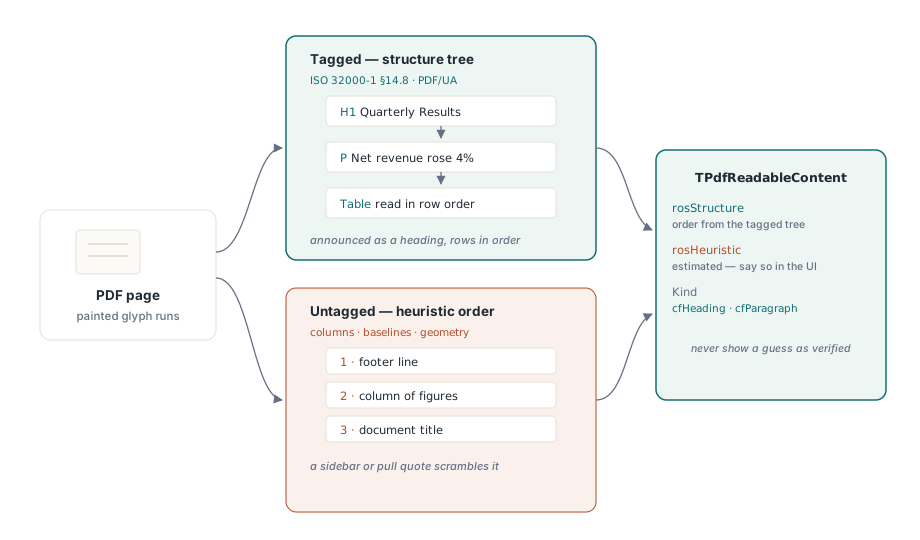
Дешёвый ход при открытии файла — прочитать IsTagged и один раз вызвать ValidatePdfUa, закэшировав ответ. Провал проверки PDF/UA — не повод отказывать файлу. Это повод вывести в строке состояния пометку «оценочный порядок чтения», чтобы, когда клиент присылает жалобу на бессвязную озвучку, поддержка сразу знала, смотрит ли она на проблему тегирования в файле или на баг в вашем коде
От страницы к очереди озвучивания через ReadingUnits
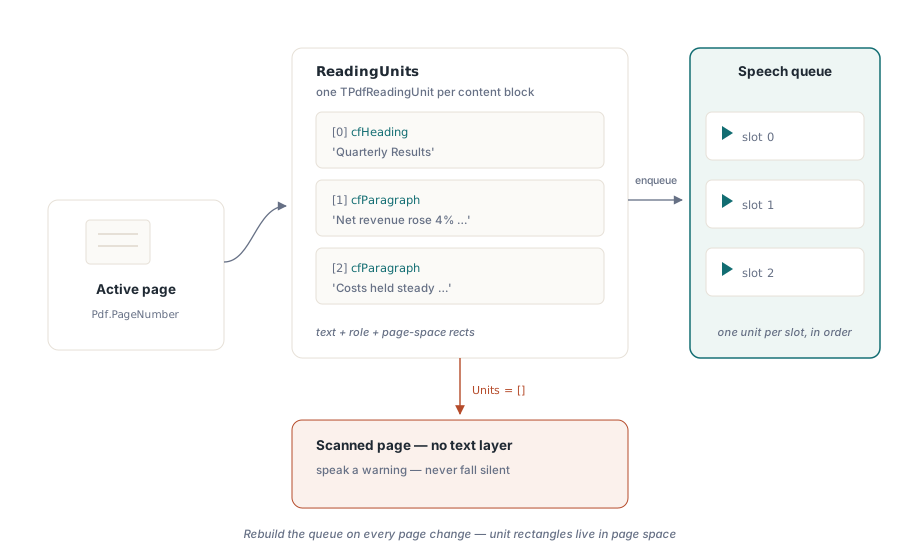
Для синтеза речи основную работу выполняет ReadingUnits. Он возвращает массив записей TPdfReadingUnit для активной страницы, каждая из которых содержит текст для озвучивания, его семантическую роль и прямоугольники, определяющие положение на странице. Есть и общедокументный аналог, DocumentReadingUnits, для сквозного чтения через все страницы. Одна единица становится ровно одним слотом очереди озвучивания:
procedure TReaderForm.QueuePageSpeech(PageNumber: Integer);
var
  Units: TPdfReadingUnits;
  i: Integer;
begin
  Pdf.PageNumber := PageNumber;   // ReadingUnits работает с активной страницей
  Units := Pdf.ReadingUnits;
  FSpeechQueue.Clear;
  for i := Low(Units) to High(Units) do
    FSpeechQueue.Add(Units[i]);  // текст + семантика + прямоугольники подсветки
  FCurrentPage := PageNumber;
  SpeakNextUnit;
end;
В этом цикле легко ошибиться в двух местах. Держите очередь привязанной к странице и пересобирайте её при каждой навигации пользователя, потому что единицы чтения несут прямоугольники в координатах страницы; очередь, оставшаяся от третьей страницы, нарисует свою подсветку поверх четвёртой. И относитесь к пустому массиву Units на странице, где явно есть содержимое, как к детектору «страница — это только изображение». Отсканированная страница — это пиксели без текстового слоя под ними, и правильный ответ здесь — произнести предупреждение («на этой странице нет извлекаемого текста»), а не замолчать так, что слушатель не отличит это от зависания
Курсор по словам, следующий за голосом
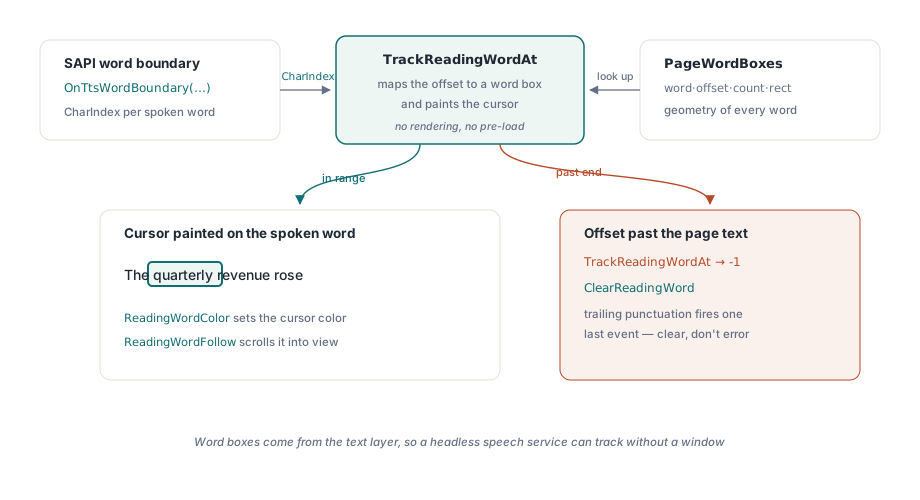
Подсветка целого абзаца за раз ощущается вязкой для слабовидящего пользователя, который следит за словами глазами, пока их читают вслух. Подсветка на уровне слов, эффект караоке, требует двух вещей: геометрии каждого слова и способа отобразить отчёты о прогрессе движка синтеза речи на эту геометрию. PageWordBoxes даёт геометрию в виде записей TPdfWordBox, каждая — с текстом слова, смещением символа, количеством символов и прямоугольником в координатах страницы. TrackReadingWordAt даёт само отображение. Передайте ему позицию символа, которую уже сообщает событие границы слова SAPI, и функция разрешит это смещение в индекс массива word-box и одним вызовом нарисует курсор на нужном слове
procedure TReaderForm.PrepareKaraoke(PageNumber: Integer);
begin
  // Прямоугольники слов отображения берутся со страницы, которую оно показывает.
  // Одной установки Pdf.PageNumber недостаточно, чтобы сдвинуть отображение
  PdfView.PageNumber := PageNumber;
  FWordBoxes := PdfView.PageWordBoxes;
end;

procedure TReaderForm.OnTtsWordBoundary(Sender: TObject; CharIndex: Integer);
var
  WordIdx: Integer;
begin
  // TrackReadingWordAt одновременно разрешает смещение И рисует курсор слова
  WordIdx := PdfView.TrackReadingWordAt(FCurrentPage, CharIndex);
  if WordIdx < 0 then
    PdfView.ClearReadingWord;  // граница вышла за пределы текста страницы
end;
Контракт этого API щедр по одному пункту и непреклонен по другому. Щедрая часть: TrackReadingWordAt держит собственный кэш word-box'ов для отслеживаемой страницы, так что предзагружать ничего не нужно, а отрисовка вообще не происходит, потому что прямоугольники слов берутся из текстового слоя. Безголовая (headless) речевая служба без видимого окна всё равно может отслеживать позиции. Непреклонная часть: индекс символа обязан указывать в текст, который извлёк сам компонент, а не в какую-то очищенную строку, которую вы собрали сами. Когда CharIndex выходит за конец текста страницы, функция возвращает -1, а не выбрасывает исключение, — это происходит постоянно, когда движок синтеза речи генерирует последнее событие границы для завершающей пунктуации. Читайте -1 как «очистить курсор», а не как ошибку
На стороне отображения ReadingWordColor задаёт цвет курсора. Янтарный цвет по умолчанию хорошо читается на большинстве фонов страницы, но проверьте его под каждым фильтром отображения, который предлагает ваш просмотрщик. Янтарный курсор может полностью исчезнуть при инверсии цвета, а работа инверсии одновременно с озвучиванием — это как раз то, как работает слабовидящий пользователь, так что именно эта комбинация, которую нужнее всего проверить, — та самая, которую беглая демонстрация никогда не задействует. Установите ReadingWordFollow в True — и отображение само прокрутит произносимое слово в видимую область, без чего не обойтись на увеличенной странице, растянутой через несколько экранов. Учитывайте одно правило области действия: SetReadingWord рисует только на активной странице TPdfView. Заранее решите, приостанавливает ли ручная прокрутка озвучивание или поведение слежения его перекрывает, потому что если не выбрать ни то ни другое, голос продолжит читать, пока курсор стоит где-то за пределами экрана
Документы, которые ломают ваш ридер
Несколько типов входных документов настолько надёжно ломают наивную реализацию, что им место среди постоянных образцов в наборе регрессионных тестов, а не среди разовых багов, которые чинят и забывают
- Нетегированные, но насыщенные текстом файлы. Эвристический порядок обычно верен для линейного отчёта и ломается, как только появляется боковая панель или врезка-цитата. Помечайте порядок как оценочный — и в интерфейсе, и в диагностическом журнале, — чтобы сбой был понятен позже
- Сканы без текстового слоя. Текстового слоя вообще нет. Отлавливайте их по пустым единицам чтения и направляйте пользователя на этап OCR выше по конвейеру, а не позволяйте ридеру озвучивать пустую страницу
- Составные символы и смешанные системы письма. Составные символы Unicode не всегда схлопываются один в один в визуальные слова, поэтому число word-box'ов может разойтись с тем, что ожидает ваш собственный токенизатор. Не индексируйте массив word-box'ов смещениями, которые вы вычислили, разбивая текст самостоятельно; используйте только индексы, которые возвращает
TrackReadingWordAt
Тестируйте это как аудитор, а не как демонстрацию
«Оно прочитало мой образец вслух» не доказывает ничего. Прогон, который можно защитить, проводит через готовую сборку с подключённым NVDA три файла: один заведомо тегированный, где заголовки объявляются заголовками, а таблица читается по строкам; один заведомо нетегированный, где виден индикатор оценочного порядка; и один скан, где действительно произносится предупреждение об отсутствии текста. Каждый из них задействует путь, который пропускает счастливый случай
Дальше убедитесь, что курсор слова остаётся точно на месте при удвоенной скорости речи и при половинной, и что прокрутка ReadingWordFollow не конфликтует с прокруткой самого пользователя. Затем запустите озвучивание, одновременно перебирая все цветовые фильтры, и проследите, что курсор ни разу не исчезает. Статья о цветовых фильтрах для слабовидящих подробно разбирает этот путь отрисовки, а глубокий разбор курсора речи по словам раскладывает по полочкам тайминг TTS
API единиц чтения и word-box'ов, использованные выше, поставляются вместе с PDFium Component для Delphi и C++Builder (VCL) и Lazarus/FPC (LCL). Страница продукта содержит ссылку на полный справочник API, включая структуры записей для единиц чтения и word-box'ов, стоящих за этими примерами