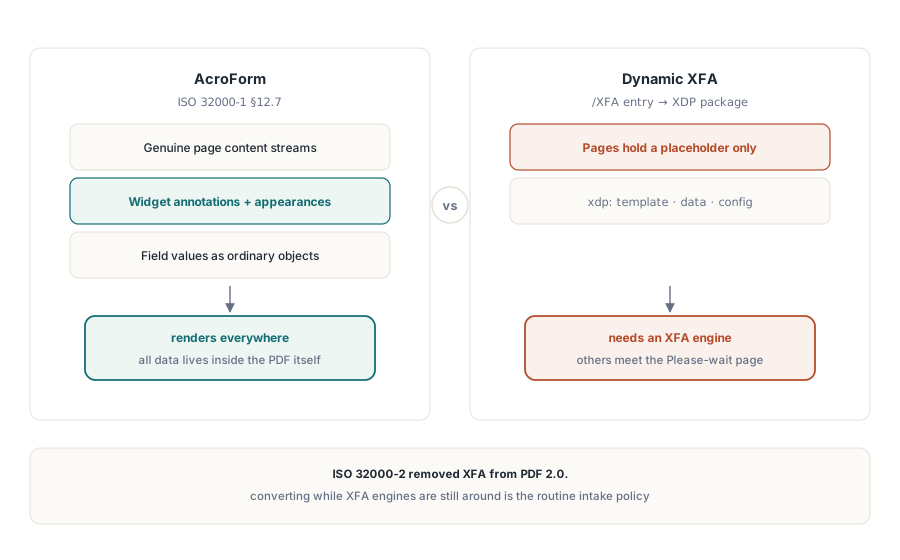
Две формы могут нести одни и те же поля и вести себя совершенно по-разному. AcroForm хранит свои поля как обычные объекты PDF, лежащие поверх настоящего содержимого страницы, так что любой совместимый ридер их отрисует. Динамическая форма XFA хранит почти ничего как PDF: поля, разметка и даже геометрия страниц живут внутри XML-пакета, а видимые страницы создаются в момент открытия движком разметки, который когда-либо широко поставлялся только Adobe. Отдайте такой файл веб-просмотрщику, архивному рендереру или экстрактору текста — и формы вы не получите. Вы получите одну серую страницу с текстом «Please wait... If this message is not eventually replaced by the proper contents of the document, your PDF viewer may not be able to display this type of document». Любой, кто принимал государственные или страховые документы, узнает эту страницу с первого взгляда
Этот заполнитель — не повреждение. Это ровно то, что предписывает формат в отсутствие процессора XFA, а по состоянию на 2026 год это описание подходит почти к каждому просмотрщику вне десктопного Acrobat. Так что практичный ход — преобразовать динамическую форму в обычный AcroForm ещё до того, как она попадёт куда-либо дальше по цепочке. HotPDF, PDF-библиотека losLab для Delphi и C++Builder, выполняет это преобразование прямо в коде, заново собирая XML-форму как нативные поля на нативных страницах
Почему две модели не могут сосуществовать
AcroForm определён в ISO 32000-1 §12.7. Каждое поле — это объект PDF с виджет-аннотацией и потоком представления, страница — настоящее содержимое PDF, а данные лежат прямо поверх него. XFA переворачивает эту схему: форма — это XML-документ, пакет XDP, хранящийся в записи /XFA словаря AcroForm, а страницы PDF динамической формы несут только заполнитель «Please wait» и ничего больше, потому что настоящее содержимое никогда не было сериализовано как PDF. Ридер обрабатывает файл по одной из двух моделей. Проигнорируйте запись /XFA — и увидите пустую оболочку; учтите её без движка XFA — и увидите предупреждение. ISO 32000-2 закрыл этот спор, исключив XFA из PDF 2.0, и это главная причина, по которой «конвертируем, пока ещё можем» из редкого случая превратилось в рутинную политику приёма файлов
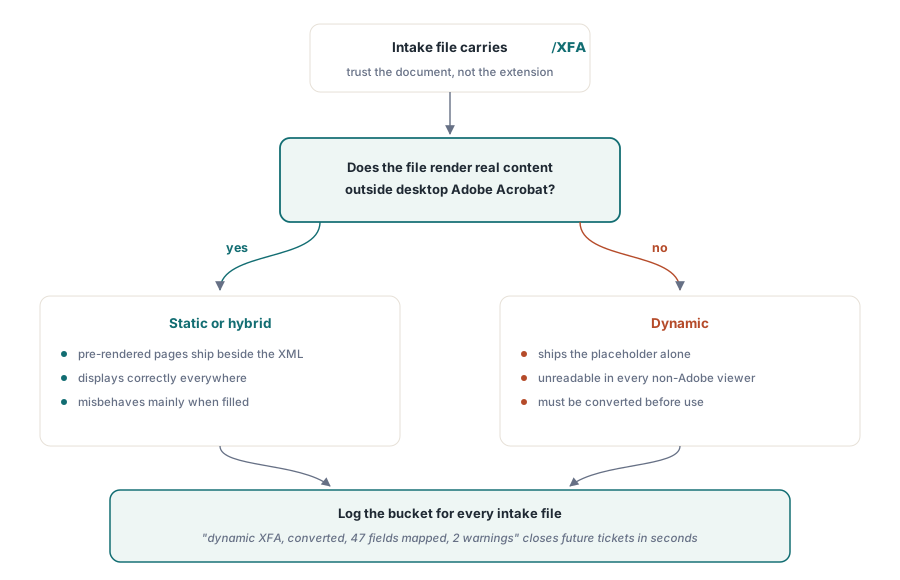
Прежде чем что-либо конвертировать, классифицируйте файл, потому что заполнитель показывают не все XFA-файлы. Статические формы XFA поставляют уже отрисованные страницы PDF рядом с XML, так что они отображаются везде и ведут себя неправильно только при заполнении. Динамические формы поставляют один лишь заполнитель и непригодны к использованию до конвертации. Доверять стоит документу, а не расширению файла и не отправителю. Файл, который отображает настоящее содержимое в просмотрщике не от Adobe, но всё ещё несёт запись /XFA, — статический или гибридный; файл, показывающий страницу с предупреждением, — динамический. Записывайте, в какую корзину попал каждый принятый файл. Эти два вида ломаются позже по-разному, и тикет о пустой архивной форме закрывается за секунды, когда в журнале приёма уже написано «динамический XFA, конвертирован, сопоставлено 47 полей, 2 предупреждения»
Преобразование загруженного документа XFA в нативные поля
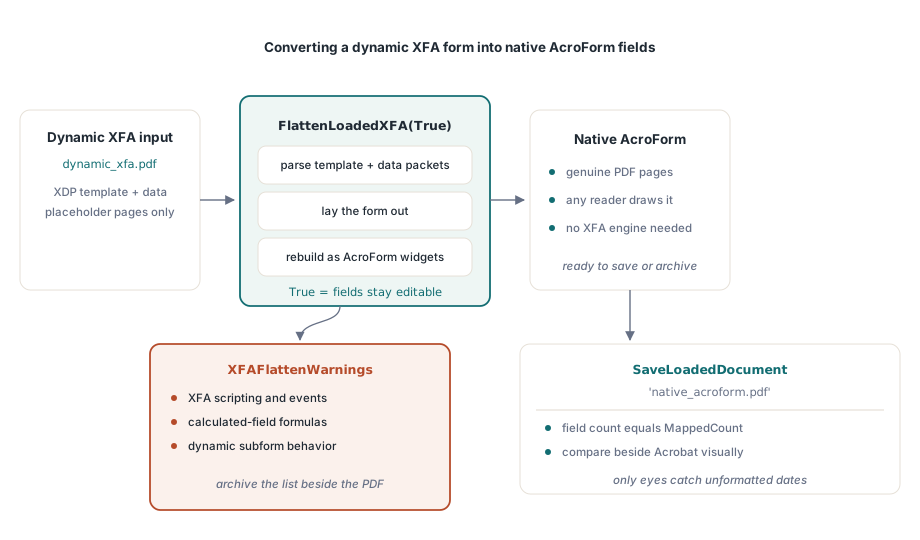
Преобразование выполняется над документом, уже находящимся в памяти. FlattenLoadedXFA разбирает шаблон XFA и его пакеты данных, раскладывает форму и заново собирает её как поля AcroForm на настоящих страницах PDF:
var
  Pdf: THotPDF;
  MappedCount, I: Integer;
  Warnings: TStrings;
begin
  Pdf := THotPDF.Create(nil);
  try
    Pdf.LoadFromFile('dynamic_xfa.pdf');
    MappedCount := Pdf.FlattenLoadedXFA(True);   // True = поля остаются редактируемыми
    Warnings := Pdf.XFAFlattenWarnings;
    for I := 0 to Warnings.Count - 1 do
      Log('XFA flatten warning: ' + Warnings[I]); // несопоставленные элементы
    Pdf.SaveLoadedDocument('native_acroform.pdf');
    Log(Format('Mapped %d fields', [MappedCount]));
  finally
    Pdf.Free;
  end;
end;
Возвращаемое значение и список предупреждений — это выходные данные, а не отладочный шум, так что сохраняйте оба. Преобразование по своей природе теряет информацию: у скриптов XFA, вычисляемых полей и поведения динамических подформ нет аналога в AcroForm, и XFAFlattenWarnings называет каждый элемент шаблона, который не удалось сопоставить. Заархивируйте сконвертированный файл без списка предупреждений — и однажды вы будете смотреть на пустое поле итогов в архивной копии, не имея ни малейшей записи о том, почему оно пусто. Флаг Editable управляет тем, останутся ли новые поля заполняемыми. Передавайте True, когда с формой продолжат работать люди, и фиксируйте значения, когда цель — замороженная запись
Проверка результата конвертации отчасти визуальная, отчасти структурная, и нужны обе половины. Структурная половина проста: убедитесь, что число полей совпадает с MappedCount. Визуальная половина — та, что ловит реальные повреждения. Откройте исходную форму в десктопном Acrobat — всё ещё единственном просмотрщике, запускающем движок XFA, — рядом со сконвертированным файлом в обычном ридере и сравните значения и разметку хотя бы на одном заполненном образце для каждого шаблона. Дата, которую движок XFA отобразил как 2026-06-11, может попасть в копию AcroForm сырым, неотформатированным значением, и заметят это только ваши собственные глаза
Когда на входе пакет XDP
Не каждая задача начинается с заполненного PDF. Иногда вы получаете сам по себе пакет XDP, экспортированный из инструмента проектирования форм или переданный партнёрской системой. ApplyXFAAsAcroForm пропускает шаг загрузки и применяет пакет прямо к текущему документу:
XDPBytes := TFile.ReadAllBytes('benefit-claim.xdp');
MappedCount := Pdf.ApplyXFAAsAcroForm(XDPBytes, True);
Та же группа вызовов работает и в обратную сторону, для более редкого случая, когда XFA нужно не потреблять, а порождать. AddXFAPacket присоединяет отдельные именованные пакеты, такие как 'xdp' или 'config'. SetXFADocument одним вызовом устанавливает полную однопотоковую полезную нагрузку. ClearXFAPackets стирает регистрацию, чтобы начать заново, а AddXFASignaturePacket встраивает материал XAdES для рабочих процессов, которые подписывают данные XML-формы напрямую. Порождение XFA в 2026 году — нишевая потребность, почти всегда навязанная одним унаследованным потребителем, отказывающимся принимать что-либо ещё, но когда это прописано в контракте, эти вызовы сводят задачу к выбору конфигурации, а не к отдельному инструменту
Другое значение слова «сведение»
Слово «сведение» («flatten») сбивает с толку многие обсуждения, потому что оно обозначает совершенно другую операцию: выжигание представлений полей AcroForm прямо в поток содержимого страницы, пока не останется ни одного интерактивного объекта. У HotPDF сегодня нет API для этого, и лучше узнать об этом сейчас, а не на середине проекта. Вместо этого библиотека даёт блокировку на уровне поля в момент его создания, подкреплённую разрешениями документа:
// Зафиксировать значение при создании поля: текстовое поле только для чтения
Pdf.CurrentPage.AddTextField('CaseNumber', 'BC-2026-0117',
  Rect(50, 700, 220, 720), 0, [ffReadOnly]);

// Ремень и подтяжки: ограничить заполнение форм на уровне всего документа
Pdf.ActivateProtection := True;
Pdf.CryptKeyLength := aes256;
Pdf.OwnerPassword := 'records-owner';
Pdf.ProtectOptions := [prPrint, prInformationCopy, prExtractContent];
// разрешение на заполнение не выдано: prFillAnnotations отсутствует в наборе
Стоит чётко понимать, что это даёт, а что нет. Поле только для чтения всё равно остаётся объектом формы. Оно отображается в панели полей просмотрщика, его значение читается через API формы, а инструмент, переписывающий файл, способен снова снять флаг «только для чтения». Флаги разрешений поднимают планку, но зависят от того, решит ли просмотрщик их уважать, — это ограничение прямо оговорено в ISO 32000-1. Когда регулятор настаивает, что архивная запись вообще не должна содержать объектов формы, честный ответ с HotPDF на сегодня — пересобрать документ: считать значения, а затем нарисовать их как обычное содержимое TextOut на новой странице, вместо того чтобы выдавать флаги «только для чтения» за сведение. На пути с разрешениями стоит помнить, что CryptKeyLength нужно задать до BeginDoc; остальное — в нашей статье о шифровании AES-256 и разрешениях
Что XFA значит для архивного соответствия
PDF/A и PDF/X оба напрямую отвергают XFA. Поэтому конвейер, наполняющий архив по ISO 19005, обязан сначала конвертировать, и порядок здесь не обсуждается: загрузить, FlattenLoadedXFA, сохранить, а затем уже запускать генерацию или проверку архива на результате в AcroForm. Не воспринимайте конвертацию как доказательство соответствия. Она чинит модель формы и оставляет шрифты, цвет и метаданные ровно такими, какими они были, так что проверяйте результат через veraPDF, прежде чем ему доверять. Как только форма оказалась на стороне AcroForm, у её поведения появляется собственный набор средств управления. Триггеры JavaScript, действия отправки и скрипты проверки разобраны в статье о полях и действиях AcroForm в HotPDF
Показанные здесь API регистрации XFA, конвертации и работы с формами поставляются вместе с HotPDF Delphi Component для Delphi и C++Builder, чья документация отслеживает набор функций XFA по мере его роста в последних релизах