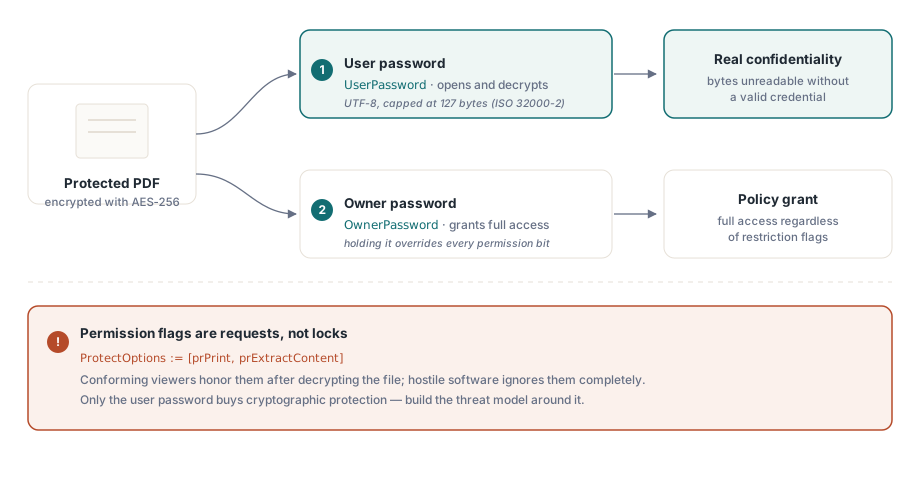
Флаг разрешений PDF — это не замок. Это просьба, которую файл адресует тому, что его открывает, и просмотрщик волен её проигнорировать. Именно этот факт определяет, как рассуждать обо всех остальных решениях на этой странице. Настоящая конфиденциальность берётся только из одного источника: шифрования AES-256 с ключом на основе пароля, которого у читателя нет. Всё остальное — флажки «нельзя печатать» и «нельзя копировать» — это политика, которую совместимое ПО соглашается соблюдать, а враждебное ПО нет. Перепутайте эти два уровня — и вы отгрузите то, что выглядит защищённым на демонстрации и утекает в реальных условиях
HotPDF — нативный VCL-компонент PDF для Delphi и C++Builder, и он открывает модель защиты ISO 32000 через небольшой набор свойств. Свойства задать легко. Сложность в том, чтобы понимать, какое из них покупает вам криптографическую защиту, а какое — лишь вежливую просьбу, и в том, чтобы соблюсти правильный порядок присваивания, чтобы запрошенное шифрование оказалось тем шифрованием, которое вы действительно получите
Что на самом деле обещают два пароля
Шифрование PDF определяет два учётных данных с разными задачами, и их смешение — самая распространённая ошибка проектирования в коде для защищённого вывода. Пароль пользователя открывает доступ к расшифровке. Без него, либо без пароля владельца, совместимый ридер не может восстановить ключ файла, и содержимое остаётся криптографически нечитаемым. Пароль владельца, в свою очередь, открывает доступ к настройкам разрешений: ридер, получивший пароль владельца, получает полный доступ независимо от того, что говорят флаги ограничений
Биты разрешений стоят на более зыбкой почве. Печать, извлечение содержимого, заполнение форм — каждое из этого флаг, который просмотрщик читает и решает уважать (ISO 32000-2 §7.6.4). Шифрование защищает байты. Флаги разрешений лишь инструктируют совместимое ПО, причём делают это постфактум. Любой, кто открыл документ с паролем пользователя, уже держит расшифрованное содержимое в памяти, так что «нельзя копировать» и «нельзя печатать» что-то значат для благонравного просмотрщика и ничего не значат для настроенного решительно. Стройте модель угроз вокруг этой границы. Конфиденциальность живёт в пароле пользователя. Разрешения формируют то, что предлагают основные просмотрщики, — и это всё, на что они способны
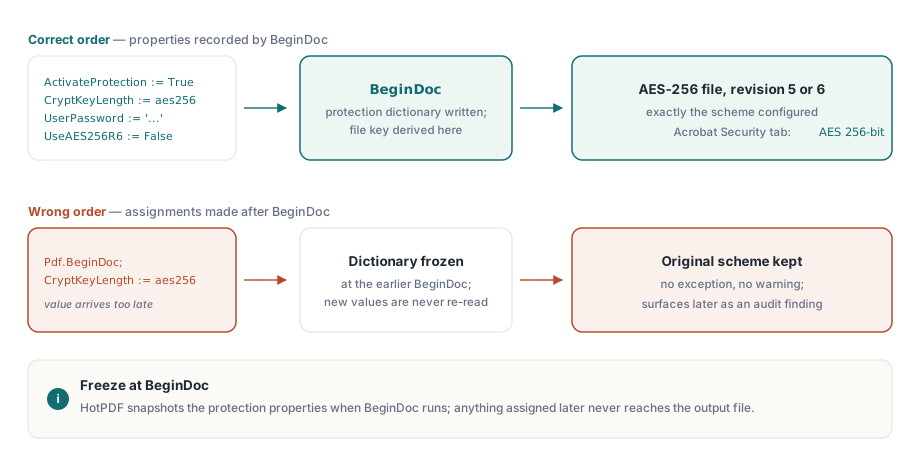
Порядок настройки: всё до BeginDoc
HotPDF строит словарь шифрования и выводит ключ файла в тот момент, когда выполняется BeginDoc. Что бы ни хранили свойства защиты в этот момент, именно это и получит документ, а изменение их позже не меняет уже ничего. Важнее всего здесь свойство CryptKeyLength, которое выбирает схему из значений THPDFKeyType: k40, k128, aes128 и aes256. Присвойте его после BeginDoc — и не получите ни исключения, ни предупреждения, просто файл, который молча остался с тем, с чем начинал. Такое тихое расхождение — худший из всех видов: оно проходит любой локальный тест и всплывает месяцы спустя как замечание аудита соответствия на столе у клиента
var
  Pdf: THotPDF;
begin
  Pdf := THotPDF.Create(nil);
  try
    Pdf.FileName := 'statement.pdf';
    Pdf.ActivateProtection := True;
    Pdf.CryptKeyLength := aes256;        // должно быть задано до BeginDoc
    Pdf.UserPassword := 'open-secret';
    Pdf.OwnerPassword := 'admin-secret';
    Pdf.UseAES256R6 := False;            // R=5: максимальная поддержка просмотрщиков
    Pdf.BeginDoc;
    Pdf.CurrentPage.SetFont('Arial', [], 11);
    Pdf.CurrentPage.TextOut(50, 720, 0, 'Account statement, June 2026');
    Pdf.EndDoc;
  finally
    Pdf.Free;
  end;
end;
Пароли — это UTF-8, ограниченные 127 байтами, таков предел ISO 32000-2 для схем AES-256. Если ваша парольная политика выдаёт более длинные секреты, выполняйте усечение сами, на своей стороне, там, где вы точно контролируете, где именно проходит срез. Оставьте это на волю случая — и библиотека с каким-нибудь будущим просмотрщиком могут разойтись во мнении о точке отсечения, что даст файл, который открывается у вас и отказывается принимать тот же пароль где-то ещё
Редакция 5 или редакция 6: один булев параметр, две экосистемы
UseAES256R6 выбирает между двумя рукопожатиями AES-256, и этот выбор весомее, чем предполагает его булев тип. Оставьте False — и HotPDF запишет редакцию 5, схему AES-256, пришедшую как расширение к PDF 1.7, которую способны открыть просмотрщики примерно за последние пятнадцать лет. Установите True — и получите редакцию 6, усиленный вывод ключа, стандартизированный в ISO 32000-2 для PDF 2.0, который закрывает известную слабость в том, как редакция 5 проверяет пароль
Так что с криптографической точки зрения редакция 6 — история лучше. Она же и та, что всё ломает. Файлу редакции 6 нужен просмотрщик, построенный под PDF 1.7 Extension Level 3 или PDF 2.0, а немало развёрнутого софта не относится ни к тому, ни к другому: архивы систем управления записями, встроенные рендереры в других продуктах, отраслевые инструменты, которых никто не трогал годами. Такие просто откажутся открывать файл, и произойдёт это на машине клиента, никогда не на вашей. Поэтому практическим значением по умолчанию остаётся редакция 5. Обращайтесь к редакции 6 только тогда, когда политика безопасности прямо называет ISO 32000-2 по номеру редакции и когда вы действительно убедились, что все получатели способны его прочитать. В любом случае запишите, какую редакцию вы выбрали и почему, — следующий человек, который тронет этот код, обязательно спросит
Более старые типы ключей заслуживают одного предложения, чтобы вы знали, что их стоит пропустить. THPDFKeyType по-прежнему перечисляет k40, k128 и aes128, но существуют они, чтобы воспроизводить исторические архивы, а не защищать новые. 40-битный RC4 падает под натиском бытового железа, а 128-битные схемы старше редакций AES-256, которых ждёт любой актуальный аудит безопасности. Для документа, который вы создаёте в 2026 году, реальный вопрос только один — редакция 5 или редакция 6; если в новом проекте вы тянетесь к устаревшим типам, значит, где-то выше по цепочке что-то пошло не так
Флаги разрешений без пароля на открытие
Часто требование прямо противоположно секретности. Прочитать документ должен уметь кто угодно, а вот печать или извлечение предполагается ограничить. Это выражается пустым паролем пользователя и непустым паролем владельца — PDF называет это режимом открытого пароля, — а операции, которые вы хотите разрешить, перечисляются в ProtectOptions
Pdf.ActivateProtection := True;
Pdf.CryptKeyLength := aes256;
Pdf.UserPassword := '';                      // открыть файл может кто угодно
Pdf.OwnerPassword := 'rotate-me-quarterly';  // защищает набор разрешений
Pdf.ProtectOptions := [prPrint, prPrint12bit, prExtractContent];
Pdf.BeginDoc;
// ... содержимое страниц ...
Pdf.EndDoc;
Набор THPDFProtectOptions отображается на биты разрешений ISO: prPrint и prPrint12bit — для печати высокого разрешения, prInformationCopy — для обычного копирования и извлечения, prExtractContent — для извлечения вспомогательными технологиями, плюс prModifyStructure, prEditAnnotations, prFillAnnotations и prAssemble. Два из них заслуживают предупреждения. Оставляйте prExtractContent включённым практически в каждом профиле, который вы строите. Именно этот бит нужен экранному диктору, чтобы добраться до текста, и его сброс незаметно превращает решение о правах в дефект доступности, с которым столкнётся человек с инвалидностью, а вы этого никогда не увидите. Другая ловушка — prPrint сам по себе, без prPrint12bit: несколько просмотрщиков в ответ на это снижают качество печати, и ваши пользователи заведут это как баг рендеринга, а не как настройку разрешений, которой это на самом деле является
Проверка занимает пять минут и заслуживает места в чек-листе релиза. Откройте образец каждого профиля в Acrobat, откройте свойства документа и прочитайте вкладку «Безопасность», где прямо написан алгоритм («AES 256-bit») и по одной перечислены разрешённые операции. Затем откройте тот же файл в самом старом просмотрщике, которым реально пользуются ваши клиенты, а не в самом новом на вашей машине. Это второе открытие — дешёвая страховка от того, что файл редакции 6 благополучно пройдёт через разработку и умрёт у клиента, который так и не обновился
Снятие защиты с существующих файлов
Расшифровка прогоняет ту же модель свойств в обратную сторону. Загрузите документ с действительными учётными данными, отключите защиту и сохраните результат уже без неё
var
  Pdf: THotPDF;
  PageCount: Integer;
begin
  Pdf := THotPDF.Create(nil);
  try
    PageCount := Pdf.LoadFromFile('encrypted.pdf', 'open-secret');
    if PageCount > 0 then
    begin
      Pdf.ActivateProtection := False;   // снять шифрование при сохранении
      Pdf.SaveLoadedDocument('plain.pdf');
    end;
  finally
    Pdf.Free;
  end;
end;
Этот маршрут разбирает весь документ в память, что нормально для обычных файлов и расточительно для огромных. Когда входной файл тянет на сотни мегабайт, более дешёвый вариант — DecryptFile: она расшифровывает во время копирования на уровне файла, используя прямой путь перезаписи AES-256, который пропускает построение полного дерева объектов везде, где это позволяет входной файл. Это часть Direct File API, описанного в сопутствующей статье об обработке больших PDF из Delphi
Ограничения, взаимодействующие с шифрованием
Есть два ограничения, о которых стоит знать до того, как проектировать вокруг шифрования, а не после. Первое — архивное соответствие. ISO 19005 запрещает шифрование в PDF/A, так что любой процесс, который одновременно шифрует документ и заявляет о соответствии PDF/A, противоречив по построению; HotPDF не позволит получить и то, и другое в одном файле. Когда обе вещи действительно нужны, ответ — два артефакта: зашифрованная копия для распространения и отдельная незашифрованная копия для архива
Второе ограничение суровее. У шифрования PDF нет ни депонирования ключей, ни восстановления. Потеряйте пароль пользователя на файле R5 или R6 — и ваши варианты сведутся к перебору или отказу от попыток. Поэтому обращайтесь с секретами владельца и пользователя так же, как с любыми другими продакшн-учётными данными. Генерируйте их, храните в хранилище секретов, ротируйте по расписанию. Единственное, чего никогда нельзя делать, — жёстко прописывать их константами в модуле, откуда они прямиком попадают в систему контроля версий и остаются в рабочей копии у каждого разработчика навсегда
Стоит выработать ещё один рефлекс. Изменение защиты файла, который вы не создавали, — это тот же самый механизм, что и расшифровка, а не отдельная функция: загрузите его с паролем через LoadFromFile, отредактируйте ProtectOptions или пароли на месте и запишите обратно через SaveLoadedDocument. Если вы можете расшифровать файл, вы можете и переназначить его разрешения, и код при этом выглядит почти так же, как пример выше
Показанные здесь свойства защиты — часть стандартного HotPDF Delphi Component для Delphi и C++Builder; страница продукта содержит полный справочник по шифрованию, включая полное перечисление разрешений