Действие AcroForm — это словарь, присоединённый к виджету, который сообщает просмотрщику, что делать, когда с этим виджетом что-то происходит. Нажмите кнопку — и просмотрщик читает её словарь действия: действие URI открывает веб-адрес, действие JavaScript запускает скрипт, действие SubmitForm отправляет собранные значения полей на конечную точку, действие ResetForm сбрасывает их обратно к значениям по умолчанию. Действие — это данные, а не поведение, впечённое в файл. ISO 32000-1 §12.6 определяет форму словаря; движок, который его интерпретирует, предоставляет просмотрщик. Это разделение важно, потому что действие, безупречно записанное в PDF, всё равно ничего не сделает, если у ридера на другом конце нет для него движка, и немалая доля мучений с AcroForm восходит именно к этому разрыву, а не к неправильно построенному полю
HotPDF записывает эти словари напрямую из Delphi и C++Builder, вместе с виджетами полей, к которым они привязаны. В каждой интерактивной форме задействованы две структуры: виджет, который пользователь видит на странице, и лежащая под ним механика поля плюс действия, несущая данные и проводку. Редактируются они независимо, и любая из них может быть неверна, пока другая выглядит нормально. Разделы ниже последовательно разбирают именование полей, сами действия кнопок, JavaScript на уровне поля и класс дефектов, переживающих визуальную проверку, потому что они целиком живут во второй структуре
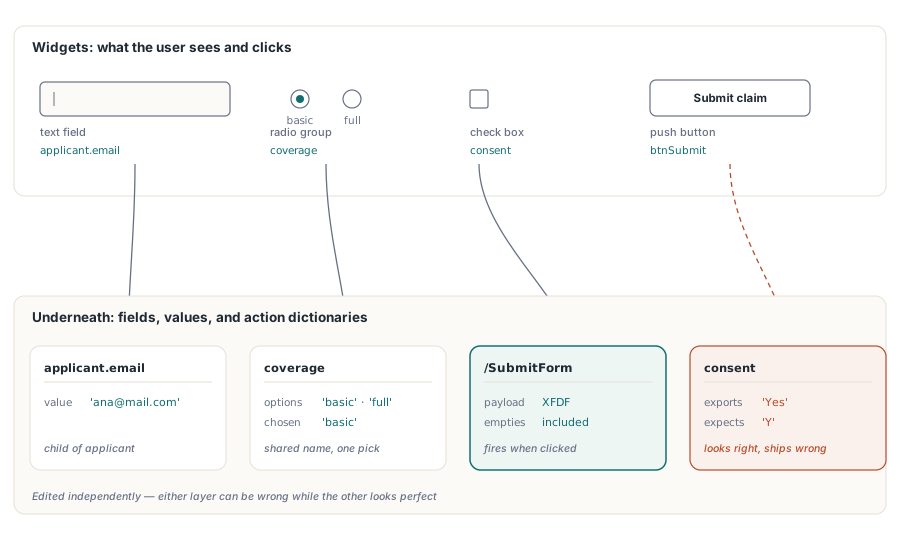
Имена полей — это ключи маршрутизации, а не подписи
Каждое поле AcroForm несёт полное квалифицированное имя. ISO 32000-1 §12.7.3 делает именно это имя, а не видимую подпись, ключом, под которым значение поля путешествует при экспорте или отправке формы. Разработчики, приходящие из проектирования VCL, склонны относиться к имени элемента управления как к приватному идентификатору кода, но здесь это не так. Это формат передачи по проводу
Первое, что из этого следует: два поля с одинаковым полным квалифицированным именем — это не два поля. PDF трактует их как две виджет-аннотации одного поля, разделяющие одно значение, так что ввод в одну сразу обновляет другую. Это ровно то, что нужно, когда имя клиента должно повторяться на каждой странице договора. И это баг, когда цикл генерации случайно переиспользует 'Field1' на трёх страницах подряд. Никакая визуальная проверка второй случай не поймает. Каждая страница по-прежнему рисует собственный прямоугольник, а связь всплывает только тогда, когда кто-то начинает печатать
Имена с точками, такие как applicant.email, строят иерархию. Родительский узел applicant группирует своих потомков, и именно это позволяет сбросу или отправке нацелиться только на часть формы. Именовать поля так с самого начала ничего не стоит, и это окупается в первый же раз, когда принимающая система запрашивает только блок applicant
У переключателей (radio button) есть собственное правило. Кнопки, которые должны переключаться вместе, обязаны разделять одно имя группы. В HotPDF вызовы AddRadioButton, передающие одно и то же имя группы, привязывают свои виджеты к одному родительскому полю, а значение экспорта каждой кнопки ('basic' или 'full') определяет выбранный вариант. Дайте каждой кнопке отдельное имя — и получите ряд независимых переключателей вкл/выкл вместо одной взаимоисключающей группы, которая выглядит идентично, но ведёт себя неправильно
Создание набора полей постранично
HotPDF размещает поля через методы THPDFPage, так что каждое поле принадлежит объекту страницы, который его создал. Ловушка с порядком вызовов, за которой нужно следить, — AddPage. Она перенацеливает CurrentPage на новую страницу сразу же после возврата, так что любой вызов поля после неё попадёт на новую страницу, даже если логически поле принадлежало странице, которую вы только что покинули. Завершайте каждую страницу — нарисованное содержимое вместе с полями — прежде чем вызывать AddPage
procedure BuildClaimForm(Pdf: THotPDF);
begin
  // Страница 1: блок applicant
  Pdf.CurrentPage.AddTextField('applicant.name', '', Rect(50, 700, 300, 722));
  Pdf.CurrentPage.AddTextField('applicant.email', '', Rect(50, 660, 300, 682));
  Pdf.CurrentPage.AddCheckBox('consent', 'Y', Rect(50, 620, 70, 640), False);
  Pdf.CurrentPage.AddRadioButton('coverage', 'basic', Rect(50, 580, 70, 600), True);
  Pdf.CurrentPage.AddRadioButton('coverage', 'full', Rect(90, 580, 110, 600), False);
  Pdf.CurrentPage.AddComboBox('plan', 'Standard',
    ['Basic', 'Standard', 'Premium'], Rect(50, 540, 200, 565));

  Pdf.AddPage;  // CurrentPage теперь указывает на страницу 2
  Pdf.CurrentPage.AddListBox('riders', 'None',
    ['None', 'Flood', 'Earthquake'], Rect(50, 500, 200, 600));
end;
Координаты следуют соглашению PDF: начало координат в левом нижнем углу страницы. Это то же самое начало координат, которое TextOut использует для нарисованного текста, так что Rect(50, 100, 200, 120) оказывается у нижнего края страницы Letter, а не у верхнего. VCL помещает Y сверху и растит его вниз, так что таблица разметки, перенесённая напрямую, выходит зеркально перевёрнутой по вертикали — каждое поле оказывается не на том конце страницы. Выполните преобразование один раз в общем вспомогательном методе, а не в каждой точке вызова, и одна-единственная поправка чинит всю форму
Привязка кнопок к действиям URI, JavaScript и отправки
Кнопка-нажималка (push button) инертна, пока к ней не привязано действие. HotPDF раскрывает типы действий из ISO 32000-1 §12.6.4 через перечисление THPDFButtonAction (baURI, baJavaScript, baSubmitURL, baResetForm, baHide, baShow, baNamed) и предоставляет два метода, которые создают кнопку и привязывают её действие одним вызовом
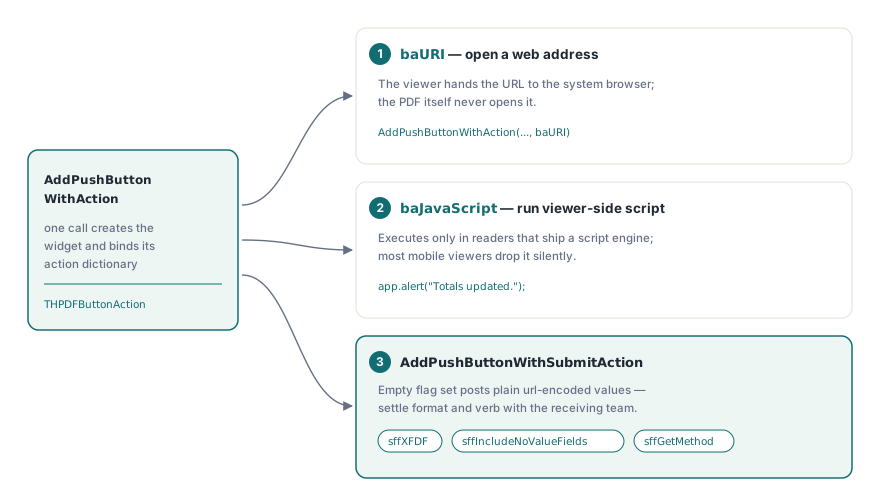
// Открыть страницу справки в системном браузере
Pdf.CurrentPage.AddPushButtonWithAction('btnHelp', 'Help',
  'https://www.example.com/claims-help', Rect(320, 700, 420, 730), baURI);

// Выполнить JavaScript на стороне просмотрщика
Pdf.CurrentPage.AddPushButtonWithAction('btnRecalc', 'Recalculate',
  'app.alert("Totals updated.");', Rect(320, 660, 420, 690), baJavaScript);

// Отправить как XFDF и сохранить пустые поля в payload
Pdf.CurrentPage.AddPushButtonWithSubmitAction('btnSubmit', 'Submit claim',
  'https://api.example.com/claims', Rect(320, 620, 420, 650),
  [sffXFDF, sffIncludeNoValueFields]);
Флаги отправки заслуживают больше внимания, чем им обычно достаётся. AddPushButtonWithSubmitAction принимает набор THPDFSubmitFormFlags, и пустой набор даёт обычный POST в формате url-encoded — формат, который многие тестовые конечные точки принимают, а многие продакшн-точки отвергают. Добавление sffXFDF переключает payload на XFDF. sffGetMethod меняет HTTP-глагол. sffIncludeNoValueFields сохраняет пустые поля в payload вместо того, чтобы молча их отбросить, а это важно в тот момент, когда потребитель различает «отсутствует» и «пусто». Набор флагов — часть вашего интерфейсного контракта с принимающей конечной точкой, так что согласуйте его с командой, которая разбирает отправку, а не после первой отклонённой партии
JavaScript на уровне поля: keystroke, format, validate
Действия живут не только в нажатиях кнопок. HotPDF также присоединяет JavaScript к событиям на уровне поля, которые генерируют просмотрщики, способные выполнять скрипты, пока пользователь вводит данные. Есть три триггера, и срабатывают они в разные моменты жизненного цикла ввода. Действие keystroke выполняется по мере поступления каждого символа, а затем ещё раз при фиксации. Действие format переписывает отображаемое значение после того, как изменение зафиксировано, — исключительно ради представления. Действие validate получает последнее слово, принимая или отвергая зафиксированное значение до того, как оно станет значением поля
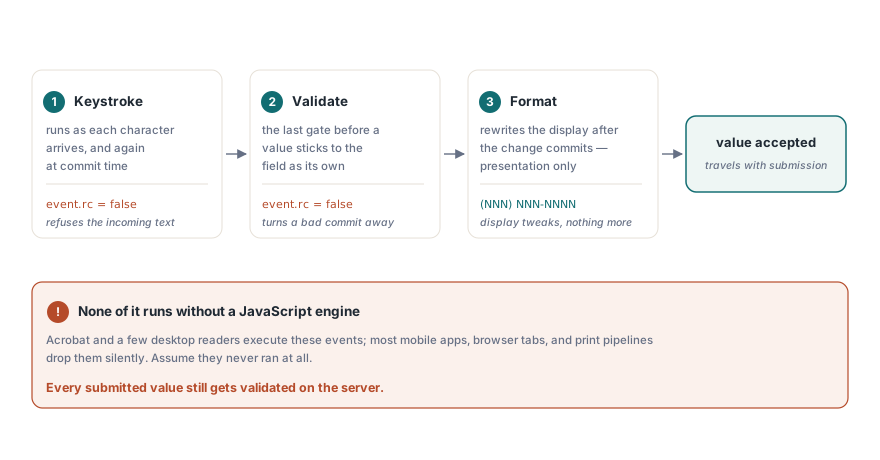
// Отклонять зафиксированные значения, не похожие на правдоподобный email-адрес
Pdf.AttachFieldKeyStrokeAction('applicant.email',
  'if (event.willCommit && !/^[\w.-]+@[\w.-]+\.\w+$/.test(event.value)) event.rc = false;');

// Отображать американские номера телефонов как (NNN) NNN-NNNN
Pdf.AttachFieldFormatAction('applicant.phone',
  'event.value = event.value.replace(/(\d{3})(\d{3})(\d{4})/, "($1) $2-$3");');

// Отклонять заявителей младше 18 лет в момент фиксации
Pdf.AttachFieldValidateAction('applicant.age',
  'if (parseInt(event.value) < 18) event.rc = false;');
Установка event.rc = false внутри скрипта keystroke или validate говорит просмотрщику отклонить ввод. Загвоздка в том, что ничего из этого не выполняется, если просмотрщик не несёт в себе движок JavaScript. У Acrobat и нескольких десктопных продуктов он есть. У большинства мобильных ридеров, встроенных в браузер рендереров и конвейеров печати его нет, и они молча отбрасывают скрипты без единого замечания. Так что скрипты полей повышают качество данных для той подгруппы пользователей, чей ридер их выполняет, — и это всё, на что они способны. Они не граница безопасности. Каждое отправленное значение всё равно нужно валидировать на сервере в момент получения, потому что нельзя предполагать, будто клиент хоть что-то проверил
Дефекты, проходящие визуальную проверку
Труднее всего в AcroForm поймать дефекты, которые живут в структуре данных, а не в отрисовке, потому что открыть файл и посмотреть на него не даёт вам ровным счётом ничего. Четыре встречаются достаточно часто, чтобы их стоило назвать, и для каждого есть механическая проверка, которая находит его до релиза
- Расхождение значения экспорта. Флажок, созданный как
AddCheckBox('consent', 'Yes', ...), отправляетYes. Потребитель, сверяющий значение сY, отклоняет каждую отправку, хотя страница выглядит безупречно. Заполните форму, экспортируйте её из Acrobat как XFDF и сверьте значения со схемой, которую потребитель реально ожидает - Случайное зеркалирование значений. Два поля, разделяющие одно полное квалифицированное имя, сливаются в одно. Симптом проявляется в момент ввода данных и никогда — на этапе генерации, так что тест состоит в том, чтобы напечатать что-то в форме, а не отрисовать её и осмотреть результат глазами
- Значения выпадающего списка за пределами списка опций. Когда текущее значение, переданное в
AddComboBox, не входит в перечисленные опции, просмотрщики расходятся во мнении, показывать ли его, очищать или помечать. Держите значение по умолчанию внутри списка — и расхождение исчезает - Поля, остающиеся редактируемыми после закрытия рабочего процесса. У HotPDF нет вызова сведения представления для полей AcroForm. Поддерживаемый способ заморозить заполненную форму — создавать поля с флагом
ffReadOnly, который сохраняет значение видимым через собственный поток представления поля, отказывая при этом в редактировании. Поле остаётся живым объектом формы, а именно это и ожидают найти дальнейшие по конвейеру инструменты сборки и подписания
Одно поведение на стороне просмотрщика заслуживает регрессионной заметки, даже если никакое изменение кода его не устраняет. Корпоративные развёртывания Acrobat могут по политике отключать JavaScript или ограничивать конечные точки отправки, так что действие, работавшее во всех сборках разработки, может оказаться мёртвым на заблокированном клиентском рабочем столе. Заложите видимый запасной вариант на случай, когда кнопка ничего не делает, даже если этот запасной вариант — всего лишь напечатанная инструкция, что пользователю делать вместо этого
Где работа с формами соприкасается с остальным документом
Поле подписи — это само по себе разновидность поля AcroForm. Форме, которую позже будут заверять или подписывать в дополнение, лучше зарезервировать это поле уже во время генерации, а не патчить его задним числом, и причины этого на уровне байтов разобраны в сопутствующей статье о цифровых подписях и подписании PAdES в HotPDF. Входные данные, приходящие как пакеты XFA, а не нативный AcroForm, — отдельная ситуация: сведение XFA в поля AcroForm — это отдельный рабочий процесс со своей моделью потерь, потому что две технологии форм не могут сосуществовать в одном файле
Показанные здесь методы полей, действий и триггеров — часть стандартного API HotPDF Delphi Component для Delphi и C++Builder; страница продукта содержит ссылку на полный справочник, включая перегрузки флагов полей и полное перечисление флагов отправки