Файл открывается на вашей машине без нареканий. Acrobat его показывает, предпросмотр печати выглядит правильно, все страницы на месте. Потом он уходит в типографию или в архивную систему, которая принимает вашу месячную партию, и возвращается отклонённым: изображения RGB в CMYK-задании, нет ключа /Trapped, выходное намерение не соответствует печатной машине. С документом не было ничего такого, что кто-нибудь мог бы увидеть. Он был неверен относительно профиля, а профиль проверяли там, где вас не было. Preflight — это допечатное название такой проверки, и настоящий вопрос в том, где ей место, когда PDF выходят из вашего собственного кода на Delphi, а не с рабочего стола дизайнера
HotPDF не даёт вам функции preflight, которую можно вызвать. У компонента есть окно отчёта preflight в GUI-демонстрации, но за ним нет API, который могла бы вызвать служба или скрипт сборки, и притворяться иначе значило бы отправить вас искать метод, которого нет. Это звучит как дыра ровно до момента, когда вы замечаете: для файлов, которые вы генерируете сами, вызов валидатора для собственного вывода в любом случае неверная форма работы. Вы уже управляете каждым свойством, которое валидатор стал бы проверять. Полезное разделение таково: сделать генератор неспособным выпустить плохой файл, а затем доказать это инструментом, который писали не вы
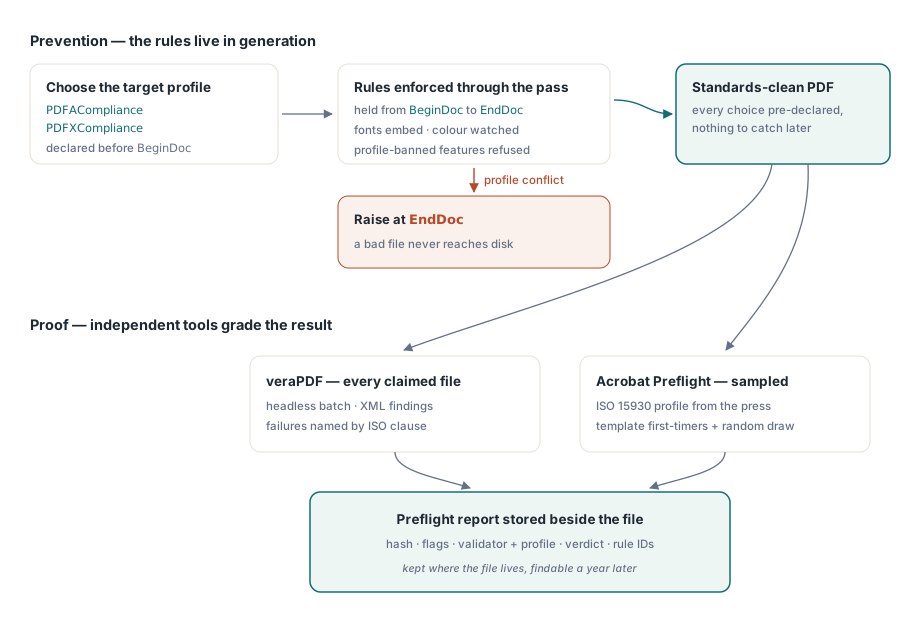
Почему собственный вывод проверяют иначе
Традиционный preflight исходит из того, что файл чужой. Его произвёл какой-то дизайнер, какое-то другое приложение, какая-то неизвестная цепочка правок, и вы его осматриваете, потому что понятия не имеете, что внутри. Документ, который произвёл ваш код, не чужой. Встраивание шрифтов, цветовое пространство, выходное намерение, блок метаданных — всё это решила ваша программа за несколько миллисекунд до того, как файл лёг на диск. Осматривать его потом, чтобы обнаружить только что сделанный вами выбор, — имитация работы. Дешевле ограничить этот выбор так, чтобы несоответствующий файл вообще не появился и ловить было бы нечего
Есть и причина доверия, по которой проверку стоит держать снаружи. Библиотека, благословляющая собственный вывод, сама себе выставляет оценку на экзамене. Когда архивная система заказчика или RIP типографии отклоняет ваш файл, фраза «наш компонент говорит, что всё в порядке» не весит ничего. Вердикт veraPDF или Acrobat весит, потому что другая сторона запускает те же инструменты
Сделайте соответствие настройкой, а не чек-листом
Слой предотвращения — это просто конфигурация. Задайте PDFACompliance или PDFXCompliance до BeginDoc, и HotPDF будет удерживать соответствующие правила на протяжении всего прохода генерации: он встраивает шрифты, следит за использованием DeviceRGB и DeviceCMYK относительно объявленного вами выходного намерения и отказывает в возможностях, которые профиль запрещает. Противоречия всплывают на EndDoc, где шлюзы соответствия поднимают исключение вместо того, чтобы тихо выпустить нечто, что провалится ниже по течению. Как только файл сохранён, те же свойства читаются обратно и сообщают, что именно было применено, — а это тот единственный факт, который больше всего нужен журналу вашего конвейера:
// После EndDoc: запишите применённые профили вместе с метаданными запуска
if Pdf.PDFACompliance <> '' then
  Log('Generated as PDF/A level ' + Pdf.PDFACompliance);
if Pdf.PDFXCompliance <> '' then
  Log('Generated as PDF/X profile ' + Pdf.PDFXCompliance);
Поместите эти флаги в ту же строку журнала, что и хеш входных данных и версию HotPDF. В тот день, когда валидатор и ваш генератор разойдутся во мнении о файле, эта строка скажет вам, какой шаблон его произвёл и какая сборка библиотеки была загружена, и спор, который иначе съел бы полдня, превращается в один grep. Выходные намерения, ICC-профили и тегирование, стоящие за этими флагами, подробно расписаны в руководстве по выводу PDF/A, PDF/X и PDF/UA средствами HotPDF
Дешёвый первый шлюз для файлов, которые вы не генерировали
Не всякий конвейер чисто генеративный. Заказчики загружают PDF, сканеры складывают их в папку, партнёры прикладывают их к письмам. Прогонять каждый такой файл через полный структурный валидатор — значит тратить время очереди на файлы, которые даже не откроются. Direct File API в HotPDF читает достаточно структуры файла, чтобы ответить на вопрос «а это вообще пригодный PDF», не загружая всё дерево объектов, и это делает его хорошим местом для быстрого отказа:
function TriagePdf(Pdf: THotPDF; const FileName: string): Boolean;
var
  Handle, Pages: Integer;
begin
  Result := False;
  Handle := Pdf.DAOpenFileReadOnly(FileName, '');
  if Handle <= 0 then
    Exit;  // структурно нечитаем: в карантин, не валидировать
  try
    Pages := Pdf.DAGetPageCount(Handle);
    Result := Pages > 0;
  finally
    Pdf.DACloseFile(Handle);
  end;
end;
Два факта об этом API определяют, как его обернуть. Ускоренный путь с плоской памятью держится только для незашифрованного ввода; передайте DAOpenFileReadOnly пароль — и он тихо откатится к полному разбору, поэтому файл, о котором вы знаете, что он зашифрован, должен пройти через DecryptFile в обычную рабочую копию до сортировки. А DAGetPageCount ничего не значит на дескрипторе, который не открылся чисто, поэтому проверка дескриптора остаётся строгой, и неположительный результат — это отказ, а не повод повторить попытку. Больше таких приёмов собрано в статье про Direct File API для работы с большими PDF
veraPDF как часть сборки
Для всего, что вы заявляете как PDF/A или PDF/UA, veraPDF — это тот валидатор, который стоит подключить. Он работает без интерфейса, принимает пакет, выдаёт XML или JSON и называет каждый провал по его пункту ISO, так что нарушение правила по ISO 19005-1, пункт 6.2.2, указывает прямиком на настройку генератора, а не оставляет вас гадать. Управление им из Delphi — это обычная работа с процессами:
function RunVeraPdf(const PdfFile, ReportFile: string): Cardinal;
var
  Cmd: string;
  SI: TStartupInfo;
  PI: TProcessInformation;
begin
  Cmd := Format('cmd /c verapdf.bat --format xml "%s" > "%s"',
    [PdfFile, ReportFile]);
  FillChar(SI, SizeOf(SI), 0);
  SI.cb := SizeOf(SI);
  if not CreateProcess(nil, PChar(Cmd), nil, nil, False,
      CREATE_NO_WINDOW, nil, nil, SI, PI) then
    RaiseLastOSError;
  try
    WaitForSingleObject(PI.hProcess, 120000);  // ограничьте ожидание для каждого файла
    GetExitCodeProcess(PI.hProcess, Result);
  finally
    CloseHandle(PI.hThread);
    CloseHandle(PI.hProcess);
  end;
end;
Этот таймаут отрабатывает своё место. Некорректный файл способен загнать любой парсер в угол, из которого тот уже не выйдет, а бессрочное ожидание внутри обработчика очереди утягивает за собой всю остальную очередь. Ограничьте ожидание, дайте таймауту собственный код отказа и отложите файл для человека. Читая результат, разбирайте XML по идентификаторам правил, а не по человекочитаемому тексту. Идентификаторы правил переживают обновления валидатора; формулировки сообщений — нет, а по стабильному коду инженер поддержки может искать среди старых обращений
То, как вы запускаете пакет, важно не меньше, чем то, проходит ли каждый файл. Один процесс на файл, а не один на пакет, чтобы ядовитый ввод стоил вам таймаута только этого файла и ничего больше. Ограничьте число процессов валидатора количеством ядер, потому что построение XML-отчёта упирается в процессор, а перегрузка лишь заставляет систему буксовать. И поставьте потолок по размеру на приёме, потому что отсканированная книга на два гигабайта завладеет очередью, как бы терпелив ни был парсер. Ничто из этого не является preflight в строгом смысле. Это разница между шлюзом, который переживает объёмы конца месяца, и шлюзом, который выключат в первую же ночь, когда он застопорит конвейер в два часа ночи

Именно на PDF/X эта схема даёт сбой. veraPDF его не проверяет, поэтому рабочей проверкой остаётся Acrobat Preflight с профилем ISO 15930, который назвала ваша типография. Acrobat требует человека, а это означает выборку вместо сплошного охвата: первый файл с нового шаблона плюс небольшая случайная выборка из каждой партии, пока автоматический шлюз занимается всем, что можно обработать без человека. Выборочная проверка, которая реально выполняется, лучше полной автоматизации, которая навсегда остаётся недоделанной
Отчёт, который вам захочется иметь и через год
Шлюз preflight окупается дважды. Один раз, когда останавливает плохой файл на входе, и второй — гораздо позже, когда кто-нибудь спросит, почему конкретный файл был пропущен. Именно второй момент должен диктовать формат, потому что именно в нём тощий отчёт оставляет вас ни с чем. Для каждого проверенного файла храните хеш входа, флаги соответствия генератора и версию библиотеки из описанной выше строки журнала, имя и версию валидатора, профиль, по которому шла проверка, результат прохождения или провала, а также идентификаторы провалившихся правил с номерами страниц там, где валидатор их даёт. Храните этот отчёт рядом с файлом, который он описывает. Положите его в отдельную систему — и эту систему выведут из эксплуатации раньше, чем архив, который она документирует
Исключения тоже надо записывать. Когда заказчик настаивает на отправке файла, который шлюзу не нравится, ответ не в том, чтобы ослабить правило для всех. Зафиксируйте, кто одобрил этот файл, на каком основании и до какой даты, и приложите это разрешение к его отчёту. Разрешение с именем и сроком — это решение, у которого есть владелец. Проверка, закомментированная «временно», — это инцидент, ждущий своей даты
Ещё одна привычка окупает себя: когда файл проваливается, скопируйте его в именованную папку регрессий, прежде чем кто-либо к нему прикоснётся. Почти всякая проблема preflight, достойная отладки, восходит к одному конкретному входу, и команды, которые эти входы сохраняют, устраняют повторение за час вместо того, чтобы ждать, пока оно всплывёт в продакшене. Показанные здесь свойства соответствия и Direct File API входят в состав HotPDF Delphi Component для Delphi и C++Builder, документация которого разбирает каждый вызов полностью