PDF/A, PDF/X и PDF/UA — три разных стандарта, решающих три разные задачи: долгосрочное архивирование, обмен для печати и доступность. Это не три флажка в одной форме соответствия, и самая частая ошибка — обращаться с ними так, будто это именно так. Файл может быть безупречным PDF/A и бесполезным для типографии; идеальный печатный мастер-файл может быть нечитаемым для экранного диктора. Хуже того, все три стандарта — это ограничения на внутреннюю структуру файла, а не на то, как он выглядит. Документ, который безупречно открывается в каждом просмотрщике, который у вас есть, вполне может провалить проверку с первой попытки — и обычно так и происходит
HotPDF, нативная VCL-библиотека PDF от losLab, трактует соответствие как то, что вы объявляете ещё до появления первой страницы. Вы задаёте свойство соответствия, подключаете структуры, которых требует стандарт, и библиотека отказывается принимать конфигурации, противоречащие профилю, в момент сохранения. Это лучшая модель, чем сгенерировать файл и надеяться, что постобработчик сможет доделать его задним числом, потому что большую часть требований этих стандартов невозможно добавить постфактум
Три стандарта ISO, три разных обещания
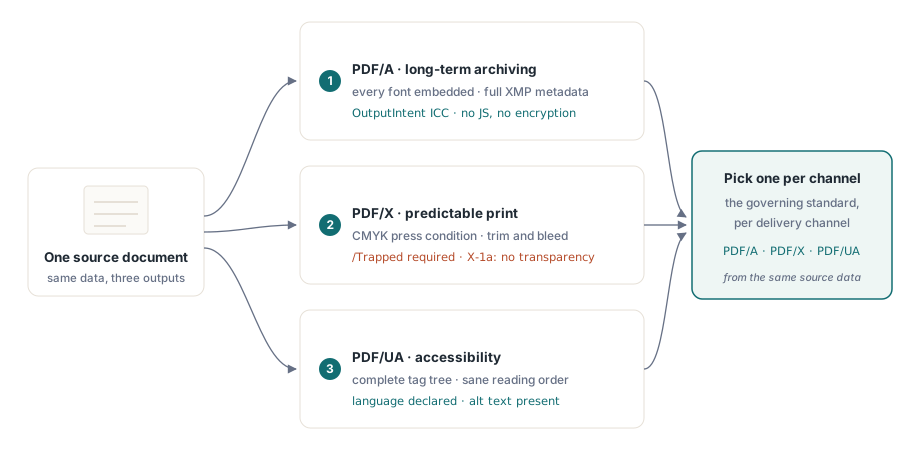
PDF/A (ISO 19005) — про время. Он обещает, что файл будет отображаться идентично и десятилетия спустя, а значит, требует полной самодостаточности: все шрифты встроены, каждому цвету через OutputIntent придан независимый от устройства смысл, присутствуют полные метаданные XMP, а всё, чьё поведение зависит от окружения, под запретом. Шифрование и JavaScript исключены, потому что никто не может гарантировать, что дешифратор или движок скриптов будут существовать в 2050 году
PDF/X (ISO 15930) — про цвет на бумаге. Он существует для того, чтобы дизайнер мог передать файл в типографию, не обсуждая с ней ничего лишнего, а значит, требует охарактеризованных условий печати, обязательного ключа /Trapped, заданной геометрии обреза и вылетов за обрез, а в варианте X-1a — отсутствия живой прозрачности, которую RIP пришлось бы додумывать самому. PDF/UA (ISO 14289) — про то, кто способен прочитать результат. Вспомогательным технологиям нужно полное дерево тегов, осмысленный порядок чтения, объявленный язык документа и текстовые альтернативы для всего, что не является текстом
Поскольку эти три стандарта тянут в разные стороны, выбирайте управляющий стандарт для каждого канала вывода отдельно, а не гонитесь за одним файлом, удовлетворяющим им всем сразу. Печатный мастер-файл только в CMYK — это ровно то, что не стоит отдавать пользователю экранного диктора, который вообще не видит цвет, а блокировка динамического поведения в архивном профиле сталкивается с чем угодно интерактивным. Генерируйте отдельно для каждого канала из одних и тех же исходных данных — и весь этот конфликт снимается сам собой
PDF/A: OutputIntent — это то, о чём все забывают
Если файл PDF/A проваливает проверку, OutputIntent — первое, что стоит проверить. Это структура, которую генераторы пропускают чаще всего именно потому, что от неё ничего не зависит визуально. ISO 19005 требует его наличия: встроенного ICC-профиля, который точно фиксирует, что на самом деле означают цвета устройства в документе. HotPDF делает этот профиль явным входным параметром, а не запоздалой мыслью:
var
  Pdf: THotPDF;
  ICC: TFileStream;
begin
  Pdf := THotPDF.Create(nil);
  try
    Pdf.FileName := 'invoice-archival.pdf';
    Pdf.PDFACompliance := 'B';            // уровень B: визуальная точность
    Pdf.Lang := 'en-US';
    Pdf.StandardFontEmulation := False;   // встраивать настоящие шрифты, без эмуляции Base-14
    ICC := TFileStream.Create('sRGB.icc', fmOpenRead);
    try
      Pdf.AddPDFAOutputIntent('sRGB IEC61966-2.1', '', ICC, 3, 'DeviceRGB');
    finally
      ICC.Free;
    end;
    Pdf.BeginDoc;
    Pdf.CurrentPage.SetFont('Arial', [], 11);
    Pdf.CurrentPage.TextOut(50, 760, 0, 'Archival invoice body');
    Pdf.EndDoc;
  finally
    Pdf.Free;
  end;
end;
Здесь исход решает несколько деталей. StandardFontEmulation обязан быть выключен: эмулированные шрифты Base-14 не встраиваются, а встраивание по ISO 19005 не обсуждается. Шифрование должно оставаться отключённым, поэтому никогда не сочетайте PDFACompliance с ActivateProtection; зашифрованный архивный файл — это противоречие, которое валидатор ловит немедленно. Число компонентов в AddPDFAOutputIntent должно соответствовать профилю: 3 для RGB-профиля вроде sRGB IEC61966-2.1 и 4 для CMYK. HotPDF отслеживает использование DeviceRGB и DeviceCMYK относительно заявленного intent'а по ходу записи, так что случайная заливка CMYK в документе с RGB-intent превращается в зафиксированную проблему, а не в тихую
Стоит сказать отдельно про ICC-профиль: относитесь к нему как к версионируемому артефакту развёртывания, а не как к файлу, который кто-то когда-то бросил на сборочный сервер. Его байты встраиваются в каждый генерируемый документ, так что усечённый или повреждённый профиль незаметно отравляет целую партию файлов, и вы узнаёте об этом только на этапе проверки. Поставляйте его вместе с инсталлятором, фиксируйте его контрольную сумму в журнале запуска и загружайте его через паттерн с TFileStream, показанный выше, чтобы отсутствующий файл громко падал во время генерации, а не тихо — на воротах архива
PDF/X для печати: Trapped, CMYK и профиль типографии
Печатные мастер-файлы переворачивают историю с цветом. Типографии нужен охарактеризованный CMYK, а стандарт требует указать, применён ли треппинг, даже если честный ответ — «понятия не имею». Ключ /Trapped обязателен в любом случае:
Pdf.PDFXCompliance := 'X-1a';
Pdf.Trapped := 'Unknown';        // обязательный ключ по ISO 15930
ICC := TFileStream.Create('FOGRA39.icc', fmOpenRead);
try
  Pdf.AddPDFXOutputIntent('FOGRA39 (ISO 12647-2:2004)', '', ICC, 4, 'DeviceCMYK');
finally
  ICC.Free;
end;
Pdf.BeginDoc;
// рисуйте цветами, безопасными для CMYK, без прозрачности, без шифрования
Pdf.EndDoc;
Число компонентов теперь равно 4 для типографского профиля CMYK. X-1a также запрещает живую прозрачность, так что проверьте весь код отрисовки, который накладывает полупрозрачные элементы; всё, что просмотрщик компонует на экране, — ровно то, что RIP откажется интерпретировать. Когда типография присылает другую характеризацию, замените байты профиля и строку идентификатора, но оставьте окружающую структуру без изменений
PDF/UA: структура генерируется, а не пристраивается задним числом
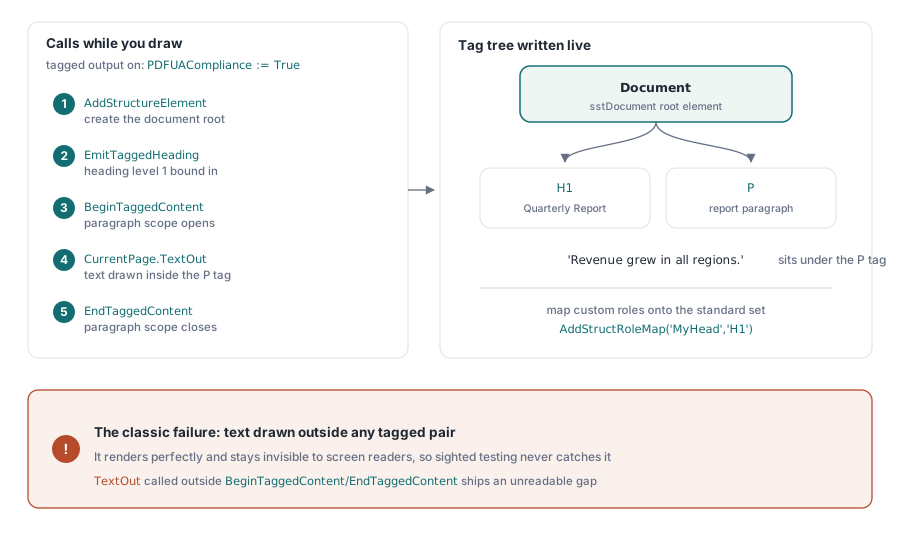
Доступность — это стандарт, который команды чаще всего пытаются прикрутить в самом конце, и он наказывает такой подход жёстче двух остальных. Дерево тегов должно отражать тот порядок, в котором содержимое было логически создано, — а этой информации у вас уже попросту нет, как только файл записан. Установка PDFUACompliance включает тегированный вывод, а API структуры привязывает каждый вызов отрисовки к его семантической роли по ходу дела:
Pdf.PDFUACompliance := True;     // автоматически включает тегированный PDF
Pdf.Lang := 'en-US';             // задавайте явно; пустое значение откатывается к 'en'
Pdf.BeginDoc;

Root := Pdf.AddStructureElement(sstDocument, nil);
H1 := Pdf.EmitTaggedHeading(1, Root, 50, 700, 'Quarterly Report');
Para := Pdf.BeginTaggedContent('P', Root);
Pdf.CurrentPage.TextOut(50, 650, 0, 'Revenue grew in all regions.');
Pdf.EndTaggedContent;

Pdf.EndDoc;
Сбой, за которым нужно следить, — это текст, нарисованный вне какой-либо пары BeginTaggedContent/EndTaggedContent. Он отрисовывается безупречно и остаётся невидимым для экранного диктора, так что ни один зрячий тестировщик его не поймает; баг уходит в релиз и всплывает только тогда, когда в этот пробел попадает реальный пользователь вспомогательных технологий. Когда ваши шаблоны несут собственные имена ролей структуры, отображайте их на стандартный набор через AddStructRoleMap('MyHead', 'H1'), чтобы совместимые ридеры понимали, что они значат. ISO 14289 также требует объявленного языка. HotPDF откатывается к 'en', когда Lang пуст, но это страховочная сетка, а не повод оставлять настоящий язык документа незаданным
Проверка: доверяйте валидатору, а не просмотрщику
Просмотрщик, который открыл ваш файл, ничего не доказывает насчёт соответствия, так что проверка должна жить в процессе релиза вместе с инструментами, которые проверяют структуру, а не отрисовку. Для PDF/A и PDF/UA veraPDF — эталонный открытый валидатор; он сообщает о сбоях с привязкой к пункту ISO, что напрямую соотносится с настройками выше. Для PDF/X практической проверкой по-прежнему остаются профили Preflight в Adobe Acrobat, потому что соответствие для типографии — это в той же мере про намерение по цвету, что и про синтаксис
Часть этой работы берёт на себя и сам генератор. В момент сохранения HotPDF сверяет флаги функций с настроенной версией PDF, молча понижая то, что версия не способна выразить, — например, AES-256 опускается до AES-128 на версиях ниже PDF 1.7. Проверки соответствия в EndDoc идут дальше и напрямую вызывают исключение при явных противоречиях, вроде запроса PDFACompliance вместе с шифрованием. Ни то, ни другое не заменяет внешний валидатор. Они лишь не дают невозможным конфигурациям вообще до него дойти
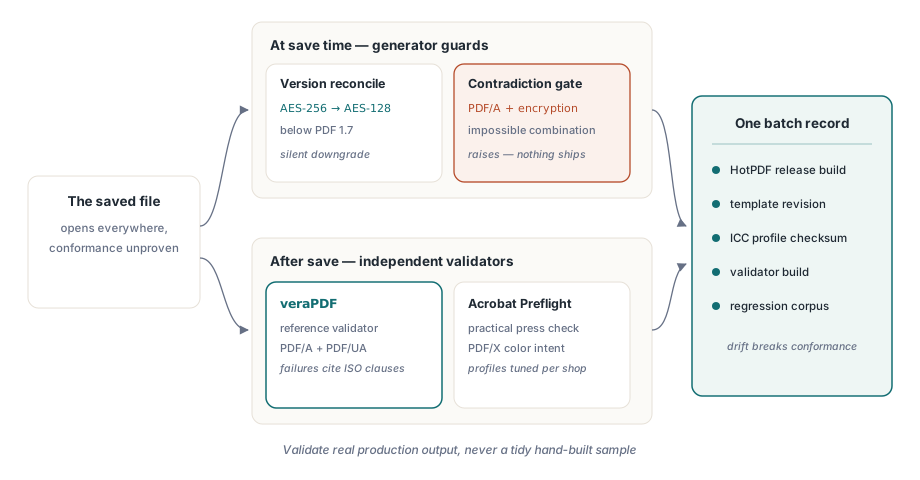
Одна привычка окупается снова и снова: версионируйте всю настройку соответствия как единое целое. Релиз HotPDF, ревизию шаблона, контрольную сумму ICC-профиля, сборку валидатора, которая дала добро. Соответствие сползает в сторону в тот момент, когда что-то одно из этого меняется без остальных, а самые уродливые аудиты — те, где никто не может восстановить, какая именно комбинация породила пятилетний архивный файл. Одна запись конфигурации на партию файлов решает это раз и навсегда
И последнее: запускайте валидатор на реальном продакшн-выводе, никогда — на аккуратно собранном вручную образце. Кусающие сбои приходят из данных, которых никто не предвидел: логотип клиента, пришедший в CMYK, хотя intent говорит RGB; правка шаблона, незаметно протащившая невстроенный шрифт; новый путь кода, рисующий текст вне дерева тегов. Держите по одному заведомо плохому файлу от каждого прошлого инцидента как регрессионный образец, и контроль соответствия останется честным на дистанции. О стороне рендеринга в этих конвейерах — наша статья о выводе отчётов, шрифтах и изображениях в HotPDF; о встраивании валидаторов в сборку — сопутствующий материал об автоматизации предпечатных проверок PDF
Свойства соответствия, output intent'ы и API тегирования, использованные в этих примерах, поставляются вместе с HotPDF Delphi Component для Delphi и C++Builder; страница продукта содержит ссылку на полный справочник по каждому вызову, показанному здесь