Генерация отчёта сводится к размещению на странице трёх вещей и к тому, чтобы они договорились между собой о том, где именно они лежат: текст в известных координатах, шрифты, которые отрисовываются одинаково и на сервере, и на вашем рабочем столе, и изображения, подогнанные по размеру. Всё остальное, что делает библиотека отчётов, выстроено вокруг этих трёх задач. HotPDF, библиотека генерации PDF от losLab для Delphi и C++Builder, даёт вам каждую из них как прямой вызов на объекте страницы, и единственное реальное трение — это система координат под всем этим, которая идёт в противоположную сторону от привычной канвы VCL. Разберитесь с этой ориентацией в самом начале — и остальная вёрстка перестанет с вами бороться
Размещение текста и начало координат в левом нижнем углу
Почти у каждого первый отчёт выходит перевёрнутым. Заголовок оказывается у нижнего края, а каждая следующая строка карабкается вверх. Ничего при этом не ломается. Пространство пользователя PDF, определённое в ISO 32000-1 §8.3, помещает начало координат в левый нижний угол, где Y растёт вверх, — это зеркальное отражение канвы GDI, где Y растёт вниз от левого верхнего угла. Пять минут, потраченные на то, чтобы примириться с этим, спасают от вёрстки, которую иначе пришлось бы переписывать в тот момент, когда числа перестанут сходиться
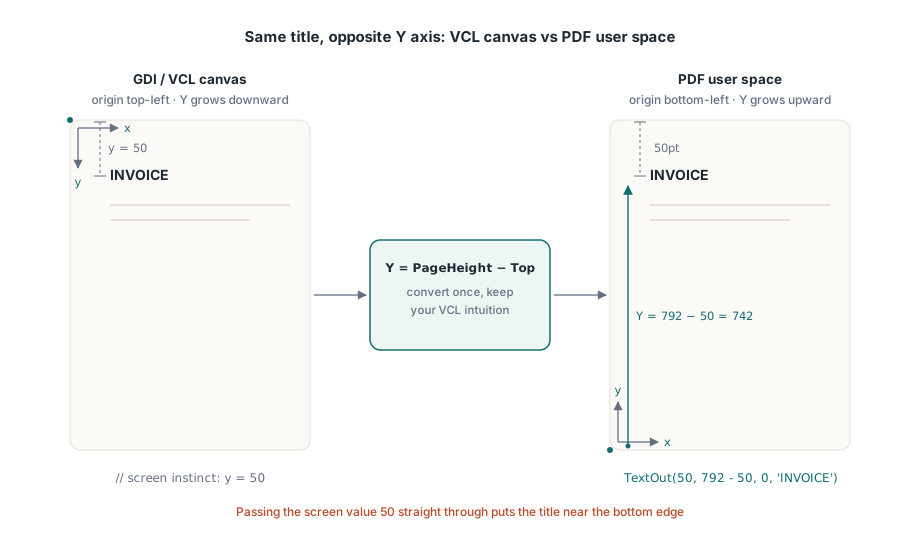
Центральный вызов объекта страницы — TextOut(X, Y, Angle, Text). X и Y задают положение текста в пунктах от левого нижнего угла, а Angle поворачивает его в градусах — именно так рисуется диагональный штамп DRAFT или COPY, без какой-либо специальной поддержки. Приём, который позволяет интуиции, натренированной на VCL, продолжать работать, — выражать Y как высоту страницы минус нужное расстояние от верхнего края:
var
  Pdf: THotPDF;
begin
  Pdf := THotPDF.Create(nil);
  try
    Pdf.FileName := 'invoice-0001.pdf';
    Pdf.BeginDoc;
    Pdf.CurrentPage.SetFont('Arial', [fsBold], 16);
    Pdf.CurrentPage.TextOut(50, 792 - 50, 0, 'INVOICE');       // 50pt от верхнего края Letter
    Pdf.CurrentPage.SetFont('Arial', [], 10);
    Pdf.CurrentPage.TextOut(50, 792 - 70, 0, 'Date: 2026-06-11');
    Pdf.CurrentPage.TextOut(300, 400, 45, 'COPY');              // повёрнутый штамп
    Pdf.AddPage;                                                // CurrentPage теперь указывает сюда
    Pdf.CurrentPage.SetFont('Arial', [], 10);                   // состояние шрифта не переносится
    Pdf.CurrentPage.TextOut(50, 742, 0, 'Page 2 detail rows');
    Pdf.EndDoc;
  finally
    Pdf.Free;
  end;
end;
Два зависящих от состояния поведения в этом листинге отвечают за большинство багов, которые проявляются только на второй странице. AddPage перенацеливает CurrentPage на только что созданную страницу, так что ссылка на страницу, закэшированная вами раньше, больше не рисует туда, куда вы ожидаете. Выбор шрифта тоже действует на уровне страницы, а не документа. Если пропустить SetFont после AddPage, первый TextOut на новой странице откатится к тому шрифту по умолчанию, с которым страница началась, а не к жирному заголовочному шрифту, который вы задали три страницы назад. Безопасная привычка — считать «начать новую страницу» и «заново установить текстовое состояние» одним неразделимым шагом в цикле формирования отчёта
Шрифты, которые существуют на сервере, а не только на вашем рабочем столе
Большинство проблем со шрифтами на самом деле — это проблемы развёртывания в маскировке. На вашей машине разработчика установлен корпоративный шрифт, поэтому отчёт на экране выглядит правильно, и вы его отгружаете. Продакшн-хост выполняет задачу под сервисной учётной записью, на которой этого шрифта никогда не было, рендерер тихо подставляет что-то из найденного, и первым об этом узнаёт клиент, спрашивающий, почему поменялся фирменный бланк. Выход — перестать доверять каталогу шрифтов ОС и загружать шрифт из файла, который ваш инсталлятор кладёт на диск. Вызов регистрации Unicode в HotPDF принимает путь и делает ровно это:
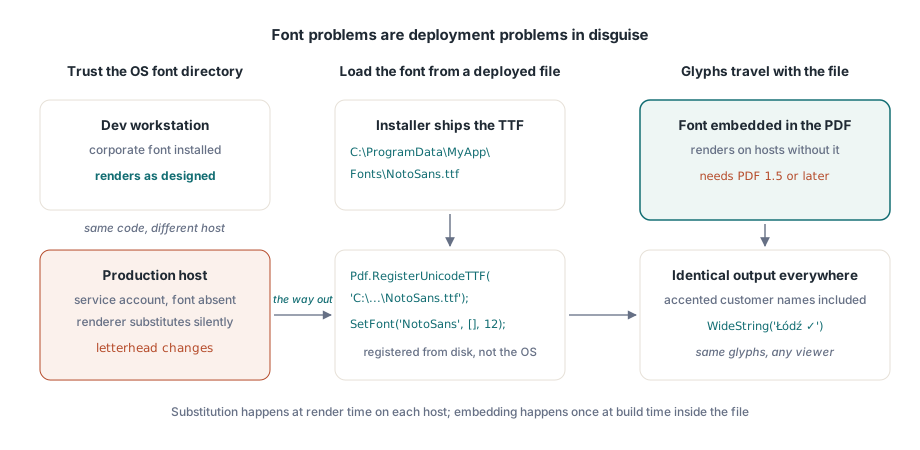
Pdf.RegisterUnicodeTTF('C:\ProgramData\MyApp\Fonts\NotoSans.ttf');
Pdf.CurrentPage.SetFont('NotoSans', [], 12);
Pdf.CurrentPage.TextOut(50, 700, 0, WideString('Łódź - Ünïcode test ✓'));
TextOut принимает WideString напрямую, и это важнее, чем кажется на первый взгляд. Имя клиента с диакритическим знаком, немецкая улица, польский город — это не крайние случаи, а обычное содержимое таблицы клиентов, и они проходят через тот же самый вызов, что и жёстко прописанные ASCII-метки, при условии что зарегистрированный шрифт действительно содержит нужные глифы. Со встроенными шрифтами идёт одно версионное ограничение: документ должен быть PDF 1.5 или новее, так что если какое-то не связанное с этим требование удерживает вас на более старой версии, именно оно тихо всё сломает. Письменности с написанием справа налево, такие как арабская и еврейская, нуждаются в настоящем шейпинге, а не в прямом поиске глифов, и для этого есть свой отдельный конвейер; см. нашу статью о шейпинге текста для сложных письменностей в HotPDF
Когда ни один установленный шрифт не способен выразить нужное — подумайте о символах MICR на чеке или проприетарном наборе символов — пробел закрывают шрифты Type 3. Каждый глиф вы определяете как небольшой поток содержимого через RegisterType3Font и AddType3Glyph. Это специализированный уголок API, к которому вы будете обращаться редко, но он куда чище, чем разбрасывать по странице сотни крошечных растровых символов
Изображения: средние аргументы — это ширина и высота, а не угол
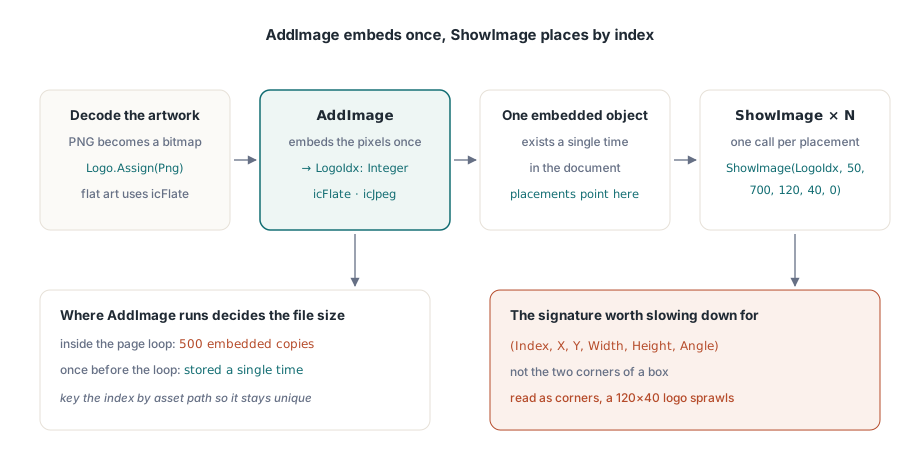
Работа с изображениями делится на два шага, и разделить их — вся суть. AddImage принимает TBitmap или TJPEGImage, встраивает его один раз и возвращает индекс. Графику PNG перед этим нужно декодировать в битмап. Затем ShowImage рисует этот индекс где и сколько угодно раз. Порядок аргументов у ShowImage — единственное место, где стоит притормозить и внимательно прочитать сигнатуру:
var
  Png: TPngImage;
  Logo: TBitmap;
  LogoIdx: Integer;
begin
  Png := TPngImage.Create;
  Logo := TBitmap.Create;
  try
    Png.LoadFromFile('brand-logo.png');
    Logo.Assign(Png);                       // декодировать PNG в битмап
    LogoIdx := Pdf.AddImage(Logo, icFlate); // без потерь для плоской заливки
  finally
    Logo.Free;
    Png.Free;
  end;
  // (Index, X, Y, Width, Height, Angle): не (X1, Y1, X2, Y2)
  Pdf.CurrentPage.ShowImage(LogoIdx, 50, 700, 120, 40, 0);
end;
Два числа после позиции — это ширина и высота. Это не координаты противоположного угла, а завершающий аргумент — угол поворота в градусах. Прочитайте сигнатуру как рамку X1/Y1/X2/Y2 — и логотип 120 на 40, размещённый в (50, 700), вместо этого растянется оттуда до (120, 40), расползаясь на большую часть страницы. Результат делает ошибку очевидной, тогда как исходный код выглядит совершенно разумным, — именно это и заставляет потерять на этом целый вечер. KeepImageAspectRatio по умолчанию равен True, так что рамка с неверными пропорциями обрамляет изображение полосами, а не искажает его; переключайте в False только тогда, когда растяжение действительно нужно
Разделение на регистрацию и размещение окупается на длинных прогонах. Поскольку AddImage встраивает пиксели один раз, а каждый ShowImage с этим индексом указывает обратно на тот же встроенный объект, именно место вызова AddImage определяет размер файла. Вызовите его внутри цикла по страницам для выписки на 500 страниц — и один и тот же логотип встроится 500 раз. Вызовите его один раз перед циклом, сохраните индекс — и логотип будет храниться единожды. Небольшого словаря с ключом по пути к ресурсу достаточно, чтобы каждое отдельное изображение регистрировалось ровно один раз
Выбор кодека — второй рычаг влияния на размер. Фотографическому содержимому — сканированным вложениям и подобному — место в JPEG: передайте icJpeg в AddImage и снизьте JpegQuality примерно до 85, поскольку это свойство стартует со 100, а разница при 85 незаметна на печатной странице. Графике с плоской заливкой — логотипам, диаграммам, линейным рисункам — место в icFlate, где сжатие без потерь уже компактно, а JPEG размазал бы заметный «звон» вокруг резких границ. Прогон выписок, впихивающий по одной фотографии полного качества на каждую страницу, может раздуться до гигабайт; то же содержимое при JPEG 85 занимает примерно десятую часть этого размера, и никакой читатель разницы не заметит
Линии, рамки и заливка через примитивы путей
Горизонтальной линии под заголовком таблицы и серому прямоугольнику под итоговой суммой не обязательно быть изображениями. Нарисуйте их как векторы — и они останутся чёткими при любом масштабе, резко напечатаются и почти ничего не добавят к размеру файла. HotPDF следует той же модели, что и сырые потоки содержимого PDF: постройте путь, затем вызовите оператор, который его закрашивает
// Горизонтальная линия под заголовком таблицы
Pdf.CurrentPage.SetLineWidth(0.75);
Pdf.CurrentPage.MoveTo(50, 660);
Pdf.CurrentPage.LineTo(545, 660);
Pdf.CurrentPage.Stroke;

// Затенённый прямоугольник итогов: X, Y, ширина, высота
Pdf.CurrentPage.SetRGBFillColor(RGB(235, 235, 235));
Pdf.CurrentPage.Rectangle(395, 120, 150, 40);
Pdf.CurrentPage.Fill;
Порядок здесь не факультативен: задайте состояние закраски, постройте путь, затем вызовите Stroke или Fill. Путь, который вы построили, но так и не закрасили, ничего не добавляет на страницу, — и это почти всегда ответ на вопрос, почему линия «не появляется». SetRGBFillColor принимает один TColor, так что привычные константы VCL вроде clNavy и clBlack подходят напрямую, а Rectangle использует те же аргументы ширины и высоты, что и размещение изображений, а не два угла. Одно предостережение насчёт тонких линий: всё, что тоньше примерно половины пункта, может изящно смотреться на мониторе и затем исчезнуть на офисном принтере с разрешением 600 dpi, так что 0.75pt — разумный нижний предел для любой линии, которая должна пережить печать
Разбивка на страницы на реальных данных, а не на демонстрационных
Одна деталь, которую нужно продумать до того, как вёрстка застынет: числовые колонки должны выравниваться по правому краю, и правильный способ этого добиться — измерить отрисованную ширину каждого значения и отступить назад от границы колонки, а не дополнять строку пробелами слева. Дополнение пробелами выравнивается только в моноширинном шрифте, а финансовый отчёт никто не набирает моноширинным шрифтом. Сначала прогоняйте значения через учитывающие локаль процедуры Delphi вроде FormatFloat, чтобы разделитель тысяч, ширину которого вы измеряете, был тем же самым, который реально отобразит локаль клиента
Опасность с разбивкой на страницы в том, что вы пишете её против демонстрационного набора данных, где десять коротких строк умещаются на одной странице и циклу ни разу не приходится ломаться. Продакшн подсовывает клиента, название компании которого занимает 140 символов, и выписку на 4000 позиций, и теперь циклу приходится ломаться правильно каждый раз. Устойчивый паттерн — единый курсор Y, который движется вниз по мере вычитания высоты каждой строки, и проверка, начинающая новую страницу в момент, когда курсор пересёк бы нижнее поле. «Вниз» здесь означает уменьшение Y — это единственное место, где начало координат в левом нижнем углу остаётся контринтуитивным. Держите всё это в одной процедуре, которая заодно заново вызывает SetFont и перерисовывает сквозной заголовок на новой странице, и баги со сдвигом на одну страницу никогда не найдут опоры. Когда те же самые отчёты должны ещё и удовлетворять архивным правилам или требованиям доступности, именно решения, принятые прямо здесь — какие шрифты вы встраиваете, тегирован ли вывод, какие цветовые пространства вы используете, — находятся под надзором этих стандартов; стоит прочитать руководство HotPDF по PDF/A, PDF/X и PDF/UA, прежде чем шаблон окончательно застынет
Каждый показанный здесь вызов — позиционирование текста, регистрация шрифтов, встраивание изображений и рисование путей — поставляется в составе HotPDF Delphi Component для Delphi и C++Builder, чей справочник документирует полный API вывода наряду с функциями форм, шифрования и подписания, которые находятся с ним рядом