Niewidomy użytkownik otwiera raport kwartalny w twojej lśniącej nowej przeglądarce Delphi, włącza NVDA i słyszy stopkę strony, potem kolumnę liczb, potem tytuł, który każdy widzący czytelnik przeczytałby jako pierwszy. Albo nie słyszy nic. Strona wygląda na ekranie idealnie, i to jest właśnie pułapka: renderowanie i czytanie to różne problemy rozwiązywane przez różny kod. Kolejność, w jakiej PDF maluje swoje glify, nie ma żadnego obowiązku odpowiadać kolejności, w jakiej dana osoba powinna je usłyszeć, więc przeglądarka zbudowana wyłącznie na wywołaniach renderujących produkuje bezbłędny obraz i bezużyteczną narrację. PDFium Component, wrapper VCL/LCL wokół silnika PDFium dla Delphi, C++Builder i Lazarusa, niesie z tego powodu osobny zestaw API do czytania. API rysujące nie potrafią odzyskać kolejności czytania, której nigdy im nie podano
Dostępna przeglądarka stoi albo upada na trzech rzeczach. Musi wyodrębnić kolejność, którą czytnik ekranu potrafi wypowiedzieć, utrzymać widoczny kursor słowa przypięty do tego, co mówi głos, i przyznać, gdy dokument nigdy nie został otagowany, zamiast zgadywać i udawać. Każda z nich ma jasne API, po które sięgnąć, i porażkę, która ugryzie, jeśli pominiesz szczegół
Kolejność czytania mieszka w drzewie struktury, nie w kolejności malowania
ISO 32000-1 §14.8 definiuje strukturę logiczną jako drzewo elementów nałożonych na treść strony. PDF/UA (ISO 14289-1) idzie dalej i czyni to drzewo obowiązkowym: każdy fragment prawdziwej treści musi być przez nie osiągalny w kolejności czytania, z artefaktami strony oznaczonymi jako takie i pomijanymi. Poprawnie otagowany raport wie, że "Quarterly Results" to nagłówek drugiego poziomu, a siatka sum to tabela z komórkami nagłówkowymi. Nieotagowany raport to sterta ustawionych w pozycjach ciągów glifów, które akurat wyglądają jak dokument
ReadablePageContent przechodzi przez to drzewo, gdy jest obecne, i zwraca fragmenty otagowane semantycznym Kind, wartościami takimi jak cfHeading i cfParagraph, więc UI może powiedzieć "nagłówek" przed słowami zamiast przeczytać pogrubioną linię jak zwykły tekst główny. Bez użytecznego drzewa to samo wywołanie wraca do heurystycznej analizy układu: wykrywa kolumny, grupuje linie bazowe, porządkuje od lewej do prawej i od góry do dołu. Ta ścieżka zapasowa jest w porządku dla jednokolumnowego notatnika, a chwiejna dla newslettera, formularza wielokolumnowego, czegokolwiek z paskiem bocznym albo cytatem wyróżnionym. Liczy się wiedza, który wynik dostałeś, a API mówi ci to wprost. Rekord TPdfReadableContent niesie pole Source ustawione na rosStructure, gdy kolejność pochodziła z otagowanego drzewa, albo na rosHeuristic, gdy została wywnioskowana z geometrii. Pokaż zgadniętą kolejność, jakby była zweryfikowana, a wyślesz wersję dostępnościową odznaki "test zaliczony" na buildzie, którego nikt nie uruchomił
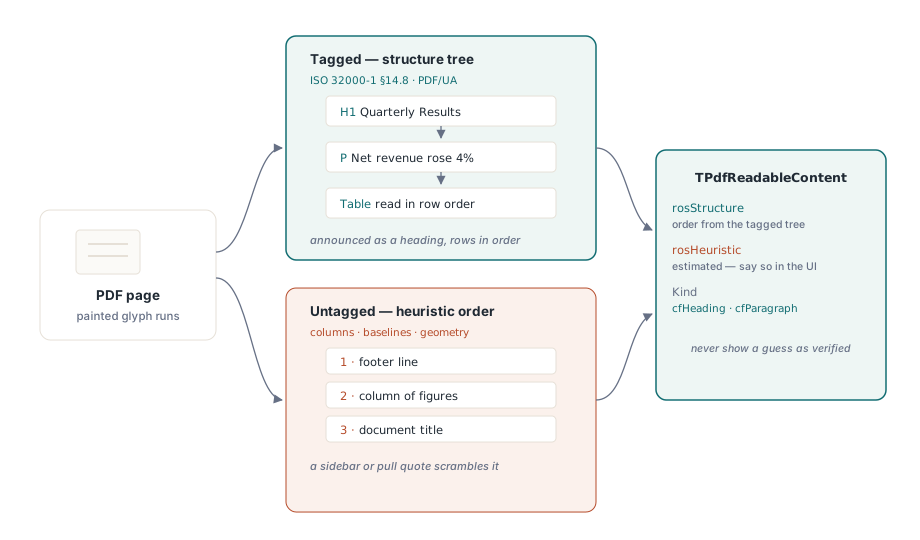
Tanim ruchem w chwili otwarcia jest odczytanie IsTagged i wywołanie ValidatePdfUa raz, a potem zapisanie odpowiedzi w pamięci podręcznej. Nieudana kontrola PDF/UA to nie powód do odrzucenia pliku. To powód, by umieścić "szacowana kolejność czytania" na pasku stanu, żeby gdy klient przyśle skargę na zniekształconą narrację, wsparcie od razu wiedziało, czy patrzy na problem z tagowaniem w pliku, czy na błąd w twoim kodzie
Od strony do kolejki mowy z ReadingUnits
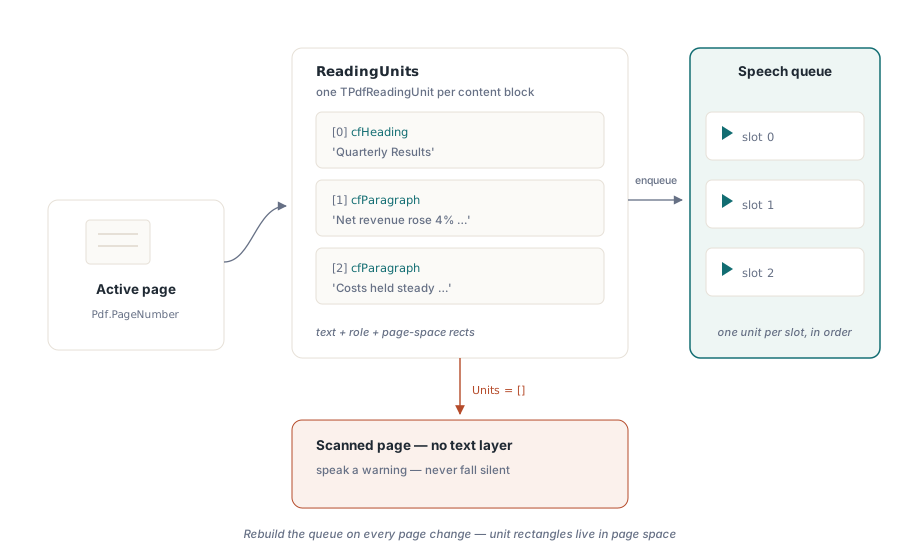
Dla zamiany tekstu na mowę ReadingUnits wykonuje ciężką pracę. Zwraca tablicę rekordów TPdfReadingUnit dla aktywnej strony, z których każdy niesie tekst do wypowiedzenia, jego rolę semantyczną i prostokąty lokalizujące go na stronie. Jest towarzysz obejmujący cały dokument, DocumentReadingUnits, na wypadek gdy chcesz ciągłego czytania między stronami. Jedna jednostka trafia wprost do jednego slotu kolejki mowy:
procedure TReaderForm.QueuePageSpeech(PageNumber: Integer);
var
  Units: TPdfReadingUnits;
  i: Integer;
begin
  Pdf.PageNumber := PageNumber;   // ReadingUnits działa na aktywnej stronie
  Units := Pdf.ReadingUnits;
  FSpeechQueue.Clear;
  for i := Low(Units) to High(Units) do
    FSpeechQueue.Add(Units[i]);  // tekst + semantyka + prostokąty podświetlenia
  FCurrentPage := PageNumber;
  SpeakNextUnit;
end;
Dwie rzeczy w tej pętli łatwo zrobić źle. Trzymaj kolejkę per strona i przebuduj ją za każdym razem, gdy użytkownik nawiguje, bo jednostki czytania niosą prostokąty w przestrzeni strony; kolejka pozostała po stronie trzeciej pomaluje swoje podświetlenia na stronie czwartej. I traktuj pustą tablicę Units na stronie, która wyraźnie ma treść, jako swój detektor "tylko obraz". Zeskanowana strona to piksele bez leżącej pod nimi warstwy tekstu, a właściwą odpowiedzią jest wypowiedzenie ostrzeżenia ("ta strona nie ma tekstu do wyodrębnienia") zamiast zamilknięcia w sposób, którego słuchacz nie odróżni od zawieszenia
Kursor słowa, który podąża za głosem
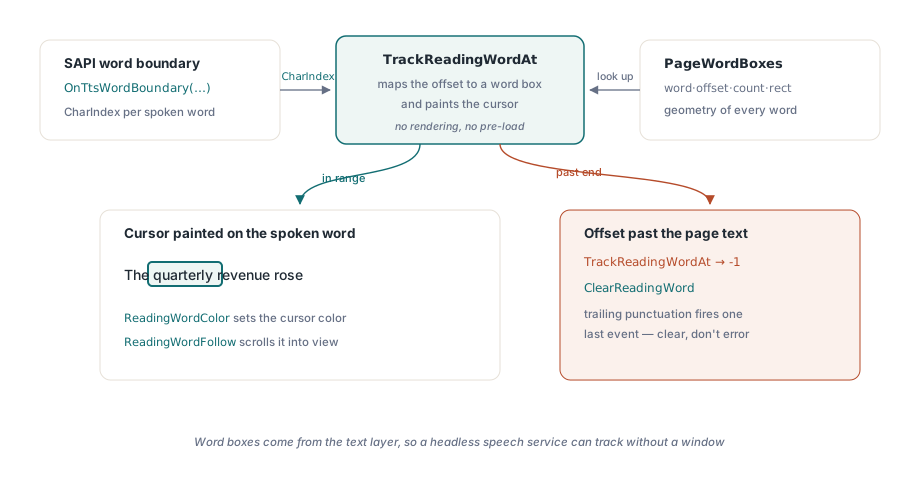
Podświetlanie całego akapitu naraz wydaje się ociężałe dla użytkownika słabowidzącego śledzącego słowa wzrokiem, gdy są czytane na głos. Podświetlanie na poziomie słowa, efekt karaoke, potrzebuje dwóch elementów: geometrii każdego słowa i sposobu na odwzorowanie raportów postępu silnika TTS na tę geometrię. PageWordBoxes daje ci geometrię jako rekordy TPdfWordBox, każdy z tekstem słowa, jego przesunięciem znakowym, liczbą znaków i prostokątem w przestrzeni strony. TrackReadingWordAt daje ci odwzorowanie. Podaj mu pozycję znaku, którą zdarzenie granicy słowa SAPI już zgłasza, a rozwiąże to przesunięcie na indeks w tablicy pól słów i pomaluje kursor na pasującym słowie w jednym wywołaniu
procedure TReaderForm.PrepareKaraoke(PageNumber: Integer);
begin
  // Pola słów widoku pochodzą ze strony, którą widok wyświetla.
  // Samo ustawienie Pdf.PageNumber nie przesunęłoby widoku
  PdfView.PageNumber := PageNumber;
  FWordBoxes := PdfView.PageWordBoxes;
end;

procedure TReaderForm.OnTtsWordBoundary(Sender: TObject; CharIndex: Integer);
var
  WordIdx: Integer;
begin
  // TrackReadingWordAt odwzorowuje przesunięcie ORAZ maluje kursor słowa
  WordIdx := PdfView.TrackReadingWordAt(FCurrentPage, CharIndex);
  if WordIdx < 0 then
    PdfView.ClearReadingWord;  // granica wybiegła poza tekst strony
end;
Kontrakt jest hojny w jednym punkcie i bezlitosny w drugim. Hojna część: TrackReadingWordAt trzyma własny cache pól słów dla śledzonej strony, więc nie ma nic do wstępnego wczytania, i nie zachodzi żadne renderowanie, bo pola słów pochodzą z warstwy tekstu. Bezgłowa usługa mowy bez widocznego okna wciąż potrafi śledzić pozycje. Bezlitosna część: indeks znaku musi wskazywać w tekst, który wyodrębnił komponent, nie w jakiś wyczyszczony łańcuch, który zbudowałeś sam. Gdy CharIndex wybiega poza koniec tekstu strony, funkcja zwraca -1 zamiast zgłaszać wyjątek, co zdarza się cały czas, gdy silnik TTS wyzwala jedno ostatnie zdarzenie granicy dla końcowej interpunkcji. Czytaj -1 jako "wyczyść kursor", nigdy jako błąd
Po stronie wyświetlania ReadingWordColor ustawia kolor kursora. Domyślny bursztyn trzyma się dobrze na większości teł strony, ale przetestuj go pod każdym filtrem wyświetlania, jaki oferuje twoja przeglądarka. Bursztynowy kursor może całkowicie zniknąć pod inwersją kolorów, a inwersja działająca razem z mową to dokładnie sposób, w jaki pracuje użytkownik słabowidzący, więc jedna kombinacja, którą najbardziej musisz zrobić dobrze, to ta, której szybkie demo nigdy nie ćwiczy. Ustaw ReadingWordFollow na True, a widok sam przewinie wypowiadane słowo w pole widzenia, czego nie da się pominąć na powiększonej stronie rozlewającej się przez ekrany. Pamiętaj o jednej zasadzie zakresu: SetReadingWord maluje tylko na aktywnej stronie TPdfView. Zdecyduj z góry, czy ręczne przewijanie wstrzymuje mowę, czy zachowanie podążania je nadpisuje, bo niewybranie żadnego z nich zostawia głos czytający dalej, podczas gdy kursor siedzi gdzieś poza ekranem
Dokumenty, które psują twoją przeglądarkę
Garść kształtów wejściowych pokonuje naiwną implementację na tyle niezawodnie, że zasługują na miejsce jako stałe próbki w zestawie regresyjnym, a nie jako jednorazowe błędy, które naprawiasz i zapominasz
- Nieotagowane, ale bogate w tekst pliki. Kolejność heurystyczna zwykle bywa poprawna dla liniowego raportu i błędna w chwili, gdy pojawia się pasek boczny albo cytat wyróżniony. Oflaguj kolejność jako szacowaną, zarówno w UI, jak i w dzienniku diagnostycznym, żeby porażka była czytelna później
- Skany tylko z obrazem. Żadnej warstwy tekstu. Łap je przez puste jednostki czytania i skieruj użytkownika do wcześniejszego kroku OCR, zamiast pozwalać przeglądarce narrować pustą stronę
- Znaki łączące i mieszane pisma. Znaki łączące Unicode nie zawsze zwijają się jeden do jednego w słowa wizualne, więc liczba pól słów może odbiegać od tego, czego oczekuje twój własny tokenizer. Nie indeksuj tablicy pól słów przesunięciami, które sam obliczyłeś, dzieląc tekst; używaj wyłącznie indeksów, które zwraca
TrackReadingWordAt
Testuj to jak audytor, nie jak demo
"Przeczytało moją próbkę na głos" niczego nie dowodzi. Test, który da się obronić, przepuszcza trzy pliki przez gotowy build z podłączonym NVDA: jeden znany otagowany plik, w którym nagłówki są zapowiadane jako nagłówki, a tabela czytana w kolejności wierszy; jeden znany nieotagowany plik, w którym widoczny jest wskaźnik szacowanej kolejności; i skan, w którym ostrzeżenie o braku tekstu jest rzeczywiście wypowiadane. Każdy z nich ćwiczy ścieżkę, którą pomija przypadek szczęśliwy
Stamtąd potwierdź, że kursor słowa pozostaje zablokowany przy podwójnej prędkości mowy i przy połowicznej, oraz że przewijanie ReadingWordFollow nie kłóci się z przewijaniem samego użytkownika. Potem uruchom mowę, przechodząc przez każdy filtr kolorów, i obserwuj, że kursor nigdy nie znika. Artykuł o filtrach kolorów dla słabowidzących omawia tę ścieżkę renderowania szczegółowo, a dogłębna analiza kursora mowy słowa rozkłada na czynniki pierwsze czasowanie TTS
API jednostek czytania i pól słów użyte powyżej są dostępne w PDFium Component dla Delphi i C++Builder (VCL) oraz Lazarus/FPC (LCL). Strona produktu odsyła do pełnej dokumentacji API, w tym układów rekordów dla jednostek czytania i pól słów stojących za tymi przykładami