Funkcja czytania na głos ma jedno widoczne zadanie poza samym głosem: w miarę wypowiadania każdego słowa musi ono zostać podświetlone na stronie i utrzymane w widoku. Aby to osiągnąć, potrzebny jest prostokąt ograniczający każde słowo, indeksowany zgodnie z tym samym strumieniem znaków, z którego korzysta silnik mowy. Jeśli mamy ramki, ale brakuje właściwego indeksowania, podświetlenie będzie się przesuwało o jedno lub dwa słowa za dźwiękiem; jeśli mamy indeksowanie, ale nieprawidłowo zarządzamy stanem strony, podświetlenie trafi na całkowicie błędną stronę. Część mowy, czyli sam syntezator, rzadko sprawia problemy. SAPI raportuje granice słów z dokładnością do znaku. Zawodzi cienka warstwa odwzorowania między przesunięciem znaku w buforze mowy a prostokątem na renderowanej stronie
PDFium Component dostarcza to odwzorowanie dla Delphi, C++Builder i Lazarus - ramki słów dostępne są od wersji v1.53, a kursor śledzenia od v1.56. Interfejs jest celowo wąski: wywołanie zwracające ramki słów dla strony, tracker zamieniający przesunięcie znaku na pomalowane podświetlenie oraz kilka właściwości dla koloru i automatycznego przewijania. Choć interfejs jest wąski, kolejność wywoływania funkcji decyduje o tym, czy funkcja działa, a większość błędów opisanych poniżej wynika z wywołania właściwych funkcji w złej kolejności
Znaki to nie słowa, a silniki TTS czytają w znakach
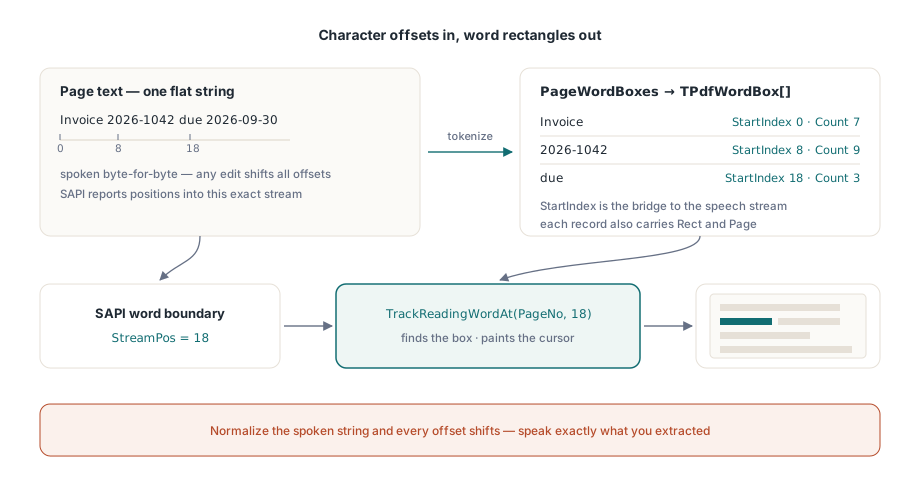
Silnik mowy przetwarza płaski ciąg znaków i raportuje postęp jako pozycje znakowe w tym ciągu. Strona PDF ma glyphs umieszczone w przestrzeni strony, gdzie "słowo" to heurystyczny klaster grup glyph. Oba układy współrzędnych nie mają ze sobą nic wspólnego, chyba że tekst przekazany syntezatorowi jest bajt do bajtu identyczny z tekstem, dla którego obliczono ramki słów. To jest reguła pierwsza i jest bezlitosna. Normalizowanie białych znaków, usuwanie miękkich łączników lub inne "czyszczenie" wyodrębnionego tekstu przed wypowiadaniem sprawia, że każde kolejne przesunięcie jest po cichu błędne. Wypowiadaj dokładnie to, co wyodrębniono, lub prowadź jawną tabelę ponownego odwzorowania przesunięć. Nie ma trzeciej opcji, która przetrwa rzeczywiste dokumenty
Tabela ponownego odwzorowania to nie hipotetyczny przypadek brzegowy. W chwili gdy interfejs wstawia wypowiedziane ogłoszenie strony ("strona piąta") lub rozszerza skrót dla syntezatora, wypowiadany ciąg znaków rozchodzi się z wyodrębnionym. Rejestruj pozycję i długość każdego wstawienia, a następnie odejmuj skumulowane dostosowanie przed każdym wywołaniem śledzenia. To około dwudziestu linii kodu, a różnica między podświetleniem, które przetrwa kolejne żądanie funkcji, a tym, które zepsuje się przy pierwszej prośbie o wypowiadane nagłówki
Co daje ramka słowa
Każdy rekord TPdfWordBox zawiera tekst słowa, jego StartIndex i Count znaków w tekście strony, prostokąt Rect w przestrzeni strony oraz numer strony Page (liczony od 1). Pole StartIndex jest mostem między dwoma układami współrzędnych: to to samo przesunięcie, które SAPI zwróci podczas czytania. PageWordBoxes zwraca pełną tablicę dla aktywnej strony:
procedure TReaderForm.PreparePage(PageNo: Integer);
begin
  PdfView.PageNumber := PageNo;   // ramki słów widoku śledzą wyświetlaną stronę

  FWords := PdfView.PageWordBoxes;
  FPageText := BuildSpeechText(FWords);   // sklej Word.Text w kolejności

  if Length(FWords) = 0 then
    HandleImageOnlyPage(PageNo);          // skan bez warstwy tekstowej
end;
Komentarz o kolejności jest kluczowy. PageWordBoxes widoku tokenizuje warstwę tekstu strony aktualnie wyświetlanej w widoku, więc najpierw należy nawigować w widoku, a dopiero potem wyodrębnić - renderowanie nie jest wymagane, wystarczy otwarty dokument. (Komponent dokumentu, TPdf, udostępnia własne PageWordBoxes powiązane z Pdf.PageNumber do użytku bez wyświetlacza. Te dwa numery stron są niezależne, co samo w sobie jest pułapką.) Pusty wynik na stronie, która ewidentnie zawiera treść, oznacza skan tylko z obrazem. Przekieruj go do OCR lub przynajmniej ogłoś to ("strona 4 nie zawiera tekstu do odczytu"), zamiast po cichu milczeć bez wyjaśnienia
Podpinanie granic słów SAPI do trackera
TrackReadingWordAt w widoku jest zawiasem całej funkcji. Podaj mu numer strony i indeks znaku; znajdzie ramkę słowa zawierającą ten znak, namaluje na niej kursor czytania i zwróci indeks słowa lub -1, gdy indeks wypada poza słowami. Powiadomienie o granicy słowa SAPI dostarcza dokładnie tej pozycji znakowej, której potrzebuje:
procedure TReaderForm.OnSpeechWordBoundary(StreamPos: Integer);
var
  WordIdx: Integer;
begin
  // Odwzorowuje przesunięcie na ramkę słowa i przesuwa podświetlenie jednym wywołaniem
  WordIdx := PdfView.TrackReadingWordAt(FPageNo, StreamPos);
  if WordIdx < 0 then
    Exit;                     // granica wypadła poza jakiekolwiek słowo: zachowaj ostatnie podświetlenie
end;
Dwa szczegóły defensywne zasługują na uwagę. Po pierwsze, TrackReadingWordAt utrzymuje własną pamięć podręczną ramek słów dla śledzonej strony, automatycznie przebudowywaną po zmianie strony, więc koszt każdej granicy pozostaje stały bez względu na szybkość ich nadchodzenia. Po drugie, nie sprawdza zakresów zbyt hojnie. Indeks równy lub większy niż liczba znaków na stronie zwraca -1 zamiast obcinać do ostatniego słowa. Traktuj -1 jako "zachowaj poprzednie podświetlenie", nigdy jako błąd, ponieważ ciągi interpunkcji i białe znaki między słowami legalnie generują granice, które nie należą do żadnego słowa. Logowanie każdego -1 cię przytłoczy. Zamiast tego licz je na stronę i patrz uważnie na każdą stronę, gdzie wskaźnik gwałtownie rośnie, bo to zwykle oznacza niezgodność normalizacji tekstu wracającą do reguły pierwszej
Sam kursor: kolor, podążanie i czyszczenie
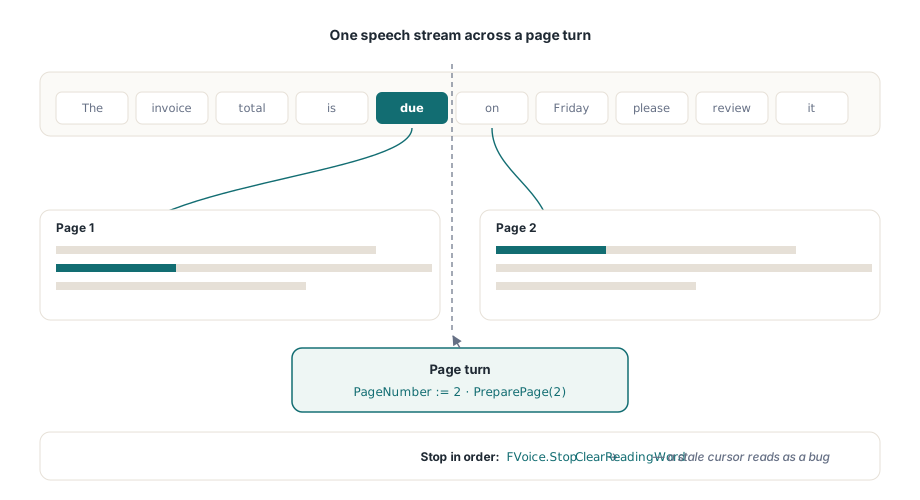
SetReadingWord maluje podświetlenie bezpośrednio, gdy masz ramkę słowa sam, ReadingWordColor stylizuje je, a ReadingWordFollow := True przewija widok dokładnie tyle, by wypowiadane słowo było widoczne. Ta ostatnia właściwość jest niezbędna. Ręcznie napisane przewijanie "wyśrodkuj bieżące słowo" powoduje szarpnięcie strony przy każdym przełamaniu wiersza, a czytelnicy wrażliwi na ruch wyłączą całą funkcję w ciągu minuty. Podświetlenie renderuje się tylko na stronie aktualnie wyświetlanej w aktywnym TPdfView, więc czytanie wielostronicowe musi przesuwać PageNumber wraz z mową, a następnie ponownie uruchamiać krok przygotowania dla nowej strony przed nadejściem jej pierwszego zdarzenia granicy. Pominięcie tego sprawi, że pierwsze podświetlenia na każdej stronie będą wskazywać na przestarzałe współrzędne
procedure TReaderForm.StopReading;
begin
  FVoice.Stop;                // najpierw zatrzymaj odtwarzanie SAPI
  PdfView.ClearReadingWord;   // potem usuń podświetlenie; nieaktualny kursor czyta się jako błąd
end;
Symetria przy zamykaniu sprawia, że podświetlenie pozostaje uczciwe. Każda ścieżka pauzy, zatrzymania i przewracania strony musi kończyć się na ClearReadingWord. Jeśli tego pominiesz, bursztynowy prostokąt zostanie na zatrzymanej stronie, wyglądając dokładnie jak defekt - to rodzaj rzeczy, którą każdy tester zgłosi, mimo że nic faktycznie nie jest zepsute
Szybkość mowy obciąża ten potok bardziej niż rozmiar dokumentu. Przy 300 słowach na minutę zdarzenia granicy pojawiają się co 200 ms, a przy najszybszych tempach SAPI przychodzą szybciej niż oko komfortowo śledzi. Właściwą odpowiedzią jest scalanie, a nie kolejkowanie. Jeśli nowa granica nadejdzie, gdy aktualizacja podświetlenia jest jeszcze oczekująca, odrzuć starą i namaluj najnowszą. Kursor, który odwiedza każde słowo po kolei, ale z opóźnieniem pół sekundy, czuje się zepsuty; ten, który okazjonalnie pomija słowo, pozostając zsynchronizowany z głosem, nie
Przypadki brzegowe oddzielające dema od produktów
Kilka kategorii dokumentów odsłania szwy. Znaki łączone są najbardziej subtelne: sekwencje Unicode takie jak litera bazowa plus łączący diakrytyk mogą zajmować więcej indeksów znakowych, niż sugeruje wizualne słowo, więc każda arytmetyka przesunięć zakładająca jeden indeks na glyph powoli dryfuje. To najsilniejszy argument za tym, by pozwolić TrackReadingWordAt zarządzać odwzorowaniem zamiast samodzielnie obliczać numery słów. Dzielenie wyrazów jest bardziej przyziemne, ale powszechniejsze: słowo przełamane przez koniec wiersza staje się dwoma ramkami, a jeśli wypowiadasz je jako jeden token, zdarzenie granicy dla jego drugiej połowy rozwiązuje się do pierwszej ramki. To zazwyczaj jest w porządku, ale to decyzja, więc podejmij ją świadomie zamiast odkrywać to przypadkiem. Tagowanie zmienia sam porządek czytania. Gdy dokument zawiera właściwe tagi struktury (dziedzina ISO 14289, PDF/UA), sekwencjonowanie słów podąża za strukturą logiczną; bez nich wraca do heurystyk układu, a dwukolumnowa, nieoznaczona strona może być czytana prosto przez obie kolumny. Obrócone strony to ostatni powszechny przypadek: Rect każdego słowa wciąż prawidłowo je ogranicza w przestrzeni strony, ale polityka podążania za rzutnią dostrojona do przepływu poziomego przewija gwałtownie, gdy tekst biegnie pionowo - trzymaj co najmniej jeden obrócony dokument w zestawie regresji. Informacje na temat obsługi kolejności czytania, jednostek na poziomie zdań przez ReadingUnits i szerszego stosu dostępności znajdziesz w artykule budowanie dostępnej przeglądarki PDF w Delphi
Jedno ograniczenie platformy kształtuje wdrożenie. SAPI działa tylko w systemie Windows. API ramek słów i śledzenia jest bajt do bajtu identyczne pod Lazarusem i FPC, ale kompilacje dla Linuksa i macOS potrzebują innego syntezatora podpiętego za tymi samymi zdarzeniami granicy; ta konfiguracja jest omówiona w artykule uruchamianie przeglądarki pod Lazarusem i FPC. Koszt podświetlenia wchodzi też w interakcję z pamięcią podręczną stron po wzroście tempa mowy, a matematyka budżetowa z artykułu buforowanie renderowania i wydajność przy zoomie ma tutaj zastosowanie bez zmian
Kiedy podświetlanie pojedynczego słowa to zła granularność
Karaoke na poziomie słów nie zawsze jest tym, czego chce czytelnik. Przy wysokim tempie mowy kursor migający słowo po słowie staje się sam w sobie wizualnym szumem, a niektórzy słuchacze lepiej śledzą zdanie niż stroboskop pojedynczych słów. Na ten przypadek komponent udostępnia grubszą jednostkę. ReadingUnits zwraca jednostki na poziomie zdania i bloku, każda z własnymi prostokątami podświetlenia, i malujesz je za pomocą SetReadingHighlight zamiast SetReadingWord. Okablowanie ma ten sam kształt: przesunięcie granicy wciąż decyduje, która jednostka się zaświeci, ale jednostka, którą podświetlasz, obejmuje klauzulę lub linię, a nie pojedynczy token. Wolniejsi czytelnicy i szybkie odtwarzanie mają tendencję do preferowania tej opcji, a nic nie stoi na przeszkodzie, by oferować oba tryby za pomocą ustawienia
Wersje minimalne warto zidentyfikować przed rozpoczęciem pracy: ramki słów wymagają PDFium Component v1.53 lub nowszego, a kursor śledzenia wymaga v1.56. Pełne API czytania, jednostki na poziomie zdania i działające demo read-aloud znajdziesz na stronie produktu PDFium Component